


I've gone through maybe fifteen clear phone cases in the last three years. Every single one starts out crystal clear, and every single one ends up looking like I dipped it in mustard. You get that sleek, minimalist thing going, your phone's design actually shows through, and you feel pretty good about your purchase. Then reality hits.
Within weeks, that crystal-clear case starts looking dingy, yellowed, or covered in a film that no amount of wiping with your shirt seems to fix. You try cleaning it. Doesn't help. Because here's the thing: it's not just dirt sitting on top of the plastic.
The problem isn't that you're careless. The real issue is that most cleaning advice treats all clear cases the same way, ignoring the fact that different materials react differently to cleaning methods. TPU cases need different care than polycarbonate ones. The oils from your hands, the UV exposure, the products you use daily (sunscreen, lotions, even the cleaner you're using wrong). All contribute to degradation in ways that generic "soap and water" advice doesn't address.
I'm going to show you the science behind why clear cases turn yellow, which cleaning methods actually work for different materials, and what you're probably doing right now that's making things worse. Look, I know nobody wants a chemistry lesson. But understanding why this happens is the difference between actually fixing it and just making it worse.
Table of Contents
Why Your Case Turned Yellow (It's Not Just Dirt)
Material Matters: TPU vs. Polycarbonate vs. Hybrid Cases
Daily and Weekly Maintenance That Actually Prevents Damage
Deep Cleaning Methods That Actually Work
What's Destroying Your Case (And You Don't Even Know It)
When to Clean vs. When to Replace
Prevention Strategies That Go Beyond Basic Care
Real Talk
Your case yellows from UV light breaking down the plastic, not just dirt. TPU cases yellow faster than polycarbonate. Clean it daily with alcohol wipes (30 seconds), deep clean monthly with baking soda paste, and replace it every 6-8 months because eventually the damage is permanent. That's it.
Why Your Case Turned Yellow (It's Not Just Dirt)
The Yellowing Problem Everyone Experiences
You finally take your case off and yep, there it is. That yellow-brown tint that definitely wasn't there last month. You try wiping it down. Nothing. Because the discoloration isn't sitting on top of the plastic. The plastic itself is changing color.
Most clear cases are made from polymers, basically long chains of molecules. UV light hits these chains and breaks them apart (photodegradation, if you want the technical term). That chemical reaction is what causes the yellowing. Your case isn't dirty. It's degraded.
Which sucks, because it means you can't always reverse it. Sorry.
Oxygen plays a role too. Oxidation occurs when oxygen molecules interact with the polymer chains, creating a yellowing effect similar to what happens with old paper or white sneakers. You can't reverse this type of damage because the material has fundamentally changed at a molecular level.
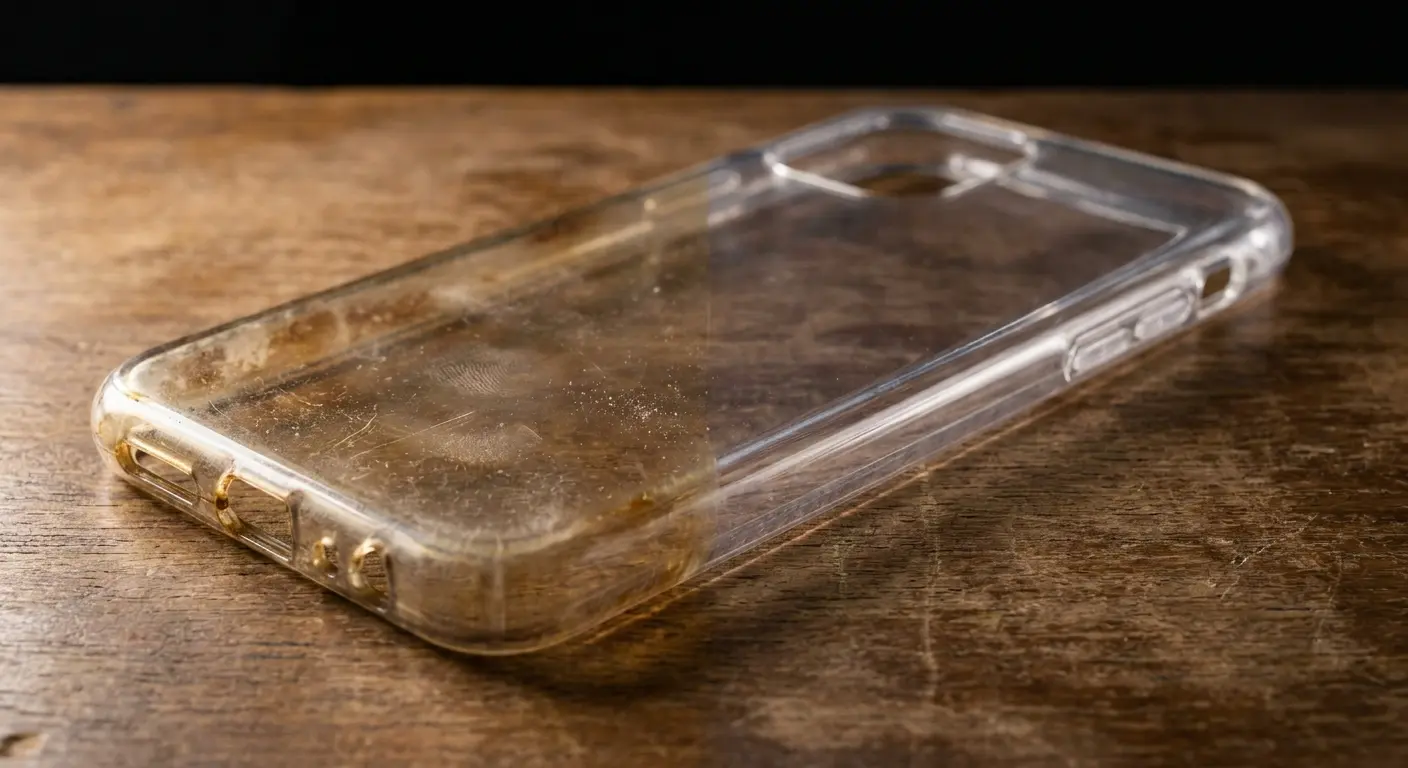
What you actually need to know: not all discoloration is permanent. Surface-level yellowing from oils, lotions, and environmental grime can be removed. The key is knowing the difference. If your case has been exposed to heavy sunlight for months, that deep yellow tone probably won't budge. If it's been in your pocket picking up oils and residue for a few weeks, you've got a fighting chance.
Cheaper cases yellow faster because they use lower-grade plastics with fewer UV stabilizers (additives that slow down photodegradation). Premium cases include these stabilizers, which is why some stay clear longer than others. If you're serious about maintaining a clear case, investing in quality protective gear from the start helps. Check out options at Rokform's phone cases collection for cases designed with durability in mind.
The Invisible Film Building Up Daily
Every time you touch your phone, you're leaving behind skin oils. And not the kind that wipe off with your shirt. Sebum (your skin's natural oil) has fatty acids that actually bond to the plastic. Fun.
Add in hand lotion, sunscreen, makeup, and hair products. Each one leaves behind residues that layer on top of each other. Within days, you've got a microscopic coating that diffuses light differently than clean plastic, making your case look cloudy or hazy.
This film doesn't just look bad. It traps particles against the plastic surface, creating tiny pockets where UV light can concentrate and accelerate yellowing. The residue holds UV-reactive compounds right against the material, speeding up the degradation process.
The longer this film sits, the harder it becomes to remove. Oils oxidize and essentially cure onto the plastic, requiring more aggressive cleaning methods. That's why cases that get cleaned weekly stay clearer than cases cleaned monthly, even if they're the same age and material. Your dirty phone case isn't just an aesthetic issue; it's a compounding problem that gets worse the longer you wait.
How Your Habits Accelerate Degradation
You toss your phone on the car dashboard while driving. The case sits in direct sunlight, heating up to temperatures that accelerate polymer breakdown. Heat doesn't just speed up yellowing; it can cause warping that makes cases fit poorly and creates gaps where dirt accumulates.
Placing your phone face-down on tables, counters, or desks grinds particles into the case back. These micro-abrasions scratch the surface, creating a rougher texture that catches more dirt and looks cloudier even when clean. Scratches also scatter light, reducing the crystal-clear appearance you're trying to maintain.
My friend works at a coffee shop and constantly sets her phone face-down on the granite counter between orders. Three months in, her clear case looked like frosted glass, hazy and scratched to hell around the edges. Turns out, every vibration and notification was grinding sugar crystals and coffee grounds into the case back. Even after cleaning, it never looked clear again because the surface was permanently scratched. A three-dollar phone stand would've prevented the whole thing.
Cleaning your phone with whatever's nearby seems convenient until you realize you've been using products that damage plastic. Glass cleaners often contain ammonia, which can cloud or craze clear plastics. Alcohol-based products (in high concentrations) can dry out certain polymers, making them brittle. Even some antibacterial wipes contain chemicals that react poorly with TPU or polycarbonate.
Your workout routine matters too. Sweat contains urea, lactic acid, and other compounds that can discolor plastics over time. If you're hitting the gym with your phone and not cleaning the case afterward, those compounds are doing their damage.
Material Matters: TPU vs. Polycarbonate vs. Hybrid Cases
TPU Cases and Their Specific Cleaning Needs
Case Material |
Yellowing Resistance |
Best Cleaning Method |
Don't Use This Stuff |
Average Lifespan |
|---|---|---|---|---|
TPU |
Pretty bad (yellows fast) |
Baking soda paste, 70% isopropyl alcohol, mild dish soap |
Acetone, nail polish remover, hot water, ammonia-based cleaners |
4-6 months |
Polycarbonate |
Way better (resists yellowing for months) |
90% isopropyl alcohol, warm soapy water |
Excessive flexing during cleaning, abrasive scrubbers |
8-12 months |
Hybrid (TPU + Polycarbonate) |
Depends on the section |
Targeted cleaning per material type |
One-size-fits-all aggressive methods |
6-8 months |
Real talk: TPU is cheaper but looks like crap faster. Polycarbonate costs more but stays clear longer. You get what you pay for. | ||||
TPU cases are the rubbery, flexible ones that are easy to pop on and off. They're popular because they absorb shock well and are easy to install and remove. But TPU has a downside: it yellows faster than most other clear case materials.
TPU's chemical structure makes it super reactive to UV light. Those urethane bonds break down fast in sunlight, which is why TPU cases start yellowing within weeks if you're outdoors a lot.
Cleaning TPU requires gentle approaches. The material can handle mild dish soap and water without issues. You can also use diluted isopropyl alcohol (70% concentration works well) to cut through oils without degrading the plastic. Avoid acetone or nail polish remover, which will damage TPU almost immediately.
Baking soda paste works exceptionally well on TPU for removing surface stains. The mild abrasive action scrubs away grime without scratching, and the alkaline nature helps break down acidic residues from sweat or food. Mix three parts baking soda with one part water, apply it to the case, let it sit for 10 minutes, then scrub gently with a soft-bristled brush.
Yes, I'm telling you to clean your phone case with toothpaste ingredients. It works.
Heat is TPU's enemy during cleaning. Don't use hot water or leave the case in direct sunlight to dry. Heat makes TPU more pliable, which sounds good until you realize it can also cause the material to stretch or warp. Lukewarm water is your maximum temperature.
Some TPU cases have a coating applied to resist yellowing. If yours does, harsh scrubbing or abrasive cleaners will remove this coating, making the case yellow faster. Test any cleaning method on a small, inconspicuous area first. When you're figuring out how to clean a yellow phone case, understanding the material composition saves you from making it worse.
Polycarbonate's Durability and Cleaning Advantages
Polycarbonate cases are rigid and snap onto your phone with a firm click. They're harder than TPU, which means they resist scratches better and maintain their clarity longer. The polymer structure in polycarbonate is more stable under UV exposure, though it's not completely immune to yellowing.
The smooth, hard surface of polycarbonate makes it easier to clean. Oils and residues don't penetrate as readily, so they wipe off more easily. You can use slightly more aggressive cleaning methods without worrying about damaging the material.
Isopropyl alcohol at higher concentrations (90-99%) works great for polycarbonate. It evaporates quickly, doesn't leave residue, and cuts through oils effectively. You can apply it with a microfiber cloth and wipe the case down in seconds. This is your go-to for daily maintenance.
For deeper cleaning, dish soap and warm (not hot) water work well. Use a soft sponge rather than a brush, since polycarbonate can scratch if you're too aggressive. The scratches won't be as visible as on TPU, but they'll still accumulate over time and dull the finish.
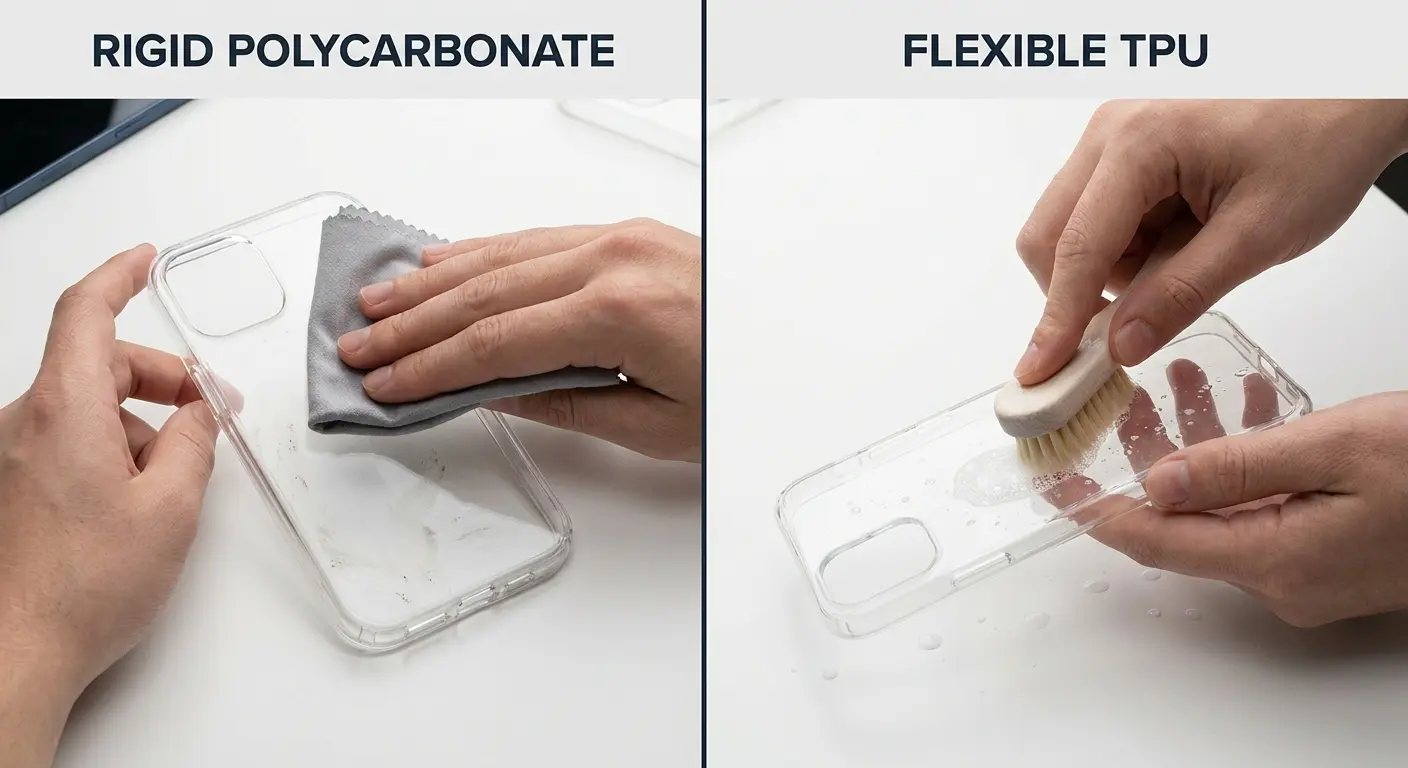
Polycarbonate's weakness is brittleness. The material can crack if flexed too much, especially after prolonged UV exposure. When cleaning, don't bend or twist the case excessively. Remove it carefully from your phone and clean it flat on a surface.
Some polycarbonate cases have a UV-resistant coating. This coating can be damaged by abrasive cleaners or rough scrubbing. If you notice your case starting to look cloudier after cleaning, you might be removing this protective layer. Switch to gentler methods.
Hybrid Cases Require Hybrid Cleaning Approaches
Many modern clear cases combine materials to balance protection with aesthetics. You might have a case with a rigid polycarbonate back and a flexible TPU bumper. These hybrid designs protect your phone better but complicate cleaning.
You can't use the same cleaning method on both materials simultaneously. What works for the polycarbonate back might damage the TPU edges. What's safe for TPU might not be aggressive enough to clean the polycarbonate section effectively.
The solution is targeted cleaning. Use a cotton swab or small brush to apply different cleaners to different sections. Apply isopropyl alcohol to the polycarbonate back with a microfiber cloth. Use a baking soda paste on the TPU bumper with a soft-bristled toothbrush. Keep the materials separated during cleaning when possible.
Seams between materials trap dirt and moisture. These gaps are where grime accumulates and where mold can develop if you're in a humid environment. Use a toothpick or dental tool to gently clean out these seams. Don't force anything that might separate the materials or damage the bond.
Some hybrid cases have removable sections. If yours does, disassemble it completely for cleaning. This lets you clean each piece thoroughly without worrying about moisture getting trapped between layers. Dry each component completely before reassembling.
Cases with integrated features (like kickstands, card holders, or magnetic mounts) need extra attention. These mechanisms can trap debris and moisture. Clean around moving parts carefully, and make sure everything is dry before reassembling to prevent corrosion or sticking. For cases designed with rugged features and multiple materials, Rokform's rugged cases offer construction that's built to handle both daily wear and thorough cleaning.
Daily and Weekly Maintenance That Actually Prevents Damage
The 30-Second Wipe That Prevents Deep Stains
Look, I know you're not going to do all this every day. But if you can manage even half of it, your case will last twice as long:
Daily Case Maintenance Checklist (30 seconds)
Pop the case off when you're done for the day
Apply 2-3 drops of 70% isopropyl alcohol to microfiber cloth
Wipe exterior surface in overlapping strokes, corner to corner
Flip case and wipe interior surface using same technique
Quick look: any cracks, cloudiness, or weird stains starting?
Air dry for 30 seconds before reinstalling
Wipe phone body with dry section of cloth before replacing case
Keep a small bottle of 70% isopropyl alcohol and a microfiber cloth near where you charge your phone. Every night when you plug in, remove the case and wipe it down. The alcohol cuts through daily oil accumulation before it has time to set.
The technique matters. Don't just swipe randomly. Start at one corner and work your way across in overlapping strokes. This ensures you cover every surface without missing spots. Pay extra attention to the edges and corners where grime accumulates first.
Flip the case over and repeat on the inside. The inside surface touches your phone directly and can transfer oils and dirt to your device. Keeping it clean protects both the case and your phone.
During your daily wipe, inspect the case for developing problems. Look for small cracks that might let moisture in. Check for areas that seem cloudier than others, which might indicate coating damage . Notice any spots where the case is starting to separate from itself (common in hybrid designs).
This routine prevents 80% of the cleaning problems you'd otherwise face. The remaining 20% requires periodic deep cleaning, but you'll need to do it far less often if you're maintaining the case daily. When you keep your phone case clean through consistent daily care, you avoid the buildup that makes deep cleaning such a chore.
Weekly Spot Treatment for Problem Areas
Once a week, you need to actually pay attention to the gross spots everyone ignores:
Camera cutouts are lint magnets. I don't know why, but they are. The raised edge around the camera creates a pocket that traps debris. Use a soft-bristled brush (an old toothbrush works) to clean around this area.
Charging port openings and speaker holes collect pocket lint and dust. These particles can transfer from your case into your phone's ports, causing charging issues or muffled sound. Use a wooden toothpick or a specialized cleaning tool to gently remove buildup from these openings. Avoid metal tools that might scratch the plastic or damage your phone if you slip.
Button covers get grimy from constant pressing with oily fingers. The textured surface on many button covers traps oils in microscopic grooves. Dampen a cotton swab with isopropyl alcohol and run it over each button cover, applying slight pressure to work the alcohol into the texture. Wipe dry immediately.
Corners are where cases show wear first. The material flexes most at corners during installation and removal, creating micro-cracks that trap dirt. These areas often look darker or dirtier than the rest of the case. Use a cotton swab with baking soda paste to scrub corners gently. The paste gets into cracks better than liquid cleaners.
The inside lip where the case grips your phone's edges deserves weekly attention. This area contacts your phone constantly and can transfer grime to your device's finish. Wipe it thoroughly with alcohol, making sure to get into the channel that holds your phone.
If your case has any textured grip areas, these need scrubbing weekly. Texture looks great and improves handling, but it's a dirt magnet. Use a soft brush with soapy water to clean textured sections, working the bristles into the pattern to lift out embedded grime.
Monthly Deep Clean Scheduling
Even with daily wipes and weekly spot treatments, your case needs a full deep clean monthly. This is when you address issues that surface-level cleaning can't touch: embedded stains, yellowing that hasn't fully set in, and residue buildup in hard-to-reach areas.
Schedule your deep clean for a time when you can go without your case for several hours. The drying process is crucial and can't be rushed. Putting a damp case back on your phone risks moisture damage to your device.
You'll know it's time for a deep clean when daily wiping stops making the case look noticeably cleaner. If you wipe it down and it still looks hazy or cloudy, surface cleaning isn't cutting it anymore. You need to break down the buildup that's accumulated over weeks.
Gather your supplies before starting: dish soap, baking soda, isopropyl alcohol, microfiber cloths, soft-bristled brushes, cotton swabs, and a clean towel. Having everything ready means you can work efficiently without stopping to hunt for materials.
Remove the case from your phone and inspect it under good lighting. Identify problem areas that need extra attention. Make a mental note of any cracks or damage that might worsen during cleaning. If the case is already compromised, aggressive cleaning might finish it off.
Plan for 15-20 minutes of active cleaning time, then 3-4 hours of drying. You can speed up drying with a fan (not a hair dryer, which can warp plastic), but don't rush it. Moisture trapped between your case and phone will cause bigger problems than going case-free for an afternoon.
Deep Cleaning Methods That Actually Work
Honestly, you only need two approaches: baking soda for stains, dish soap for general grime. Everything else is overkill.
The Baking Soda Method for Surface Stains
Baking soda is mildly abrasive and alkaline, making it perfect for breaking down acidic stains and gently scrubbing away surface discoloration. Mix three tablespoons of baking soda with one tablespoon of water to create a thick paste. You want it spreadable but not runny.
Apply the paste to your case using your fingers or a soft cloth. Cover the entire surface, paying extra attention to yellowed areas. The paste should be thick enough to stay in place without dripping off.
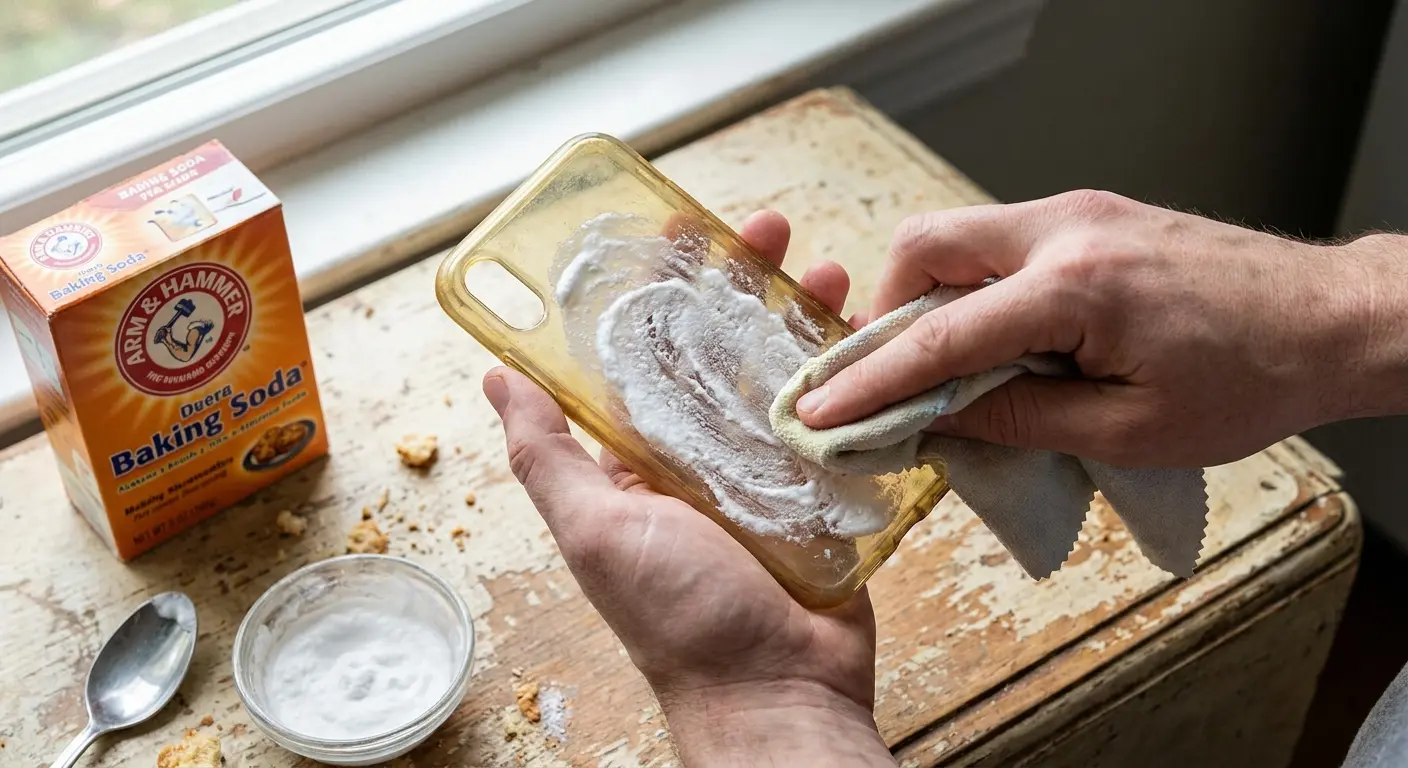
Wait 10-15 minutes. This gives the alkaline properties time to break down oils and acidic residues. Don't let it dry completely or it becomes harder to remove and less effective.
Use a soft-bristled toothbrush to scrub the case in circular motions. Apply gentle pressure. You're not trying to sand the plastic; you're using the mild abrasive action to lift away grime. Work in sections, keeping the paste moist by adding drops of water if needed.
Rinse thoroughly under lukewarm running water. Make sure all baking soda residue is gone. Any paste left behind will dry to a white film that's ironically harder to remove than the original stains.
Inspect the case while it's still wet. Wet plastic shows its true clarity. If stains remain, you can repeat the process, but don't do it more than twice in one session. Over-scrubbing can scratch the surface and make the case look worse.
This method works best on TPU cases and on surface-level yellowing that hasn't penetrated deep into the material. If your case has been yellowing for months, baking soda might improve it but won't restore it to new condition. When you're learning how to clean a clear phone case that turned yellow, this is your first line of defense against discoloration.
Isopropyl Alcohol for Oil and Residue Removal
Isopropyl alcohol (IPA) cuts through oils and evaporates quickly without leaving residue. For most clear cases, 70% concentration is ideal. It's strong enough to dissolve oils but diluted enough to be gentle on plastics. Higher concentrations (90-99%) work for polycarbonate but can dry out TPU over time.
Pour a small amount onto a microfiber cloth, not directly onto the case. This gives you better control and prevents excess liquid from getting into ports or seams. Wipe the entire case surface, applying moderate pressure.
The alcohol dissolves sebum, lotions, and other oil-based residues on contact. You'll notice the cloth picking up grime that water alone wouldn't touch. Flip to a clean section of cloth frequently to avoid redistributing dirt.
For stubborn spots, dampen a cotton swab with alcohol and work it into problem areas. This targeted approach lets you apply more pressure to specific spots without over-cleaning the entire case.
Alcohol evaporates within seconds, which is why it's perfect for phone accessories. You don't need to rinse or dry the case. Once the alcohol evaporates, the case is clean and ready to use.
One warning: don't use rubbing alcohol that contains additives like glycerin or fragrances. These leave residue that defeats the purpose. Pure isopropyl alcohol is what you want. Check the label to make sure it's just alcohol and water.
This method is your best option for quick cleaning between deeper treatments. It's also the safest for cases with electronic components or integrated features since it evaporates without leaving moisture behind.
Dish Soap Soak for Comprehensive Cleaning
Fill a bowl with lukewarm water and add a few drops of clear dish soap. You want enough soap to create some suds but not so much that rinsing becomes a chore. Avoid dish soaps with lotions, antibacterial additives, or degreasers (which can be too harsh for some plastics).
Submerge your case completely and let it soak for 15-20 minutes. This loosens grime that's bonded to the surface and softens any buildup in textured areas or seams. The soap molecules surround oil particles and suspend them in the water, making them easier to rinse away.
After soaking, use your hands to gently scrub the case while it's still in the water. The soap provides lubrication that prevents scratching. Work your fingers into all the corners, edges, and cutouts.
For cases with heavy buildup, use a soft sponge or brush while the case is still submerged. The water helps carry away loosened debris so you're not just pushing it around the surface.
Drain the soapy water and rinse the case under running lukewarm water. Keep rinsing until the water runs clear and you don't feel any slippery soap residue. Soap left on the case will dry to a film that attracts more dirt.
Shake off excess water and pat the case dry with a clean towel. Don't rub vigorously, which can create static that attracts dust. Place the case on a dry towel in a well-ventilated area to air dry completely.
This method takes the most time but provides the most thorough cleaning for cases that have been neglected. It's gentle enough for any case material and effective against most types of buildup.
What's Destroying Your Case (And You Don't Even Know It)
Hand Sanitizer and Antibacterial Products
Hand sanitizer seems harmless enough, right? Wrong.
You use it dozens of times daily, and inevitably some gets on your phone case. But many sanitizers contain ingredients beyond just alcohol that damage clear plastics.
Glycerin and other moisturizers in sanitizer leave a sticky residue that attracts dirt. This residue builds up over time, creating a cloudy film that's difficult to remove. The film also traps other contaminants against the plastic surface.
Some sanitizers contain hydrogen peroxide or other oxidizing agents. These chemicals can cause white spots or patches on clear cases, especially TPU. The oxidation reaction permanently alters the plastic's color in those areas.
Fragrance compounds and essential oils in scented sanitizers contain chemicals that can react with plastics. You might notice rainbow-like streaks or a cloudy haze developing where sanitizer frequently contacts your case.
And no, I'm not saying stop using hand sanitizer. Just wipe your case after, or accept that it's going to look like hell.
Clean your hands, then wipe your case with a dry cloth before handling your phone. This removes excess sanitizer before it has time to react with or build up on the plastic.
If you're in a healthcare setting or job that requires frequent sanitizer use, consider a case material that's more resistant to chemical exposure. Some cases are specifically designed to withstand repeated sanitizer contact, though they're often not completely clear.
When you do get sanitizer on your case, wipe it off within a few minutes. The longer these products sit on plastic, the more damage they cause. Quick removal prevents most issues.
Makeup, Sunscreen, and Personal Care Products
I know someone who does makeup and handles her phone constantly between clients. Two weeks in, her clear case had orange streaks everywhere. Foundation with iron oxide transferring during calls. She tried cleaning it at the end of each day, but by then the silicone-based foundation had already bonded with the TPU. The stains that she wiped off immediately came out fine. The ones she left for even a few hours? Permanent.
Foundation and concealer contain pigments suspended in oils or silicones. These products transfer to your case when you hold your phone to your face during calls. The pigments can stain plastic, and the carrier oils leave residue that yellows over time.
Remove makeup stains immediately with isopropyl alcohol on a cotton swab. The alcohol dissolves both the pigment and the carrier oil. Waiting even a few hours makes these stains way harder to remove.
Sunscreen is a nightmare for clear cases. Chemical sunscreens can straight-up stain the plastic yellow or orange. Physical sunscreens leave white residue everywhere. Either way, you're screwed. Wipe your case down after applying sunscreen, or just don't use a clear case at the beach.
Physical sunscreens (zinc oxide or titanium dioxide) don't stain but leave a white residue that builds up in textured areas and seams. This residue is stubborn because these minerals don't dissolve in water or alcohol.
Clean sunscreen residue with dish soap and warm water, using a brush to work into textured areas. For chemical sunscreen stains, try a paste of baking soda and hydrogen peroxide (mix equal parts), but test on an inconspicuous area first. This combination can lighten some sunscreen stains but might also damage certain plastics.
Hair products (especially hairspray and dry shampoo) create a sticky, filmy buildup. These products contain polymers designed to coat and hold hair, and they do the same thing to your case. Regular alcohol wipes prevent buildup, but once it's established, you'll need a dish soap soak to remove it.
Perfume and cologne contain alcohol and fragrance oils. The alcohol evaporates, but the oils remain, creating sticky spots that attract dirt. Some fragrances contain colorants that can stain. Wipe your case after applying perfume, especially if you spray it while holding your phone.
Environmental Factors You Can't Avoid
UV exposure is the primary cause of yellowing in clear cases. You can't avoid sunlight completely, but you can minimize damage. Phones left on windowsills, car dashboards, or carried during long outdoor activities accumulate UV exposure that breaks down plastic polymers.
The damage is cumulative. Each minute of sun exposure adds to the total degradation. Cases don't suddenly yellow after one beach day; they gradually change over months of accumulated exposure.
Minimize UV damage by keeping your phone in pockets, bags, or drawers when not in use. Face your phone screen-down on tables so the case back (which shows yellowing most obviously) gets less direct light exposure.
Humidity affects cases differently depending on material. TPU can absorb moisture, which can lead to a cloudy appearance or even mold growth in extreme cases. Polycarbonate resists moisture better but can develop water spots if you're in a very humid environment.
Temperature extremes cause plastic to expand and contract. Repeated cycling between hot and cold makes cases brittle and more prone to cracking. This is especially true for polycarbonate. If you live somewhere with significant temperature swings, your case will degrade faster than someone in a mild climate.
Air pollution deposits particles on your case that can be acidic or corrosive. City dwellers notice their cases get grimier faster than people in rural areas. Regular cleaning (at least weekly) prevents these pollutants from bonding to the plastic.
Seasonal factors matter too. Summer means more sunscreen, sweat, and UV exposure. Winter means dry air and temperature extremes from going between heated indoors and cold outdoors. Adjust your cleaning frequency based on seasonal challenges.
Common Stains and How to Handle Them (Or Not)
I'm not covering every possible stain because we'd be here all day. Here are the ones you'll actually deal with:
Coffee, Wine, and Beverage Stains
Coffee and tea contain tannins that bond to plastic surfaces quickly. These stains start as brown spots but can spread if not addressed immediately. The longer tannins sit, the deeper they penetrate into the material.
For fresh coffee spills, rinse the case under cold water immediately. Hot water sets the stain by opening the plastic's pores and allowing tannins to penetrate deeper. Cold water rinses away surface tannins before they bond.
Set-in coffee stains respond to a hydrogen peroxide treatment. Mix equal parts hydrogen peroxide (3% solution) and water, soak a cotton ball in the mixture, and hold it against the stain for 5-10 minutes. The peroxide breaks down the tannin molecules. Rinse thoroughly afterward.
Wine stains are trickier because they combine tannins with pigments. Red wine leaves purple or pink stains that resist standard cleaning. White wine is easier but still problematic due to sugar content.
Create a paste using baking soda and lemon juice for wine stains. The acid in lemon juice helps break down pigments while the baking soda provides gentle abrasion. Apply the paste, let it sit for 15 minutes, then scrub gently with a soft brush.
Soda and energy drinks leave sticky residues from their sugar content. These residues attract dirt and can create a tacky surface. Dish soap and warm water remove sugar residues effectively, but you need to scrub to break down the sticky layer.
Sports drinks often contain artificial colors that can permanently stain lighter plastics. Blue and red dyes are particularly stubborn. If you catch the spill immediately, you can usually rinse it away. After a few hours, the stain might be permanent.
Prevention matters more than treatment for beverage stains. Keep drinks away from your phone, use lids on cups, and wipe your case immediately if you notice any spills.
Ink, Dye, and Color Transfer Issues
Ink stains happen when you toss your phone in a bag with pens or markers. The ink transfers to the case and can penetrate quickly, especially into TPU materials that are slightly porous.
Ballpoint pen ink is oil-based. Isopropyl alcohol (90% or higher) is your best bet. Saturate a cotton ball with alcohol and dab at the stain repeatedly. Don't rub, which spreads the ink. Keep applying fresh alcohol until the stain lifts.
Gel pen ink contains pigments suspended in water-based gel. These stains respond better to rubbing alcohol combined with dish soap. Apply alcohol first to break down the gel, then use soapy water to lift out the pigment.
Permanent marker is the worst-case scenario. The ink is designed to bond to surfaces permanently. Acetone (nail polish remover) can remove permanent marker, but it will also damage most clear case materials. Try rubbing alcohol first, accepting that you might not remove the stain completely.
Fabric dye transfer happens when you carry your phone in colored pockets, especially new denim. The dye migrates from the fabric to your case through pressure and friction. Blue jeans are the most common culprit.
Treat dye transfer using high-concentration isopropyl alcohol on a cloth and work at the stain patiently. Multiple applications over several days might gradually lighten the stain even if you can't remove it completely.
Color transfer from other objects (colored phone grips, stickers, or accessories) can leave ghost images on your case. These are often permanent because the dye has chemically bonded with the plastic. Prevention is your only real defense: avoid prolonged contact between your clear case and colored materials.
Some stains won't come out no matter what you try. If you've attempted multiple methods and the stain remains, you're dealing with permanent discoloration. Accept it or replace the case.
Grease, Oil, and Adhesive Residue
Kitchen grease and cooking oil create some of the most stubborn stains on clear cases. These oils penetrate into plastic and oxidize over time, creating yellowed spots that resist water-based cleaning.
Dish soap is formulated to break down grease, making it your first line of defense. Apply undiluted dish soap directly to the greasy area, work it in with your fingers, then rinse with warm water. Repeat several times for heavy grease.
For set-in grease stains, try a paste of baking soda and dish soap. The combination provides both chemical grease-cutting action and mild abrasion. Apply the paste, let it sit for 10 minutes, then scrub gently.
Adhesive residue from stickers or tape is frustrating because it attracts every piece of lint and dirt nearby. The residue itself might be clear, but the dirt it collects makes it highly visible.
Isopropyl alcohol dissolves most adhesives effectively. Soak a cotton ball in alcohol and hold it against the residue for 30 seconds to soften the adhesive. Then gently rub in circular motions to lift it away.
For stubborn adhesive, try oil-based solutions. A small amount of cooking oil or baby oil on a cloth can break down adhesive residue. Apply the oil, let it sit for a few minutes, then wipe away. Follow up with dish soap to remove the oil itself.
Commercial adhesive removers (like Goo Gone) work but test them on an inconspicuous area first. Some of these products contain solvents that can cloud or damage certain plastics.
Avoid using your fingernails to scrape off adhesive or grease. You'll scratch the plastic surface, creating permanent damage that's worse than the original problem. Always use cloths, cotton balls, or soft tools.
When to Clean vs. When to Replace
Signs Your Case Has Reached End of Life
Real talk: if you're checking off three or more of these, stop trying to save the case. It's done:
Case Replacement Decision Checklist
Any cracks, even tiny ones
Feels brittle or weird when you flex it
Deep yellowing throughout that doesn't improve after cleaning
Case no longer snaps on securely or has gaps between case and phone
Cloudiness persists after thorough cleaning attempts
Separation visible in hybrid cases where materials meet
Persistent musty or moldy odor even after cleaning
It's been 8+ months (just replace it already)
Multiple areas of permanent staining or discoloration
Case warping or deformation visible when laid flat
Cracks are the clearest sign your case needs replacement. Even small cracks compromise the case's ability to protect your phone. Cracks propagate over time, especially in rigid materials like polycarbonate. What starts as a hairline fracture can split completely during the next drop.
Check for flexibility loss in TPU cases. Press on the case gently. If it feels brittle or doesn't flex smoothly, the material has degraded to the point where it won't absorb shock effectively. A brittle case might shatter on impact rather than protecting your phone.
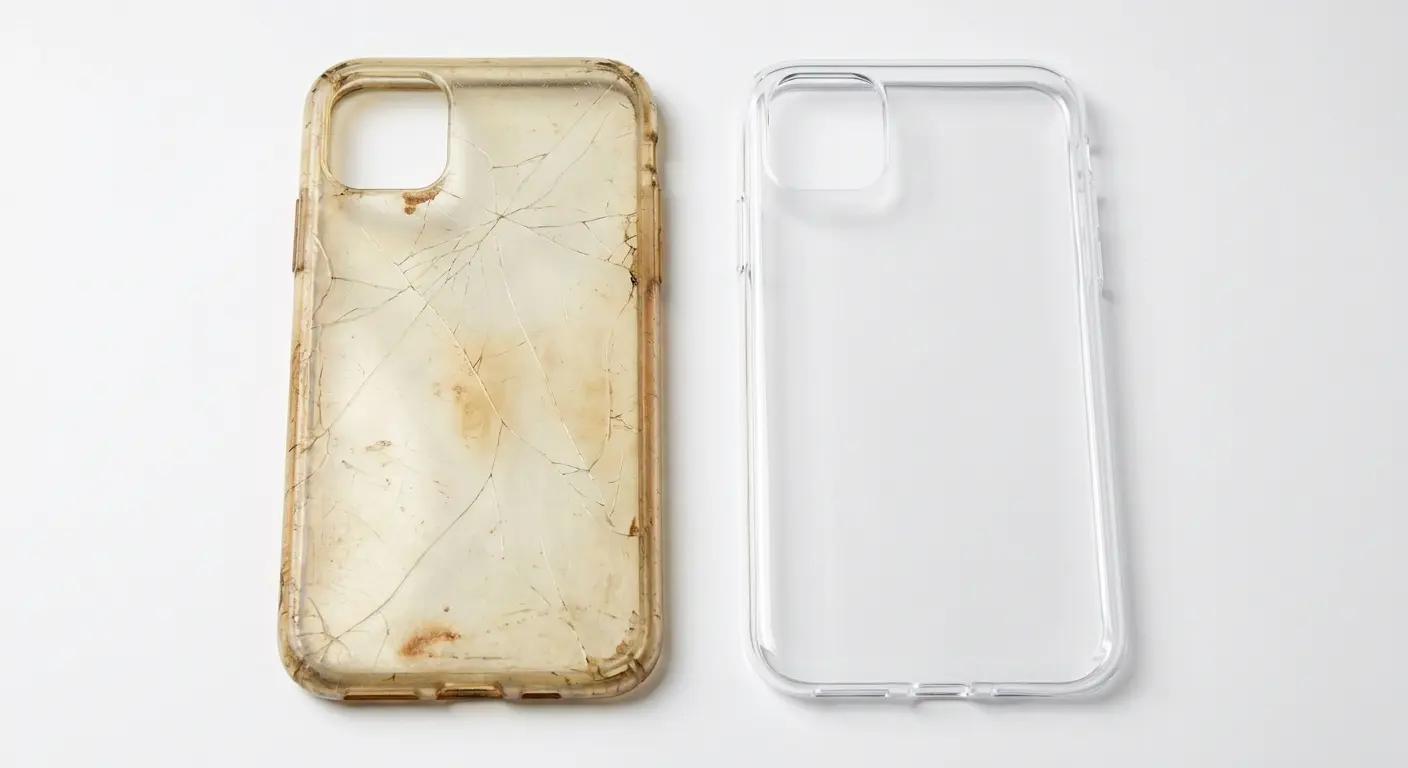
Deep yellowing that penetrates through the material can't be cleaned away. If you've tried multiple cleaning methods and the case is still uniformly yellow or brown, the polymer structure has changed at a molecular level. You can keep using it, but it won't get clearer.
Warping or poor fit indicates the case has been exposed to too much heat or has simply worn out. Cases that don't snap on securely or have gaps between the case and phone don't provide proper protection. They also allow dust and debris to get between the case and your phone, potentially scratching your device.
Cloudiness that doesn't improve with cleaning suggests the surface has been abraded or the material has degraded. This happens from repeated removal and installation, exposure to harsh chemicals, or just age. The case is still functional but will never look clear again.
Separation in hybrid cases is a safety issue. If the different materials are coming apart at the seams, the case's structural integrity is compromised. These cases are designed as integrated units; partial separation means they won't protect properly.
Odor is an often-overlooked indicator. Cases that smell musty or moldy even after thorough cleaning have likely been exposed to moisture for too long. The smell indicates bacterial or fungal growth that you can't fully eliminate. Replace these cases for hygiene reasons.
Cost-Benefit Analysis of Deep Cleaning
How much is your time worth? If you're spending an hour scrubbing a fifteen-dollar case, we need to talk about your priorities.
I've been there. I've spent 90 minutes trying to save a case that cost twelve dollars. Learn from my mistakes.
Consider the expected outcome. If your case has minor yellowing and surface stains, deep cleaning might restore 80-90% of its original appearance. That's worth the effort. If it's heavily yellowed with multiple stains and structural issues, you might only achieve 40-50% improvement. Probably not worth it.
Factor in how long the case will last after cleaning. A six-month-old case that's well-constructed might have another six months of life after a good cleaning. A two-year-old case that's already showing wear probably has a month or two left regardless of cleaning. The remaining lifespan affects whether cleaning makes sense.
Sentimental value matters too. If your case has personal significance (a gift, a design you can't replace, custom printing), the time investment in cleaning is worth it even if the economic calculation doesn't add up.
Environmental considerations play a role. Replacing cases frequently creates plastic waste. If you can extend a case's life by a few months through cleaning, that's better for the environment than constantly buying new ones. Balance this against the reality that cases do have finite lifespans.
Make the decision based on multiple factors, not just one. A cheap case with minor issues might be worth cleaning if you have the time and want to reduce waste. An expensive case with major structural problems might not be worth saving despite the initial investment.
How Often Should You Replace Clear Cases
User Profile |
Typical Environment |
Recommended Replacement Frequency |
Warning Signs to Watch |
|---|---|---|---|
Desk job, mostly indoors |
Climate-controlled, minimal UV |
10-12 months |
Cloudiness, minor yellowing around edges |
Average user (mixed indoor/outdoor) |
Moderate UV, typical handling |
6-8 months |
Visible yellowing, reduced clarity, surface scratches |
Heavy user (outdoor work, active lifestyle) |
High UV, sweat, temperature extremes |
3-4 months |
Rapid yellowing, brittleness, poor fit |
Gym/athlete (frequent sweat exposure) |
Moisture, temperature changes, friction |
4-5 months |
Odor, cloudiness, discoloration from sweat compounds |
Healthcare/high sanitizer use |
Chemical exposure, frequent cleaning |
3-5 months |
White spots, rainbow streaks, coating degradation |
Look, these are guidelines. If your case looks like garbage at 3 months, replace it. If it still looks good at 10 months, keep using it. You're an adult.
Most clear cases should be replaced every six to eight months with normal use. This timeline assumes daily wear, regular cleaning, and typical environmental exposure. You're not being wasteful replacing cases in this timeframe; you're maintaining proper phone protection.
Heavy users need more frequent replacement. If you're outdoors constantly, work in harsh environments, or are particularly hard on your phone, plan for replacement every three to four months. The accelerated wear compromises both appearance and protection faster.
Light users can extend case life to 10-12 months. If your phone spends most of its time on a desk, you don't expose it to extreme conditions, and you clean it regularly, cases last longer. Watch for the structural issues mentioned earlier rather than following a strict timeline.
Material affects replacement frequency. TPU cases typically need replacement sooner than polycarbonate because they yellow faster and lose elasticity over time. Hybrid cases often last longer because different materials handle different stresses.
Seasonal replacement makes sense for some users. Replace your case at the start of summer (before heavy UV exposure and sunscreen season) and again in late fall (after summer damage accumulates). This pattern aligns replacement with when cases take the most abuse.
Budget for case replacement as a regular phone expense. Cases are consumable items, not permanent accessories. Setting aside money for new cases every few months prevents the temptation to keep using cases that no longer protect adequately.
Don't wait for catastrophic failure. Replace cases when they show significant wear, not after they crack during a drop that damages your phone. The case's job is protection; once it can't do that job effectively, it's time for a new one. When you need a replacement, explore options at Rokform's iPhone cases or Samsung cases for durable alternatives.
Prevention Strategies That Go Beyond Basic Care
Protective Coatings and Treatments
Nano-coatings are fine. They help a little. Are they worth the hassle? Depends on how much you care about your case looking perfect.
Nano-coatings create an invisible barrier on plastic surfaces that repels oils and water. These coatings make daily cleaning easier because contaminants don't bond to the plastic as readily. They don't prevent yellowing from UV exposure but do slow down oil-based staining.
Apply nano-coatings to clean, completely dry cases. Any dirt or moisture trapped under the coating will be sealed in. Follow the product instructions precisely; most require application in thin layers with specific drying times between coats.
They last maybe 2-3 months, then you have to reapply. Which is annoying.
UV protectant sprays designed for plastics can slow yellowing. These products contain UV absorbers that take the hit from sunlight instead of your case material. They're more effective on polycarbonate than TPU because TPU's inherent chemistry makes it more UV-reactive.
Apply UV protectants outdoors or in well-ventilated areas. Many contain solvents that need to evaporate. Spray a light, even coat and let it dry completely before handling. Heavy application doesn't provide extra protection and can leave a sticky residue.
Ceramic coatings offer the longest-lasting protection but require careful application. These products bond to plastic at a molecular level and can last six months or more. They're expensive and tricky to apply correctly, making them better suited for premium cases you plan to keep long-term.
Evaluate whether protective treatments make sense for your situation. If you replace cases every few months anyway, treatments aren't worth the cost and effort. If you have a premium case you want to maintain, they can extend its clear appearance significantly.
Storage and Handling Habits That Extend Case Life
Some of this is going to sound obvious, but I see people do this stuff constantly:
Where you set your phone down matters more than you'd think. Placing phones face-down on surfaces grinds particles into the case back with every vibration or notification. Those micro-movements create scratches that accumulate over time.
Store your phone screen-up on clean surfaces. This protects both your screen and your case. If you're worried about screen scratches, use a screen protector rather than sacrificing your case to protect your screen.
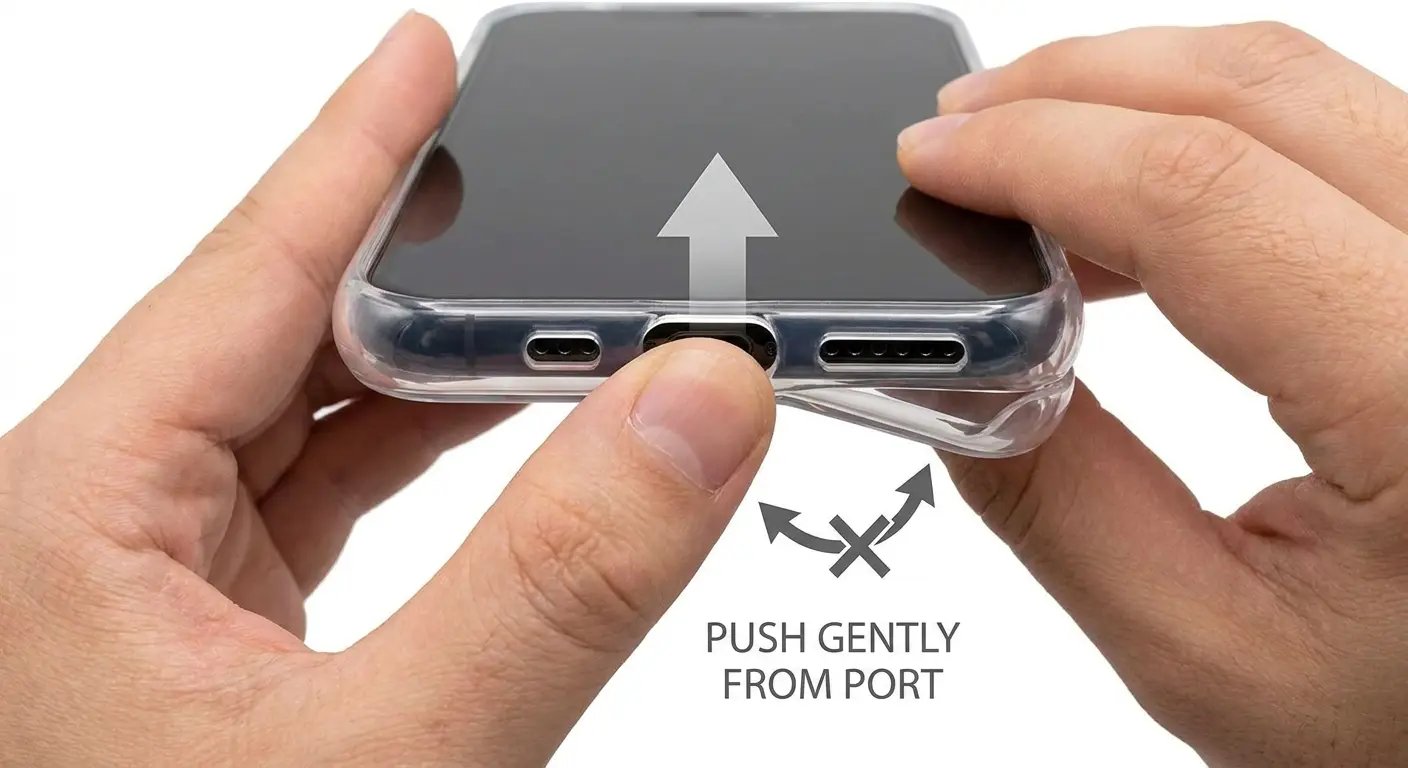
Stop peeling your case off from one corner. You're going to crack it. Instead, push the phone out from the camera or charging port cutout, distributing force more evenly.
Install cases correctly the first time. Forcing a case on misaligned creates stress points that weaken the material. Line up the phone properly, start with one edge, and work your way around. Take your time.
Avoid temperature extremes when possible. Don't leave your phone in hot cars or in direct sunlight for extended periods. Don't take your phone from a cold car directly into a hot shower (the humidity plus temperature shock is particularly bad for cases).
Rotate where you carry your phone. If you always keep it in the same pocket, that side of the case wears faster from friction. Switching pockets distributes wear more evenly. This sounds minor but extends case life by preventing uneven degradation.
Use a phone grip or ring that attaches to your case rather than holding the case edges constantly. Your fingers transfer oils every time you handle your phone. Grips reduce direct contact between your hands and the case, slowing oil buildup.
Keep your phone out of bags with sharp objects. Keys, pens, and other items scratch cases. Use a dedicated phone pocket or pouch within your bag to protect the case from abrasion.
Choosing Cases Designed for Easier Maintenance
A photographer I know bought a clear case with an oleophobic coating, cost fifteen bucks more than the basic version. Four months later, after constant outdoor use in dusty conditions, it still wiped clean in seconds. Meanwhile, his colleague with the basic textured case spent five minutes every week scrubbing grime out of the grip pattern and replaced it after three months. The extra fifteen dollars paid for itself.
Case design significantly impacts how easy it is to keep clean. Completely smooth cases show every fingerprint but wipe clean easily. Textured cases hide smudges better but trap dirt in grooves. Neither is objectively better; choose based on your cleaning preferences.
Personally? I go with smooth cases. Yeah, you see every fingerprint, but at least you can actually clean them. Textured cases hide dirt better but scrubbing grime out of those grooves makes me want to throw the case away.
Look for cases with oleophobic coatings already applied. These factory coatings repel oils more effectively than aftermarket treatments and are integrated into the manufacturing process. Cases with these coatings stay clearer longer between cleanings.
Avoid cases with excessive seams, ridges, or decorative elements. Every groove is a dirt trap. Minimalist designs with clean lines and few interruptions are easier to maintain. You can wipe them down in seconds rather than scrubbing multiple crevices.
Consider cases with antimicrobial additives in the plastic. These don't prevent dirt buildup but do inhibit bacterial growth, which means less odor and potentially less discoloration from biological sources. They're particularly useful if you work in environments where hygiene is critical.
Removable components make deep cleaning easier. Cases where you can separate the bumper from the back panel or remove integrated accessories let you clean each piece thoroughly. Single-piece cases are simpler but harder to clean comprehensively.
Check for cases specifically marketed as yellowing-resistant. Manufacturers achieve this through UV stabilizers, special polymer blends, or protective coatings. These cases cost more but maintain their appearance way longer than basic clear cases.
Raised edges around the camera and screen protect your phone but create pockets that collect debris. Cases with minimal lip height are easier to clean but offer less protection. Balance your priorities between protection and maintenance ease.
If you value a clear case for showing off your phone's design but hate the maintenance, consider cases with clear backs and colored or textured bumpers. The clear section shows your phone while the bumper (which takes the most abuse) hides wear better. This hybrid approach reduces visible degradation while maintaining the aesthetic you want.
Final Thoughts
Here's the bottom line: clear cases look great until they don't. You're fighting UV light, skin oils, and basic chemistry. You can slow down the yellowing with daily wipes and proper cleaning, but you can't stop it forever.
TPU yellows faster than polycarbonate. Baking soda works on surface stains. Alcohol cuts through oils. Replace your case every 6-8 months regardless of how well you maintain it, because eventually the plastic itself degrades beyond saving.
And honestly? Sometimes it's easier to just buy a new case than spend an hour scrubbing one that cost fifteen bucks. I've done both. The new case usually wins.
Keep it clean, don't leave it in direct sunlight, and know when to quit. That's all there is to it.

