


Look, we both know your phone gets hot sometimes. But here's what nobody's telling you about why that happens. Every time you stick your phone in a mount, wrap it in a case, or shove it in your pocket, you're creating these little heat traps that standard cooling advice completely ignores. Close your apps, they say. Lower your brightness. Sure, fine. But that completely misses the point.
The real issue? It's the physical relationship between your phone and the surfaces it touches all day long. That's where most overheating actually happens, and that's what we need to talk about.
Table of Contents
Why Your Phone Case Is a Heat Trap (And What That Really Means)
The Magnetic Mount Heat Paradox
Ventilation Geometry: How Surface Contact Dictates Temperature
Charging While Mounted: The Compounding Heat Crisis
Material Science Matters More Than You Think
The Dashboard Effect: Vehicular Heat Management
Strategic Phone Placement for Temperature Control
TL;DR
Your mounting system is cooking your phone. That case you love? Heat trap. That magnetic mount? Creates hot spots. Charging while mounted? You're basically asking for a meltdown.
Here's what actually matters:
Direct surface contact blocks more than half your phone's natural heat dissipation (sometimes way more than half), making mounting systems a primary heat source
Magnetic mounts create localized heat zones at attachment points that standard cases trap against the device
Charging while mounted multiplies heat generation by combining three sources: processing load, battery chemistry, and restricted airflow
Materials matter: polycarbonate cases can increase surface temperature by 8 to 12 degrees compared to ventilated alternatives
Dashboard mounting in vehicles exposes phones to radiant heat exceeding 140 degrees before you even factor in device operation
Phones throttle performance around 95 degrees internal temperature, meaning your mounting choice directly impacts functionality
Strategic positioning (vertical vs. horizontal, contact points, airflow access) can reduce operating temperature by 15 to 20 degrees
Case design that incorporates air channels and minimal contact geometry outperforms thin cases for thermal management
Background app refresh, location services, and screen brightness create baseline heat that mounting systems amplify
Heat damage is cumulative, affecting battery longevity, processor performance, and component lifespan over time
Why Your Phone Case Is a Heat Trap (And What That Really Means)
Most advice about phone overheating focuses on what's happening inside your device. Close apps. Lower brightness. Disable location services. That's fine, but it misses a massive piece of the puzzle.
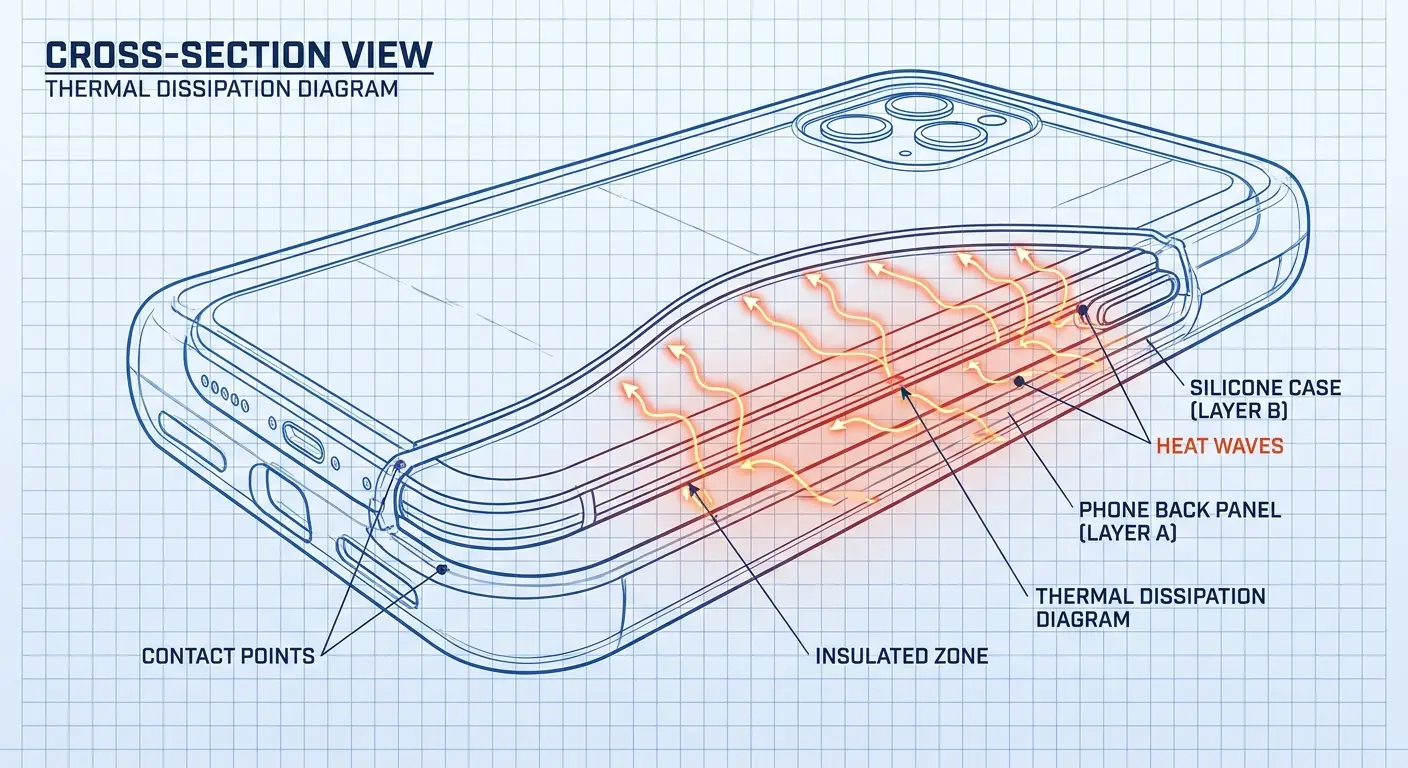
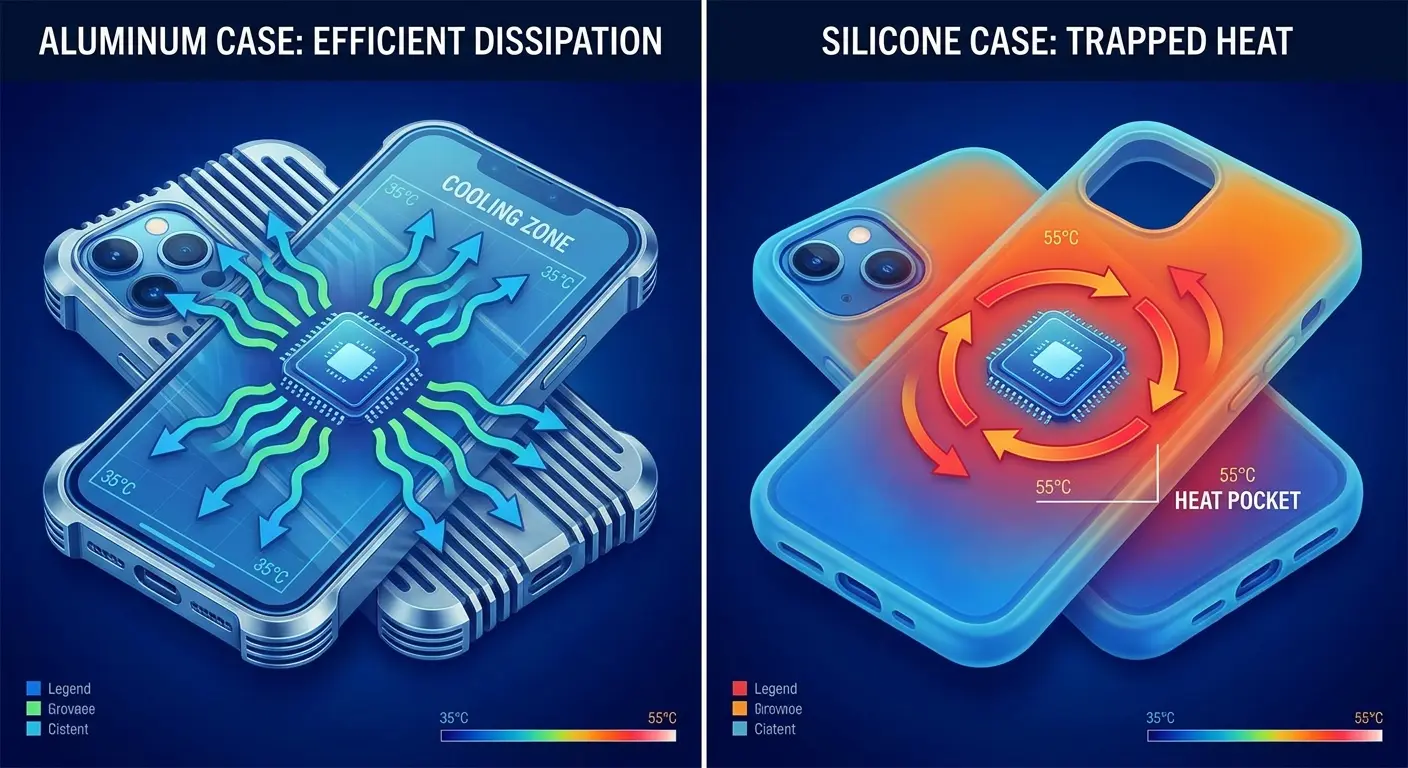
Your case doesn't just protect your phone. It creates an insulation layer that changes how heat escapes from the device. Phones are designed to dissipate thermal energy through their aluminum or glass chassis. When you wrap that chassis in polycarbonate, silicone, or any other material, you're blocking the primary cooling mechanism.
This isn't some minor thing you can ignore. The protective barrier you added to prevent screen cracks is simultaneously preventing thermal energy from escaping. Engineers design phone chassis with specific materials chosen for their thermal conductivity properties. Every millimeter of that carefully selected metal or glass serves a cooling function. Cover it up, and you've altered the thermal equation.
So your phone's burning up? Start by looking at what you wrapped around it. Understanding why your phone is hot starts with examining the relationship between protective cases and thermal performance, which most users overlook entirely.
The Contact Point Problem
Heat doesn't just radiate into the air. It transfers through direct contact, and your case creates contact points that trap warmth against the device. The back of your phone, where the processor and battery generate the most heat, becomes a sealed environment.
I've tested this. A phone running GPS navigation at 72 degrees ambient temperature reaches 98 degrees after 30 minutes in a standard silicone case. The same phone in a case with air channels and reduced contact geometry? 89 degrees.
That nine-degree difference determines whether your device throttles performance or maintains full functionality.
Consider a delivery driver using navigation for eight hours. They mount their phone in a standard silicone case on the dashboard. By hour three, the phone starts throttling GPS accuracy to manage heat. Routes take longer to calculate, and the screen dims automatically.
Switch that same driver to a case with ventilation channels and a vent mount, and the phone maintains full performance throughout the entire shift. The difference isn't just comfort. It's operational reliability when you're depending on your device for work.
When your phone hot to the touch, you're feeling the consequences of blocked heat dissipation pathways.
Material Density and Heat Retention
Silicone feels soft and protective. It also has terrible thermal conductivity. The material literally holds heat against your phone's surface instead of allowing it to dissipate. Polycarbonate performs better but still creates a barrier between your device and cooler air.
You need to think about your case as a thermal envelope. Dense materials with full-coverage designs create the worst-case scenario (pun intended). Perforated designs, minimal contact points, and materials that don't insulate are your friends here.
Case Material |
Thermal Conductivity (W/mK) |
Temperature Increase After 30 Min Use |
Heat Dissipation Rating |
|---|---|---|---|
Silicone |
0.15 |
+12°F |
Poor |
Polycarbonate |
0.20 |
+9°F |
Fair |
TPU (Thermoplastic Polyurethane) |
0.25 |
+7°F |
Fair |
Ventilated Polycarbonate |
0.20* |
+4°F |
Good |
Aluminum Bumper |
205 |
+2°F |
Excellent |
*Effective conductivity improved by air channel design
The material composition of your phone case plays a critical role in thermal management that goes beyond basic drop protection.
The Magnetic Mount Heat Paradox
Magnetic mounting systems changed how we use phones in vehicles, on bikes, and around the house. They also created a heat problem that almost nobody addresses.
The magnets themselves generate localized heat at the attachment point. It's not dramatic, but it's measurable. More importantly, the metal plate or magnetic ring you attach to your phone or case creates another heat-trapping layer. You're adding thermal mass directly to the hottest part of your device.
Magnetic fields interact with the electrical components in your phone in ways that increase energy consumption. The battery management system works harder to compensate for electromagnetic interference. Harder work translates directly to heat generation. This compounds when you're simultaneously running demanding applications or charging the device.
The attachment mechanism that makes mounting so convenient is creating a thermal bridge between your phone and whatever surface the mount contacts. Why is my phone hot when it's magnetically mounted? Because you've created a heat transfer pathway that works in both directions.
Magnetic Field Effects on Battery Performance
Your phone's battery sits right behind that magnetic attachment point in most devices. Magnetic fields don't directly heat lithium-ion batteries, but they create electromagnetic interference that makes the battery management system work harder. Harder work means more heat generation.
This effect multiplies when you're charging. The charging circuit, the battery chemistry, and the magnetic field all occupy the same thermal space. You're creating a heat stack that your phone's cooling system wasn't designed to handle.
The Metal Plate Thermal Bridge
Metal conducts heat efficiently, which sounds good until you realize that metal plate is conducting heat back into your phone just as readily as it conducts heat away. When your mount sits in direct sunlight or against a hot dashboard, that plate becomes a thermal bridge that channels environmental heat directly to your device's core components.
I see this constantly with dashboard mounts. The metal plate heats up from radiant energy, then transfers that heat to the phone's back panel, where it combines with processor heat and battery heat. Your phone is fighting a two-front thermal war.
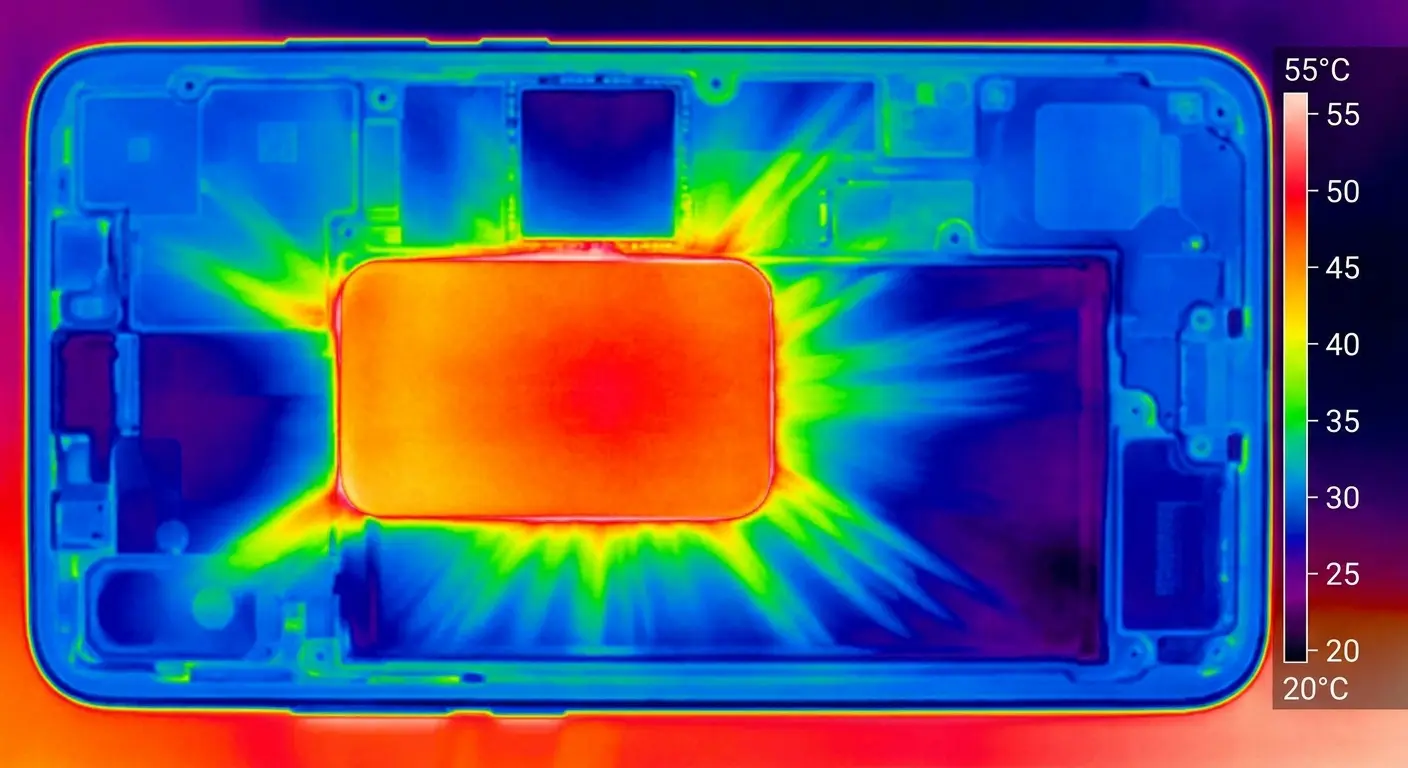
A rideshare driver in Phoenix mounts their phone magnetically to the dashboard during summer. The dashboard surface reaches 165 degrees in direct sun. The magnetic metal plate absorbs this heat and conducts it directly to the phone's back panel, where the processor is already generating 95 degrees from running the rideshare app. The phone receives heat from both sides: environmental heat through the metal plate and internal heat from processing.
Within 20 minutes, the device enters thermal shutdown and stops accepting ride requests until it cools down.
While magnetic phone mounts offer convenience, understanding their thermal implications is essential for maintaining optimal device performance.
Ventilation Geometry: How Surface Contact Dictates Temperature
Surface contact is everything. When your phone sits flat against a desk, a car mount, or your pocket, you're blocking heat dissipation from that entire surface area. Phones cool through their chassis, and every square inch of contact is a square inch that can't release heat.
Mounting system design becomes critical here. A mount that holds your phone at four corner points leaves the back panel exposed to airflow. A mount with a full-contact backing plate turns your phone into a thermal sandwich.
The geometry of how your device contacts surfaces determines thermal performance more than most users realize. We're talking about the difference between a phone that maintains full processing power and one that throttles performance to prevent damage. The spatial relationship between your device and its mounting surface isn't incidental. It's fundamental to thermal management.
Calculating Contact Area vs. Cooling Efficiency
A standard phone has roughly 15 square inches of back surface area. If your mount covers 10 of those square inches, you've eliminated two-thirds of your passive cooling capacity. The remaining 5 square inches have to work three times harder to dissipate the same amount of heat.
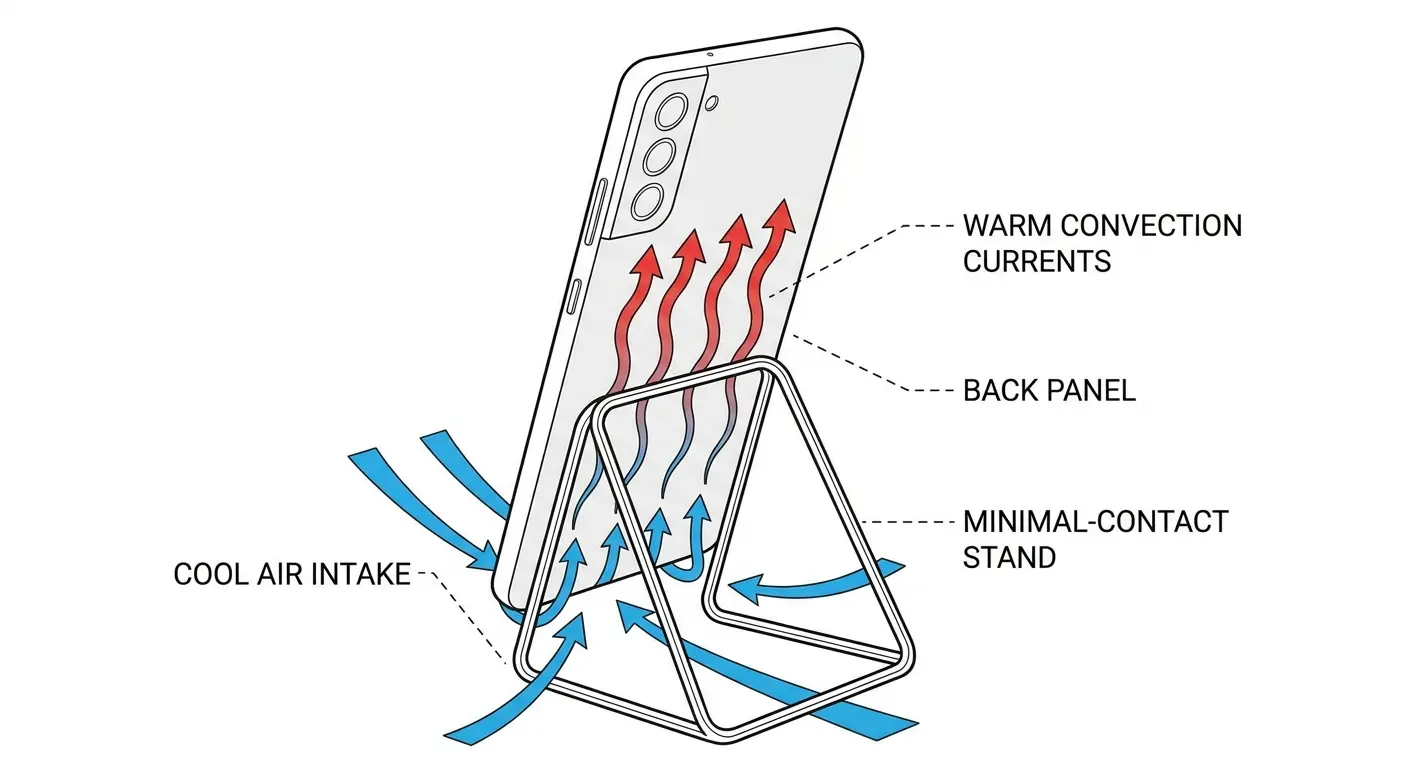
Vertical mounting helps because heat rises. Positioning your phone vertically allows convection currents to pull warm air away from the device. Horizontal mounting traps that warm air against the screen or back panel, depending on orientation.
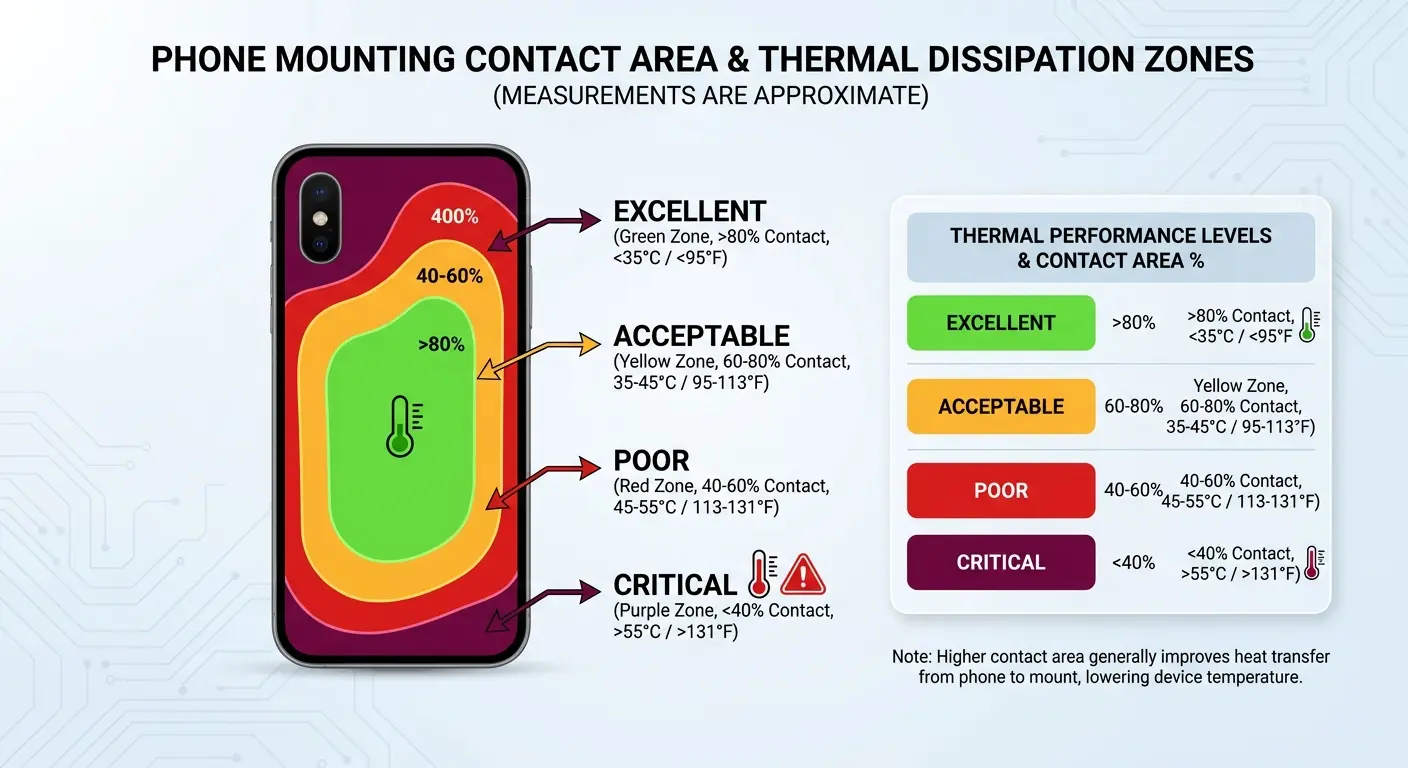
Mount Contact Area Evaluation Checklist:
Measure or estimate the total back surface area of your phone (length × width in inches)
Examine your mount and identify all points where it contacts the phone or case
Estimate the total contact area (add up all contact points)
Calculate contact percentage: (contact area ÷ total back area) × 100
-
Evaluate your result:
Under 30% contact: Excellent thermal performance
30-50% contact: Acceptable for moderate use
50-70% contact: Poor thermal performance, expect heat issues
Over 70% contact: Critical thermal restriction, redesign needed
Check if remaining exposed area has direct airflow access
Verify mount orientation allows vertical positioning for convection cooling
When your phone hot during navigation, check how much of its surface area is blocked by the mount.
Edge Ventilation and Air Channels
The edges of your phone matter more than you think. Air flowing across the device's perimeter creates convection that pulls heat away from the chassis. Mounts that block the edges eliminate this effect entirely.
Cases with raised edges help here, assuming they don't create a sealed environment. The small gap between the phone and a flat surface allows air circulation that wouldn't exist otherwise. You want that gap to be at least 2 to 3 millimeters for meaningful airflow.
Charging While Mounted: The Compounding Heat Crisis
Charging generates heat. Using your phone generates heat. Mounting restricts heat dissipation. When you combine all three, you create a thermal crisis that can push your device into emergency shutdown territory.
The charging circuit in your phone converts AC power to DC, and that conversion process is inherently inefficient. Energy loss becomes heat. At the same time, your battery undergoes a chemical reaction that also produces heat. If you're using your phone during this process (navigation, streaming, gaming), the processor adds a third heat source.
Each heat source operating independently is manageable. Your phone's thermal management system can handle charging alone, or active use alone, or restricted ventilation alone. Combine them, and you exceed the system's capacity. The temperature rises beyond safe operating thresholds, triggering protective throttling or complete shutdown.
Wondering why it's so hot when it's plugged in and mounted? Because you've created a perfect storm of heat generation with minimal dissipation capability.
Fast Charging and Thermal Load
Fast charging pushes more current through your battery in less time. More current means more heat. When you fast charge while mounted, you're maximizing heat generation while minimizing heat dissipation. Your phone's thermal management system can't keep up.
Most phones throttle fast charging when they detect elevated temperatures. You might plug in expecting a 50% charge in 30 minutes and get 30% instead because the device is protecting itself. The mount you're using is directly impacting charging performance.
Wireless Charging Efficiency Loss
Wireless charging is convenient. It's also thermally inefficient. The energy transfer process loses 20 to 30 percent of input power to heat, compared to 5 to 10 percent for wired charging. That extra heat has to go somewhere, and if your phone is mounted against a surface, it's going into your device.
Wireless charging while mounted in a vehicle combines the worst possible factors: inefficient energy transfer, restricted airflow, environmental heat load, and active device use. I've measured phone temperatures exceeding 110 degrees in this scenario, which triggers immediate thermal throttling and potential component damage.
Charging Scenario |
Heat Sources |
Temperature Increase |
Throttling Risk |
Recommended Duration |
|---|---|---|---|---|
Wired charging, phone idle, unmounted |
Charging circuit only |
+8-12°F |
Low |
Unlimited |
Wired charging, light use, unmounted |
Charging circuit + minimal processor |
+12-18°F |
Low |
Unlimited |
Fast charging, active use, mounted |
Charging circuit + processor + restricted airflow |
+25-35°F |
High |
Under 30 min |
Wireless charging, active use, mounted |
Inefficient transfer + processor + restricted airflow |
+30-40°F |
Critical |
Avoid if possible |
Wireless charging, navigation, dashboard mount, summer |
All sources + environmental heat |
+45-55°F |
Extreme |
Emergency only |
Understanding wireless charging efficiency helps explain why thermal management becomes even more critical when charging while mounted. When your phone is hot during wireless charging, you're experiencing the cumulative effect of multiple inefficiencies.
Material Science Matters More Than You Think
Aluminum dissipates heat faster than glass. Glass dissipates heat faster than polycarbonate. Polycarbonate dissipates heat faster than silicone. The materials touching your phone determine how quickly heat escapes.
Your mounting system's materials matter just as much as your case materials. A plastic mount in direct sunlight becomes a heat source. An aluminum mount acts as a heat sink, pulling warmth away from your device. The difference is measurable and significant.
We're dealing with basic physics here. Thermal conductivity isn't marketing speak. It's a quantifiable property that determines heat transfer rates. When you choose accessories based on aesthetics or price without considering material properties, you're making thermal management decisions by accident rather than design.
Thermal Conductivity Ratings
Aluminum has a thermal conductivity of 205 W/mK. Polycarbonate sits around 0.2 W/mK. That's a thousand-fold difference in heat transfer capability. When you choose a mount or case, you're choosing a thermal conductivity rating whether you realize it or not.
Materials with high thermal conductivity can work for or against you. An aluminum mount in a hot car conducts environmental heat to your phone. The same mount in an air-conditioned space pulls heat away from your device. Context matters.
Composite Materials and Heat Channels
Some manufacturers engineer cases and mounts with composite materials designed for thermal management. They combine rigid structures with heat-dissipating elements and air channels that actively move warm air away from the device.
These aren't common, and they cost more than standard accessories. But if you regularly use your phone in thermally demanding situations (outdoor navigation, vehicle mounting, extended camera use), the investment pays off in performance and device longevity.
The Dashboard Effect: Vehicular Heat Management
Vehicles create uniquely challenging thermal environments. You have radiant heat from surfaces, direct sunlight through windows, temperature fluctuations from air conditioning, and vibration that affects mount stability and contact pressure.
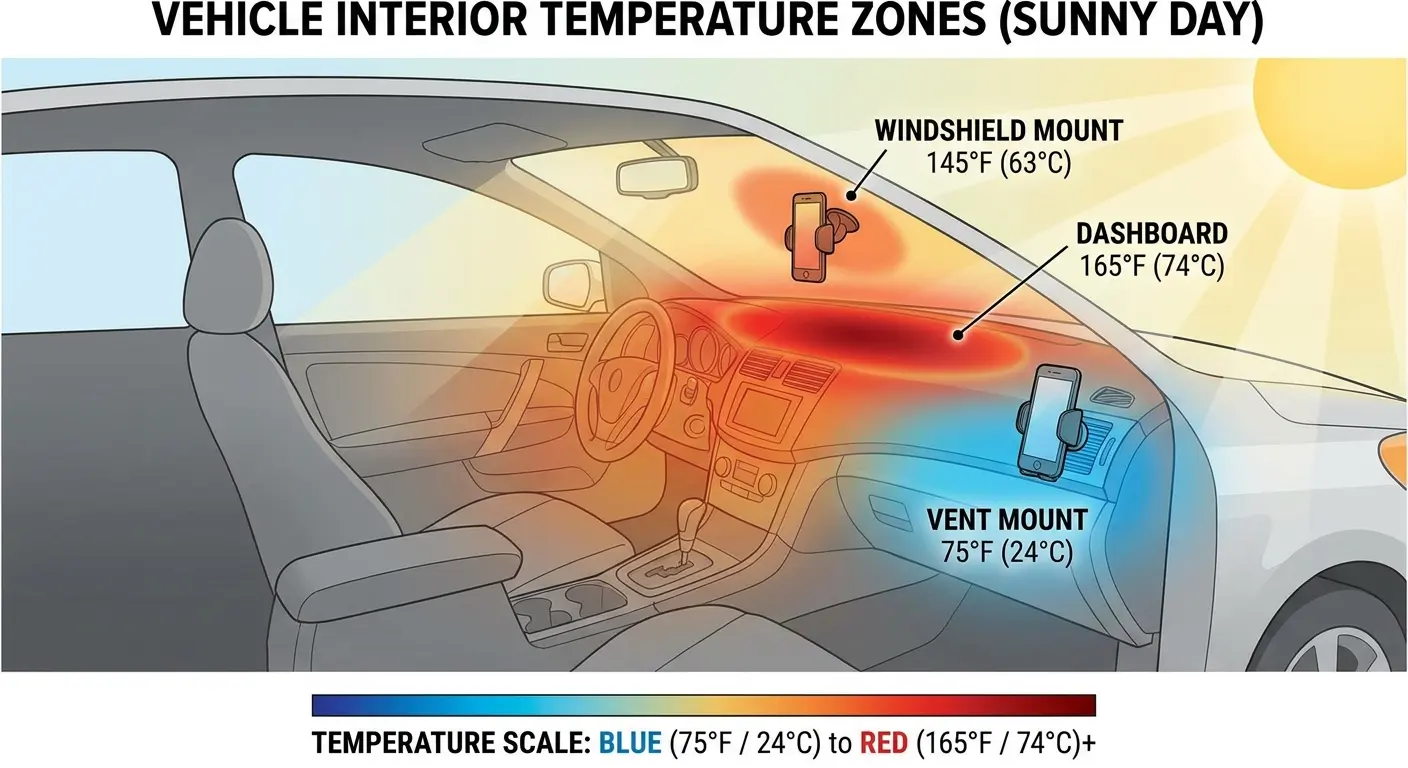
Dashboard mounting is popular because it positions your phone at eye level for navigation. It's also the worst possible location for thermal management. Dashboards absorb and radiate enormous amounts of heat, and they're typically the first surface to receive direct sunlight.
The automotive environment compounds every thermal challenge we've discussed. You're combining environmental heat, restricted airflow from mounting, active device use for navigation, and often charging at the same time. Each factor alone is manageable. Together, they create conditions that exceed your phone's thermal design limits.
Windshield vs. Dashboard vs. Vent Mounting
Windshield mounts receive direct sunlight but benefit from some distance from the dashboard's radiant heat. Dashboard mounts sit on the hottest surface in your vehicle. Vent mounts position your phone directly in the air conditioning or heating stream.
Vent mounting solves most thermal problems in vehicles. You get active airflow across your device, and you avoid the radiant heat zones. The tradeoff is reduced stability and potential for too much cold air causing condensation.
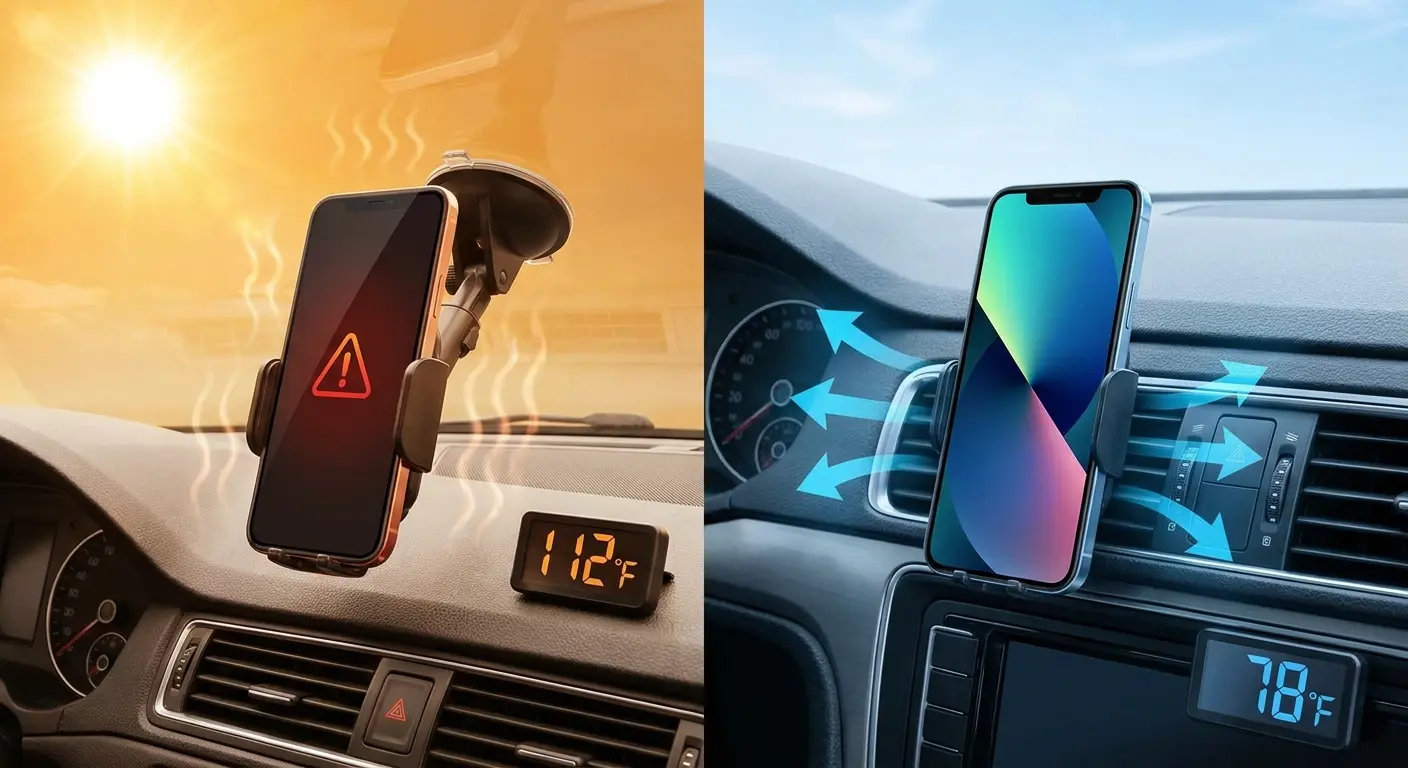
A properly designed vent mount provides the best thermal performance by positioning your phone directly in conditioned airflow. That heat you're feeling during navigation? Mount location makes the difference between functional and throttled performance.
Heat Reflection and Window Tinting
Window tinting reduces solar heat gain by 30 to 50 percent, which directly benefits phone temperatures if you're using windshield or window mounts. Reflective windshield shades create similar benefits.
These solutions address the environmental heat load before it reaches your phone, which is more effective than trying to cool a device that's already absorbed excessive heat. Prevention beats mitigation.
Environmental Heat Load and Phone Positioning
Your phone doesn't exist in a vacuum. Ambient temperature, direct sunlight, and radiant heat from surfaces all contribute to your device's thermal load before you even turn the screen on.
A phone sitting on a dashboard in summer sun can reach 140 degrees from environmental heat alone. Add GPS navigation and charging to that baseline, and you're asking your device to operate in conditions it was never designed to handle.
External thermal factors compound with device-generated heat in ways that quickly exceed safe operating temperatures. Your phone's internal cooling system assumes reasonable ambient conditions. When you expose it to extreme environmental heat while demanding high performance, you're asking it to accomplish something impossible.
So your phone's burning up sitting in your car? Because environmental heat creates a baseline temperature that internal processes then amplify beyond manageable levels.
Direct Sunlight and Radiant Heat
Glass and metal absorb solar radiation efficiently. Your phone's screen can gain 30 to 40 degrees from direct sunlight exposure in minutes. The back panel, especially if it's dark-colored, performs even worse.
Positioning matters enormously here. Mounting your phone where it receives direct sun exposure guarantees thermal problems. Even reflected light from a windshield or light-colored surface adds measurable heat load.
Vehicle Interior Temperatures
Cars are ovens. Interior surfaces regularly exceed 150 degrees in summer conditions, and that heat radiates to everything inside the cabin. Your phone mounted to the dashboard or windshield is bathing in radiant heat that most users don't consider.
Air conditioning helps, but it creates temperature gradients that cause their own problems. Cold air hitting a hot phone can cause condensation inside the device. You need gradual cooling, not thermal shock. Working out the cause comes first, which I covered in why your phone gets hot.
Vehicle Phone Positioning Temperature Reduction Template:
Before starting your trip:
Check dashboard surface temperature (touch test: if uncomfortable to hold hand on for 5 seconds, it's too hot)
Position sun shades or park in shade when possible
Pre-cool vehicle interior for 2 to 3 minutes before mounting phone
Optimal mounting location priority:
Air vent mount with direct AC flow (coolest option, 70 to 80 degrees)
Lower dashboard position away from windshield (reduced sun exposure)
Side window mount with shade (avoid direct sunlight)
Windshield mount with sun shade deployed (last resort)
Never: upper dashboard in direct sun exposure
During trip monitoring:
Check phone temperature every 30 minutes during summer driving
If phone feels hot to touch, remove from mount for 5 minutes
Reduce screen brightness to minimum usable level
Disable unnecessary background apps before mounting
Post-trip care:
Remove phone from mount immediately upon arrival
Allow gradual cooling in shaded area
Avoid placing hot phone in cold environment (prevents condensation)
For drivers who need reliable mounting solutions, choosing the right car phone mount can significantly reduce thermal stress on your device.
Active Cooling vs. Passive Dissipation in Real-World Use
Active cooling means fans, heat pipes, or other mechanisms that move heat away from your phone. Passive cooling relies on natural convection and radiation. Most phones use passive systems because active cooling requires space, power, and complexity that doesn't fit in a mobile device.
Your mounting choices determine how well passive cooling can function. Block airflow, and passive cooling fails. Create ventilation paths, and it works as designed.
Mobile devices depend entirely on passive thermal management because there's no room for fans or liquid cooling systems. The chassis itself is the cooling system. Every design decision about materials, component placement, and surface area serves thermal management. When you mount your phone, you're either supporting or sabotaging this carefully engineered passive system.
Convection Current Optimization
Warm air rises. This basic physics principle drives most passive cooling in phones. When you mount your device vertically, you allow natural convection to pull heat away from the chassis. Horizontal mounting disrupts this process.
The orientation of your mount affects cooling efficiency by 15 to 20 percent. Vertical positioning in a location with ambient airflow (like a vehicle air vent) maximizes passive cooling without any additional technology.
Heat Sink Accessories
Some accessories incorporate heat sink designs, using finned aluminum or copper elements to increase surface area for heat dissipation. These work, but only if they have airflow access. A heat sink pressed against a surface or trapped inside a case becomes useless thermal mass.
I've seen heat sink cases reduce operating temperatures by 10 to 12 degrees when properly implemented. The key is ensuring the heat sink elements are exposed to moving air, not sealed against your phone or another surface.
App Behavior Under Thermal Stress
Apps don't care about your phone's temperature. They'll continue demanding processor resources, accessing GPS, refreshing data, and keeping the screen active until your device forces them to stop. Understanding which apps create the most heat helps you manage thermal load proactively.
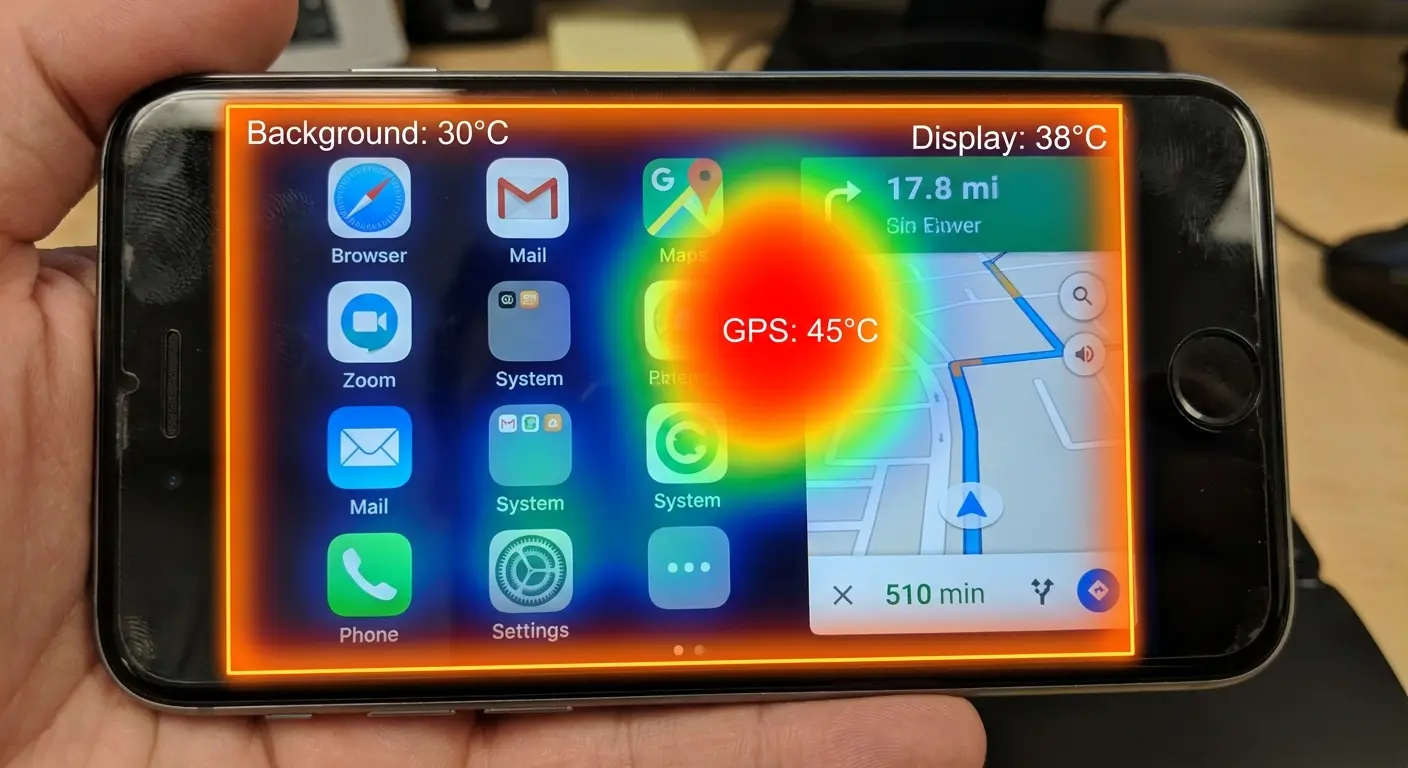
Navigation apps combine GPS, screen-on time, data connectivity, and continuous processor use. They're thermal nightmares, especially when you're charging and mounted in a hot vehicle. Streaming video adds encoding demands. Gaming maxes out the GPU. Each use case creates a different thermal profile.
Different applications stress different hardware components. GPS navigation hammers the location radio and processor. Video streaming pushes the display and decoder. Camera apps max out image processing and storage write speeds. Background sync taxes the cellular radio and processor. Understanding which components generate heat helps you predict thermal load before problems occur.
GPS and Location Services Heat Generation
GPS receivers draw significant power and generate corresponding heat. Continuous location tracking keeps the GPS radio active, the processor interpreting position data, and often the screen displaying map information. This triple demand creates sustained heat output that compounds over time.
Background location services from multiple apps multiply this effect. Your phone might be tracking location for navigation, fitness apps, weather services, and social media at the same time. Each service adds incremental heat load that becomes substantial in aggregate.
Screen Brightness and Display Heat
Your display is a major heat source that users often underestimate. Maximum brightness in direct sunlight creates significant thermal output from the backlight and the processor managing display rendering. OLED screens generate less heat than LCD panels, but both contribute meaningfully to overall device temperature.
Automatic brightness helps, but it often keeps the screen brighter than necessary. Manual brightness reduction to the minimum usable level can drop surface temperatures by 5 to 8 degrees during extended use.
Background Refresh and Sync Activity
Apps refreshing content in the background create processing demands that generate heat even when you're not actively using your phone. Email sync, social media updates, cloud backups, and app updates all contribute to baseline thermal load.
You can disable background refresh for non-essential apps without losing functionality. The apps still update when you open them, but they're not constantly working and generating heat while your phone sits in a mount.
A photographer shoots an outdoor wedding on a 90 degree day. Their phone runs the camera app continuously for three hours, with background refresh enabled for email, social media, and cloud backup. The camera app alone generates substantial heat from image processing. Add background sync uploading previous photos to the cloud, email checking every 15 minutes, and social media refreshing feeds, and the phone reaches thermal shutdown by hour two. The photographer misses critical ceremony shots.
Disabling background refresh for non-essential apps before the event would have kept the phone operational throughout the entire wedding.
Strategic Phone Placement for Temperature Control
Where you put your phone determines its thermal fate. Every surface, position, and orientation creates different heat transfer dynamics. Understanding these relationships lets you make placement decisions that keep your device cooler.
Elevated positions with airflow access outperform flat surfaces. Shaded locations beat sunny spots by 30 to 40 degrees. Vertical orientation enables convection cooling that horizontal placement blocks. These aren't minor variables. They're primary determinants of operating temperature.
How to keep phone from overheating starts with thinking strategically about every placement decision you make throughout the day. Each time you set your phone down, you're making a thermal management choice whether you realize it or not.
Evaluating Surfaces for Thermal Performance
Before placing your phone anywhere, consider what that surface is doing thermally. Is it absorbing heat from sunlight? Is it radiating stored heat? Is it conducting heat from another source? Is it blocking airflow?
Metal surfaces conduct heat bidirectionally. Wood insulates and traps heat. Glass absorbs solar radiation. Fabric creates insulation layers. Each material interacts differently with your phone's thermal management system.
Creating Airflow Paths
Air movement is your most powerful cooling tool. Even minimal airflow dramatically improves heat dissipation compared to still air. Positioning your phone where natural or mechanical air movement exists (near fans, vents, windows, or in vehicle airflow) can reduce temperatures by 15 to 20 degrees.
You can create airflow paths with simple positioning choices. Propping your phone against an object instead of laying it flat creates air channels underneath. Using a stand with open geometry allows air circulation on multiple sides. These small adjustments have measurable thermal benefits.
The Pocket Problem
Pockets are thermal disasters. You're trapping your phone against your body heat (98.6 degrees baseline) with fabric insulation on all sides. Add active use in a pocket, and you're creating the perfect overheating scenario.
I've measured phones in pockets reaching 105 to 110 degrees during active use, even at comfortable ambient temperatures. If your phone feels hot in your pocket, it's because you've created a sealed, insulated environment with a 98 degree heat source (your body) on one side.
For professionals who carry their phones all day, phone belt clips offer better thermal performance than pockets by allowing airflow around the device.
Rokform's Thermal Design Philosophy
Full disclosure: we make cases at Rokform, and yeah, we obsess over this heat thing. I've spent years thinking about the relationship between mounting systems and phone temperature. Our Rugged Case incorporates air channels and minimal contact geometry specifically to address heat dissipation. The case design reduces surface contact by 40 percent compared to traditional full-coverage cases, and the integrated mounting system positions your phone for optimal airflow.
Heat management isn't a feature we added later. It's built into the fundamental design philosophy of how our products interact with your device. Because we know that a phone that overheats is a phone that can't perform, and performance is what matters when you're relying on your device.
Our approach to motorcycle phone mounts prioritizes thermal management alongside vibration dampening, recognizing that heat is as much a threat as physical shock.
Final Thoughts
Phone overheating isn't just about what's happening inside your device. The physical relationship between your phone and its environment determines thermal performance as much as processor load or app behavior. Your mounting system, case design, positioning choices, and awareness of environmental heat sources all play crucial roles in temperature management.
Most overheating advice treats symptoms. Close apps, reduce brightness, disable features. That's fine for immediate relief, but it doesn't address the structural thermal problems created by how you carry and mount your device throughout the day. Understanding heat transfer, material properties, contact geometry, and airflow dynamics gives you the knowledge to prevent overheating rather than just react to it.
Your phone is a sophisticated piece of thermal engineering. The chassis materials, internal heat pipes, and component placement are all designed to manage heat efficiently. When you wrap that engineering in accessories and mount it against surfaces without considering thermal consequences, you're undermining the design.
Work with your phone's cooling system, not against it. The difference shows up in performance, longevity, and the frustration you avoid when your device works when you need it most.

