


Table of Contents
Why Your Phone's Buttons Are More Vulnerable Than You Think
The Hidden Cost of Button Failure
Common Button Issues and What They Actually Mean
DIY Button Repair: When It Makes Sense (And When It Doesn't)
Professional Repair vs. Replacement: The Real Math
Prevention Over Repair: The Strategy No One Talks About
How Rokform Addresses the Root Cause
Final Thoughts
Quick Version
Your phone buttons are breaking because cases suck at protecting them. Repairs are expensive band-aids that don't fix why the button failed in the first place. Volume and power buttons fail first because they take the most abuse. DIY fixes work sometimes but you'll probably make things worse. Professional repairs run $50-$150 and don't prevent the next failure. Most of this is preventable with a case that actually protects the vulnerable spots instead of leaving them exposed. I'm going to show you why prevention beats repair every single time.
Why Your Phone's Buttons Are More Vulnerable Than You Think
The Mechanical Weakness Built Into Every Smartphone
Your phone's buttons aren't just external controls. They're tiny, complicated assemblies of flex cables, metal contacts, and plastic housings compressed into millimeter-thin spaces. Every time you press the power button to wake your screen or adjust volume during a call, you're creating physical stress on components designed with planned obsolescence in mind.
With 66% of smartphone owners damaging their devices in the past year, the vulnerability of these mechanical components becomes obvious. Buttons are often the first casualties.
We've got a real design problem here. Your phone is mostly solid-state technology with no moving parts except for those buttons. They're the mechanical weak point in an otherwise static system, and manufacturers know it. They want devices thin enough to feel premium but durable enough to last through a two-year contract cycle. Barely. Buttons become the sacrifice point.
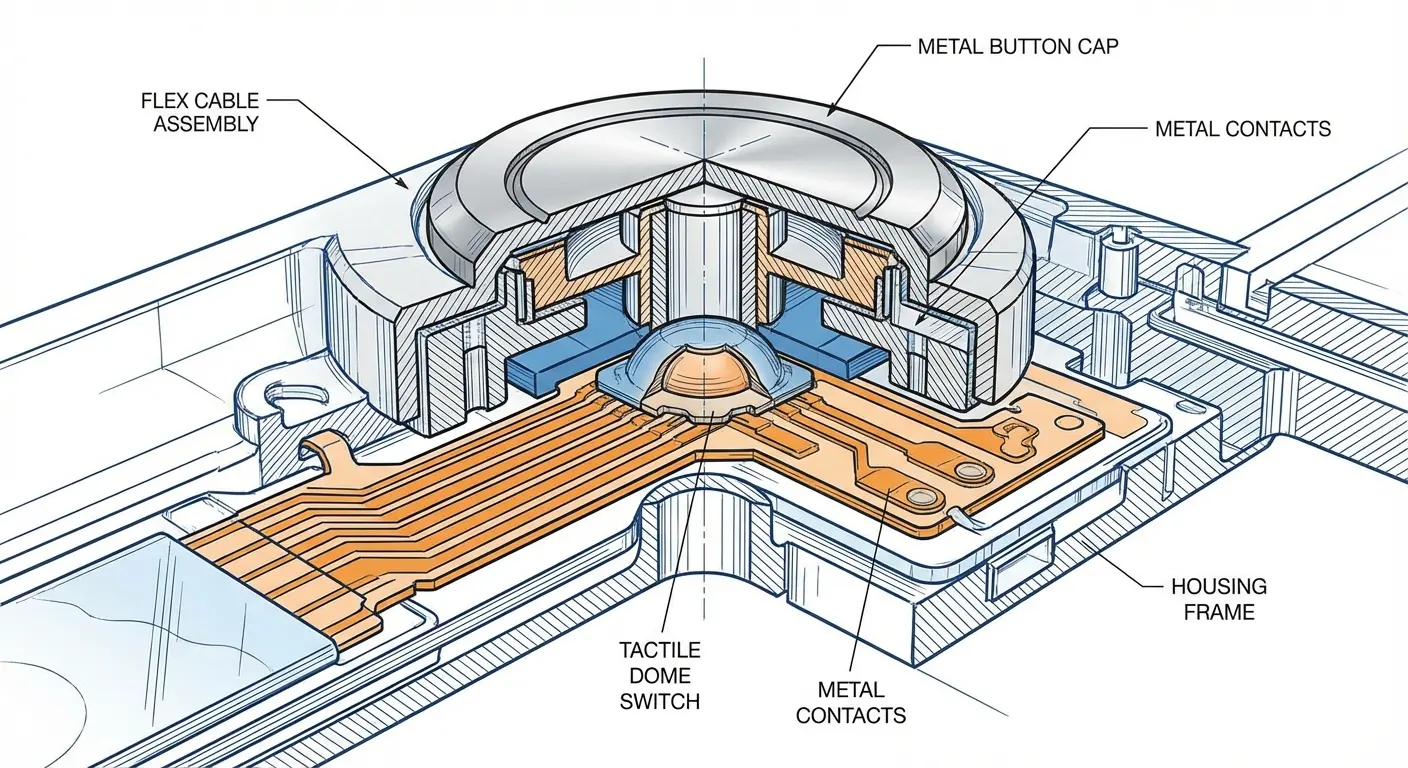
You'll notice that screens have gotten remarkably resilient with Ceramic Shield and Gorilla Glass. Button mechanisms? They're still using the same basic design from a decade ago. The components get thinner as phones get slimmer, which means less material protecting these vulnerable points. Each button press creates physical stress on tiny components that are engineered to eventually fail.
Why Volume and Power Buttons Fail First
Power buttons get destroyed because you're jamming them 50+ times a day. Usually while distracted. Volume buttons? They're sitting right on the edge, exactly where your phone hits the ground first when you drop it.
Research shows that 74% of smartphone repairs are due to accidental drops, with edge-mounted buttons bearing the brunt of impact forces that concentrate at their mounting points.
The failure modes tell you everything. Sticky buttons mean debris intrusion or worn contact points. Unresponsive presses suggest flex cable damage or disconnection. Buttons that sink into the housing mean the retention clip broke. Phantom presses (when the button activates without touch) point to short circuits from moisture.
Different failures, same root cause: inadequate protection at the point of vulnerability.
Button Failure Mode |
Primary Cause |
Typical Repair Difficulty |
Prevention Method |
|---|---|---|---|
Sticky/Unresponsive Press |
Debris intrusion, worn contacts |
Low (cleaning) to Medium (replacement) |
Sealed case design with button covers |
Button Sinks Into Housing |
Broken retention clip |
Medium to High (housing replacement) |
Impact-absorbing case with raised bezels |
Phantom Presses |
Moisture damage, short circuit |
High (component replacement) |
Water-resistant case, sealed button design |
Complete Non-Response |
Flex cable disconnection/damage |
High (internal repair required) |
Shock-dispersing dual-layer case protection |
The Hidden Cost of Button Failure
What You Lose Beyond Functionality
Button failure doesn't just mean you can't adjust volume easily. It screws up your entire phone experience in ways you probably haven't connected.
You enable AssistiveTouch as a workaround, which drains battery faster and clutters your screen with a floating button. You miss calls because you can't quickly silence your phone when it rings in a meeting. Photographers lose the tactile feedback of using the volume button as a shutter release, which is way more stable than tapping the screen.
People with motor control challenges who rely on physical buttons suddenly face accessibility barriers that shouldn't exist.

My friend shoots weddings and relies on the volume button for photos because tapping the screen makes everything shaky. Last month her button died mid-ceremony, right when the bride was walking down the aisle. She had to tap the screen like an amateur and half her shots were blurry. The repair cost her $75. The couple's disappointment? That cost her a lot more.
The repair industry knows this. They've built their pricing models around your urgency, not their costs.
The Repair Economics That Don't Add Up
Parts for button repairs are cheap. A replacement volume button flex cable costs repair shops $5-15. They charge you $75-150 for the repair. You're paying for labor, sure, but you're mostly paying for expertise and the risk they assume if something goes wrong during the repair.
The US cell phone repair industry is approximately $4 billion in 2023, with the average repair shop generating $150,000 in annual revenue. That's a business model built entirely on device failures that proper protection could prevent.
Manufacturers charge even more for out-of-warranty button repairs ($200-400) because they'd rather you upgrade than repair. Here's the thing: you're wasting money unless you're planning to keep your phone for another year minimum. Otherwise, you're putting money into a depreciating asset that's already shown vulnerability.
Phones with documented button issues sell for $50-150 less on the secondary market. That's your sunk cost even if you do repair the button, because buyers assume (correctly) that one failed component indicates overall wear.
Common Button Issues and What They Actually Mean
Diagnosing the Real Problem
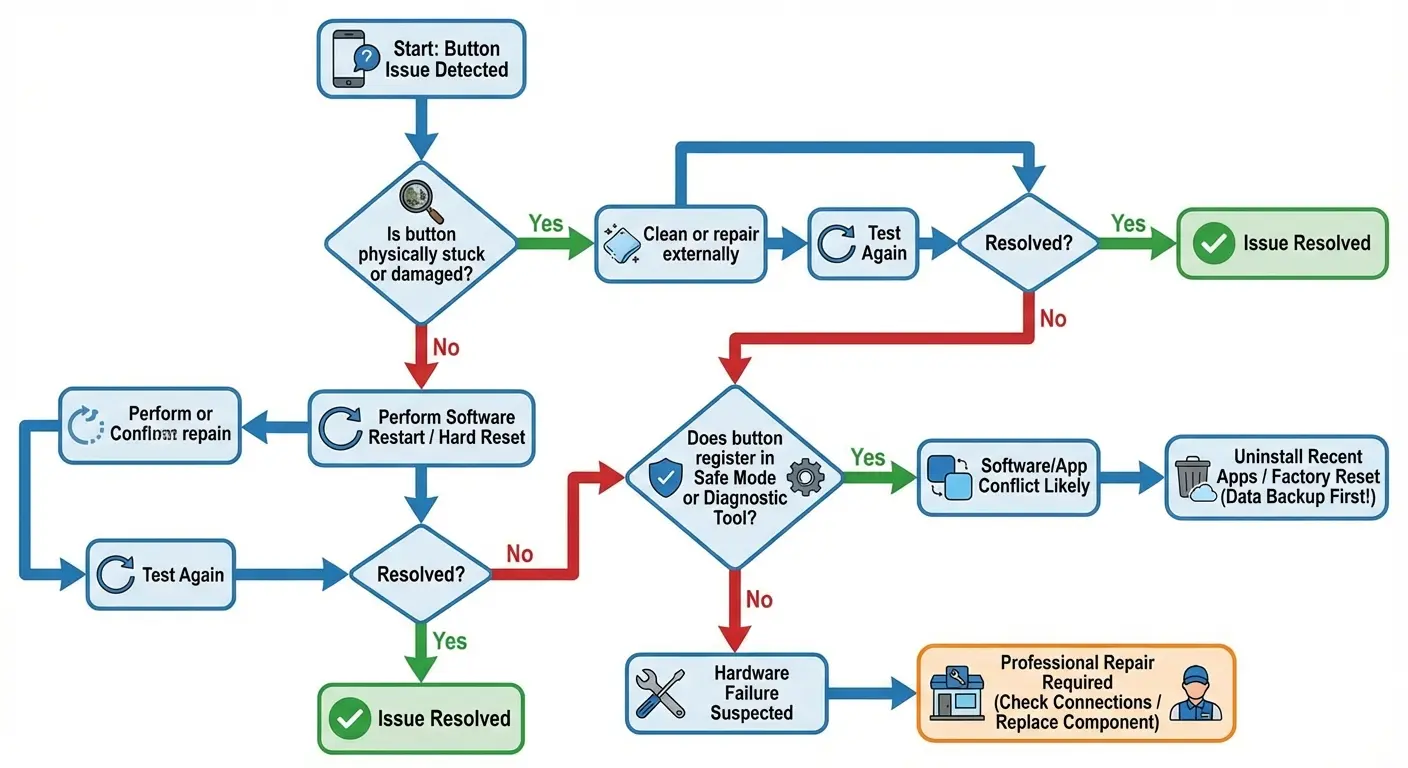
You need to figure out if your button is actually broken or if your phone is just being temperamental before you invest time or money in repair. Your button might feel broken but really it's responding to corrupted system files or accessibility settings you've forgotten about.
According to recent troubleshooting guidance from Cellular Zone, software glitches are responsible for a significant portion of button issues, particularly when "the button works sometimes but not others, or if multiple buttons suddenly stop working at the same time." The repair experts emphasize that a force restart should be your first diagnostic step before assuming hardware failure.
Try this first: restart your phone using only the screen (Settings > General > Shut Down on iOS, or press and hold the power icon on Android). If your buttons suddenly work after restart, you've got a software issue. If the problem persists, you're looking at hardware failure.
Check your button press count if your phone supports it. Some diagnostic apps can estimate this. Buttons rated for 100,000+ presses will start failing around that threshold. Heavy users hit this in 2-3 years. You're not imagining increased failure rates as your phone ages.
Before you panic, try this stuff:
☐ Perform a force restart using screen-only controls
☐ Check Accessibility settings for AssistiveTouch or button remapping
☐ Test buttons in Safe Mode (yes, this is a thing - hold down volume while restarting)
☐ Remove phone case and clean around buttons with isopropyl alcohol
☐ Test each button individually and note which specific functions fail
☐ Check for recent software updates that might have caused conflicts
☐ Try buttons while phone is charging vs. on battery power
☐ Document when failure occurs (cold weather, after drops, moisture exposure)
If buttons work after restart, it's software.
If buttons fail all tests, it's hardware and you need repair.
Moisture Damage vs. Impact Damage
Moisture damage is sneaky. Your button works fine, then you notice you're mashing it harder, then it stops working when it's cold out, then dead. It's like watching something die in slow motion. You'll often notice other symptoms like muffled speaker or charging port issues because moisture doesn't discriminate between components.
Impact damage is immediate and localized. You drop your phone, and suddenly the power button is stuck or unresponsive. The housing might show deformation around the button area. The button might rattle when you shake the phone, indicating the internal retention mechanism broke.
A guy brings his phone to a repair shop complaining that the volume button "stopped working overnight." The technician finds corrosion on the button's flex cable and asks about moisture exposure. Turns out the phone was in the bathroom during a hot shower three weeks ago. Condensation slowly infiltrated the device through the button gap, causing progressive corrosion. The repair requires cleaning multiple components and costs $120, versus a $60 simple button replacement for impact damage. Moisture damage compounds over time and affects multiple systems.
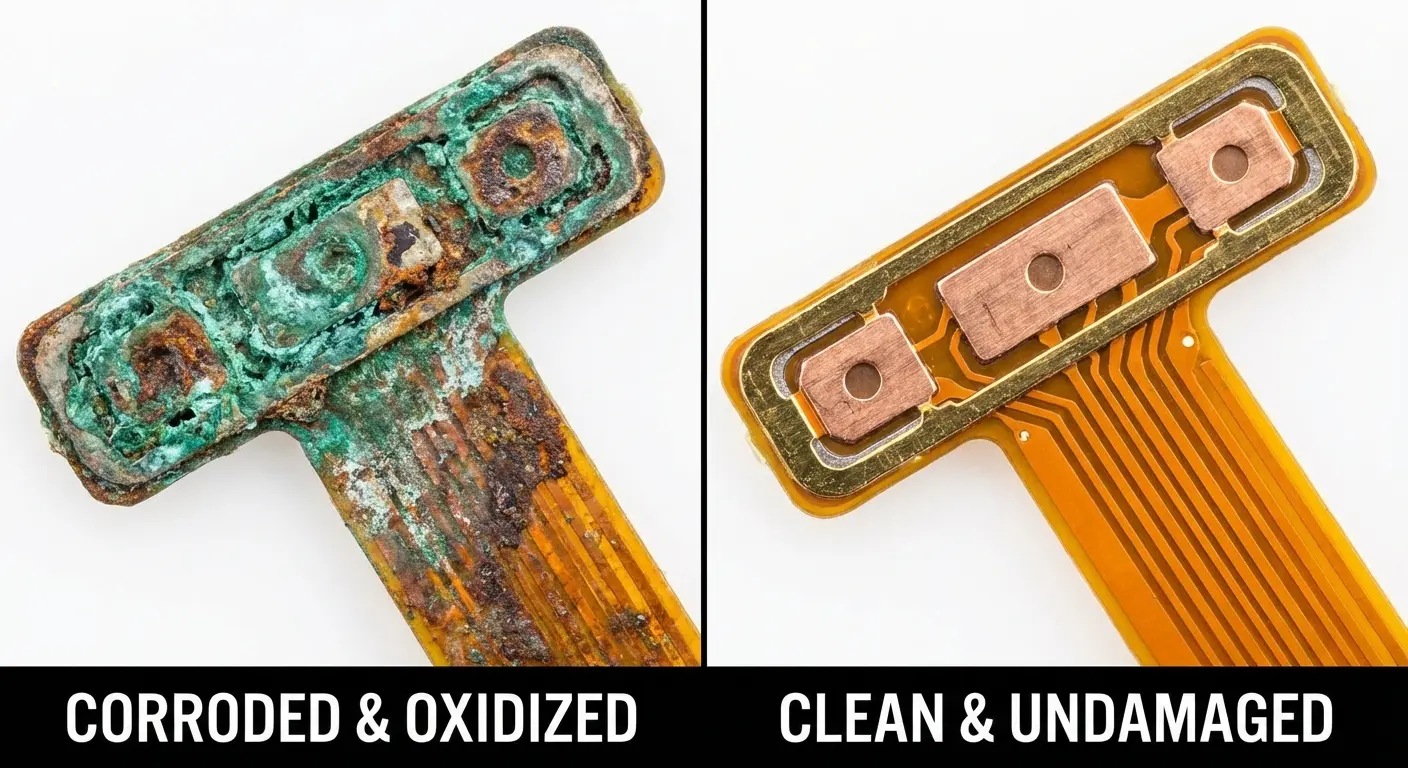
Moisture damage requires component cleaning or replacement plus addressing how moisture got in. Impact damage often means replacing the button assembly and possibly the housing. Repair shops charge more for moisture damage because it's less predictable and more time-consuming.
DIY Button Repair: When It Makes Sense (And When It Doesn't)
The Tools and Skills You Actually Need
You can clean debris from around your buttons with isopropyl alcohol and a soft brush. That's genuinely DIY-friendly and solves sticky button issues about 40% of the time. You need basic tools you probably already own.
Replacing a flex cable assembly requires disassembling your phone, which means removing the screen (risking cracking it), disconnecting battery cables (risking short circuits), and working with components measured in millimeters.
You'll need tools you probably don't own and skills you definitely don't have. Precision screwdriver set ($15-30), plastic spudgers (which sound made-up but aren't), a suction cup for screen removal ($3), and a heat gun or hair dryer to soften adhesive. iPhone button repairs are harder than Samsung because Apple uses more adhesive and proprietary screws. Google Pixels fall somewhere in between. Your first attempt will take 2-4 hours even with video guides. Professionals do it in 30 minutes because they've done it hundreds of times.
Phone Model |
DIY Difficulty Level |
Required Tools Cost |
Average Completion Time |
Common Pitfalls |
|---|---|---|---|---|
iPhone 12-15 Series |
High |
$25-50 |
3-4 hours |
Proprietary screws, heavy adhesive, Face ID cable damage risk |
Samsung Galaxy S20+ |
Medium-High |
$20-40 |
2-3 hours |
Multiple screw types, fragile back glass, wireless charging coil |
Google Pixel 6-8 |
Medium |
$20-35 |
2-3 hours |
Fingerprint sensor cable, display adhesive, button flex cable routing |
OnePlus/Motorola |
Medium-Low |
$15-30 |
1.5-2.5 hours |
Parts availability, inconsistent build quality across models |
Budget Android Devices |
Low-Medium |
$10-25 |
1-2 hours |
Cheaper materials, simpler construction, but lower-quality replacement parts |
The Warranty Void You Need to Know About
Opening your phone doesn't automatically void your warranty in the US, thanks to the Magnuson-Moss Warranty Act. But manufacturers can deny coverage if your repair caused the damage you're claiming. That's a judgment call they make, and you'll have to fight them on it.
The Right to Repair movement has gained significant momentum, with the Right to Repair bill introduced in over 30 US states as of 2023. Apple has responded by launching its "Self Service Repair" program covering over 200 parts and tools, though critics note the program's complexity and cost often make professional repair more practical for average consumers.
AppleCare and extended warranties from carriers explicitly exclude coverage after unauthorized repairs. You're giving up that safety net the moment you remove your phone's back panel. For phones less than a year old, that's a significant financial risk.
Water resistance ratings (IP67, IP68) depend on intact adhesive seals. You'll never restore factory-level water resistance with aftermarket adhesive strips.
Never.
Your phone might survive a splash, but submersion? You're gambling.
Success Rates and What Can Go Wrong
First-time DIY button repairs succeed about 60% of the time for simple issues like external button covers or basic cleaning. That drops to 30-40% for internal flex cable replacement because there are more failure points and less room for error.
Common mistakes that turn repairable issues into expensive problems:
Stripping the tiny screws (they're often different sizes and torque ratings)
Tearing flex cables while removing them (they're fragile and often adhered)
Cracking the screen during removal (happens more than people admit)
Losing or mixing up the dozen different screws (they're not interchangeable)
Disconnecting the wrong cable and causing new issues
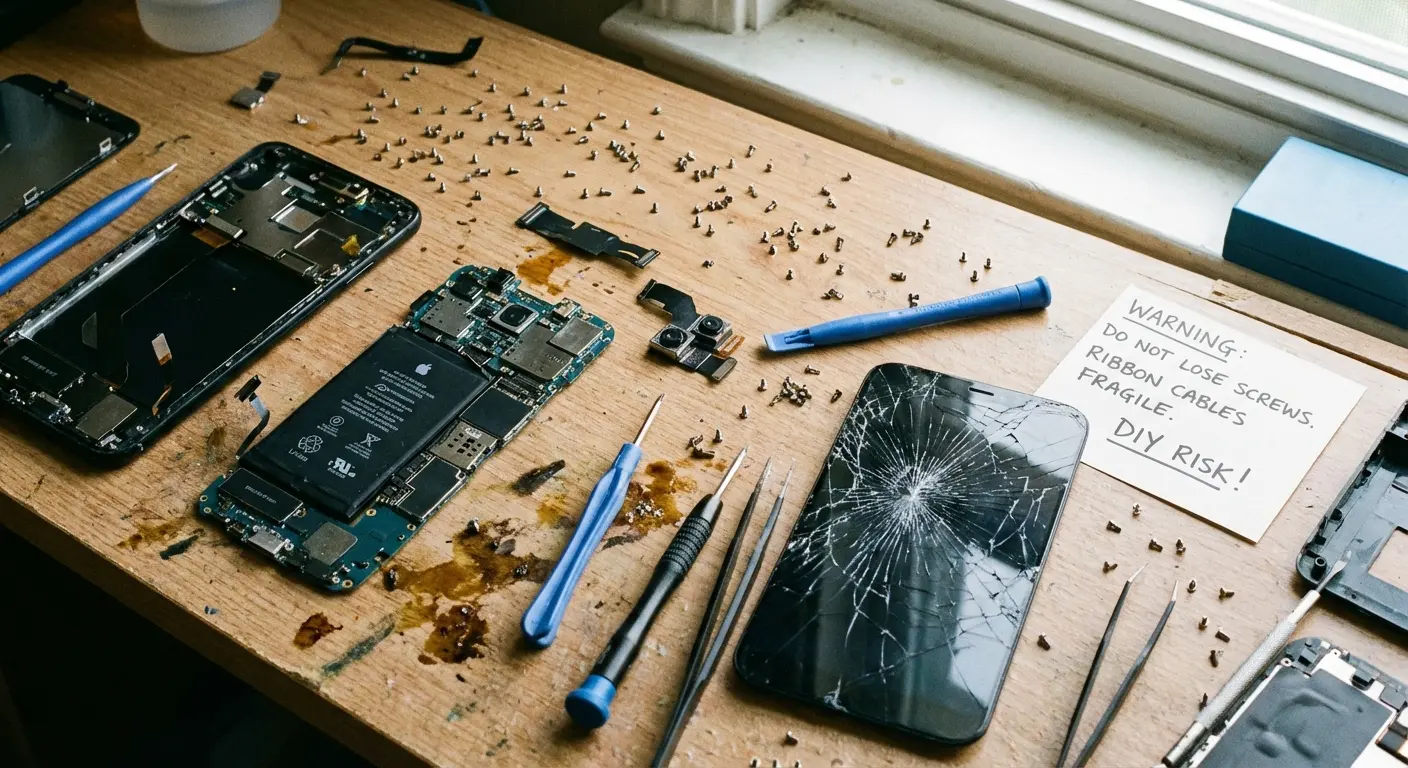
You can buy a used phone in working condition for $100-200 if your DIY repair bricks your device. Keep that in mind before you grab your screwdriver. If your phone is worth $600+ and still under warranty, DIY repair is almost never the right financial decision.
Should you DIY? Here's the honest version:
Answer these questions before attempting repair:
Your Phone:
Is your phone worth more than $300 on the resale market? (Yes = higher risk)
Is your phone still under warranty or AppleCare? (Yes = don't DIY)
Is your phone older than 2 years? (Yes = lower risk tolerance)
The Issue:
Is it a simple cleaning/debris removal? (Yes = DIY-friendly)
Does it require opening the phone? (Yes = significant risk)
Does it involve flex cable replacement? (Yes = high difficulty)
Your Skills:
Have you successfully repaired electronics before? (No = reconsider)
Do you have 3+ hours of uninterrupted time? (No = wait)
Can you afford to replace the phone if repair fails? (No = don't attempt)
Decision:
3+ "high risk" answers? Seek professional repair
Mixed answers? Consider professional diagnosis first
Mostly "low risk" answers? DIY may be appropriate
Professional Repair vs. Replacement: The Real Math
What Repair Shops Won't Tell You Upfront
Repair shops make money on volume and upsells. They'll quote you for a button repair, then "discover" additional damage once they've opened your phone. Sometimes this is legitimate because they couldn't see internal damage until disassembly. But it's also a common sales tactic.
Ask these questions before you hand over your phone:
What's your warranty on the repair work? (30 days minimum, 90 is better)
Are you using OEM or aftermarket parts? (OEM costs more but fits better)
Do you charge a diagnostic fee if I decline the repair? (some do, some don't)
What's your success rate specifically for button repairs on my phone model?
"Authorized" repair shops have agreements with manufacturers and use OEM parts. They're more expensive but less likely to void remaining warranty coverage. Independent shops are cheaper but use aftermarket parts of varying quality. Pick your poison.
A woman brings an iPhone 13 to an independent repair shop with a quoted price of $75 for volume button repair. After opening the device, the technician claims the water damage indicator is red and recommends a full logic board cleaning for an additional $150. She never exposed the phone to water but feels pressured because the phone is already disassembled. Always ask for photographic evidence of additional damage before authorizing extra work. This upsell tactic is common: the initial low quote gets you in the door, but the "discovered" issues drive up the final bill.
The Replacement Threshold
Repair makes sense when the cost is less than 30% of your phone's current market value and you plan to use it for at least another year. Outside those parameters, you're throwing money at a depreciating asset.
Run this calculation: Check your phone's current resale value on Swappa or eBay (search "sold listings" for accuracy). If the repair costs more than one-third of that value, replacement is probably smarter. A $400 phone with a $150 repair bill is borderline. A $250 phone with a $150 repair bill is bad economics.
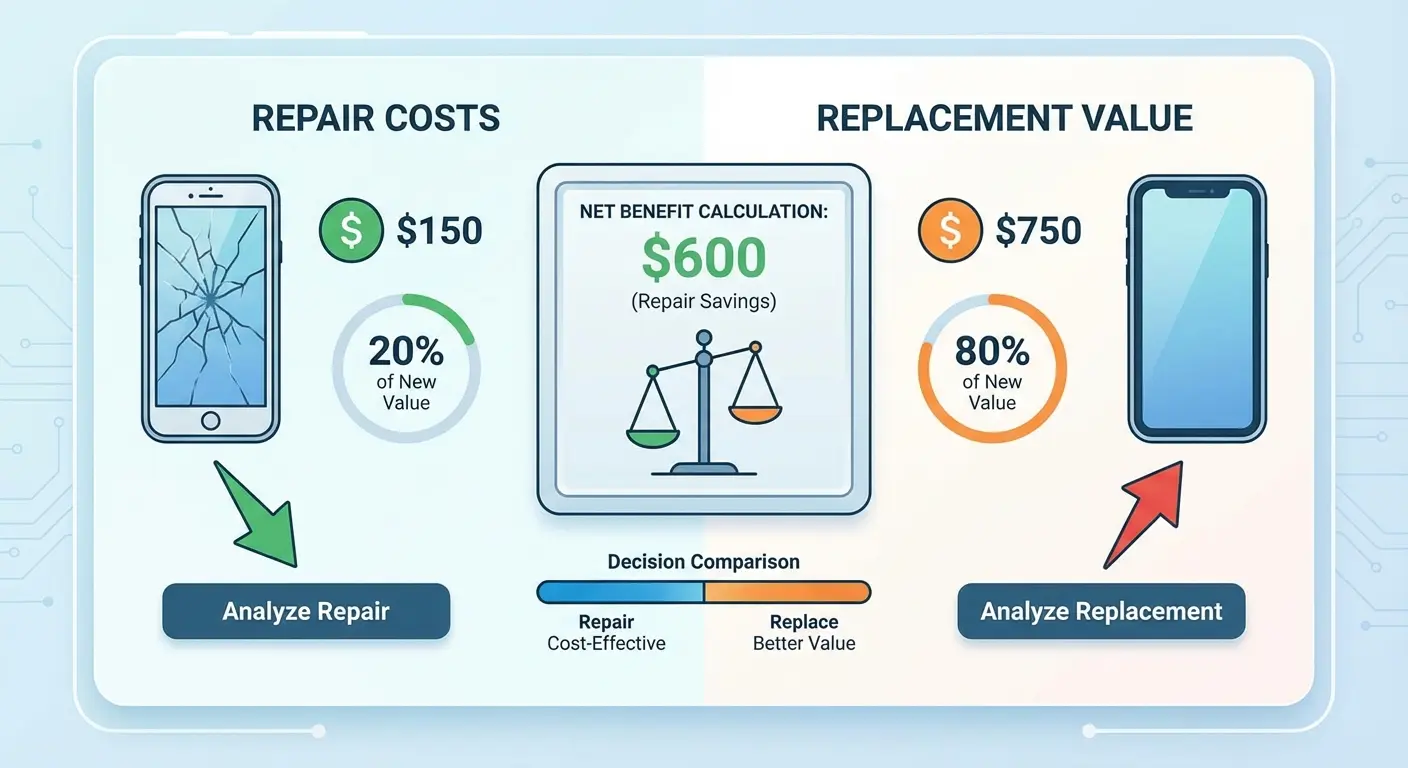
Factor in that your phone will continue aging after the repair. Other components will fail. Software updates will slow it down. You're not buying two more years of life with a button repair. You're buying maybe 6-12 months before the next issue appears.
The Environmental Calculation
Yeah, e-waste matters. We generate 50+ million tons annually, and phones are particularly problematic because they contain rare earth elements and toxic materials. Repairing extends device life and reduces demand for new manufacturing.
But keeping a phone alive that barely functions doesn't serve you or the environment if it means you're constantly frustrated and less productive. The environmental benefit of repair assumes you're using the repaired device, not limping along until you can afford a replacement anyway.
The most environmentally sound approach? Don't break your phone in the first place. Then repair when damage occurs if the repair restores full functionality. Then recycle responsibly when replacement becomes necessary. You don't have to choose between your needs and environmental responsibility if you're thoughtful about protection upfront.
Prevention Over Repair: The Strategy No One Talks About
Why the Repair Industry Doesn't Want You Thinking About Prevention
The phone repair industry generated $4.14 billion in 2023. That revenue depends on you needing repairs. There's no incentive for repair shops to tell you that a $50 case would have prevented the $150 repair you're paying for.
Insurance companies (AppleCare, carrier protection plans) operate on similar math. They collect monthly premiums betting that most people won't file claims. When you do file a claim for button damage, you're paying a deductible ($29-99) for damage that proper protection could have prevented entirely. You're funding a system designed around failure rather than prevention.
Manufacturers have the most perverse incentive structure. They want phones thin and beautiful because that's what sells. They know buttons will fail, but that failure drives upgrade cycles. You think you need a new phone because your current one is "falling apart," when really it just needed better protection from day one.
The Engineering Reality of Button Protection
Buttons fail because force concentrates at their mounting points. A drop creates impact energy that has to go somewhere. Without a case, that energy transfers directly to the button assembly's weakest point, usually where the flex cable connects.
Proper button protection requires three elements:
Raised button covers that absorb initial impact before it reaches the button mechanism
Shock-absorbing material (TPU, silicone, or specialized polymers) that disperses energy across a wider area
Precise fit that prevents lateral movement (which stresses button mounting points)
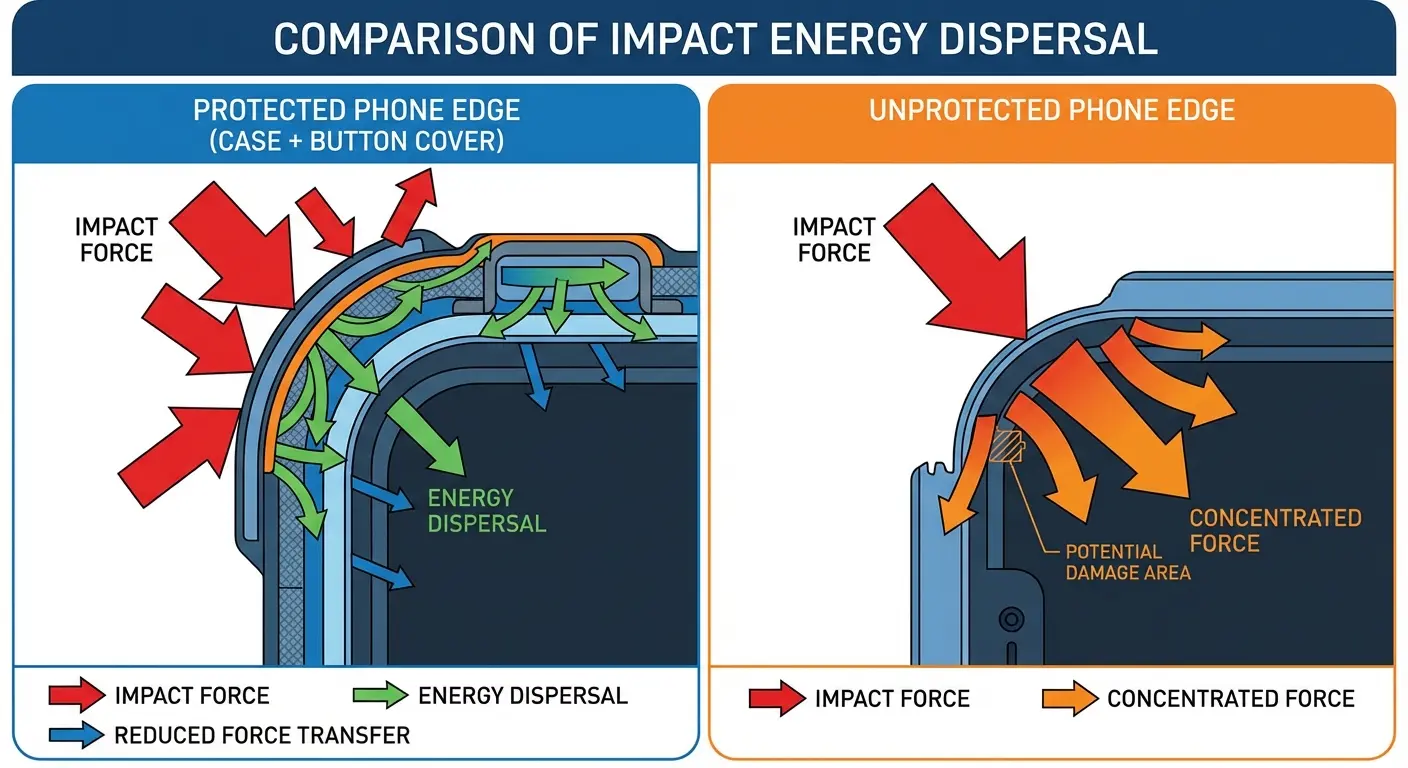
Button cutouts (where the case has holes exposing the buttons) offer zero protection. You're leaving the most vulnerable components completely exposed. Button covers add 1-2mm of material between impact and mechanism, which reduces force transmission by 60-80% depending on material.
Sealed designs that cover buttons completely while maintaining tactile response are harder to engineer but prevent debris intrusion (dust, sand, lint) that causes 30% of button failures. You want a case that feels responsive but isn't directly exposing your phone's buttons to the elements.
The True Cost of Cheap Cases
A $15 case from Amazon uses injection-molded plastic with minimal quality control. The button covers might be misaligned by a millimeter, which seems like nothing until you realize that misalignment creates friction every time you press the button. That friction accelerates wear on both the case and your phone's button mechanism.
Cheap cases use hard plastics that don't absorb shock effectively. They protect against scratches but not the impact forces that break buttons. You're getting cosmetic protection while remaining vulnerable to mechanical failure.
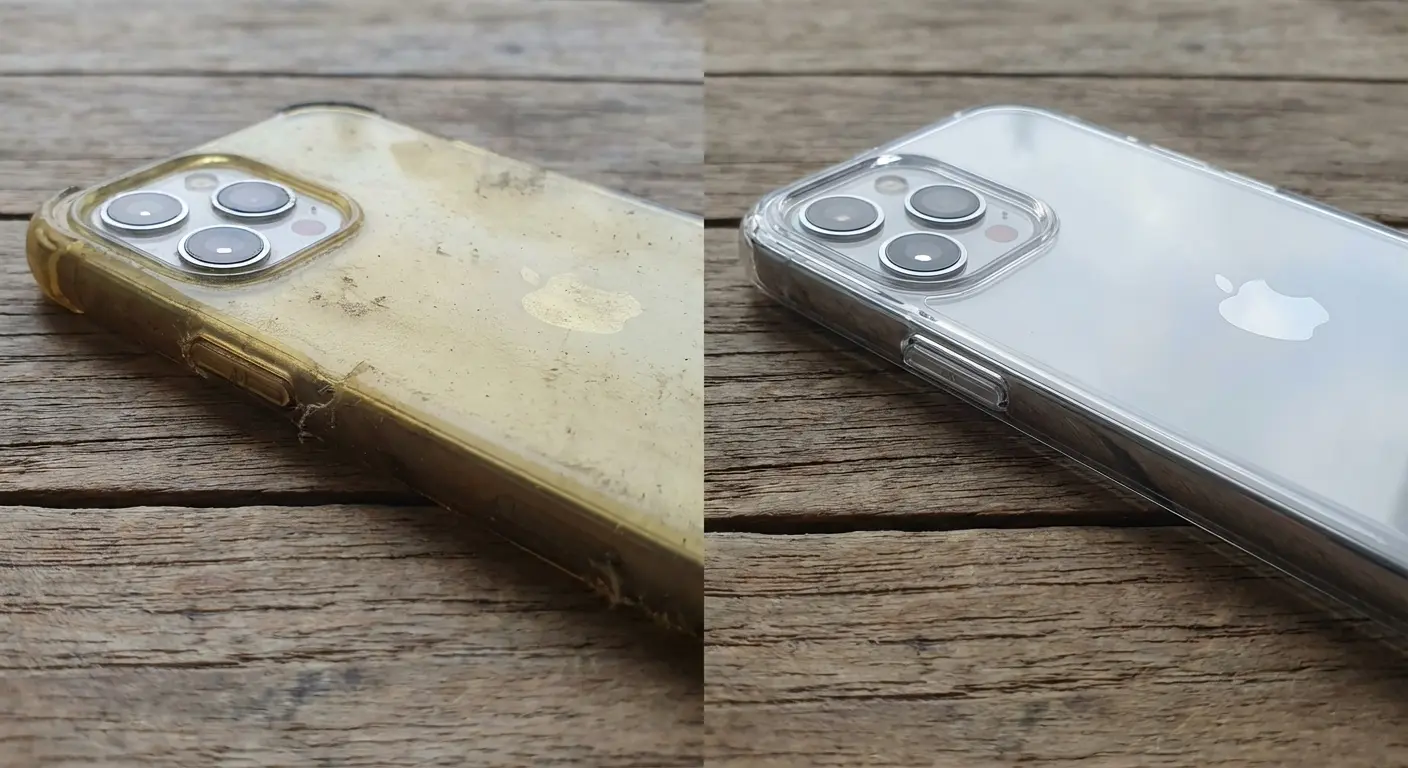
The replacement cycle matters. Cheap cases degrade within 3-6 months. The button covers get mushy, the material yellows, the fit loosens. You'll buy 3-4 cheap cases over a two-year phone ownership period ($45-80 total) versus one quality case ($40-80) that lasts the entire time. Then add the repair cost you're still risking because the cheap case didn't protect the buttons.
Case Features That Actually Matter for Button Longevity
Look, I made this list because I got tired of explaining the same thing:
Military-grade drop testing (MIL-STD-810G is the standard, requires 26 drops from 4 feet onto concrete). This isn't marketing fluff. It's a specific testing protocol that verifies impact protection.
Dual-layer construction (hard outer shell with soft inner layer) distributes impact better than single-material cases. The hard layer prevents penetration. The soft layer absorbs shock.
Precision-engineered button covers with 1:1 tactile response. You should feel the button click, not the case material compressing. If the case button feels mushy, it's requiring harder presses that accelerate wear.
Raised bezels around buttons (0.5-1mm minimum) that take initial impact before force reaches the button itself.
Material specifications matter. TPU (thermoplastic polyurethane) for flexibility and shock absorption. Polycarbonate for rigid protection. Avoid pure silicone (too flexible, doesn't protect against impact) and hard plastic alone (no shock absorption).
How Rokform Addresses the Root Cause
Military-Grade Protection Engineered for Button Vulnerability
Look, this is where I tell you about Rokform. But hear me out.
You've spent time learning about button repair because you're dealing with failure that probably could have been prevented. Rokform cases are engineered specifically around the vulnerability points we've covered.
The dual-layer construction (polycarbonate shell with TPU liner) creates the impact distribution we discussed earlier. Drop energy disperses across the case structure rather than concentrating at button mounting points. The cases meet MIL-STD-810G-516.6 certification, which means they've survived the 26-drop protocol from 4 feet onto concrete.
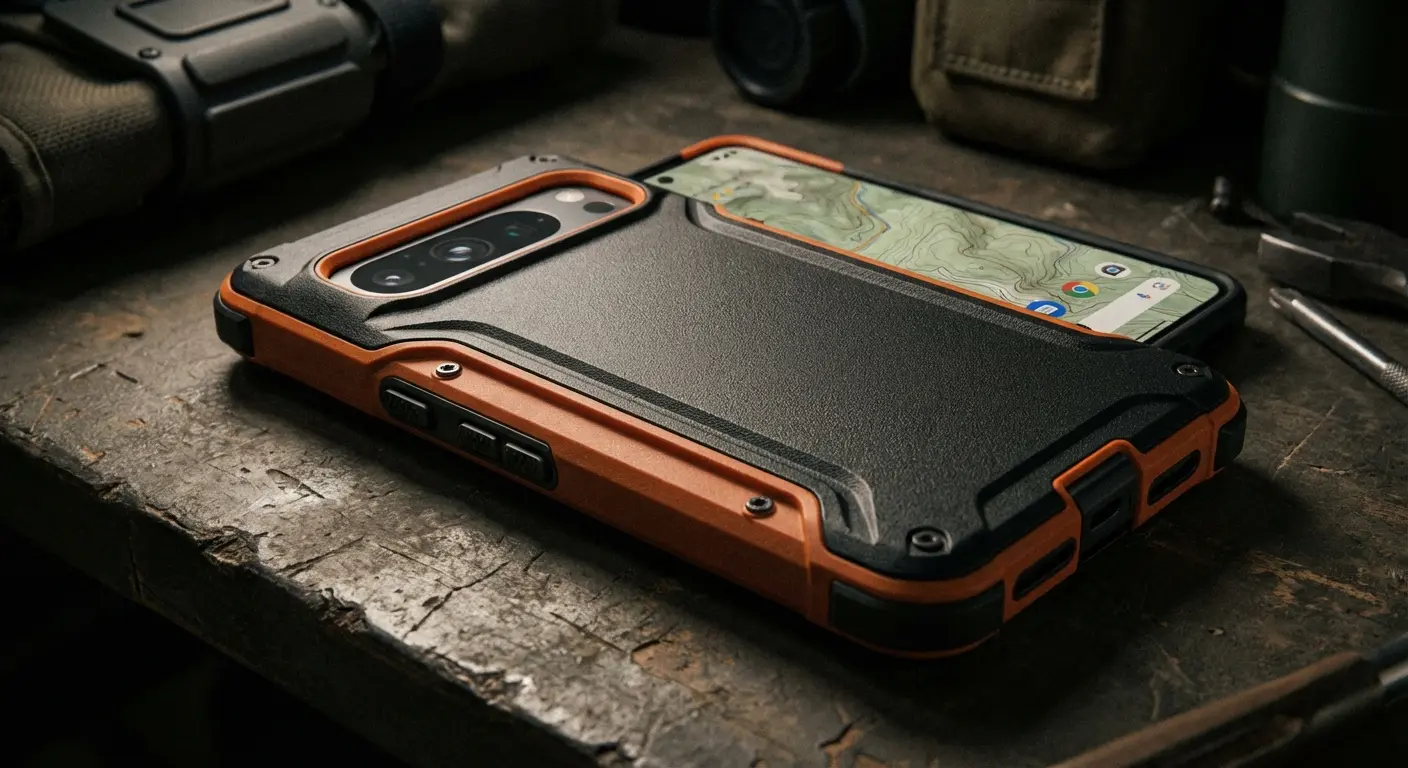
The button covers are precision-molded to provide 1:1 tactile response while adding protective material between impact and mechanism. You're pressing through shock-absorbing TPU that still delivers the satisfying click of the button. The raised bezel design means the button covers take initial impact in a drop before force reaches your phone's vulnerable button assembly.
Here's what matters for long-term button health: Rokform's magnetic mounting system means you're not constantly removing and reinstalling your case. Every time you remove a case, you're flexing the button covers and stressing the fit. Cases that stay on (because the mounting system works without removal) maintain consistent protection and reduce wear on both the case and your phone's buttons.
We've seen phones with Rokform cases that are three years old with fully functional buttons because the protection prevented the cumulative stress that leads to failure. That's not a repair you're paying for. That's not downtime while your phone is in the shop. That's prevention working exactly as it should.
Final Thoughts
You came here to learn about button repair. You're leaving with something more valuable: the understanding that most button repairs are preventable failures.
If your buttons are already damaged, the repair information we've covered will help you make informed decisions about DIY versus professional repair, cost-benefit analysis, and when replacement makes more sense. You've got the framework to evaluate your options rationally.
If your buttons still work, you've got a limited window to prevent the damage that leads to repair. The case you choose in the next week matters more than any repair skill you might learn later. You're either investing in prevention now or paying for repair later, and the math heavily favors prevention.
The repair industry will always exist because accidents happen and devices age. But you don't have to be a repeat customer. You don't have to accept button failure as inevitable. Engineering solved this problem years ago. You just need to use the solution.
Your phone's buttons are designed to be the weak point. Your case should be designed to protect that weakness.
Your call. Fix it later or protect it now.

