



Table of Contents
-
Capturing Ideas Before They Vanish
Otter.ai
Notion AI
Fireflies.ai
-
Turning Raw Data Into Decisions
Julius AI
Tableau AI
Browse AI
Polymer
-
Getting Visual Work Done Without a Designer
Midjourney
Canva Magic Studio
Runway ML
Adobe Firefly
Designs.ai
-
Handling Communication Without the Overhead
Superhuman
Lavender
Grammarly Business
Krisp
Descript
Zoom AI Companion
Clockwise
TL;DR
Stop taking notes in meetings. Let AI do it so you can actually listen. Data analysis tools translate spreadsheets into answers without requiring you to learn SQL. Visual creation software produces professional graphics in minutes instead of hours. Communication tools handle email drafting, scheduling conflicts, and audio cleanup. Most of these integrate with your existing software, so you don't have to rebuild your entire workflow. Pick tools based on specific problems you're trying to solve, not hype.

Capturing Ideas Before They Vanish
I lose about 40% of what happens in meetings. Not because I'm not paying attention, but because I'm paying too much attention to taking notes. You've been there: someone says something important, you look down to write it, and by the time you look up, the conversation has moved on and you've missed the next two things.
It's exhausting. And it's unnecessary.
Voice transcription isn't just dictation anymore. These tools actually understand who's talking, what matters, and what you need to do about it. They handle the cognitive load of documentation so you can focus on the actual conversation, asking better questions and building stronger relationships instead of frantically typing.
Remote teams find this particularly valuable. When meetings are your primary collaboration touchpoint, losing information means losing momentum on projects. According to Zapier's research on AI productivity tools, more than 4 in 10 enterprises run multiple AI vendors at once to spread their risk. This highlights the importance of selecting tools that integrate with what you're already using rather than creating additional silos.
Here are three I've actually used.
1. Otter.ai
Otter records everything and figures out who said what. That's the baseline. What makes it actually useful: I can search through months of meetings by keyword.
Last week someone asked "didn't we decide something about the vendor contract in March?" I typed "vendor contract" into Otter, found the meeting, jumped to that exact part of the conversation. Took 30 seconds. The alternative was scrolling through three months of meeting notes hoping I'd written it down.
It works with Zoom, Meet, Teams. Basically if you're on a video call, Otter can record it.
The system learns your team's vocabulary over time. Technical terms and acronyms that initially caused accuracy issues become less problematic as it adapts to your language patterns. I've been using it for six months now, and I'm still finding recordings from February that answer questions that came up last week.
Remote teams conducting daily standups benefit from automatic documentation. Client-facing roles get accountability through searchable records of what was promised and agreed upon. Leadership teams can review strategic discussions without committing hours to re-watching recordings.
The mobile app extends functionality beyond virtual meetings. Record in-person conversations, brainstorming sessions, or client calls on the go.
The free version gives you 600 minutes a month. That's about 10 hours of meetings. For most small teams, that's plenty. Don't pay for Pro until you actually need it. I used the free version for four months before I hit the limit.

2. Notion AI
If your team already uses Notion for project management and documentation, adding AI features requires minimal learning curve since it works within interfaces you already know.
Notion AI functions as a writing assistant embedded within your existing workspace. It helps teams organize brainstorming output, draft project briefs from bullet points, and maintain consistent documentation standards across departments without requiring a dedicated technical writer.
Here's what makes this actually useful: it continues half-formed thoughts and restructures messy notes into coherent formats. You've captured the key points during a meeting but they're scattered and incomplete. Notion AI helps you articulate ideas you haven't fully developed. It's like having a thought partner who's always available.
This focuses on collaborative knowledge management rather than individual productivity. Teams use it to build shared resources without assigning someone to play scribe during every meeting. It excels at creating first drafts of standard documents: project proposals, meeting agendas, status updates. Team members then refine these drafts with specific details.
The AI understands context from other pages in your workspace. Suggestions align with existing documentation and company terminology. For teams already invested in the Notion ecosystem, this is an obvious add-on rather than another tool to learn.
3. Fireflies.ai
I was skeptical about Fireflies. Another transcription tool? How different could it be from Otter?
Turns out: pretty different. The CRM integration is what sets it apart. If you're in sales, it automatically logs calls to Salesforce and HubSpot and analyzes what you talked about. Not just transcription but actual analysis of talk time, topics discussed, questions asked.
My friend's sales team uses it to coach new reps. Instead of sitting in on every call, the manager reviews the analytics: "You talked 70% of the time. Let the prospect talk more." That's actionable feedback you can't easily get otherwise.
Reviewing calls without re-watching entire recordings saves hours each week for managers coaching their teams. Topic-based timestamps let you jump directly to moments when pricing, competitors, or specific features were discussed. No more scrubbing through recordings hoping to find the relevant section.
The analytics dashboard identifies patterns across multiple calls: frequently asked questions that should be addressed earlier in your pitch, objections that consistently arise at specific deal stages, topics that predict successful outcomes.
For non-sales teams? Honestly, Otter is probably fine. Fireflies is built for sales and customer success roles where call analysis matters.
Turning Raw Data Into Decisions
Most companies are drowning in data they can't use. You've got spreadsheets, dashboards, analytics platforms, and somehow you still can't answer basic questions about your business without asking someone from the data team and waiting three days.
These tools fix that specific problem. They're for people who know what questions to ask but don't know SQL or Python or whatever you're supposed to know to get answers out of a database.
Each tool solves a different aspect of the data problem, from visualization to automated collection to natural language querying. The common thread is accessibility for people who understand their business questions but lack technical analysis skills.
Small to mid-size companies that can't justify full-time data analysts still need insights to compete effectively. These tools reduce the time from question to answer from days to minutes.
Tool |
Best For |
Key Capability |
Integration Strength |
|---|---|---|---|
Julius AI |
Visual data exploration |
Ask questions in plain English, get charts |
Google Sheets, Slack |
Tableau AI |
Enterprise-level visualization |
Handles multiple data sources with interactive dashboards |
Databases, cloud services |
Browse AI |
Web data extraction |
Monitors competitor sites without coding |
Google Sheets, Airtable, Zapier |
Polymer |
Presentation-ready insights |
Auto-generates compelling visualizations from spreadsheets |
Marketing platforms, operations tools |
4. Julius AI
Ask questions about your datasets in plain English and receive charts, statistical analyses, and written explanations that interpret the findings in business terms. That's what Julius AI delivers.
It handles various file types including CSV, Excel, Google Sheets, and even PDFs with tabular data. This flexibility matters for teams working across different systems who don't want to standardize on a single format before analysis can begin.
Marketing teams analyze customer survey responses to identify satisfaction drivers. Sales teams identify trends that predict future performance. Operations teams forecast inventory needs based on historical patterns and seasonal factors.
The system generates Python code behind the scenes for users who want to understand the methodology or verify the analysis approach. This transparency distinguishes it from black-box AI solutions where you can't see how conclusions were reached.
Complex statistical operations happen without requiring users to understand the underlying mathematics. Regression analysis, correlation studies, hypothesis testing are all accessible through conversational queries.
Last quarter, our marketing manager used Julius to figure out why our email open rates tanked in March. Turned out it correlated with a subject line template change nobody connected until the data was visualized. That kind of insight would have taken days to surface manually, if we'd even thought to look for it.
Marketing teams segment customers based on behavior patterns, identify which campaigns drive the most valuable conversions, and predict churn risk. Operations teams optimize supply chains, identify bottlenecks in processes, and forecast resource needs.
If you know what questions to ask but lack technical analysis skills, this bridges that gap.
5. Tableau AI
Enterprise-level data visualization meets natural language processing. Tableau AI builds on the platform's established reputation for powerful analytics while making it accessible to users who don't want to become data visualization experts.
It suggests relevant charts based on your dataset characteristics. Identifies outliers automatically that might indicate data quality issues or significant business events. Creates interactive dashboards without manual configuration of every element.
Here's the thing though: this is overkill for most small teams. If you're dealing with large, complex datasets from multiple sources like databases, cloud services, and spreadsheets, Tableau unifies them into coherent analyses. But if you're just analyzing a few spreadsheets, Julius does what you need for a fraction of the cost. Market watchers lean on a different toolset, and I ranked the apps for stock trading worth keeping on your phone.
Collaboration features let teams work with shared metrics, ensuring everyone's looking at the same numbers when making decisions. This matters particularly for quarterly business reviews and stakeholder reports where visual clarity impacts how information gets received.
The AI assistant can explain unexpected changes in metrics. Why did revenue drop in a specific region? Which product categories are growing faster than others? It understands business context, so asking about "sales performance" automatically considers relevant dimensions: time periods, regions, product categories.
Executives who need insights without becoming data experts get executive summaries alongside detailed visualizations. The system knows what to highlight and what to leave in the background.
6. Browse AI
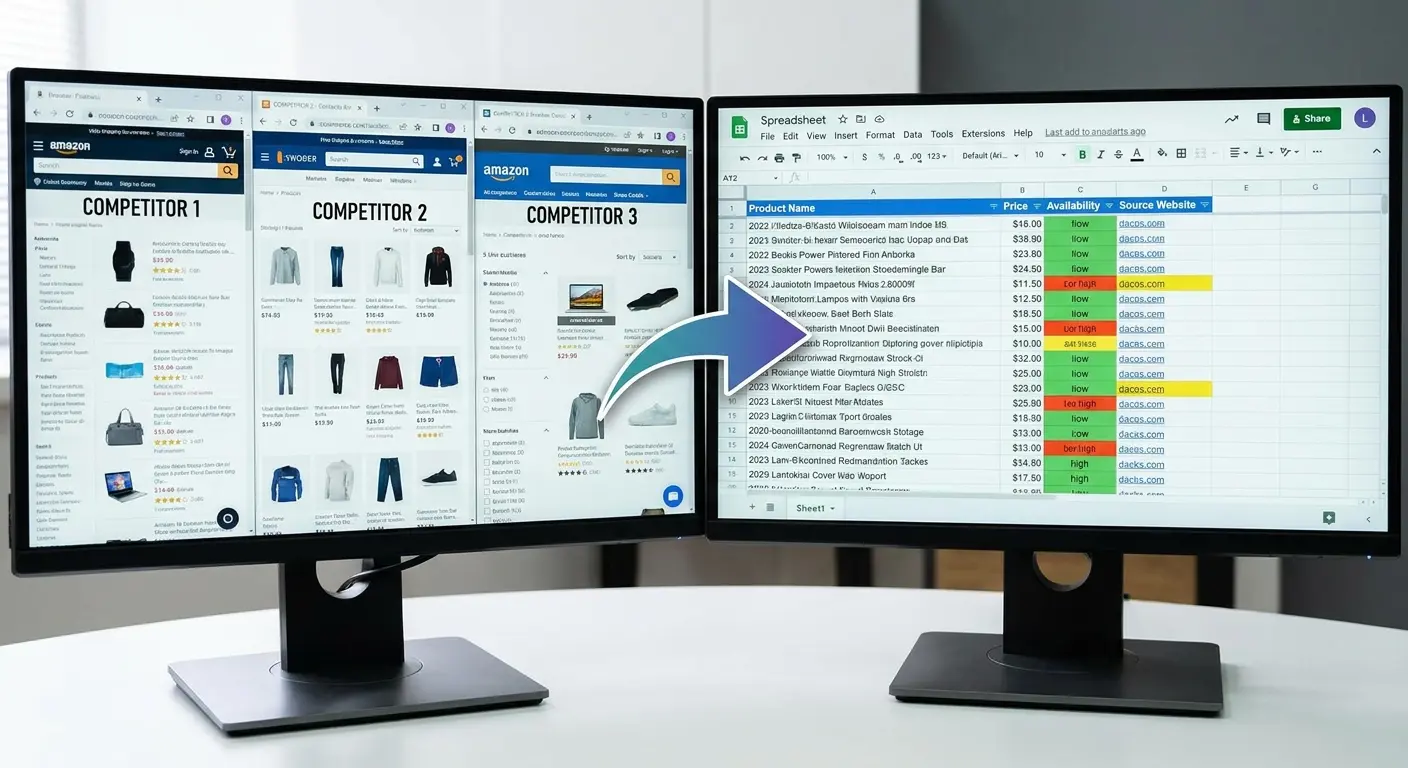
Extracting and monitoring data from websites without requiring API access, coding knowledge, or technical scraping expertise opens up competitive intelligence possibilities for teams without engineering resources.
Track competitor pricing changes. Monitor job postings that signal company growth. Check product availability for market research. Watch news mentions for brand monitoring. You do all this through a visual interface where you simply click the elements you want to extract.
Creating custom robots that check sites on schedules you define (hourly, daily, weekly) takes minutes. Updates deliver via email or integrate with tools like Google Sheets, Airtable, and Zapier for further processing.
Product teams study competitor features. Sales teams identify companies hiring in specific roles, creating warm outreach opportunities. The platform handles pagination automatically, extracting data across multiple pages without manual intervention.
E-commerce businesses monitor competitor pricing and inventory levels, receiving alerts about opportunities or threats. Recruitment teams identify companies expanding in their target markets. Market researchers track trends across multiple sources without manually visiting dozens of websites daily.
7. Polymer
Spreadsheets become interactive presentations with AI-generated insights and visualizations that make data compelling for non-technical audiences.
Polymer automatically suggests the most relevant charts for your data type. Time series get line charts. Categorical comparisons get bar charts. Correlations get scatter plots. It highlights anomalies that deserve attention and creates shareable links for stakeholders who need to view insights but don't need edit access to underlying data.
Marketing teams analyzing campaign performance across channels find this particularly useful. Compare cost per acquisition against customer lifetime value. Identify which content types drive engagement. All without spending hours manually creating charts in PowerPoint.
Operations teams track KPIs across departments, create executive dashboards that update automatically, and build reports that previously required manual assembly each month.
Presentation mode walks viewers through insights in a logical narrative flow, explaining what the data shows and why it matters. The AI identifies correlations you might miss: how website traffic patterns relate to sales cycles, how customer support volume predicts churn.
Your data tells a story. Polymer helps you tell it effectively without design skills or hours of manual chart creation.
Getting Visual Work Done Without a Designer
Your company needs graphics. Your company does not have a designer. This is a problem.
You can hire someone (expensive), use freelancers (slow), or learn design software yourself (not happening). Or you can use AI tools that produce decent-looking visuals without requiring design skills or a design budget.
That's what this section covers.
Speed without sacrificing professional appearance matters for maintaining consistent brand presence across social media, presentations, and marketing materials. These tools democratize creative production for teams where everyone's expected to contribute content.
Small businesses and startups benefit particularly. Team members wear multiple hats. Visual content creation falls to people without formal design training. These tools work best when you understand basic design principles (contrast, hierarchy, white space) but lack the time or software expertise to execute them manually in tools like Photoshop or Premiere Pro.
Tool |
Primary Use |
Learning Curve |
Best For Teams Who |
|---|---|---|---|
Midjourney |
Custom image generation |
Moderate (Discord-based) |
Need unique brand imagery and concept visualization |
Canva Magic Studio |
Social graphics and templates |
Low (familiar interface) |
Already use Canva and need AI enhancements |
Runway ML |
Video editing and effects |
Moderate |
Produce video content without editing expertise |
Adobe Firefly |
Generative fill and effects |
Low ( Adobe integration) |
Use Adobe tools and need commercial-safe assets |
Designs.ai |
Multi-format content suite |
Low |
Need logos, videos, and designs from one platform |
8. Midjourney
Custom image generation for brand imagery, concept visualization, and unique graphics happens through text prompts that describe what you want to create. Midjourney produces results that range from photorealistic to artistic, depending on how you craft your description.
The Discord-based interface is objectively terrible. I'm not being dramatic. You're generating images by typing commands in a chat room like it's 1999. But the results are good enough that I've made peace with it.
Marketing teams use it for campaign concepts that would be expensive or impossible to photograph. Product teams visualize features before development. Content creators produce unique imagery that stands out in crowded social feeds.
The quality has improved dramatically. Early versions produced obviously AI-generated images. Current outputs often pass for professional photography or illustration, especially when you refine prompts through several iterations.
Midjourney frustrated me for the first two weeks. The Discord interface is genuinely weird if you're used to normal software. My first 50 images were garbage. I'm talking unusable, weird, AI-artifact-filled garbage. It takes practice to write prompts that produce something you'd actually use.
Rights and usage matter here. Generated images can be used commercially under Midjourney's paid plans. For brands concerned about originality and avoiding stock photo aesthetics, this provides a genuine alternative.
You'll spend time learning prompt engineering, the skill of describing what you want in ways the AI understands. That investment pays off when you can generate dozens of concept variations in the time it would take to brief and wait for a single design from a freelancer.

9. Canva Magic Studio
Template-based design meets AI features for background removal, image expansion (extending images beyond their original borders), and text-to-image generation. All within a familiar interface many teams already use.
This fits into existing design workflows for teams already using Canva. Adding features without requiring new software adoption or additional training time matters when you're trying to maintain productivity during tool transitions.
Social media managers who need volume without sacrificing quality benefit from Magic Resize. Instagram post becomes LinkedIn banner becomes Pinterest pin with one click. The AI writing assistant generates post captions, headlines, and body copy that matches brand voice.
Brand consistency through saved templates that incorporate AI enhancements lets junior team members produce on-brand content without constant creative director oversight. The background remover handles product photography cleanup, eliminating the need for professional photo editing.
Brand Kit features ensure fonts, colors, and logos stay consistent across all AI-generated content. You're not starting from scratch each time or hoping people remember the correct hex codes for brand colors.
Look, Canva's free version does 90% of what most people need. The AI features are nice to have, not must-have for most teams. If you're already paying for Canva Pro, the AI stuff is a solid bonus. If you're not, try the free version first.
10. Runway ML
Video editing and generation for non-editors. Runway ML offers tools for removing backgrounds from video footage, extending clips to meet timing requirements, and creating motion graphics without After Effects expertise.
Professional-looking video content for social platforms, presentations, and product demos no longer requires dependency on video production teams or expensive freelancers.
Automatic subtitle generation matters critically for social media where most videos play without sound. Green screen removal works without actual green screens. AI-powered video editing cuts out silences and filler words automatically, tightening content without manual timeline editing.
Text-to-video generation creates short animated clips from descriptions. Explaining concepts or creating social content quickly becomes feasible for teams that recognize video's importance (it drives higher engagement across every platform) but lack editing expertise or time for traditional video production workflows.
Customer success teams create tutorial videos. Marketing teams produce social content at scale. Sales teams generate personalized video messages for prospects. The barrier to video content creation drops significantly.

11. Adobe Firefly
Generative AI integrates into familiar Adobe workflows. Text-to-image generation, generative fill (replacing or adding elements to existing images), and text effects that transform typography into textured, dimensional designs all happen within tools you already know.
Existing Adobe users gain AI features without abandoning their current tools or learning entirely new platforms. That matters when your team has invested years in mastering Photoshop, Illustrator, or other Creative Cloud applications.
Commercial safety advantages set Firefly apart. It's trained on licensed content from Adobe Stock rather than scraped internet images. This reduces copyright concerns for businesses using generated assets in commercial work. Legal departments sleep better knowing the imagery won't trigger infringement claims.
Creative teams speed up mockup creation, exploring multiple concept directions before investing time in detailed execution. Generative fill revolutionizes photo editing by letting you remove unwanted objects, extend backgrounds, or add elements that blend seamlessly with original photography.
Marketing teams adapt existing assets for new campaigns. Product teams visualize features before development. Content creators produce unique imagery that aligns with brand guidelines. The integration with Photoshop, Illustrator, and Express means generated assets flow directly into existing projects without export and import steps.
You're working in the same environment where you'll finalize the design. That eliminates the friction of moving between tools.
12. Designs.ai
A suite of tools covering logos, videos, mockups, speeches (AI voiceovers), and design assets through a single platform subscription. Small businesses and solopreneurs who need multiple content types but can't justify separate subscriptions for specialized tools in each category find value here.
Template customization options span different content types. The various tools work together for cohesive brand asset creation. Your logo appears in video intros and social graphics automatically.
Designs.ai is fine. It's not going to blow your mind, but if you need a logo and have $29, it'll get you something usable. Breadth of capability for generalist roles rather than specialist depth defines this platform. Quick turnaround of decent quality assets is the strength. Complex video projects or detailed illustration work might require dedicated tools, but for most business content needs, this covers the bases.
The AI video maker creates marketing videos from text scripts, selecting relevant stock footage and adding transitions automatically. The voice generator produces narration in multiple languages and accents, useful for creating tutorial videos or podcast intros.
Startups building brand presence across multiple channels simultaneously get enough capability in each area to maintain consistent output without hiring specialists. You're trading some advanced functionality for convenience and cost efficiency.
Handling Communication Without the Overhead
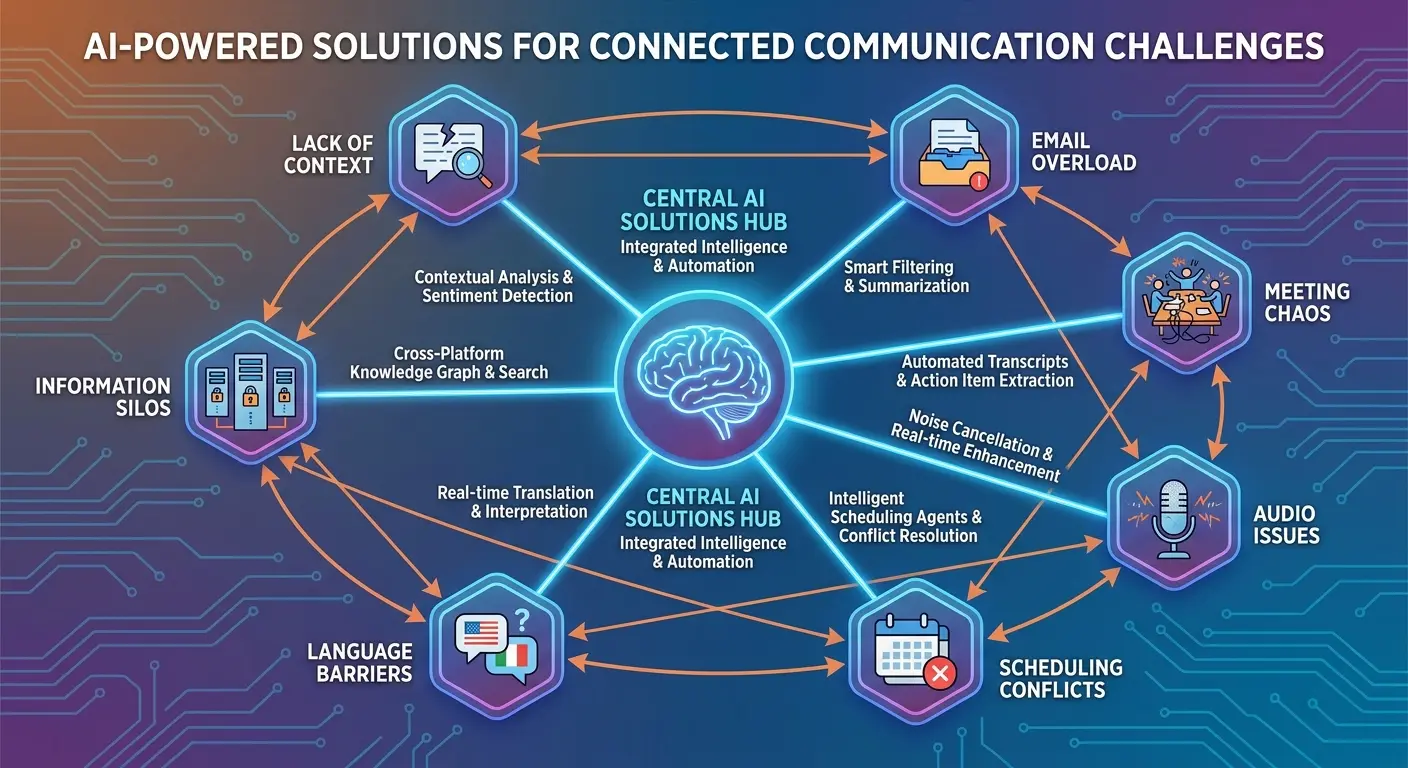
Email management, meeting scheduling, and audio quality issues drain time that could go toward actual work. The mental load of communication logistics, constant context switching between conversations, and administrative overhead prevent you from focusing on tasks that require your expertise.
Here are seven tools that handle different aspects of professional communication. From drafting responses to eliminating background noise to optimizing calendars for focused work time, these address specific friction points in daily workflows.
Automation and AI assistance can reclaim hours each week without sacrificing relationship quality or responsiveness to colleagues and clients. The best tools in this category become invisible infrastructure, handling routine communication tasks so you can focus energy on conversations that require your judgment.
Client-facing roles where communication quality directly impacts business outcomes benefit particularly. Managers whose calendars become so fragmented with meetings that strategic work gets pushed to evenings and weekends need these solutions.
13. Superhuman
AI sorts email by importance, suggests responses based on your communication patterns, and surfaces messages requiring action while filtering notifications and newsletters that can wait.
The system learns your communication patterns over time to prioritize inbox items. It understands which senders always require quick responses and which emails can be batched for later review. Keyboard shortcuts reduce time spent on email by 30-40% according to user studies, processing messages faster than traditional email clients allow.
Split inbox features separate important messages from notifications, creating two distinct processing modes for immediate attention versus batch processing during designated times. AI triage identifies emails you can safely ignore or archive, reducing decision fatigue around what deserves your attention.
Email fragments focus throughout the day. Intelligent sorting creates space for deep work by containing communication to specific windows. Read receipts show when recipients open your emails, valuable for time-sensitive outreach. The reminder feature surfaces messages that didn't receive responses, eliminating the mental overhead of tracking follow-ups manually.
At $30/month, Superhuman needs to save me at least 30 minutes a day to justify the cost. Your math may vary. You check email less frequently because you trust the system to surface what matters. That shift in behavior compounds over weeks and months.
Superhuman only works with Gmail and Outlook. If your company uses something else, you're out of luck. Check compatibility before you get excited.
14. Lavender
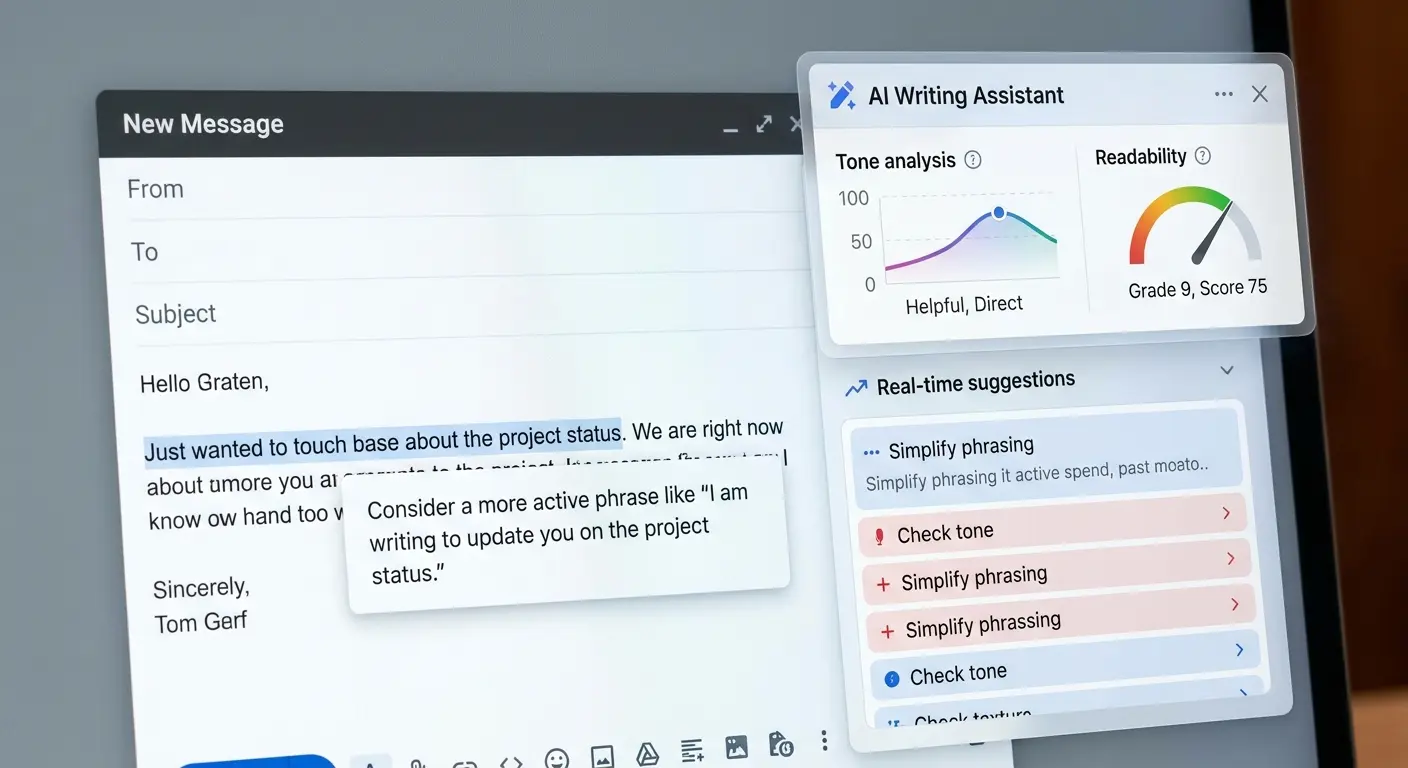
Real-time coaching for written communication happens before you hit send. Lavender analyzes outbound emails for tone, clarity, and effectiveness.
Sales teams improve response rates by 30-50% using data-driven coaching on email length (shorter usually performs better), question count (one clear question gets more responses than multiple), and personalization depth (generic templates get ignored).
Integration with Gmail and Outlook means it works directly in your composition window. Email scoring based on likelihood of response uses data from millions of analyzed messages. Client communication where tone matters, cold outreach where response rates directly impact pipeline, and any scenario where email effectiveness impacts business outcomes benefit from this feedback.
It flags potentially problematic phrasing that might read as pushy or unclear. Suggests stronger subject lines. Identifies when you're talking too much about yourself versus the recipient's needs.
I'll admit I rolled my eyes at "AI email coaching" when I first heard about Lavender. Turns out I needed it more than I wanted to admit. Teams managing high-volume outreach maintain quality standards across different senders. Junior team members send emails that match the effectiveness of experienced colleagues. The coaching is immediate and contextual, not generic advice you read once and forget.
15. Grammarly Business
Basic grammar checking extends to brand tone consistency, plagiarism detection, and team style guides that maintain voice across multiple writers.
Consistent voice across customer service responses, marketing copy, and internal documentation ensures your brand sounds the same regardless of who's writing. Features flag sensitive information like credit card numbers or confidential project names before you accidentally send them externally. Clarity improvements go beyond spelling errors to eliminate jargon or simplify complex sentences.
Content teams catch errors before publication. Customer service departments ensure professional communication across all support channels. Any group where written communication represents the brand to external audiences gains quality control and consistency.
The analytics dashboard shows team-wide writing patterns, identifying common mistakes that might indicate training needs. Custom style guides define preferred terms, banned phrases, and brand-specific spelling choices that the AI enforces automatically.
It works across email, Slack, Google Docs, and most web-based writing tools. Consistent feedback regardless of where you're composing means you don't have to remember to paste content into a separate checker.
Grammarly Business is basically expensive spell-check with some team features. If your team already writes well, you probably don't need it.
16. Krisp
Background noise, echoes, and interruptions disappear from both sides of calls using AI audio processing that works in real-time without noticeable latency.
It works across all communication apps including Zoom, Teams, Slack, and phone calls without requiring special setup from other participants. Audio processes on your device before transmission. Common disruptions like barking dogs, construction noise, keyboard typing, and even other people talking in the background get filtered out.
Poor audio quality undermines professionalism and credibility. Strong ideas sound less convincing when delivered through choppy, noisy connections. Customer-facing roles depend on audio quality as a credibility factor that most people underestimate until they hear the difference.
Echo and voice distortion removal addresses common issues with built-in laptop microphones and speakers. The AI distinguishes between voices and noise intelligently, preserving your speech while eliminating everything else.
Parents working from home can take calls while kids play in the next room without clients hearing the chaos. Remote workers in non-ideal audio environments maintain professional standards. Much like how Rokform's magnetic phone mounts provide secure connectivity in challenging environments, Krisp ensures reliable communication regardless of your surroundings.
Krisp works great until you're on a call with someone else also using Krisp. Then you both sound slightly robotic. It's fine for most calls, but I turn it off for podcast recordings.
17. Descript
Audio and video transcription happens, then you edit recordings by editing the text transcript. This fundamentally changes how non-editors approach content production.
Automatic filler word removal (um, uh, like, you know) cleans up recordings without manual timeline editing. Audiograms for social sharing with animated captions get created with a few clicks. Podcast episodes and video content reach polished quality without traditional editing expertise.
Overdub features generate voice synthesis for corrections. Fix mistakes or add missing words by typing rather than re-recording entire segments. Teams repurpose long-form content into clips for social media, identifying the best moments and exporting them instantly.
Content creators producing regular audio or video but lacking dedicated editing resources make professional-quality production accessible. One-person operations and small teams compete with larger productions. Collaboration features let multiple people work on the same project, adding comments and suggestions.
Screen recording capability with automatic transcription makes it valuable for creating product tutorials, training materials, and demo videos. You record once, the system transcribes everything, and you edit by cutting text.

18. Zoom AI Companion
Meeting summaries generate automatically. Follow-up emails draft based on discussions. Questions about past meetings get answered without requiring third-party integrations.
Direct integration into the platform most teams already use eliminates another subscription and tool to manage. Catching up on meetings you missed happens through summaries of what was discussed and decided. Action items get identified without manual tagging during the meeting.
Post-meeting administrative work typically falls on whoever took notes. Automatic documentation democratizes this so it happens regardless of who attended. Specific questions get answered by searching across multiple meetings. "What did we decide about the pricing strategy?" searches your meeting history and returns the relevant discussion.
Smart recording starts automatically for recurring meetings, ensuring nothing gets lost because someone forgot to hit record. Distributed teams across time zones stay informed without attending every meeting live, reducing meeting overload while maintaining alignment.
Zoom AI Companion is convenient because it's already in Zoom, not because it's the best at what it does. But convenience counts for a lot when you're trying to maintain productivity.
19. Clockwise
Team calendars optimize to create blocks of uninterrupted focus time while automatically resolving scheduling conflicts based on everyone's preferences and priorities.
It moves flexible meetings to accommodate everyone's preferences, understanding that some meetings matter more than others and some time blocks are more valuable for deep work. Works across teams to find optimal meeting times without endless back-and-forth of manual scheduling, considering factors like time zones, working hours preferences, and existing calendar density .
Calendar fragmentation matters more than total meeting time. Three one-hour meetings scattered across a day eliminate more productive time than three consecutive hours of meetings. Deep work time gets protected from fragmentation by grouping meetings together when possible and defending focus blocks from new meeting requests.
The AI learns your patterns over time, understanding when you do your best work and protecting those hours. Managers whose calendars become meeting marathons get breathing room for strategic thinking between conversations.
I tried Clockwise for a month and it kept moving my meetings to times that technically worked but felt terrible. 8am meetings because that's when everyone had a gap? No thanks. I turned it off. Maybe it works better for people who aren't morning people, or maybe my calendar was just too chaotic to optimize. Your mileage may vary.
Team features coordinate across multiple calendars, finding meeting times that work for everyone without the usual scheduling negotiations. Your calendar becomes a tool that protects your time rather than just tracking how it disappears.
Making AI Tools Work in Your Actual Workflow
Discovering tools and using them consistently enough to see value are different challenges. Start with the problem, not the technology. Which part of your workday feels like unnecessary friction? Where do you lose time to administrative tasks that don't require your specific expertise?
Integration matters more than features. An AI tool that requires you to export data, upload files, and manually transfer outputs won't stick, no matter how impressive its capabilities. Look for options that connect with your existing software stack (Slack, Google Workspace, Microsoft 365, your CRM) and reduce steps rather than adding them.
Think about how you actually work. Integration works like choosing the right tools for your existing setup rather than requiring you to rebuild your entire workflow. If it requires you to abandon your current workflow, you won't use it.

Team adoption determines actual value. You can't force people to use tools they find complicated or unnecessary. Involve the people who'll use these products in the selection process, run trials before committing to annual subscriptions, and be willing to abandon tools that create more work than they save.
Getting your team to actually use Notion AI requires getting them to use Notion first. If your team lives in Google Docs, this is a non-starter. The Discord interface for Midjourney will confuse anyone over 40. I'm not being ageist, I've watched it happen. If you're rolling this out to a team, budget time for training.
Measure specific outcomes. "Saving time" is too vague. Track concrete metrics: hours spent in meetings, email response rates, content production volume, or time from data collection to decision. If you can't measure improvement, you can't justify the cost.
Nearly 80% of enterprises are struggling to integrate AI with their current tech stacks, which makes choosing tools that work within your existing workflow even more critical for maintaining productivity without adding complexity.
Final Thoughts
Look, this list is long. Too long, probably. You don't need 19 new tools. You need maybe two or three that fix your specific problems.
The 19 tools we've covered represent different approaches to common workplace challenges. None of them will transform your productivity overnight, and that's not a reasonable expectation. What they can do is remove specific points of friction that currently slow you down, freeing mental energy and time for work that requires your expertise.
Start with the category that addresses your biggest daily frustration. If you spend hours in meetings without clear outcomes, focus on the capturing tools. If you're drowning in data but starving for insights, try one of the analysis platforms. If communication overhead is eating your calendar, experiment with the email and scheduling assistants.
Give each tool a fair trial (most offer free tiers or trial periods), but be ruthless about cutting things that don't deliver measurable value within a month. The goal is to work better, not to manage more software subscriptions.
I've paid for subscriptions to tools I opened twice. Don't be me. Start with one tool. Fix one problem. If it works, great. Add another. If it doesn't, cancel it and try something else. Don't build a stack of 19 AI tools because some blog post (this one) said they were all useful.
Pick the thing that fixes your biggest daily frustration. Use it for a month. Then decide if you need anything else.
The best tool is the one you actually use.

