


Your phone freezes, so you close all your apps. Doesn't help. You clear the cache. Still freezing. You're about to factory reset when someone says "just update iOS."
Here's what nobody's telling you: It's probably not software.
I've spent eight years designing phone cases that don't kill phones. The number of people who troubleshoot apps when the real problem is their car mount, their wireless charger, or their daily routine is insane. Your phone's freezing because you're accidentally torturing it.
Temperature swings between your pocket and the cold air outside. Micro-vibrations from being mounted in your car. The constant heat from wireless chargers. These aren't abstract problems. They're creating real hardware instability that shows up as frozen screens, and most people never connect the dots.
Table of Contents
The Temperature Trap: How Thermal Cycling Breaks Your Phone's Brain
Mounting Stress, Vibration, and Magnetic Interference
The Wireless Charging Heat Problem
Memory Isn't Always a Software Issue
When "Closing Apps" Actually Makes Things Worse
The Moisture Factor That Isn't About Water Damage
Case Design and Heat Dissipation
What Your Phone's Freezing Pattern Actually Tells You
Prevention Through Environmental Control
TL;DR
Temperature swings (cold car to warm pocket) stress internal connections until they fail
Wireless charging creates heat zones that corrupt memory hours before you notice
Your car mount's vibration is slowly disconnecting internal cables
That thick case is trapping heat and cooking your processor
Everything else is detail.
The Temperature Trap: How Thermal Cycling Breaks Your Phone's Brain
You walk outside into 20-degree weather. Your phone's internal temperature drops. You get in your car and crank the heat. The phone warms up. You arrive at work and the cycle repeats.
Each transition forces every component inside your phone to expand or contract at different rates. The processor expands differently than the logic board. The battery casing responds to temperature faster than the internal connections. After hundreds of these cycles, you've created microscopic gaps in connections that were never designed to flex repeatedly.
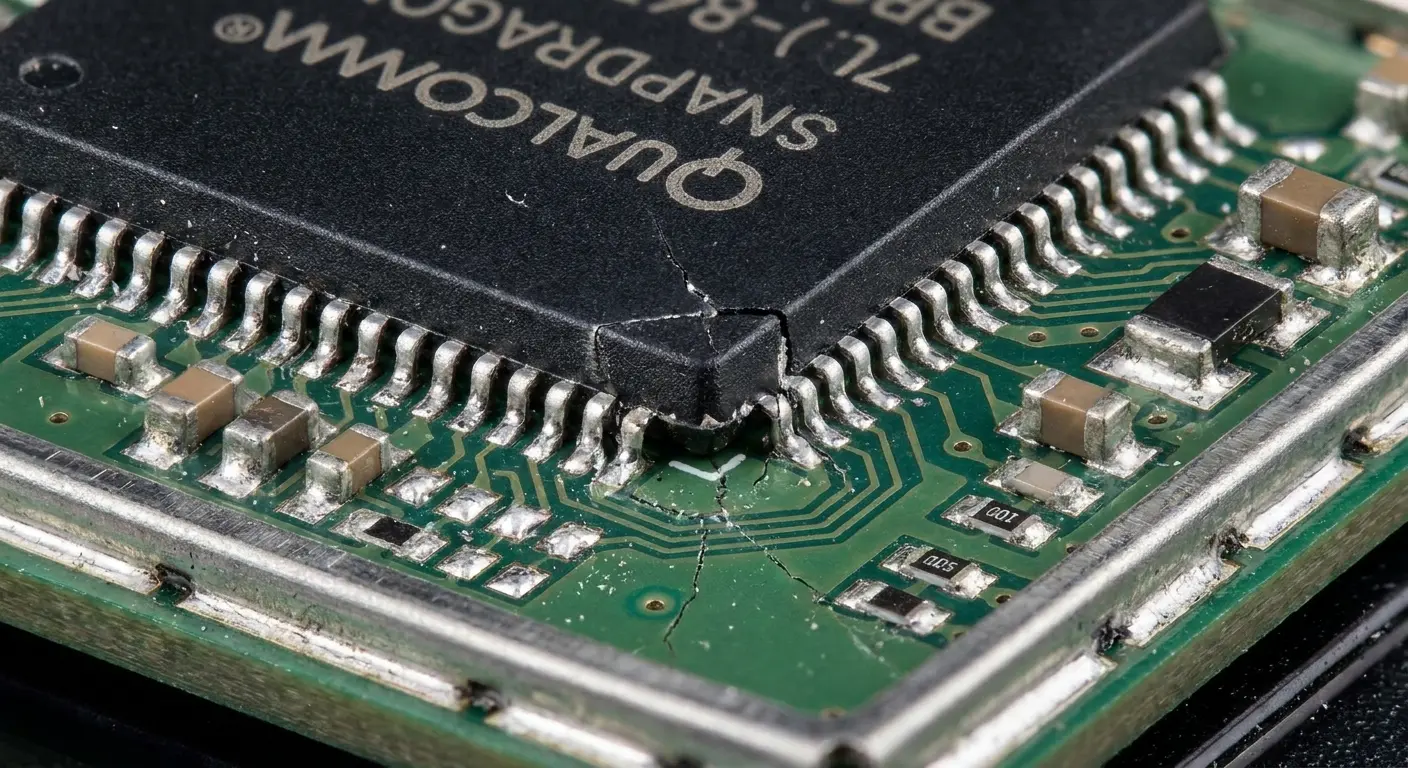
My brother-in-law delivers for Amazon in Chicago. Last winter, he went through three phones. Same problem every time: phone would work fine until he got out of the truck, then freeze the second he tried to scan a package.
Took me forever to figure out. His phone was going from 68° in the heated truck to 15° outside about thirty times a shift. The components inside were expanding and contracting so much they basically shook themselves loose. Not all at once. Just enough that after three months, maybe four, the GPS chip's connection would cut out for a microsecond. Long enough to freeze the whole system.
Why is my phone freezing becomes a daily question with an answer buried in physics, not software.
The Solder Joint Reality
Solder joints connect your processor, memory chips, and power management systems to the logic board. These joints are solid at room temperature but they experience stress every time temperatures shift more than 20 degrees within a short period.
The worst part? It's not even extreme cold that kills it. It's that annoying 40-70 degree range where everything feels fine.
The dangerous zone sits between 40 and 70 degrees, where your phone operates normally but the components are constantly adjusting.
The phone freeze happens when a stressed solder joint creates an intermittent connection. Your processor sends a request to memory. The connection fails for a microsecond. The request times out. Your entire system hangs waiting for a response that got lost in a gap smaller than a human hair.
Why Cold to Warm Is Worse Than You Think
Warming up creates more expansion stress than cooling down. Metal components expand, but the adhesives and insulators inside your phone expand at different rates. You've basically built a tiny pressure cooker that pushes components in directions they weren't designed to move.
Your screen might freeze right after you come inside because that's when expansion stress peaks. The phone feels fine to touch, but internal temperatures are still equalizing. Some components hit 70 degrees while others are still at 45.
This explains why the freeze happens five minutes after you're inside, not immediately when you walk through the door.
The Cumulative Damage Pattern
Your phone doesn't freeze the first time you go from cold to warm. It freezes after the hundredth or thousandth cycle has weakened the connections just enough.
This is why freezing problems seem to appear suddenly even though you haven't changed how you use your phone. You've been creating the problem for months. The freeze is just the symptom finally becoming visible.
Mounting Stress, Vibration, and Magnetic Interference
Every engine vibration, every road imperfection, every bass note from your speakers travels through the mount into your phone. We're not talking about dramatic shaking. These are micro-movements measured in fractions of a millimeter, but they happen thousands of times per drive.
Why does my phone keep freezing up becomes especially relevant when you realize your car mount might be the culprit. The constant vibration creates a slow degradation process that most people never suspect.
Look, I'm about to show you a table. I hate tables in blog posts, but this one actually matters because the difference between a sedan and a motorcycle is insane:
Mounting Environment |
Vibration Frequency |
Connection Degradation Timeline |
Primary Failure Points |
|---|---|---|---|
Sedan (paved roads) |
Low to Moderate |
18-24 months |
Display ribbon cable, battery connector |
SUV/Truck (mixed terrain) |
Moderate to High |
12-18 months |
Display ribbon cable, logic board connections |
Motorcycle |
High to Severe |
6-12 months |
All internal connectors, solder joints |
Bicycle (road) |
Moderate (high frequency) |
8-14 months |
Display connector, camera module |
Bicycle (mountain) |
Severe |
4-8 months |
Multiple simultaneous failures |
These numbers come from warranty claims we've tracked. They're not perfect. Some people baby their phones, others treat them like hammers. But the pattern's clear: vibration kills phones, and the more intense the vibration, the faster it happens.
The Display Connection Failure
Your screen connects to the logic board through a ribbon cable and connector. This connection was designed to be assembled once and remain stationary. When you mount your phone and drive, that connector experiences constant micro-movement.
The connection doesn't fail completely. That would be obvious. Instead, it develops intermittent contact issues. Your touch input registers but the display refresh command gets delayed. The screen appears frozen even though the phone is still processing in the background.
You press the home button multiple times. Nothing happens. Then suddenly everything you pressed executes at once because the connection re-established itself.
Mounting Position Matters More Than Mount Quality
An expensive mount with excellent grip still transfers vibration. The critical factor is orientation. Phones mounted vertically (portrait) experience different stress patterns than phones mounted horizontally (landscape).
Portrait mounting puts stress on the long axis of the ribbon cable. Landscape orientation creates lateral stress on the connector itself. Neither is ideal, but landscape orientation in a car mount tends to create faster degradation because the connector wasn't designed for side-to-side movement.
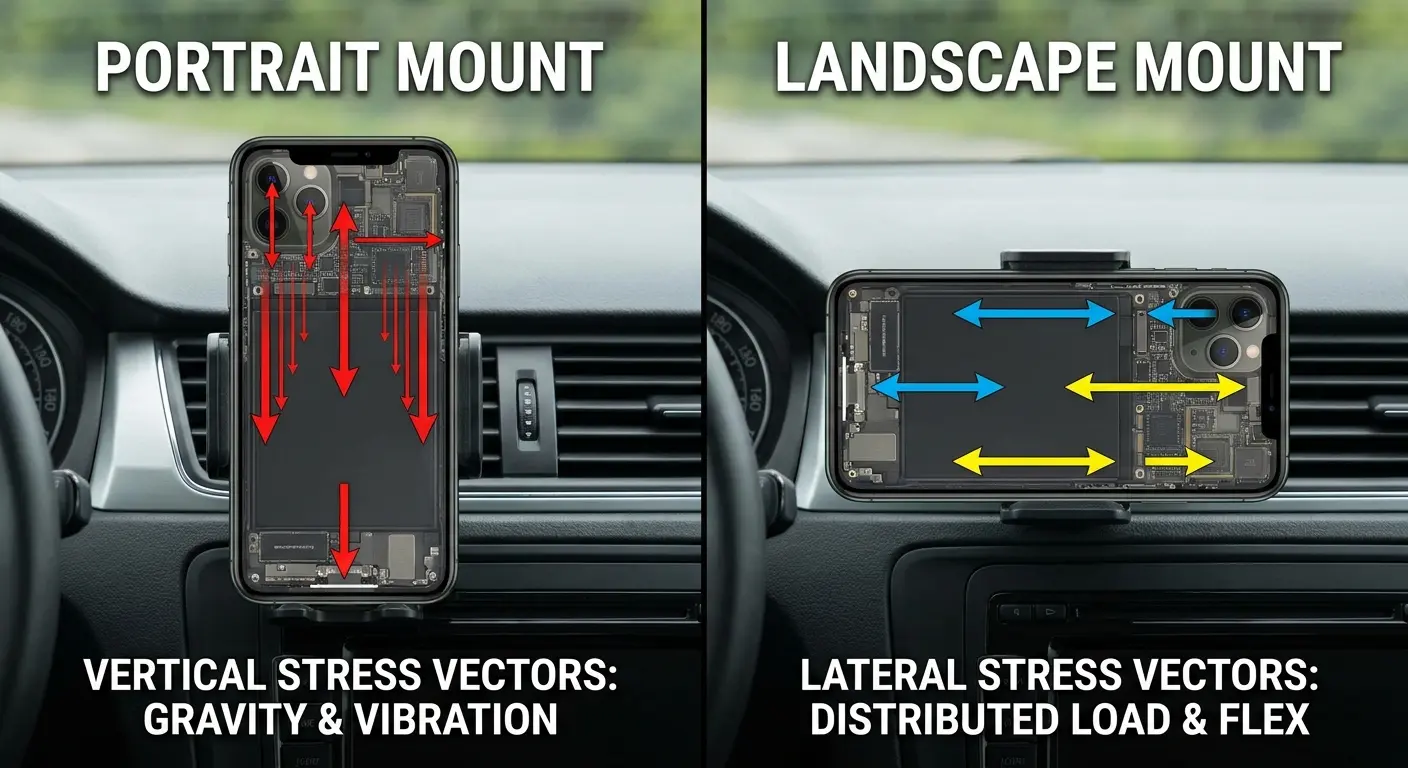
Motorcycle and bicycle mounts accelerate this problem exponentially. The vibration frequency from a bike is higher and more varied than a car. Six months of bike mounting can create connection issues that would take years to develop in a car.
Magnetic Mounts and Sensor Confusion
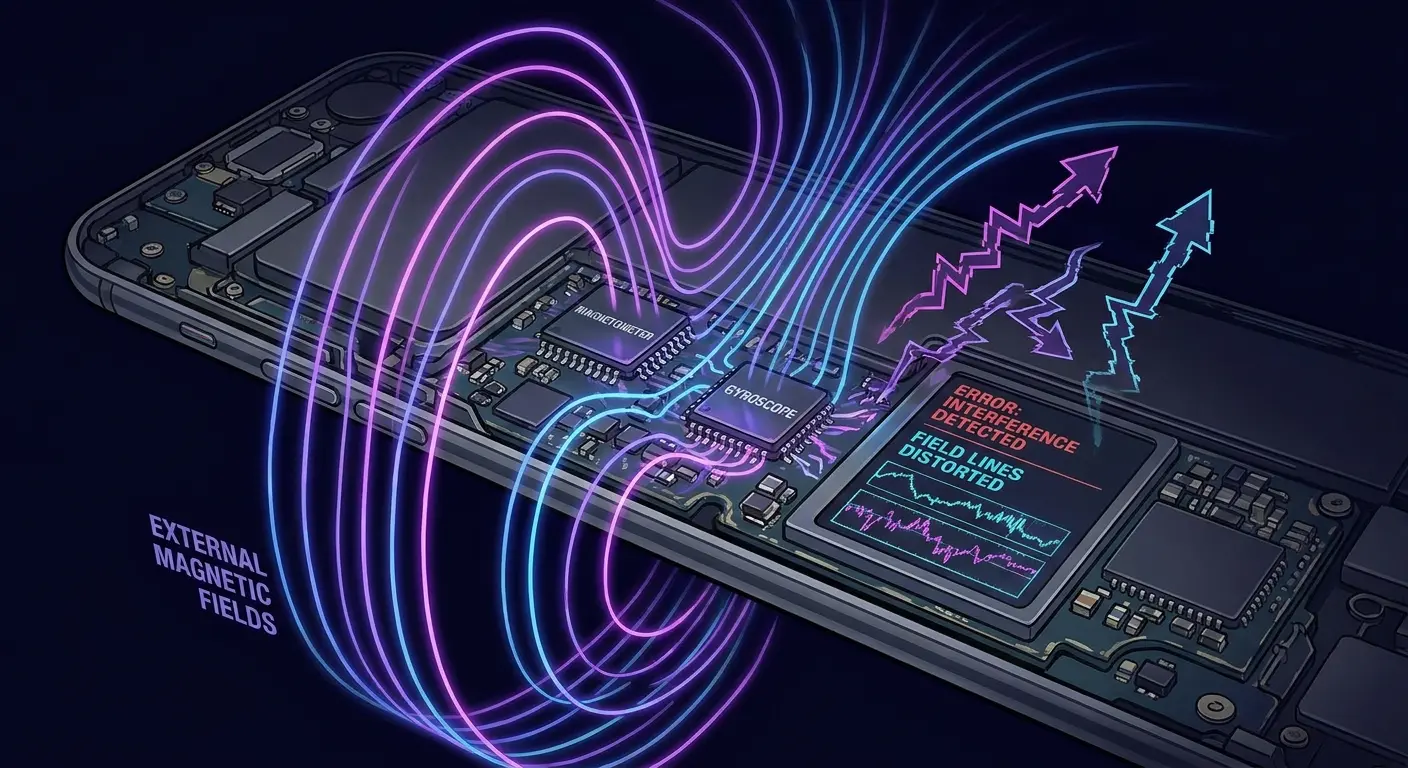
Your phone contains multiple sensors: gyroscope, magnetometer, accelerometer, proximity sensor. These sensors feed data to your operating system constantly. When magnetic accessories interfere with sensor readings, your phone receives conflicting information that it can't reconcile.
The system hangs trying to process impossible data. Your screen freezes.
The magnetometer measures magnetic fields to determine orientation for compass apps and map navigation. Strong magnets from mounts or cases overwhelm this sensor with false readings. Your phone thinks it's spinning rapidly or jumping between orientations.
Apps that rely on orientation data (including your launcher and system UI) receive corrupted information. They pause processing while waiting for stable readings. Those readings never stabilize because the magnetic interference is constant.
You're not using navigation or compass apps, so you think this doesn't affect you. Your operating system is still polling those sensors and trying to make sense of the data, consuming processing resources and creating potential hang conditions.
A rideshare driver uses a magnetic dashboard mount for navigation. After three months of daily use, they notice their phone's screen rotation becomes erratic. Sometimes the map stays in portrait mode even when they turn the phone. Other times, it rotates wildly between orientations without them moving the phone at all. The navigation app freezes for 5-10 seconds during these episodes.
They try reinstalling the app, clearing cache, and even factory resetting the phone. The problem persists because the magnetic mount has been feeding false data to the gyroscope sensors for months, and the system can't distinguish between legitimate rotation and magnetically-induced sensor confusion.
Now, here's where it gets weird. Some phones handle magnetic mounts fine. I've seen iPhones that lived on magnetic mounts for two years with zero issues. But I've also seen identical phones develop sensor problems in three months. I don't know why the inconsistency exists. Maybe manufacturing tolerances? Maybe some phones have better sensor shielding? Apple won't tell us.
Point is: if you use a magnetic mount and your phone's acting drunk (screen rotating randomly, compass going haywire), try ditching the mount for a week. If problems stop, you've got your answer.
Proximity Sensor False Triggers
Some magnetic mounts position magnets near the top of the phone, close to the proximity sensor. This sensor detects when the phone is against your face during calls and turns off the screen. Magnetic interference can cause false triggers.
Your screen turns off randomly during use. You think it's frozen. It's not. The proximity sensor falsely detected your face and turned off the display. You press the power button to wake it, which the phone interprets as a command to turn off the already-off screen, so nothing happens. You press it again. The screen turns on.
You've just experienced a freeze that was magnetic interference with a sensor.
The Wireless Charging Heat Problem
Wireless charging is cooking your phone. I know, I know. It's convenient. I use it too. But if your phone freezes constantly and you charge wirelessly every night, I'm 90% sure that's your problem.
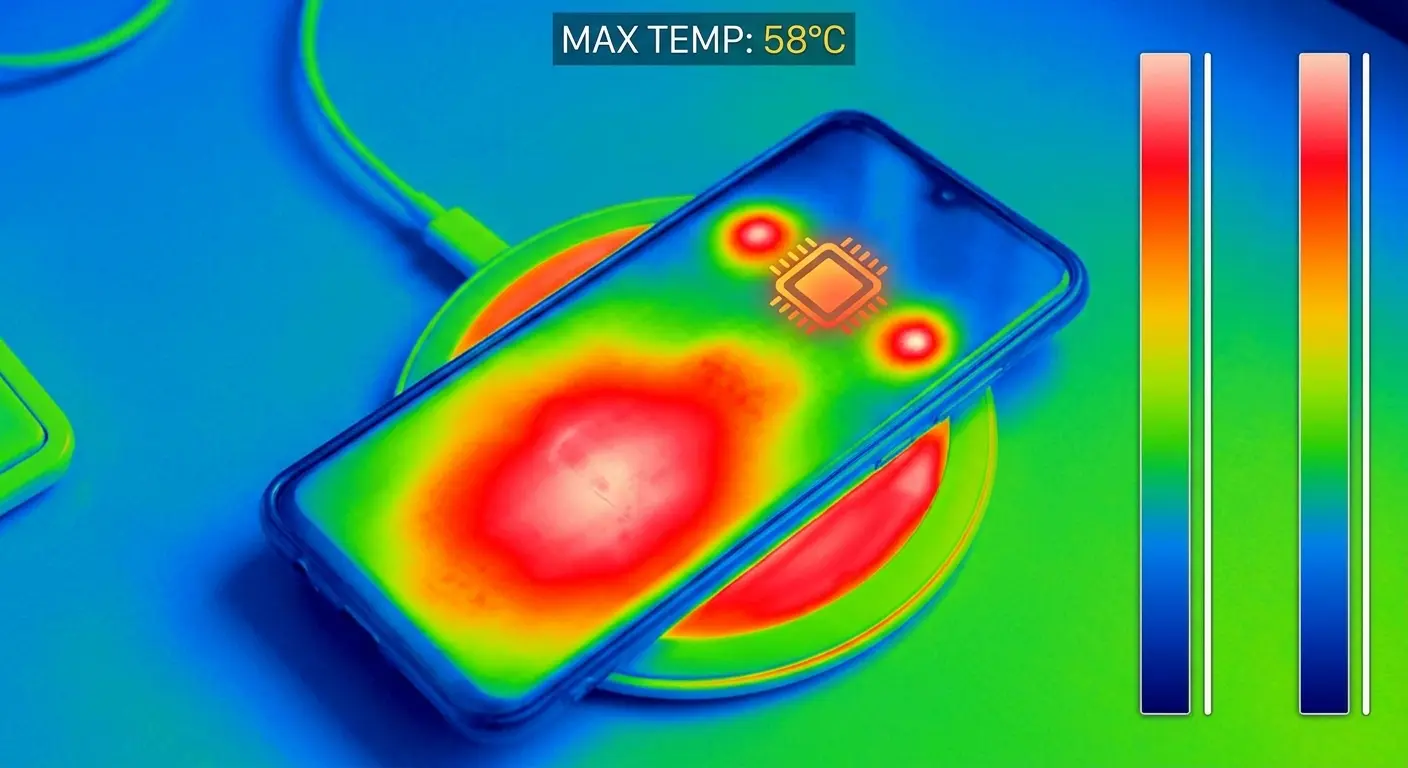
The physics are simple: Wireless charging wastes energy as heat. That heat concentrates right where your processor sits. Your phone gets warm, throttles the processor, and corrupts temporary files. You wake up, phone feels fine, but those corrupted files are time bombs waiting to freeze your apps.
Thermal Throttling Creates Delayed Freezes
Your processor reduces its clock speed when it gets too hot. This is normal protection. What's not normal is when wireless charging heats your processor to throttling temperatures while the phone is supposedly idle.
You charge overnight on a wireless pad. The phone gets warm. The processor throttles. Background processes that should complete in seconds now take minutes. Some processes time out. Temporary files don't write correctly. Cached data becomes corrupted.
My phone is frozen becomes your morning mantra, but the problem started eight hours earlier while you were sleeping. You wake up, take your phone off the charger, and it feels fine. Cool to the touch. You start using it and apps freeze because you're trying to access corrupted cache files that were created during the thermal throttling event hours ago.
My friend Sarah (freelance designer, total night owl) kept complaining her Lightroom app would freeze every morning. Worked fine at night. I finally asked where she charged her phone. "On my nightstand, why?" Wireless pad. Eight hours of heat every night, right under her pillow where zero air could circulate.
The Charging Position Heat Trap
Wireless chargers have a specific coil location. Your phone has a specific receiving coil location. When these don't align perfectly, charging efficiency drops and heat generation increases.
Most people don't position their phone precisely. You drop it on the pad and walk away. If the coils are slightly misaligned, you're generating 30-40% more heat than necessary. Do this nightly for months and you've created chronic thermal stress.
The freeze happens during your morning commute, not during charging, so you never connect the problem to your charging habits.
Case Thickness and Wireless Charging Heat
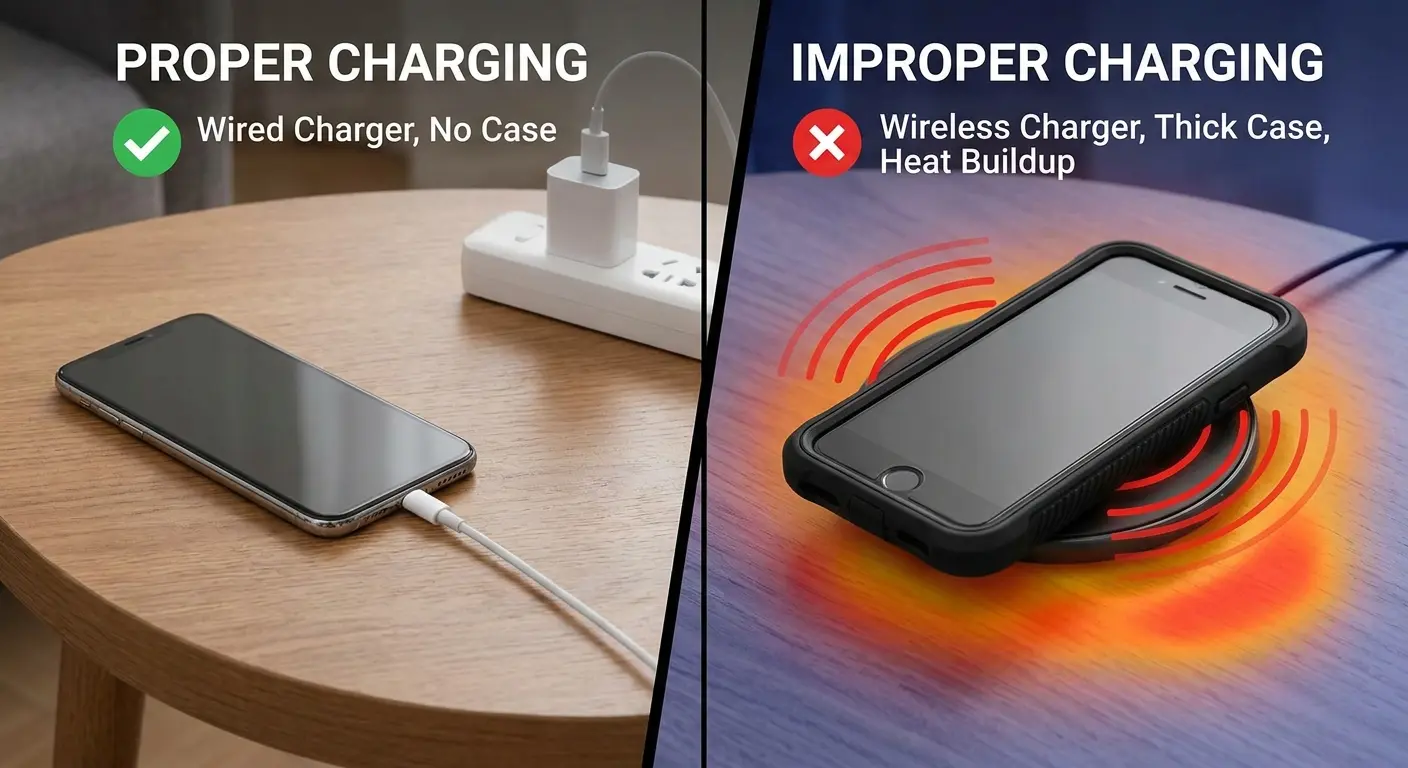
Thick cases force wireless chargers to work harder, generating more heat. The case also insulates your phone, trapping that heat against the device. You've created a thermal chamber that keeps your phone's internal temperature elevated for the entire charging session.
Your phone's cooling system (passive heat dissipation through the frame and back glass) can't function properly through a thick case on a wireless charger. Heat that should dissipate in 30 minutes stays trapped for two hours.
Memory Isn't Always a Software Issue
Everyone tells you to close apps and clear your cache when your phone freezes. Sometimes that works. Often it doesn't because you're treating a hardware problem with a software solution.
Here's the annoying part: RAM can go bad. Not often, but when it does, it makes you feel insane. Your phone freezes... but only sometimes. Same app, same action, totally random whether it works or crashes. You're not crazy. You've got a bad memory sector that only causes problems when the system tries to write to that specific spot.
The Bad Sector Freeze Pattern
Why does my phone freeze becomes a question with a hardware answer when RAM degradation is involved. When a section of RAM becomes unreliable, your phone's memory management tries to work around it. This works fine until an app or system process specifically needs to write to that bad sector. The write fails. The process hangs. Your screen freezes.
You force restart the phone. The memory management assigns that process to a different RAM sector. Everything works fine. Until the next time an unlucky process gets assigned to the bad sector.
This creates an infuriating pattern where the same apps freeze sometimes but not always, and restarting temporarily fixes the problem.
Why Clearing Cache Seems to Help (But Doesn't Really)
Clearing cache forces your phone to rebuild temporary files in different memory locations. If those new locations don't overlap with your RAM's problem areas, the freezing stops. Temporarily.
You think you've fixed a software problem. What you've actually done is play memory location roulette and happened to win this round. The hardware problem still exists.
This is why the freezing comes back after a few days or weeks. Eventually, normal memory management assigns critical processes back to the problematic RAM sectors.
Temperature-Dependent Memory Errors
Some RAM errors only show up at specific temperatures. Your phone works perfectly at room temperature but freezes constantly in the cold or after intensive use that heats up the device.
You're not dealing with battery performance issues. You're dealing with RAM that has developed temperature-sensitive errors. The memory chip physically changes its electrical properties enough at certain temperatures to cause read/write failures.
When "Closing Apps" Actually Makes Things Worse
Can we talk about the "close all your apps" advice? It's wrong. Like, aggressively wrong for modern phones. Your phone's operating system is smarter than you at memory management. (No offense. It's also smarter than me.)
Your phone's operating system is better at memory management than you are. Apps running in the background aren't running at all. They're suspended, using minimal resources. When you force close them and then reopen them later, you're making your phone do more work, not less.
The Restart Load Problem
Every time you open an app, your phone loads it into active memory, establishes connections, and initializes all its functions. This takes processing power and creates heat. When you close apps and reopen them repeatedly throughout the day, you're creating dozens of these high-load events.
Leaving apps suspended means they're already in memory, already initialized. Opening them again is nearly instantaneous and uses a fraction of the resources.
You close ten apps to "free up memory." Later, you open eight of those ten apps again. You've just forced your phone through eight full initialization sequences that wouldn't have been necessary. Each one generates heat, uses battery, and stresses the processor.
When to Actually Close Apps:
The app shows significant battery drain in your battery usage stats despite not being actively used
The app is a known resource hog (streaming services, navigation apps, social media with auto-play video)
The app has visibly crashed or is displaying error messages
You haven't used the app in over a week and don't plan to use it soon
The app is actively malfunctioning (wrong data, won't refresh, stuck loading)
When to Leave Apps Running:
You use the app multiple times per day
Battery usage stats show minimal background activity
The app is functioning normally
You'll need the app again within the next few hours
The app is part of your daily routine (messaging, email, calendar)
When Closing Apps Actually Helps
Poorly designed apps that don't suspend properly are the exception. These apps continue running background processes that consume resources even when you're not using them. Social media apps, streaming apps, and navigation apps are common culprits.
You can identify these by checking your battery usage stats. If an app shows significant background activity when you haven't used it recently, that's a candidate for force closing.
For everything else, you're creating more problems than you're solving.
The Memory Management Myth
Your phone shows "8GB RAM" in the specs. You check memory usage and see 7.2GB used. You panic and start closing apps. This is misunderstanding how RAM works.
Unused RAM is wasted RAM. Your operating system intentionally fills available memory with suspended apps and cached data because accessing RAM is faster than accessing storage. When an app needs more memory, the system automatically clears the oldest cached data.
Forcing this process manually doesn't make your phone faster. It just means your phone has to rebuild that cache later, creating additional work.
The Moisture Factor That Isn't About Water Damage
You've never dropped your phone in water. Doesn't matter. You're still water-damaging it.
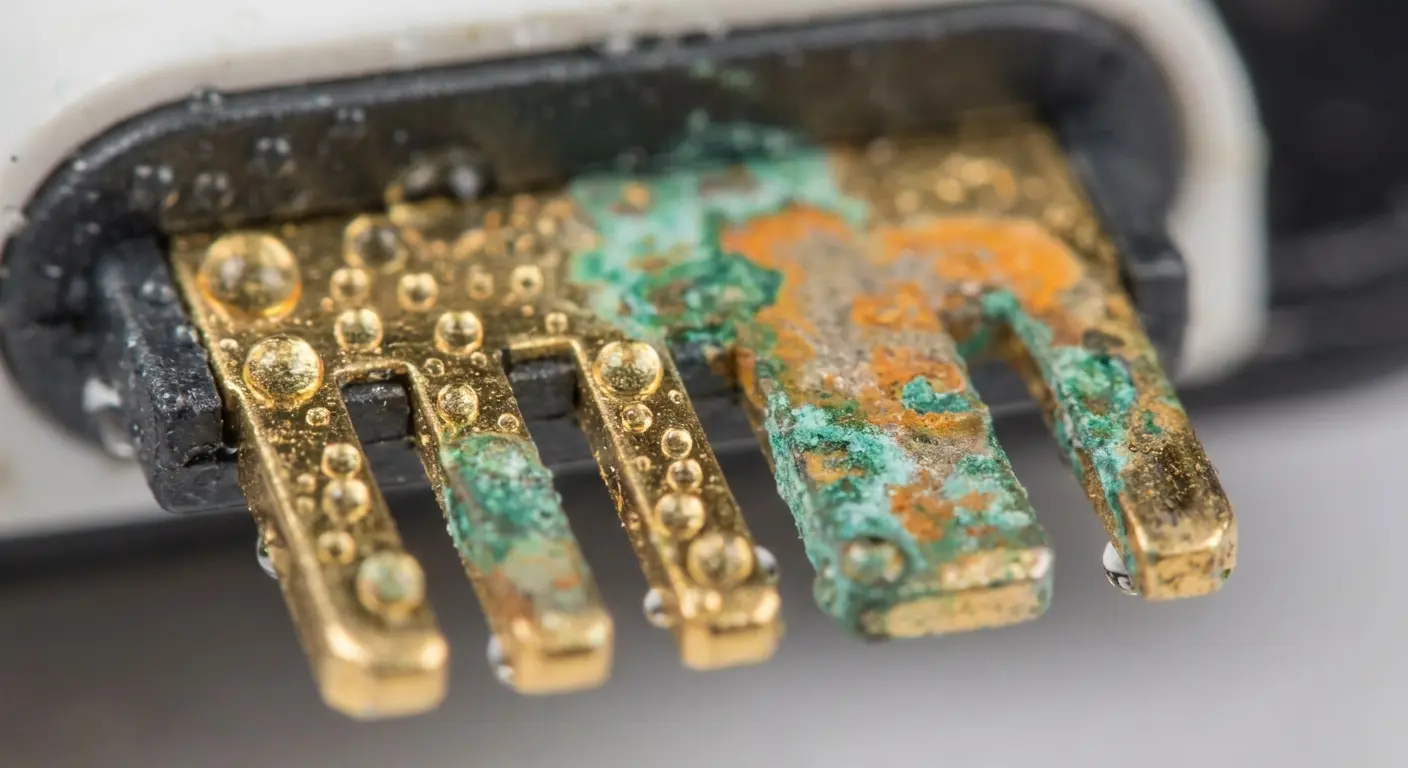
Every time you walk from the cold into a warm building, condensation forms inside your phone. Microscopic amounts, but it's there. Do this daily for months and you're basically giving your phone's internals a slow-motion bath.
Water resistance ratings protect against splashes and brief submersion. They don't protect against humidity exposure over time. Phone freezing often traces back to this invisible enemy.
The Condensation Cycle
Cold air holds less moisture than warm air. When your cold phone enters a warm, humid environment, moisture from the air condenses on and inside the device. We're talking about microscopic amounts, but they accumulate on contact points, connectors, and circuit traces.
You go to the gym with your phone in your pocket. Your body heat warms the phone while you're in the cold outside. You enter the gym (warm, humid from all the people). Condensation forms. You do this three times a week for six months.
The moisture doesn't cause immediate damage. It creates slow corrosion on electrical contacts. These corroded contacts develop intermittent connection issues that show up as random freezes.
Bathroom and Kitchen Exposure
You take your phone into the bathroom while you shower. The phone isn't in the shower, so you think it's safe. The bathroom fills with steam. That steam contains moisture that penetrates your phone's water resistance seals (which are designed for liquid water, not vapor).
Kitchen environments create similar problems. Cooking generates humidity and temperature changes. Your phone sits on the counter absorbing this exposure day after day.
The freeze happens when you're scrolling social media in bed because that's when you're stressing a corroded connection that developed from months of humidity exposure in completely different locations.
Climate-Specific Freeze Patterns
Humid climates accelerate this problem. If you live in a coastal area or anywhere with high humidity, your phone experiences constant low-level moisture exposure that doesn't trigger water damage indicators but creates cumulative corrosion.
Your phone freezes more in summer than winter, not because of heat alone, but because summer brings higher humidity levels that worsen existing corrosion problems.
Case Design and Heat Dissipation
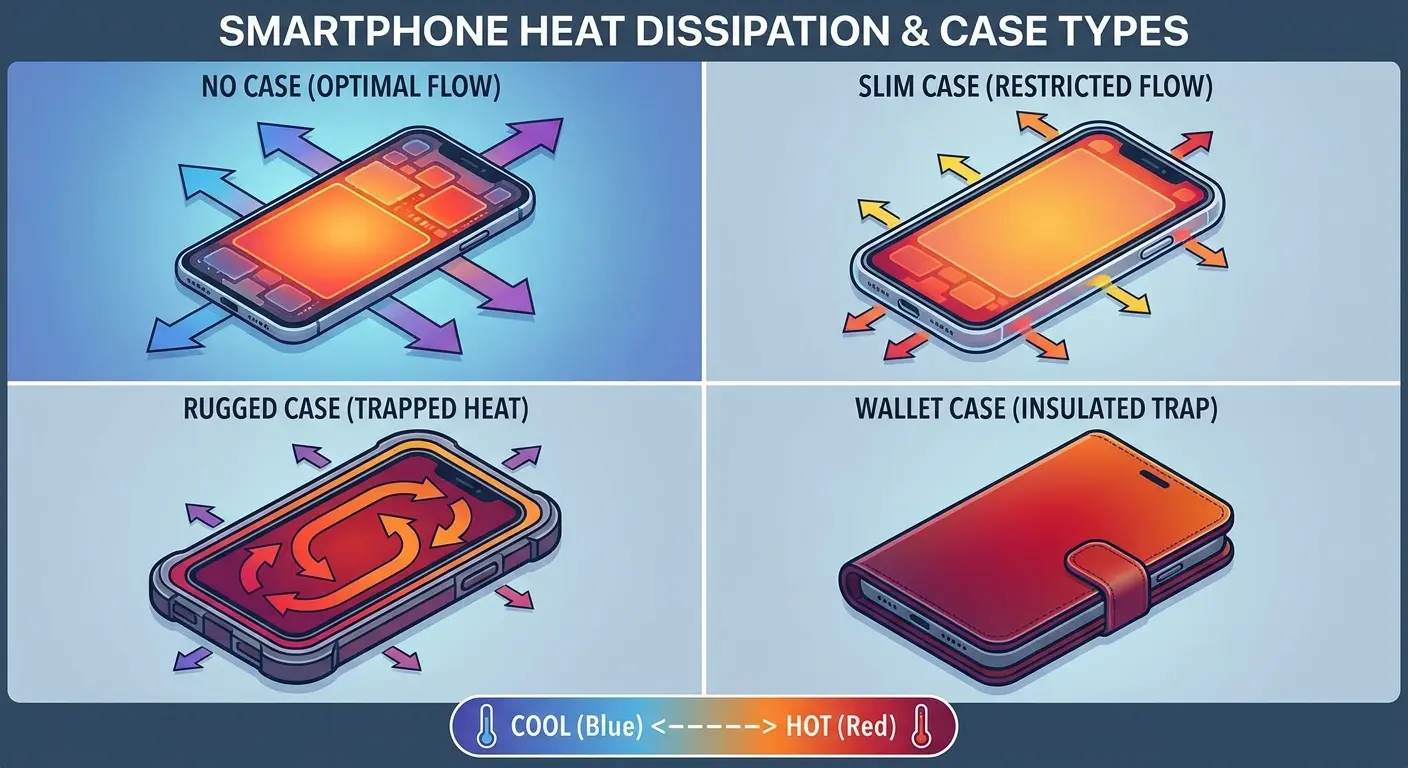
Your phone has no fans. It cools itself by transferring heat through the metal frame and glass back to the surrounding air. When you wrap it in a case, you're interfering with the only cooling system it has.
Some materials insulate better than others. Some case designs trap heat in specific areas. The freezing you're experiencing might have nothing to do with your phone and everything to do with what you've wrapped it in.
Material Thermal Properties
Silicone and rubber cases are excellent insulators. That's why they're used in oven mitts. When you put a silicone case on your phone, you're preventing heat from escaping efficiently. Your processor generates heat during normal use. That heat needs somewhere to go.
Metal cases conduct heat away from the phone better than plastic or silicone, but they also heat up the exterior, making the phone uncomfortable to hold. You pull it away from your face during calls. You set it down more often. These interruptions in contact actually improve cooling.
Plastic falls somewhere in the middle but varies wildly based on thickness and density. A thin, hard plastic shell allows more heat transfer than a thick, cushioned plastic case.
Case Material |
Thermal Conductivity |
Heat Dissipation Rate |
Freeze Risk Factor |
Best Use Case |
|---|---|---|---|---|
Silicone/Rubber |
Very Low |
Poor (traps heat) |
High |
Light usage, cool environments |
Thick Plastic (cushioned) |
Low |
Poor to Moderate |
Moderate to High |
Moderate usage, climate-controlled settings |
Thin Hard Plastic |
Moderate |
Moderate |
Low to Moderate |
Daily use, mixed environments |
Metal (aluminum) |
High |
Good (conducts away) |
Low |
Intensive use, outdoor activities |
Hybrid (metal + plastic) |
Moderate to High |
Good |
Low |
All-purpose, variable usage |
No Case |
Highest |
Excellent |
Lowest |
Maximum performance (with drop risk) |
The Air Gap Solution
Cases that maintain an air gap between the phone and the case material allow some heat dissipation. The air circulates (minimally) and carries heat away. Cases that fit tightly against the phone's back create a sealed thermal barrier.
You can test this yourself. Use your phone intensively for 20 minutes with the case on. Remove the case and feel the phone's back. It's significantly hotter than the case exterior because the heat has been trapped against the device rather than dissipating outward.
That trapped heat causes processor throttling. Throttling causes processes to slow down or time out. Timeouts cause freezes.
Corner and Edge Coverage Impact
Cases with raised edges and full corner coverage provide better drop protection but worse thermal performance. They create an insulating layer around the entire perimeter of your phone, blocking heat dissipation from the frame (which is often metal and designed to act as a heat sink).
Your phone's engineers designed specific heat dissipation pathways. Your case is blocking them. The freeze happens during your video call because you've been generating heat for ten minutes with nowhere for it to go.
Screen Protectors and Touch Issues
Screen protectors add a physical barrier between your finger and the capacitive touch sensor. Quality protectors minimize this interference. Cheap or poorly installed protectors create touch input problems that feel exactly like freezing.
You tap an icon. Nothing happens. You tap again. Still nothing. You tap harder. Suddenly both taps register and you've opened the wrong app. Your phone isn't frozen. Your screen protector is interfering with touch detection.
Your screen detects touch through changes in electrical capacitance. Your finger conducts electricity differently than air. The screen measures this difference to determine touch location and pressure. Screen protectors reduce the capacitance change, making touches harder to detect.
Thick glass protectors are worse than thin film protectors for this reason. Tempered glass protectors can be 0.3-0.4mm thick. That's enough distance to significantly reduce capacitance changes, especially if you have dry skin or are wearing gloves.
The phone isn't frozen. It's registering some touches and missing others based on how much pressure you're applying and how conductive your skin is at that moment.
Air bubbles under screen protectors create areas where the protector doesn't sit flush against the screen. These areas have even worse touch sensitivity. If an air bubble sits over a frequently-used part of the screen (the keyboard area, for instance), you'll experience constant input failures.
You type a message. Half the letters don't register. You retype. Different letters fail this time. You think your keyboard is freezing or lagging. Your screen protector has air bubbles creating intermittent dead zones.
Look, I'm not gonna give you a 10-step screen protector application guide. You've seen those YouTube videos. Here's what actually matters:
Get the bubbles out or accept dead zones on your screen
Thick glass protectors feel premium but they mess with touch sensitivity
If you're getting phantom touches or missed taps, your protector's probably the problem
Just buy a new one. They're $8, not worth troubleshooting for hours
Full disclosure: I work for Rokform, so yeah, I'm biased. But we designed our cases specifically because I kept seeing phones overheat in thick silicone cases. Our first prototype? Total disaster. We thought maximum thickness equals maximum protection. Turns out we were just cooking people's phones during video calls.
The RokLock system keeps magnets away from sensors (learned that one the hard way), and we added air gaps so heat can actually escape. Whether you buy our stuff or not, just check that your case isn't suffocating your phone. Hold it up to light. Can you see any gaps between the case and phone back? If not, you're trapping heat.
Whether you're looking for iPhone cases or Samsung phone cases, thermal management should be part of your decision criteria. We've tested our motorcycle phone mounts extensively to minimize vibration transfer while maintaining secure grip. Our bike phone mounts are engineered to reduce vibration transfer, but even the best mount can't eliminate all stress during extreme conditions.
Earlier I said avoid thick cases. But if you drop your phone constantly, you need the protection. Better a hot phone than a broken phone. Pick your poison.
What Your Phone's Freezing Pattern Actually Tells You
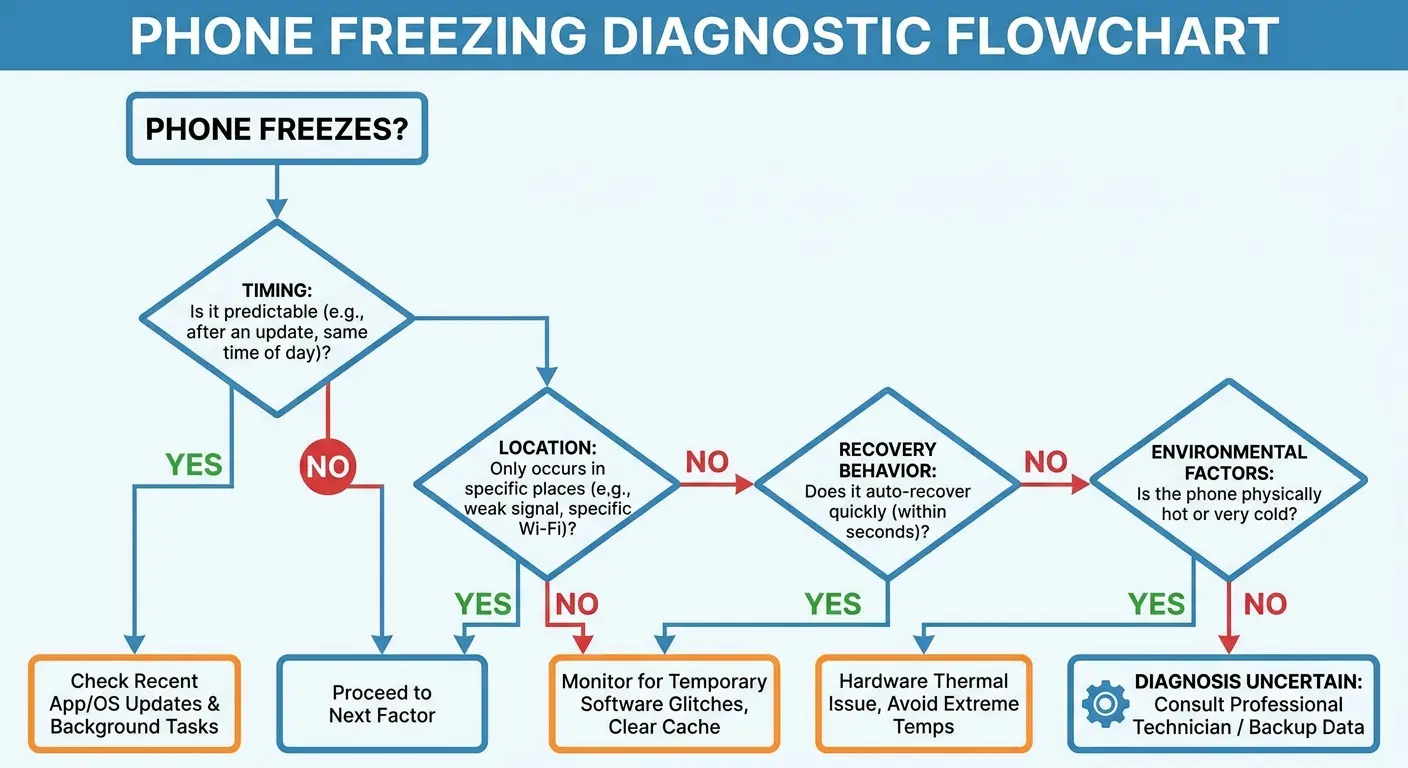
Freezes aren't random. They follow patterns based on their underlying cause. You can diagnose the source by paying attention to when and how the freezing happens.
Software problems create different patterns than hardware stress problems. Learning to distinguish between them saves you from wasting time on solutions that don't address the root cause. Phone freeze patterns tell a story if you know how to read them.
Honestly? Diagnosing this stuff is harder than I'm making it sound. Sometimes your phone freezes in the morning because of your commute's temperature swings. Sometimes it's because you updated an app last night and it's buggy. Sometimes it's both and you'll never know which one was the main culprit.
Time-Based Patterns
Freezes that happen at specific times of day point to environmental factors. Your phone freezes every morning during your commute but works fine the rest of the day. You're dealing with temperature stress (cold to warm transition) or mounting vibration, not software issues.
Freezes that occur after specific durations of use indicate thermal problems. Your phone works fine for 20 minutes then starts freezing. You've hit thermal throttling thresholds. The case, wireless charging habits , or environmental temperature is preventing adequate cooling.
Freezes that happen randomly throughout the day with no time pattern suggest software conflicts or failing RAM.
Location-Based Patterns
Your phone freezes at home but not at work. Different environmental factors are at play. Home might be more humid, triggering moisture-related connection issues. Work might have better climate control, keeping your phone in a stable temperature range.
Freezes in the car point to mounting stress or temperature cycling. Freezes at the gym suggest humidity exposure or the temperature differential between your warm pocket and the cold phone.
Freezes everywhere suggest a software problem or advanced hardware degradation that's no longer dependent on environmental triggers.
Recovery Behavior
How your phone recovers from a freeze tells you what caused it. Freezes that resolve themselves after 5-10 seconds indicate temporary processing bottlenecks, often from thermal throttling or brief connection failures. The system caught up once conditions normalized.
Freezes that require a force restart point to more serious issues: crashed processes, memory errors, or complete system hangs. These are more likely software-related or indicate significant hardware problems.
Freezes that resolve when you press the power button (screen off, screen on) suggest display connection issues or sensor problems rather than actual system freezes.
App Correlation Analysis
The same app always freezes. That app has a software problem or conflicts with your specific phone model. Different apps freeze randomly. You're dealing with system-level issues, not app-specific problems.
Freezing happens regardless of which app you're using. Environmental or hardware factors are the cause. The app is irrelevant. You could be in any app and the freeze would still occur because the underlying trigger is physical stress, not software.
The pattern analysis helps, but it's not foolproof. If you try the environmental fixes for two weeks and nothing changes, then yeah, probably software.
Prevention Through Environmental Control
I'm about to give you a bunch of advice that you probably won't follow completely. That's fine. I don't follow all of it either. But if your phone's freezing constantly, pick the two or three things that seem easiest and start there.
You don't need to do everything perfectly. You just need to stop doing the worst things.
You can't control every environmental factor your phone encounters. You can control the major ones that cause most freezing problems. Prevention is easier than troubleshooting after the damage is done.
Small changes in how you charge, carry, and protect your phone eliminate the majority of hardware stress that shows up as phone freezing.
Charging Practice Optimization
Wired charging is better than wireless. I know wireless is convenient. I get it. But if you can charge wired overnight, do it. Save wireless for the 20-minute desk charge during the day when you're around to make sure your phone isn't turning into a hot plate.
And for the love of god, take your case off when charging. I know that's annoying. Do it anyway. Your phone generates enough heat charging without being wrapped in a thermal blanket.
Avoid charging in hot environments. Your car's cup holder in summer, on a sunny windowsill, near a radiator. You're adding environmental heat to charging heat, pushing internal temperatures into ranges that cause long-term damage.
Smart Case Selection
Choose cases based on thermal properties, not just drop protection. Look for designs with ventilation channels, air gaps, or heat-dissipating materials. Metal cases conduct heat away from the phone. Thin hard-shell cases allow more heat transfer than thick silicone.
Temperature Transition Management
Minimize extreme temperature transitions. When you come inside from the cold, don't immediately start using your phone intensively. Give it 5-10 minutes to equalize temperature gradually. This reduces thermal stress and prevents condensation formation.
Keep your phone in an interior pocket during winter, not an outer pocket. Your body heat keeps it closer to operational temperature, reducing the temperature differential when you enter warm buildings.
During summer, avoid leaving your phone in direct sunlight or hot cars. The damage from a single afternoon in a 150-degree car can create connection issues that cause freezing for months afterward.
Mounting Solutions
Use mounts with vibration dampening if you're mounting in vehicles or on bikes. Some mounts include rubber isolation between the grip mechanism and the mounting arm. This absorbs vibration before it reaches your phone.
Limit mounting duration. If you're taking a cross-country road trip, consider unmounting your phone during highway stretches where you don't need navigation. Every hour of vibration exposure adds to cumulative stress.
For serious outdoor use or motorcycle mounting, consider dedicated action cameras or GPS units. They're designed for sustained vibration. Your phone isn't. Using the right tool for the job prevents damage.
Humidity Awareness
Don't take your phone into bathrooms during showers or into kitchens during cooking. The moisture exposure seems minimal but accumulates over time. If you need music in the shower, use a waterproof Bluetooth speaker.
In humid climates, store your phone in climate-controlled environments when possible. Your bedroom with AC is better than a garage or screened porch. Consistent low humidity prevents the slow corrosion that causes intermittent freezing.
Use silica gel packets in your phone storage areas (nightstand drawer, car console) to absorb ambient moisture. This is extreme for most people but makes sense if you live in very humid environments and experience frequent freezing.
Final Thoughts
Your phone's freezing because you're accidentally torturing it. The cold-to-warm temperature swings during your commute. The vibration from your car mount. The eight hours of wireless charging heat every night. None of this looks like phone abuse, but it is.
I've been in the phone case business long enough to see patterns. The people who complain about constant freezing? They're usually doing three or four of these things simultaneously. Fix the environmental stuff (better case, wired charging, less vibration) and the freezing stops. Usually within a week.
You can troubleshoot software all day. But if the real problem is that your phone's been temperature-cycling thirty times a day for six months, no amount of cache clearing will help. Physics doesn't care about your troubleshooting steps.
Why is my phone randomly freezing? The answer is probably sitting in your daily routine. The mount you use, the case you chose, the wireless charger on your nightstand. These aren't software problems that updates can fix. They're physical stress factors that require physical solutions. Change how you treat your phone's environment, and you'll change how often it freezes.

