


So your phone screen is green.
Not like "I changed my wallpaper" green. Like "everything looks like I'm wearing night-vision goggles" green. And you're frantically Googling because you've got a meeting in 20 minutes and you can't see your screen.
Let me save you some time: restarting won't fix it. Neither will that software update everyone's recommending. I've been designing phone cases for six years, and I've personally examined hundreds of failed displays.
Here's what's actually wrong: something physical broke inside your phone. And I'm going to show you exactly what, why it happened, and whether you're looking at a $50 fix or a $500 problem.
But first, let me guess. You dropped your phone like three weeks ago, right? Thought you got away with it?
Table of Contents
Why Green? (And Not Red or Blue?)
That Drop From Three Weeks Ago Is Finally Catching Up
Your Wireless Charger Is Slowly Cooking Your Phone's Insides
Car Mounts: The Silent Phone Killer
When Software Updates Expose What Was Already Broken
The Magnetic Interference Factor
Humidity Is Sneaking In Through Cracks You Can't See
Why Your Screen Protector Might Be Making Things Worse
Can You Actually Fix This, or Should You Start Shopping?
How to Not End Up Here Again
Protecting Your Investment Beyond the Screen
The Short Version (Because Your Phone's Probably Green Right Now)
Look, here's what's actually happening: something physical broke. Maybe you dropped it weeks ago and forgot. Maybe your wireless charger's been slowly cooking the internals. Maybe that car mount's been squeezing your phone to death.
Point is, restarting won't fix it. Sorry.
The good news? I'll show you how to tell if it's fixable or if you need to start shopping for a new phone. And more importantly, how to prevent this from happening to your next one.
Quick breakdown of what causes green screens:
Damaged display connectors or GPU stress (not software bugs)
Physical impacts that create micro-fractures showing up weeks later
Heat from wireless charging degrading ribbon cables over time
Mounting systems applying uneven pressure that accelerates connector failure
Most green screen issues need hardware intervention, not just a forced restart
Prevention focuses on reducing physical stress points and thermal cycling
Why Green? (And Not Red or Blue?)
Your phone's display mixes red, green, and blue to make every color you see. When you get a green screen, it's not that green is special. It's just the last color standing after the others crapped out.
OLED displays use organic compounds that light up when electricity flows through them. Each pixel has separate red, green, and blue emitters. LCD screens work differently, using a white backlight filtered through color layers. Both rely on incredibly thin ribbon cables connecting the display to your phone's logic board. These ribbons carry separate data streams for each color channel.
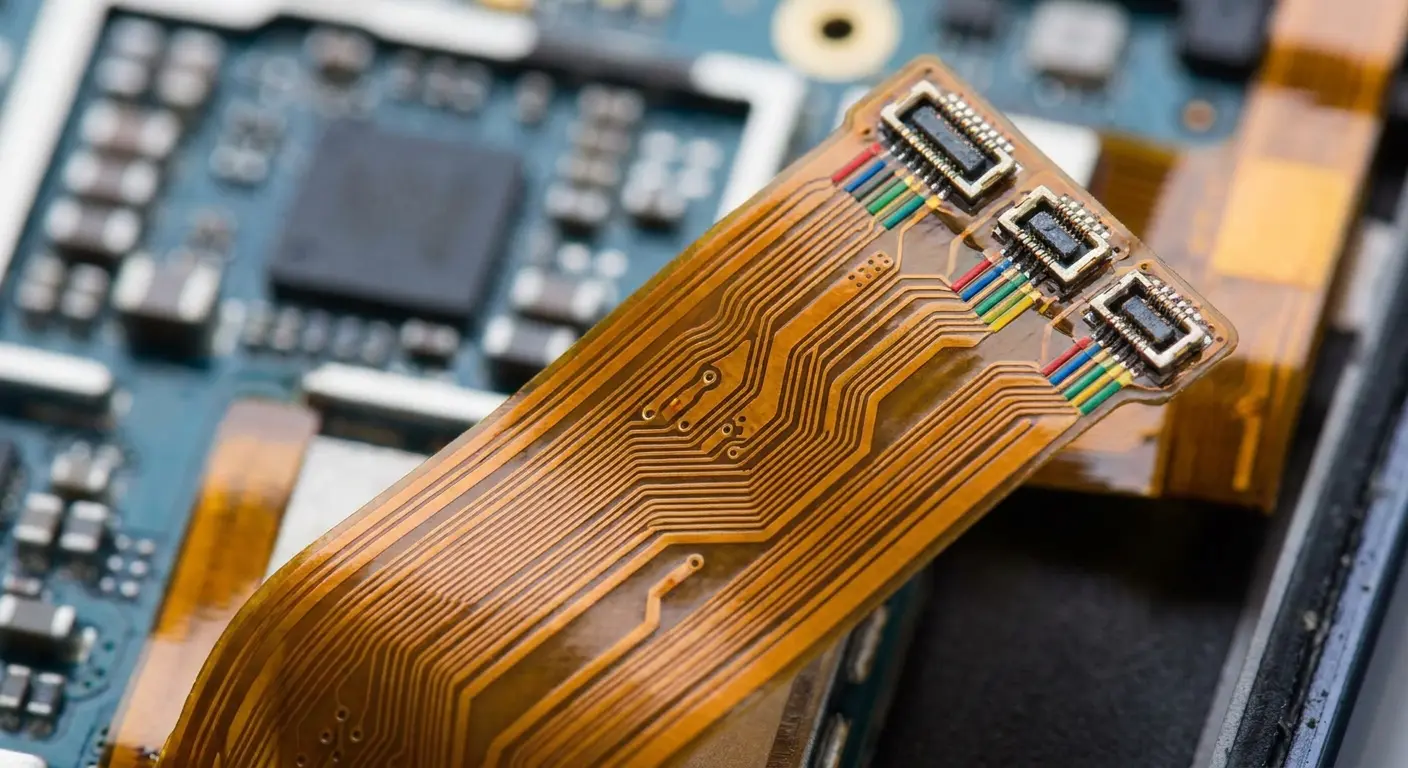
Partial disconnection or degradation of these ribbons doesn't kill all colors at once. The green channel often survives initial damage because it carries the strongest signal. Human eyes are most sensitive to green wavelengths, so manufacturers optimize for it. When red and blue channels fail or weaken, you're left with predominantly green output. This explains why is my phone screen green rather than showing other color distortions.
Here's a table because I'm a nerd and I like tables. Skip it if you want, but it's actually pretty useful:
Display Technology |
How It Makes Colors |
How It Dies |
Why You See Green |
|---|---|---|---|
OLED |
Organic compounds light up when electrified |
Individual emitters burn out |
Red and blue emitters fail while green keeps working |
LCD |
White backlight filtered through color layers |
Backlight or filter damage |
Color filter shifts or backlight spectrum changes |
AMOLED |
Active matrix organic LED with individual pixel control |
Ribbon cable goes bad |
Partial signal loss hits red/blue channels first |
IPS LCD |
In-plane switching liquid crystal display |
Connector oxidizes |
High-frequency color signals get corrupted by resistance |
Your phone's GPU handles millions of color calculations per second. When it overheats or gets knocked around, it can start making mistakes. Sometimes those mistakes look green. Why green? Honestly, it's kind of random, depends on which part of the GPU is failing. But green's common enough that we see it constantly.
The display connector sits in one of the most mechanically stressed areas of your phone. Every time you press the screen, the flex cable experiences microscopic movement. Over thousands of interactions, the connection points develop intermittent contact. This shows up as color shifts, flickering, or the dreaded green tint that comes and goes.
That Drop From Three Weeks Ago Is Finally Catching Up
You dropped your phone three weeks ago. The screen didn't crack. Everything seemed fine.
Now you're staring at a green display and wondering what happened.
Understanding how phone cases protect your phone from these delayed failures starts with understanding what actually happens during impact.
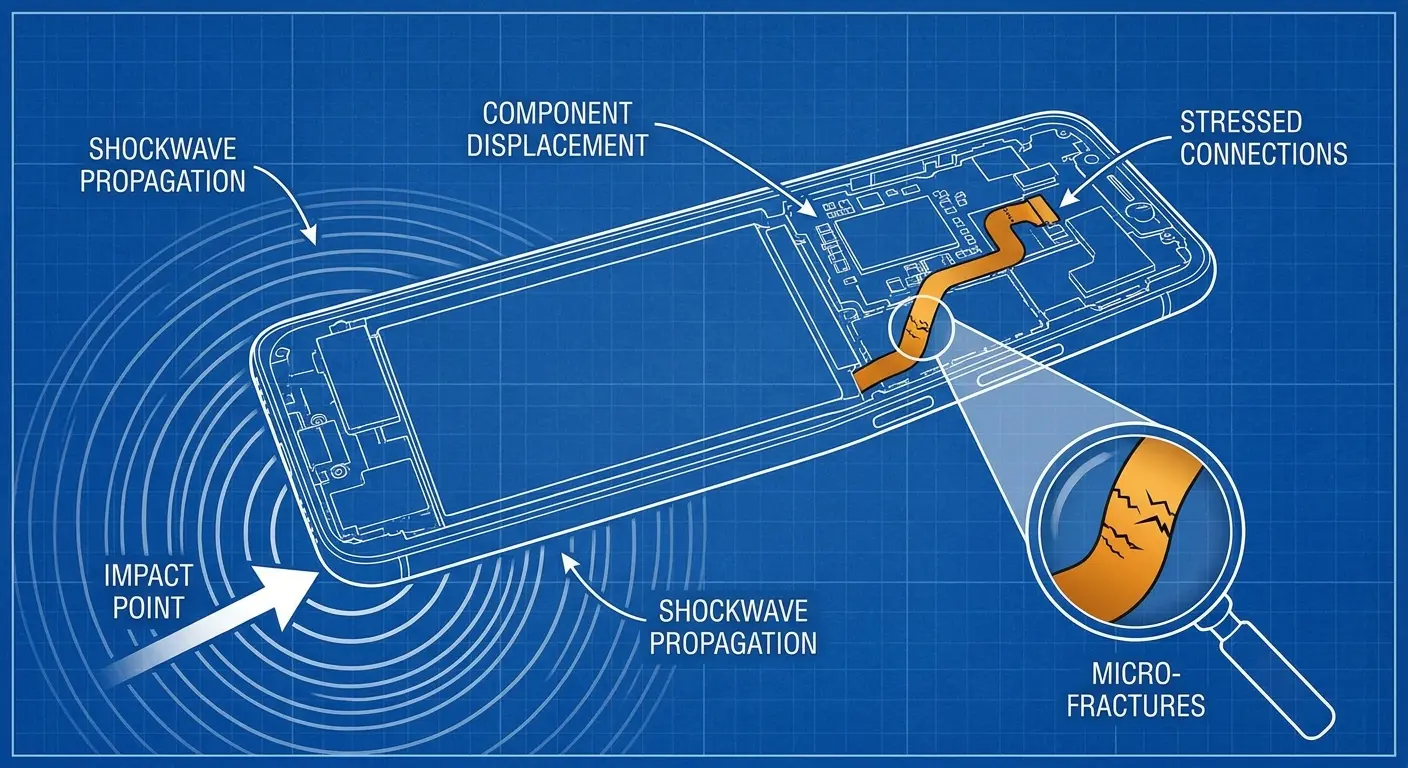
Impact energy travels through your phone as a shockwave, affecting components far from where it hit. The display assembly flexes, even if the glass doesn't break. This flex strains the ribbon cable connections, creating micro-tears in the conductive traces or loosening the connector seats.
Drop your phone from waist height onto tile, and it experiences around 100-150 Gs of force. The display assembly weighs about 15-20 grams. During that split-second deceleration, it generates enough force to bend the ribbon cable connector by several micrometers. The connector housing might compress by 0.1mm. Invisible to your eye, but enough to create intermittent contact on specific pins.
Three weeks later, after thousands of screen presses and temperature cycles, those pins lose contact completely. You see a phone screen turned green and have no idea the damage started with that bathroom drop.
These micro-damages don't fail immediately. They degrade gradually as you keep using your phone. Each screen press, each temperature change, each vibration from notifications slowly widens the damage. The connection becomes intermittent. Color data starts dropping. Green takes over.
The logic board experiences similar stress. Solder joints holding the display connector can develop hairline cracks. These cracks create high-resistance connections that mess with signal quality. Your phone tries to compensate, but eventually the signal degradation exceeds what the display controller can correct.
I see this pattern constantly. Someone contacts us about a phone screen turning green, swears they never dropped their phone, then remembers that one time it slipped off the couch onto carpet. Carpet seems harmless, but the deceleration force still exceeds what these delicate connections can handle without consequence.
The GPU mounting also takes impact stress. Modern phones use thermal paste and pressure mounts to keep the GPU cool. Impact can shift these mounts slightly, creating hotspots. The GPU overheats in specific areas, leading to localized failures that show up as color problems.
Your Wireless Charger Is Slowly Cooking Your Phone's Insides
Your phone heats up during charging, cools down in your pocket, heats up during video calls, cools down overnight. This constant temperature cycling makes materials expand and contract at different rates.
The display ribbon cable uses copper traces on a flexible polyimide substrate. The connector housing is plastic or composite material. Each has a different thermal expansion coefficient. As temperatures change, these materials move relative to each other.
The movement is microscopic, but it happens hundreds of times throughout your phone's life. This movement wears away the protective coatings on connector contacts. Bare copper gets exposed to air. Oxidation begins.
Here's the annoying part: copper oxidizes. That crusty green stuff you see on old pennies? Same thing happens inside your phone, just invisible. And oxidized copper doesn't conduct electricity properly, which means your color signals get scrambled. Green wins the scramble lottery most often.
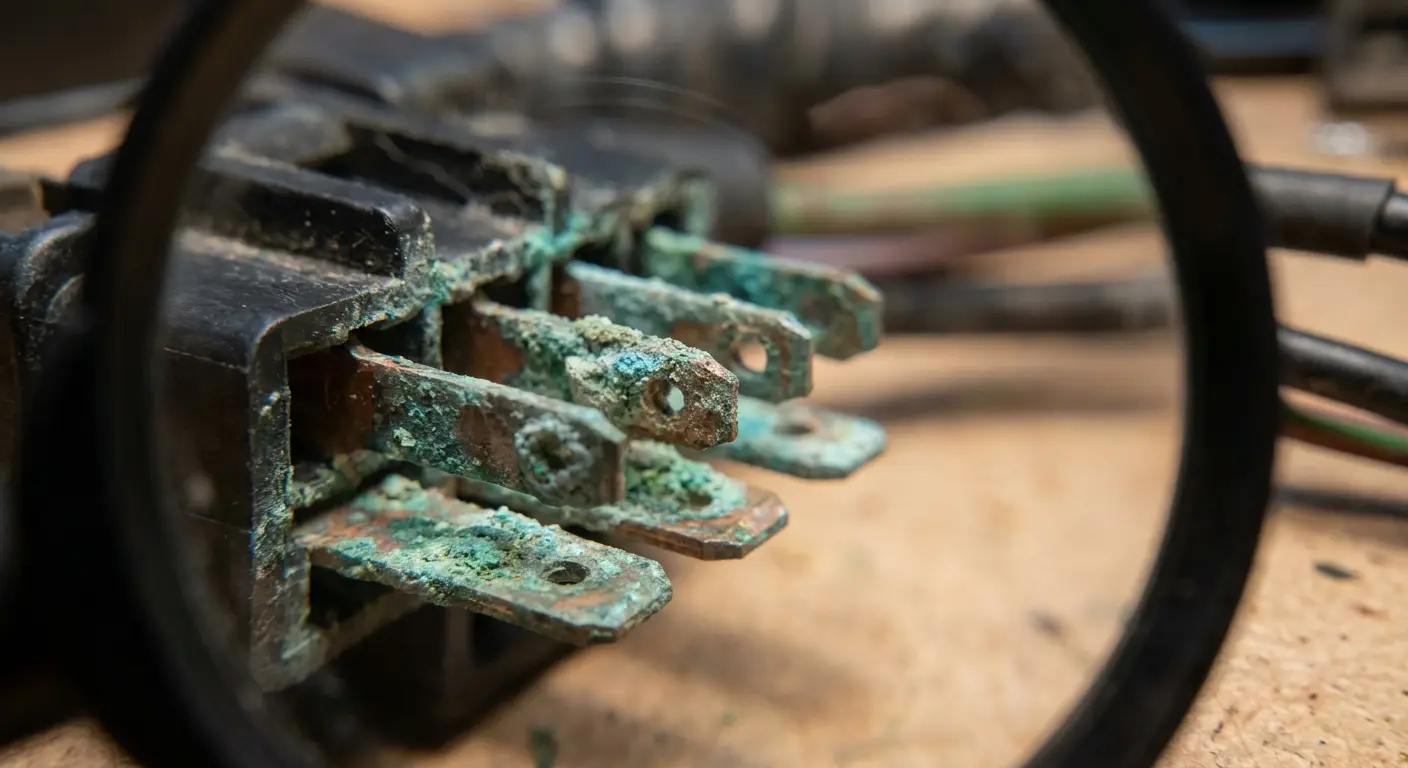
Humidity accelerates this process. Water vapor in air combines with the oxidation process, creating copper hydroxide and other compounds that further kill conductivity. You don't need to drop your phone in water. Normal atmospheric humidity, especially in coastal or humid climates, provides enough moisture for this degradation.
Wireless charging intensifies temperature cycling. The phone heats significantly during wireless charging, often reaching temperatures 15-20 degrees higher than wired charging. This heat concentrates near the charging coil, but spreads throughout the device. The display connector area experiences these temperature spikes repeatedly, accelerating the expansion-contraction cycle.
I wrote a whole deep-dive on whether wireless chargers are bad for your phone. Spoiler alert: yes, if you're not careful about heat.
Don't Cook Your Phone (Seriously, Stop It):
Take the damn case off when you're wireless charging. Yes, every time.
Hot day? Don't charge your phone. Wait till you're inside with AC.
If your phone's too hot to hold comfortably, STOP CHARGING IT. I don't care if you're at 2%.
Gaming for an hour straight? Let it cool down before you plug it in. 15 minutes. Go touch grass.
Never (and I mean NEVER) charge your phone in direct sunlight. I've seen what happens. It's not pretty.
Use wired charging when it's already warm outside
Monitor charging speed and reduce to standard (not fast) charging in warm conditions
Keep phone out of enclosed spaces during charging (drawers, under pillows, inside bags)
Yeah, this seems paranoid. But I've seen $800 phones die because someone couldn't wait 10 minutes.
Car Mounts: The Silent Phone Killer
Phone mounts seem convenient until they destroy your display connector. The pressure points created by most mounting systems concentrate force in exactly the wrong places.
Magnetic mounts attach to a metal plate you stick to your phone or case. That plate sits directly over internal components. When the mount grabs the plate, it pulls with significant force. This force compresses the phone's internal structure. The logic board flexes slightly. Connectors experience sideways stress they weren't designed to handle.
Vent clip mounts grip your phone's edges. This creates a clamping force across the phone's width. Your phone's frame is designed to distribute force evenly across its surface, not to resist inward pressure from opposite edges. The clamping compresses the phone slightly, pushing the logic board and display assembly closer together in some areas while creating gaps in others.
This uneven pressure affects the display connector directly. The connector relies on precise alignment and consistent contact pressure across all its pins. Mounting pressure can tilt the connector slightly, reducing contact on some pins while increasing it on others. The pins carrying green signal data might lose proper contact, causing your phone screen turned green.
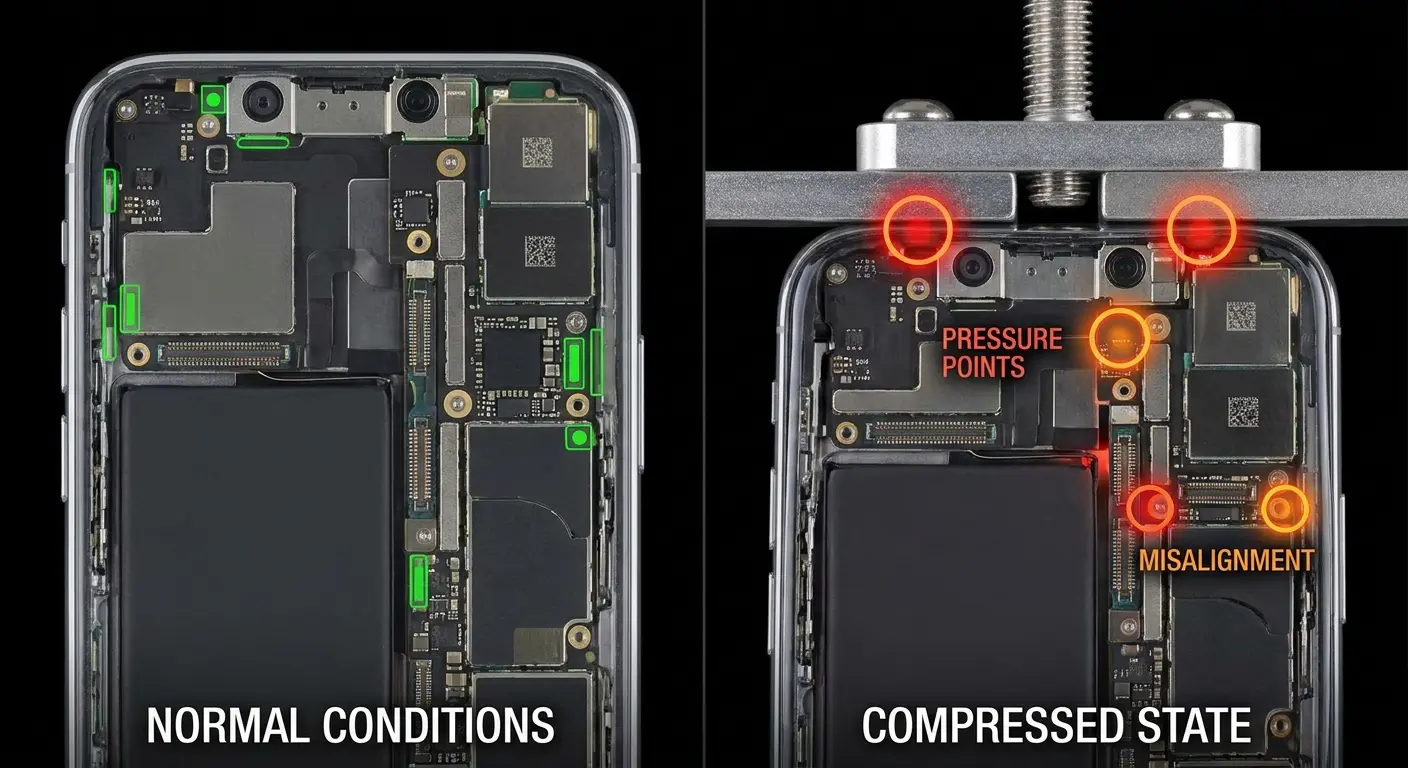
Dashboard mounts compound the problem with vibration. Road vibration at specific frequencies resonates with your phone's internal structure. This resonance amplifies the movement of components. The display ribbon cable flexes back and forth. Solder joints fatigue. Connections loosen.
I know a guy (let's call him Marcus) who delivers for Amazon. He had one of those cheap vent clip mounts from the gas station. Six months in, his phone started doing this weird green flash thing whenever he hit a bump. He ignored it.
Bad move.
Three months later, permanent green screen. Had to buy a new phone mid-route because he couldn't see his delivery app. $800 down the drain because of a $12 mount.
Meanwhile, his coworker Sarah? Been using a proper magnetic mount for two years. Same routes, same potholes, zero issues. The difference? Her mount doesn't squeeze her phone like it owes it money.
We engineered our mounting systems to distribute force across the phone's entire back surface rather than creating pressure points. The magnetic array spreads attraction force over a larger area. The case structure channels stress away from vulnerable internal components. This matters because mounting-induced screen damage is entirely preventable with proper mechanical design.
When Software Updates Expose What Was Already Broken
Your screen turned green immediately after a software update. You blame the update.
The update isn't innocent, but it's not the root cause.
Software updates change how your phone's GPU processes graphics. New optimization algorithms, updated color profiles, and revised power management can all push hardware differently than previous software versions. Hardware that was barely functioning under the old software can't keep up with new demands.
The display connector might have been making intermittent contact for months. The old software's error correction and signal processing compensated for the poor connection. The new software uses different algorithms that don't compensate as effectively. The underlying hardware problem finally becomes visible as a green screen on iPhone or other devices.
GPU voltage and frequency changes in updates create similar issues. Manufacturers often adjust these parameters to improve performance or battery life. A GPU with marginal stability might have worked fine at previous voltage levels. The new voltages push it past its tolerance. Color processing fails. Green appears.
Color calibration profiles also change between updates. These profiles tell the GPU how to mix red, green, and blue to achieve accurate colors. If the display or GPU has degraded, new calibration profiles might expose this degradation. The profile assumes all color channels function properly. When they don't, the results look wrong.
This explains why rolling back to the previous software version sometimes fixes iPhone green screen issues temporarily. You're not fixing the hardware problem. You're returning to software that compensates for it. The hardware continues degrading. Eventually, even the old software won't help.
True software-only green screens are rare but possible. Driver bugs, corrupted system files, or failed updates can cause display problems without hardware damage. These show up immediately after the update, affect multiple users with the same device model, and get fixed quickly with patches.
The Magnetic Interference Factor
Magnets don't directly damage LCD or OLED displays the way they affected old CRT monitors. The technology is fundamentally different. But magnets can still contribute to green screen problems through indirect mechanisms.
Strong magnetic fields affect the electrical currents flowing through your phone's circuits. The display ribbon cable carries high-frequency signals. Magnetic fields can induce small currents in these cables, creating noise in the signal. Enough noise degrades signal quality. Color data gets corrupted. Display problems appear.
The compass and magnetometer in your phone are designed to detect Earth's magnetic field, which is incredibly weak. Strong external magnets overwhelm these sensors. Your phone tries to compensate, running calibration routines repeatedly. This creates processing overhead.
In phones with marginal GPU or thermal performance, this extra processing can push temperatures higher, contributing to heat-related display problems.
Magnetic mounting systems use strong neodymium magnets. These magnets create fields strong enough to affect nearby components if poorly designed. The key is keeping the magnetic field away from sensitive components. Proper magnetic mount design concentrates the field in specific areas while shielding other areas.
We've tested our magnetic systems extensively against display interference. The magnetic field strength drops off rapidly with distance. By the time it reaches the display components inside your phone, it's too weak to cause problems. The bigger risk comes from cheap magnetic accessories that use unshielded magnets or create uneven magnetic fields.
Some phone components contain ferromagnetic materials. Magnets can physically pull on these materials, creating mechanical stress. This stress is minimal with properly designed magnetic systems but can add up over time with poorly designed ones. The cumulative stress might contribute to connector problems.
Humidity Is Sneaking In Through Cracks You Can't See
Your phone's water resistance depends on intact seals. Micro-cracks in the glass, gaps around buttons, or degraded adhesive strips create pathways for humidity to enter. You don't need visible cracks. Damage invisible to the naked eye is enough.
Water vapor molecules are small enough to penetrate through gaps that liquid water cannot. High humidity environments constantly expose your phone to water vapor. The vapor diffuses through any available opening. Once inside, it condenses on cooler components.
The display connector area often runs cooler than other parts of your phone. It's away from the heat-generating processor and battery. This makes it a prime condensation point. Water droplets form on the connector contacts. Corrosion begins.
Corrosion on connector pins creates non-conductive oxide layers. These layers block electrical signals. The green channel might fail first simply because of which specific pins corroded first. There's nothing inherently special about green. It's just probability and connector pin layout, resulting in phone screen turning green.
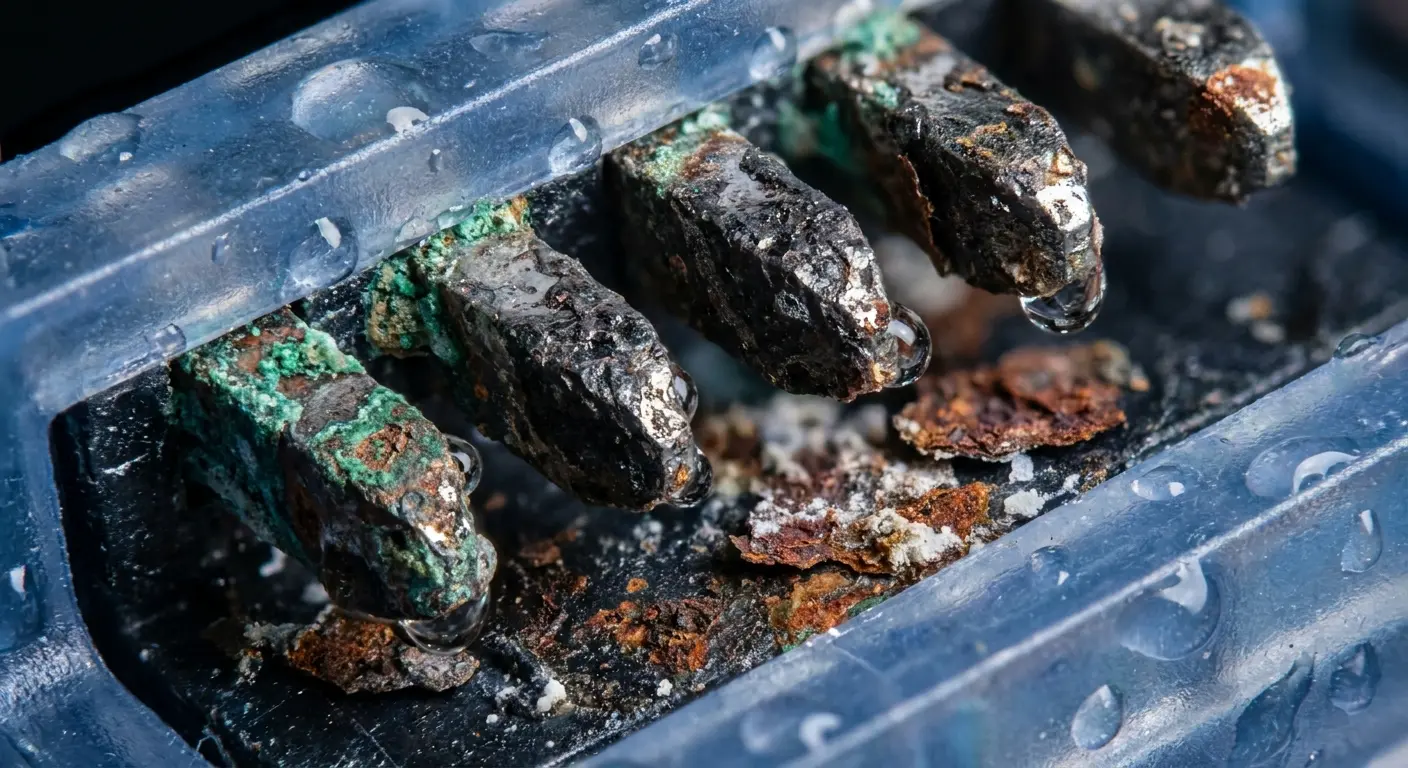
Salt accelerates this corrosion

