Skip to content

FREE shipping on $50+ orders

FREE FedEx 2-Day on $79+ orders

60-Day Money Back Guarantee

  • Cases
    iPhone
    • Shop All iPhone Cases
    • iPhone 17 Pro Max
    • iPhone 17 Pro
    • iPhone 17 Air
    • iPhone 17
    • iPhone 17e
    • iPhone 16 Pro Max
    • iPhone 16 Pro
    • iPhone 16 Plus
    • iPhone 16
    • iPhone 16e
    • iPhone 15 Pro Max
    • iPhone 15 Pro
    • iPhone 15 Plus
    • iPhone 15
    • iPhone 14 Pro Max
    • iPhone 14 Pro
    • iPhone 14 Plus
    • iPhone 14
    • More iPhone Cases...
    Galaxy
    • Shop All Galaxy Cases
    • Galaxy Z Fold7New
    • Galaxy S26 ULTRANew
    • Galaxy S26+New
    • Galaxy S26New
    • Galaxy S25 ULTRA
    • Galaxy S25 Edge
    • Galaxy S25+
    • Galaxy S25
    • Galaxy S24 ULTRA
    • Galaxy S24+
    • Galaxy S24
    • Galaxy S23 ULTRA
    • Galaxy S23+
    • Galaxy S23
    • Galaxy S22 ULTRA
    • Galaxy S22+
    • Galaxy S22
    • Galaxy Note 20 ULTRA
    Google
    • Google Pixel 10 Pro XLNew
    • Google Pixel 9 Pro XL
    • Google Pixel 8 Pro
    iPad
    • iPad Air 4/5 and 11” Pro
    • Don't see your device?
    Let Freedom Ring

    Let Freedom Ring

    Limited Edition Stars & Stripes Rugged Cases. Quantities limited!
  • Mounts
    Car Mounts
    • All Car Mounts
    • Swivel Mounts
    • Suction Mounts
    • Vent Mounts
    • Dash Mounts
    • Screen MountNew
    Motorcycle Mounts
    • All Motorcycle Mounts
    • Handlebar Mount
    • Pro Ball Mount
    • Perch Mount
    • Stem Mount
    • Mount Charging Head
    • Vibration Dampener
    Bike Mounts
    • All Bike Mounts
    • Universal Bike Bar Mount
    • Over The Top Mount
    • Stem Mount
    Universal Mounts
    • All Universal Adapters
    • Magnetic Tripod Mount
    • Universal Adapter
    • RAM® Ball Adapter
  • Power
    Charging Mounts
    • Windshield Car Charger
    • Dash Car Charger
    • Vent Car Charger
    • Car Screen ChargerNew
    • RokLock™ Wireless Charger
    • Moto Mount Charging Head
    • Tripod Phone Mount/Adapter
    Charging Accessories
    • 65W GaN Fast Wall ChargerNew
    • 30W Dual USB-C Car ChargerNew
    • 3-in-1 Wireless Folding Charging StandNew
    • 10,000mAh Power Bank
    • 100W USB-C Charging Cable
    • Wireless Charging Stand
    • 12V USB-C Motorcycle Adapter
    • Travel Charger KitNew
    Power On The Go

    Power On The Go

    Stay charged wherever, and whenever.
    3-IN-1 POWER

    3-IN-1 POWER

    Charge your phone, watch, and earbuds all at once.
  • Accessories
    Accessories
    • All Accessories
    • Magnetic Fuzion Wallet
    • Magnetic Sport Ring
    • RokLock™ Sport Ring
    • AirTag Holder
    • Premium Lanyard
    • Lanyard
    • USB-C Port Covers
    Screen Protectors
    • iPhone 17
    • iPhone 16
    • iPhone 15
    • iPhone 14
    • iPhone 13
    • Galaxy S26New
    • Galaxy S25 ULTRA
    Camera Lens Protectors
    • iPhone 17
    • iPhone 16
    • iPhone 15
    • Galaxy S26 ULTRANew
    • Galaxy Z Fold7New
    Universal Adapters
    • All Universal Adapters
    • Universal Adapter
    • RAM® Ball Mount
    Replacement Parts
    • Magnetic RokLock™ Plug
    • RokLock™ Upgrade
    • RokLock™ Adhesive Disc
    • Tape Dot Replacement
    • Bar Mount Spacers
  • Golf
    G-ROK PRO Wireless Speaker

    G-ROK PRO Wireless Speaker

    All-New G-ROK PRO is available now!
    G-ROK Wireless Speaker

    G-ROK Wireless Speaker

    The award-winning Golf Speaker.
    Golf Shooter Pro

    Golf Shooter Pro

    Perfect your swing.
  • Coming Soon
Rokform Rokform Logo
Rewards 0
      • Shop All iPhone Cases
      • iPhone 17 Pro Max
      • iPhone 17 Pro
      • iPhone 17 Air
      • iPhone 17
      • iPhone 17e
      • iPhone 16 Pro Max
      • iPhone 16 Pro
      • iPhone 16 Plus
      • iPhone 16
      • iPhone 16e
      • iPhone 15 Pro Max
      • iPhone 15 Pro
      • iPhone 15 Plus
      • iPhone 15
      • iPhone 14 Pro Max
      • iPhone 14 Pro
      • iPhone 14 Plus
      • iPhone 14
      • More iPhone Cases...
      • Shop All Galaxy Cases
      • Galaxy Z Fold7New
      • Galaxy S26 ULTRANew
      • Galaxy S26+New
      • Galaxy S26New
      • Galaxy S25 ULTRA
      • Galaxy S25 Edge
      • Galaxy S25+
      • Galaxy S25
      • Galaxy S24 ULTRA
      • Galaxy S24+
      • Galaxy S24
      • Galaxy S23 ULTRA
      • Galaxy S23+
      • Galaxy S23
      • Galaxy S22 ULTRA
      • Galaxy S22+
      • Galaxy S22
      • Galaxy Note 20 ULTRA
      • Google Pixel 10 Pro XLNew
      • Google Pixel 9 Pro XL
      • Google Pixel 8 Pro
      • iPad Air 4/5 and 11” Pro

    Let Freedom Ring

    Limited Edition Stars & Stripes Rugged Cases. Quantities limited!
    Don't see your device?
      • All Car Mounts
      • Swivel Mounts
      • Suction Mounts
      • Vent Mounts
      • Dash Mounts
      • Screen MountNew
      • All Motorcycle Mounts
      • Handlebar Mount
      • Pro Ball Mount
      • Perch Mount
      • Stem Mount
      • Mount Charging Head
      • Vibration Dampener
      • All Bike Mounts
      • Universal Bike Bar Mount
      • Over The Top Mount
      • Stem Mount
      • All Universal Adapters
      • Magnetic Tripod Mount
      • Universal Adapter
      • RAM® Ball Adapter
      • Windshield Car Charger
      • Dash Car Charger
      • Vent Car Charger
      • Car Screen ChargerNew
      • RokLock™ Wireless Charger
      • Moto Mount Charging Head
      • Tripod Phone Mount/Adapter
      • 65W GaN Fast Wall ChargerNew
      • 30W Dual USB-C Car ChargerNew
      • 3-in-1 Wireless Folding Charging StandNew
      • 10,000mAh Power Bank
      • 100W USB-C Charging Cable
      • Wireless Charging Stand
      • 12V USB-C Motorcycle Adapter
      • Travel Charger KitNew

    Power On The Go

    Stay charged wherever, and whenever.

    3-IN-1 POWER

    Charge your phone, watch, and earbuds all at once.
      • All Accessories
      • Magnetic Fuzion Wallet
      • Magnetic Sport Ring
      • RokLock™ Sport Ring
      • AirTag Holder
      • Premium Lanyard
      • Lanyard
      • USB-C Port Covers
      • iPhone 17
      • iPhone 16
      • iPhone 15
      • iPhone 14
      • iPhone 13
      • Galaxy S26New
      • Galaxy S25 ULTRA
      • iPhone 17
      • iPhone 16
      • iPhone 15
      • Galaxy S26 ULTRANew
      • Galaxy Z Fold7New
      • All Universal Adapters
      • Universal Adapter
      • RAM® Ball Mount
      • Magnetic RokLock™ Plug
      • RokLock™ Upgrade
      • RokLock™ Adhesive Disc
      • Tape Dot Replacement
      • Bar Mount Spacers
  • G-ROK PRO Wireless Speaker

    All-New G-ROK PRO is available now!

    G-ROK Wireless Speaker

    The award-winning Golf Speaker.

    Golf Shooter Pro

    Perfect your swing.
  • Coming Soon
AccountRewards

Search Quick Links

  • iPhone 17 Pro Max
  • iPhone 16 Pro Max
  • Camera Lens Protectors
  • Rokform Warranty
  • USB-C Port Cover
  • Car Mounts

Cart

Your cart is empty

Start shopping
emergency override iPhone charging situations can get you in a pickle - here’s what to know

Rokform Blog

Emergency Override iPhone Charging: What Happens After You Hit That Button

1TB Phone Storage: Why Most People Are Solving the Wrong Problem Reading Emergency Override iPhone Charging: What Happens After You Hit That Button 20 minutes
By David WhitakerJul 13, 2026 0 comments
Tags
  • Lifestyle
  • Tech
Share
Facebook Pinterest Twitter E-mail
Share

You see the warning. You plug in anyway. Hitting emergency override iPhone charging gets juice flowing, but it doesn’t make the moisture vanish or reset the risk. You’re telling the phone, “do it anyway,” and hoping the port, cable, and board all survive the call you’re about to make.


The real trouble starts after that choice. Moisture can sit in the port, chew on the metal, and turn into the “why is my iPhone not charging?” moment a few weeks later. That’s why the way you charge, the gear you use, and how often you hit override matter way more than that one pop-up box on your screen.

Quick Links

What You’re Actually Forcing Through Corrosion Timeline: What Happens After You Charge Wet Charging Port Degradation After Override Use When “Just This Once” Turns Into a Habit Wet Charging Turns Your Port Into a Space Heater Insurance And Warranty Stuff Nobody Wants To Think About Building A Plan After You’ve Already Hit Override Case Design’s Job: Keep The Port Out Of The Fight Final Thoughts

TL;DR

Emergency override shuts off moisture detection, not the water in your port

Corrosion starts fast once you push power through a wet connector

Every override adds tiny damage that stacks up over time

Most warranties don’t cover liquid damage, even if you used the warning the “right” way

Wet ports run hotter, which only makes the damage spread faster

Cases with real port covers keep most of the moisture off your charging hardware

A backup way to charge means you don’t lean on override every time you see the alert

Close up of iPhone charging port with small water droplets showing risk of emergency override charging
Source: asurion - This is the port you’re forcing power through when you hit emergency override iPhone charging

What You’re Actually Forcing Through

Apple’s liquid warning is there so your port doesn’t cook itself when it’s wet. When you slam emergency override iPhone charging, you’re not solving anything. You’re just telling the phone, “shut up and push power.”

What You’re Really Saying Yes To

So what does emergency override mean in plain language? The phone saw moisture and tried to stop you. You told it to ignore the sensor and charge anyway. What is emergency override? It’s not a fix, it’s a risk you take on purpose.

What Still Has Your Back

Even with override on, the phone isn’t totally blind. It still watches the important stuff, just not the water.


Protection system

Status during override

What it’s still doing

Moisture detection

Disabled

Normally watches resistance changes in the port

Thermal monitoring

Active

Tracks heat while you’re charging

Voltage regulation

Active

Keeps power delivery from getting sketchy

Charging speed control

Active

Adjusts current based on what the phone sees

Short circuit protection

Active

Cuts power if it detects a bad path


Indubitably, it’s worth checking the basics before you ever get to this screen.

That Little Countdown Isn’t For Show

Apple gives you a short timer before the button goes away on emergency override iPhone. That’s not pressure, that’s a built-in pause so you can think instead of just hammering “continue.”


Most people use that countdown to talk themselves into it. The port’s still damp, the phone’s still fresh out of the shower or the rain, and they override because they want power now. That’s how a quick decision turns into the corrosion problem you meet a few weeks later.

Corrosion Timeline: What Happens After You Charge Wet

Corrosion doesn’t take a day off. The moment you push power through a damp port with emergency override, the damage starts. You don’t see it at first. You just see a phone that “still works,” so you think you got away with it.


The problem is all the action is happening where you can’t see it. Metal, moisture, and current start eating that connector from the inside out. By the time you feel it at the cable, the port’s been losing the fight for a while.

First 30 Minutes: Silent Hit

In the first half hour, water and electricity start doing chemistry nobody asked for. The pins in the port begin to break down on a microscopic level, even though charging still looks normal. No glitch, no warning, just quiet damage starting in the background.

Hours 1–6: Things Get Weird

Over the next few hours, a thin oxidation layer starts building on those contacts. Now the port acts a little off. Charging slows down, drops out for a second, or needs a second plug-in. Most people blame the cable here, but the connector inside the phone is usually the one slipping.

Days 1–7: You Can Finally See It

After a few days, the evidence shows up. You’ll see green or white gunk on the pins, flaky charging, and “hold it at this exact angle” behavior. At this point, emergency override has turned from a quick tap into a problem that wants tools, time, or a bench.


Here’s what that slide from “fine” to “fried” looks like laid out:


Timeline

Corrosion stage

What you see

What charging does

0–30 minutes

Electrochemical reaction

Nothing yet

No obvious change

1–6 hours

Oxidation layer forms

Still looks clean

Slight resistance bump

1–7 days

Visible corrosion starts

Green or white buildup on pins

Intermittent connection issues

2–4 weeks

Structural damage kicks in

Heavy discoloration, possible cracks

Unreliable, frequent failures

1–3 months

Advanced deterioration

Pins heavily damaged or missing

Port often needs replacement

Weeks 2–4: The Port Taps Out

Two to four weeks in, the connector is usually in serious trouble. The plating is chewed up, raw copper is exposed, and it’s breaking down fast. Sometimes the plastic around the port even shows stress marks or hairline cracks from everything happening inside.


By then, charging is so touchy most people finally admit something’s wrong. A quick clean doesn’t cut it. This is the point where you’re looking at a repair, not a wipe-down. If you’re already at that stage, you’re in “how to fix iPhone charging port” territory, not “ignore the warning and hope for the best.”

Close up of iPhone charging port covered in water showing risk of emergency override iPhone charging
Source: askcomputers - This is how an emergency override charging habit starts and how a port dies

Charging Port Degradation After Override Use

Every time you hit override, you’re making a trade. You get power right now, and your port pays for it later. One emergency override in a real emergency is understandable. Turn it into your go-to move, and you’re grinding that connector down way faster than normal use. So is it bad to emergency override iPhone charging? If you’re doing it often, yeah, because the damage doesn’t reset between charges.

Pin Wear

Those tiny spring-loaded pins are designed for clean contact. Corrosion turns them rough, so every plug-in becomes a scrape instead of a soft touch. You’ve got chemical damage from the moisture and mechanical wear from the cable rubbing over the same scarred spots. That’s not what the port was built for.

Data Pins Go First

Here’s the sneaky part. A port can still charge while the “smart” stuff is already gone. Data pins usually lose the fight before the main power line does. That means CarPlay, wired audio, and syncing can all die while the phone still takes a charge. Emergency override makes it easy to assume everything’s fine because the battery icon goes up, but under the hood the port is already halfway done.

Heat and Resistance

Corroded contacts don’t just look ugly. They add resistance. Resistance turns into heat. Heat speeds up corrosion. That loop is how a slightly damaged port turns into a cooked one. This is also where a good charger setup matters. If you’re running sketchy bricks and random cables, you’re just giving that weak port more chances to fail instead of switching to something safer like one of the better universal iPhone chargers out there.

When “Just This Once” Turns Into a Habit

Habits don’t need a calendar invite. You hit emergency override once, the phone charges, nothing explodes, and your brain files that as “safe.” Next time the warning pops up, it’s easier to hit it again. After a few rounds, override isn’t a last resort anymore. It’s just what you do.

The Fake Sense of Safety

Your phone doesn’t die the first time you charge it wet. The damage builds slowly, which is why it feels harmless. You override, the battery climbs, you move on. Meanwhile, corrosion is doing quiet work inside the port with zero feedback. By the time you notice issues, you’ve probably overridden several times. People ask how long does emergency override last like it’s a timer. It isn’t. Each hit leaves behind tiny permanent scars that stack up over every charge.

Convenience vs. Caution

We’re all wired for “right now.” You need your phone for maps, messages, or music, and waiting 20 minutes feels like punishment. The moisture alert starts to look like Apple being dramatic instead of your phone trying to protect itself. Every “nothing bad happened” override trains you to ignore the warning. That’s how occasional use slides into regular abuse of emergency override.


Some environments make this worse. Bathrooms, kitchens, job sites, hot and humid climates: you’ll see the alert more often. The phone doesn’t care if it’s a full splash or just heavy steam. Same warning, different risk. That’s where people start doing their own on-the-fly risk math and usually give in.

Override Decision Checklist

Before you smash that button, run through this quick gut check.

  • Is this actually an emergency? (calling 911, stranded and need navigation, critical work call)

  • Do I have wireless charging nearby? (car mount, desk charger, nightstand, anywhere you can drop it on a pad)

  • Can I wait 15–20 minutes and let it air out?

  • Is the port visibly wet? (if you can see droplets with a flashlight, don’t override)

  • Have I already overridden in the last week?

  • If this kills the port, how am I charging tomorrow?

If the answer to the first one is no and you’re hitting yes on any of the others, that’s your sign to back off. Drop it on a pad, unplug, or walk away for a bit. At Rokform, we already put together a guide to which iPhones with wireless charging can bail you out here, so you’re not stuck choosing between a dead battery and a fried port every time the warning shows up.

Wet Charging Turns Your Port Into a Space Heater

Heat and moisture on their own are bad. Put them together and your charging port becomes the weakest link in the whole phone. When you hit emergency override and force a wet charge, you’re stacking two kinds of stress that love to wreck hardware.

Why a Damp Port Runs Hot

Water inside the port adds resistance. Resistance makes heat. Now your connector is acting like a tiny heater every time you plug in. The phone’s thermal system keeps a close eye on the battery, but it doesn’t babysit the port the same way. That means the area around the connector can get hotter than you think, especially if you’re using a beefy wall brick or fast charger.

Heat That Spreads Past the Port

That extra heat doesn’t stay put. It bleeds into the charging chip, the flex cables, and the lower part of the logic board. Those parts are built to handle normal temps, not constant spikes from wet charging and emergency override runs. Push them out of their comfort zone enough times and you’ll start seeing weird behavior: charging that cuts out, chargers the phone “doesn’t like,” or power that ramps up and down for no obvious reason.

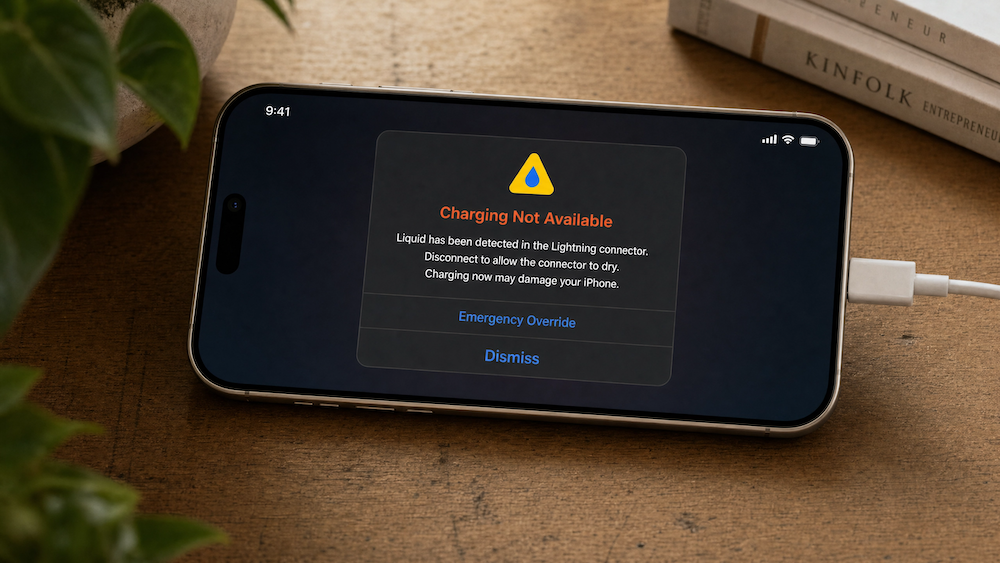
 iPhone showing liquid detected USB C connector alert with emergency override charging option
Source: reddit - Liquid warning screen that shows up right before people smash emergency override iPhone charging

Your Battery Takes the Hit Too

Your battery lives close to that port, so it gets baked by the same heat. Lithium-ion cells hate running hot. They age faster, lose capacity quicker, and make your battery health number drop sooner than it should. A lot of people chalk that up to “this model just has bad battery life,” when part of the story is how they’ve been charging. Honestly, some iPhones have the worst battery life, and wet charging doesn’t help the ones that already struggle.

Insurance And Warranty Stuff Nobody Wants To Think About

This is the part nobody checks until something breaks. Your warranty and insurance paperwork almost always has language about liquid damage, and not in your favor. A lot of people only go hunting for how to turn off emergency override iPhone charging after they’ve already used it and the port starts acting sketchy. By then, the phone’s logs have already told the story.

How Override Looks On Paper

AppleCare and AppleCare+ treat liquid very differently from normal defects. AppleCare+ might help, but you’re still paying a service fee. Regular coverage usually taps out the second corrosion shows up. When you use emergency override on iPhone, you’re basically telling the device, “yeah, I know it’s wet, do it anyway.” If diagnostics later show moisture alerts plus a corroded port, it’s easy for a tech or adjuster to say this wasn’t random bad luck.


Third‑party plans and carrier insurance love terms like “reasonable care” and “proper use.” Repeated wet charging doesn’t look like either. The phone logs when moisture was detected and when you pushed past it. That data doesn’t auto‑deny your claim, but it does give the repair center a clear link between your choices and the damage. If you want cleaner options next time, building a safer setup with better Apple phone accessories is a lot cheaper than gambling on a claim that might not land in your favor.

Building A Plan After You’ve Already Hit Override

You’ve already used emergency override charging. Maybe once. Maybe more than you want to admit. No point beating yourself up. The move now is building a setup that keeps the damage from getting worse and makes override the last option, not the first. Once you understand what emergency override is on iPhone - you get what you’re actually doing. Now, it’s easier to decide when it’s worth the risk and when it’s just a bad habit.

Step One: Check The Port You’ve Been Ignoring

Grab a flashlight and actually look at the port. You’re hunting for green, white, or dark spots on the pins. That’s corrosion, not “just dirt.” Catching it early gives you a shot at stopping the spread instead of jumping straight to a repair.


Here’s how to clean your iPhone's charging port


What you need

  • Wooden toothpick or plastic dental pick

  • 90%+ isopropyl alcohol

  • Cotton swabs

  • Flashlight or phone light

  • Compressed air (optional)

What you do

  1. Power the phone off

  2. Check the port with the light and note any crud or color changes

  3. Hit it with short bursts of compressed air to clear loose junk

  4. Gently scrape buildup with the toothpick, working from the back of the port toward the edge

  5. Lightly dampen a cotton swab with alcohol, then wipe the inside of the port

  6. Let the phone sit and air dry for at least 30 minutes

  7. Recheck with the light

  8. Plug in and see if the connection feels solid

  9. Repeat if charging still cuts out or feels loose

Do this right after any emergency override charging, once a month as maintenance, and any time your cable suddenly gets picky.

Step Two: Give Yourself A Backup Charger

Most overrides happen because you’ve got one way to charge and it’s the port in front of you. Kill that bottleneck. Add wireless into the mix so a wet port doesn’t force a bad decision.

Drop a MagSafe or Qi pad in the spots where you keep seeing that moisture warning: bathroom counter, kitchen, nightstand, desk, car mount. If the alert pops up, switch to the pad instead of forcing the cable. The phone still gets power. The port gets time to dry.

Step Three: Figure Out Where The Water’s Coming From

That alert keeps showing up for a reason. Steam from showers, sweat from runs, cooking humidity, rain, pocket condensation when you move between hot and cold. The phone doesn’t care, it just knows the sensor saw moisture.

  • Once you know your main culprit, you can change the routine:

  • Don’t leave your phone parked next to the shower

  • Keep it out of the line of fire when you’re cooking

  • Use a pocket or bag that isn’t trapping sweat against the port

  • Watch what happens when you walk from AC into humid air and plug in right away

You’re not trying to live in a lab. You’re just trying to stop feeding the same scenario that keeps dragging you back to override.

Step Four: Build A Fast-Dry Move

You don’t always have hours to wait it out. You can still speed up drying without cooking the phone.

  • Aim a fan straight at the port for 15–20 minutes

  • Don’t use a hair dryer or heater

  • Shake the phone gently with the port facing down to knock loose droplets

  • Set it port‑down on something absorbent and leave it alone

Do that before you ever think about plugging in again. Half the time, that window is all you need to clear the alert and avoid hitting override at all.

Rokform Rugged iPhone case protecting phone used for emergency override charging
Rokform Rugged case built to take hits so you’re not reaching for emergency override iPhone charging every weekend

Case Design’s Job: Keep The Port Out Of The Fight

Your case either keeps the USB‑C opening out of trouble or it turns it into a splash zone. Most cases carve a big hole at the bottom and call it “access.” That’s fine until steam, sweat, or rain start living in that gap and you’re staring at the override screen again. At that point, you don’t need to know how to turn off emergency override. You need a setup that keeps the warning from showing up in the first place.


We built our newer Rugged, and Crystal cases around that idea. They’re designed to work with our USB‑C Port Cover 2‑Pack, a soft silicone plug that locks into the case and caps the port when you’re not charging. It keeps dust, grit, and splash out of the connector without getting in your way when it’s time to plug in.

Why Our Port Cover Setup Hits Different

We didn’t throw a random dust plug in the box and hope for the best. The USB‑C port covers are shaped to snap into Rokform cases and stay there. They sit flush, flex enough to move with the case, and don’t pop out every time you pocket the phone. You flip them out with one hand, plug in, and push them back when you’re done. No tiny tabs to rip, no stiff hinge to fight.


The combo is simple. Rugged or Crystal case on the outside, USB‑C cover guarding the opening, mounts and magnets still doing their thing everywhere else. That means less moisture in the connector, fewer “liquid detected” alerts, and fewer moments where you’re tempted to slam override just to get through the day.

Final Thoughts

Emergency override iPhone charging is there for the bad days, not the lazy ones. It’s meant for the “I have to get this call out” moment, not the “I don’t feel like waiting 15 minutes for this port to dry” moment. The feature does exactly what it says. It lets you charge through moisture. The catch is every time you use it, you’re trading a little bit of long‑term reliability for short‑term power.


That charging port is one of the only doors into the inside of your phone and it takes every hit from your environment. Every override is basically you saying, “yeah, I’m cool with risking this connector for a few percent right now.” Sometimes that’s the right call. Most of the time, it’s not. If you know which iPhone models you’re working with and how long you plan to keep them, it’s a lot easier to decide when that trade is worth it.


The smarter move is to build a setup that makes override almost never necessary. Pad on the desk. Pad in the car. Case that actually protects the port. Simple drying routine when the alert shows up. None of that is complicated. It just takes a little planning instead of hammering the button and hoping for the best.


At Rokform, we build gear for people who actually use their phones hard. If your phone is riding with you, working with you, and catching the same abuse you do, give it a case and setup that keeps the port alive and the battery fed without leaning on override. Don’t buy a fragile setup and baby it. Run a tougher kit that keeps up.

More from Rokform

  • Samsung Battery Life

  • How to Turn Off Battery Optimization in iOS and Android

  • iPhone 16 Battery Test

  • Phones Could Get a Serious Power-Up with Silicon-Carbon Batteries

Continue reading

Big 1TB phone storage for the dude who keeps everything on him

1TB Phone Storage: Why Most People Are Solving the Wrong Problem

Leave a comment

All comments are moderated before being published.

This site is protected by hCaptcha and the hCaptcha Privacy Policy and Terms of Service apply.

Newsletter

Text "SIGNUP" to 34297 for SMS Updates.

Support

  • Contact Us
  • Terms of Promotion
  • My Account
  • Shipping Information
  • Military and First Responder Discount
  • Reviews
  • Find a Dealer
  • Contact Us
  • Terms of Promotion
  • My Account
  • Shipping Information
  • Military and First Responder Discount
  • Reviews
  • Find a Dealer

About

  • About Us
  • Rokform Giveaway
  • Rokform Rewards
  • Rokform Rewards Terms and Conditions
  • Blog
  • Dealer Locator
  • Become a Dealer
  • B2B
  • What is MAGMAX?
  • Patents
  • Case Comparison
  • About Us
  • Rokform Giveaway
  • Rokform Rewards
  • Rokform Rewards Terms and Conditions
  • Blog
  • Dealer Locator
  • Become a Dealer
  • B2B
  • What is MAGMAX?
  • Patents
  • Case Comparison

Policies

  • Return Policy
  • Warranty Policy
  • Accessibility Policy
  • Terms of Service
  • Privacy Policy
  • California Privacy Notice
  • Notice of Financial Incentive
  • Your Privacy Choices
  • Return Policy
  • Warranty Policy
  • Accessibility Policy
  • Terms of Service
  • Privacy Policy
  • California Privacy Notice
  • Notice of Financial Incentive
  • Your Privacy Choices
California Consumer Privacy Act (CCPA) opt-out icon Your Privacy Choices

Premium handheld innovation.