


Your phone won't turn on. You've tried charging it, you've held down every button combination you can think of, and you're staring at a black screen wondering what you did wrong.
Everyone jumps straight to software issues or dead batteries. And yeah, sometimes that's it. But most of the time? There's physical damage you don't even remember happening.
I'm talking about the drop from three weeks ago that "didn't do anything." The time your phone got wet but seemed fine after you dried it. That afternoon you left it in your car. All of that adds up, and eventually, your phone just... doesn't turn on anymore.
So we need to talk about the physical damage angle that nobody wants to hear about, because understanding it actually helps you prevent this nightmare in the first place.
Table of Contents
The Hidden Connection Between Drop Impact and Power System Failure
Why Water Damage Symptoms Don't Always Show Up Immediately
Temperature Extremes and Internal Component Degradation
The Charging Port Destruction Timeline Nobody Talks About
When Your Screen Replacement Actually Caused the Power Issue
Battery Swelling as a Mounting System Problem
How Case Design Affects Long-Term Device Durability
The Real Reason Your Phone Died After a "Minor" Drop
Diagnosing Physical vs. Software Power Failures
Prevention Strategies That Actually Address Root Causes
TL;DR
Impact damage to internal components often manifests as power failures weeks or months after the initial drop
Water exposure creates corrosion that progressively damages power delivery systems over time
Extreme temperatures cause micro-fractures in solder joints that eventually break power connections
Charging port damage accumulates from daily use and inadequate case protection around vulnerable areas
Third-party screen replacements frequently damage ribbon cables and connectors during installation
Battery swelling from heat exposure and charging habits physically disconnects internal components
Case mounting systems that distribute impact force prevent the cumulative damage leading to power failures
Most "sudden" power deaths trace back to physical stress events from days or weeks prior
Physical damage symptoms require different diagnostic approaches than software issues
Protective systems designed around impact physics and heat dissipation prevent most physical power failures
The Hidden Connection Between Drop Impact and Power System Failure
Look, I've seen this probably a hundred times. Your phone hit the ground three weeks ago. The screen didn't crack. Everything seemed fine. Now it won't turn on, and you're convinced it's unrelated.
But it is related.
Impact damage doesn't always announce itself with visible cracks or immediate malfunction. The force from a drop travels through your device, and internal components (especially the ones responsible for power delivery) are way more fragile than the glass protecting them.
Your phone's logic board contains dozens of tiny capacitors, resistors, and integrated circuits that manage power flow. When your device hits concrete, these components experience sudden deceleration forces. Solder joints crack microscopically. Connections loosen just enough to create intermittent contact. The damage is cumulative, not catastrophic.
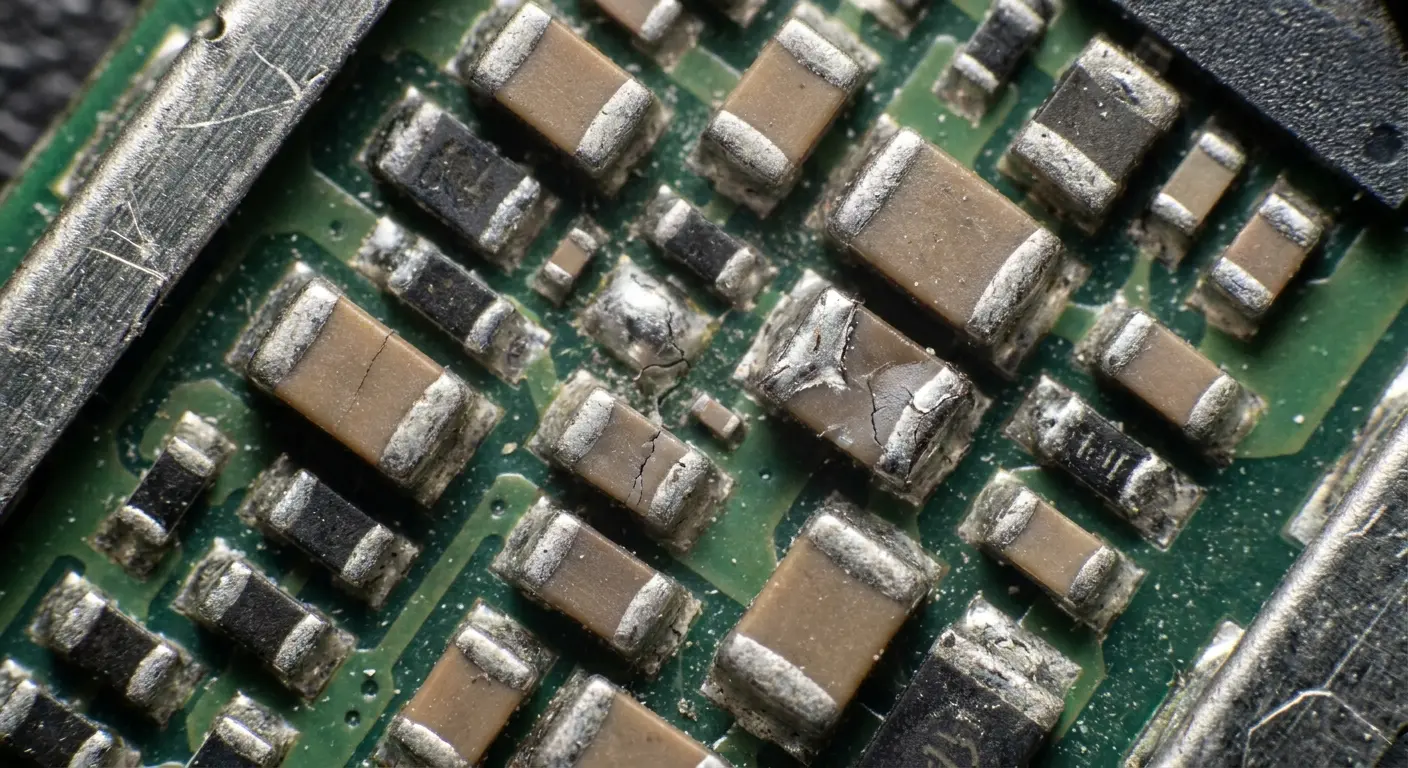
And here's the deal: those micro-fractures expand with each subsequent vibration, temperature change, or minor jostle. The power management IC might lose connection to the battery. The charging circuit develops resistance that prevents proper current flow. Eventually, you get a phone that appears completely dead.
Had a customer last month who dropped her phone from a kitchen counter onto tile flooring while she was cooking. The screen survived intact, no visible damage appeared, and the phone continued working normally for three weeks. Then, during a routine morning alarm, the device shut down and refused to power back on. A repair technician later discovered that the initial drop had created a hairline crack in the solder joint connecting the power management IC to the logic board. Over those three weeks, normal vibrations from being carried in a pocket, temperature fluctuations from charging cycles, and minor bumps gradually widened that crack until the electrical connection failed completely. She never connected the kitchen drop to the power failure because the delay seemed to rule out causation.
And everyone's always shocked. "But it was fine after I dropped it!" Yeah, for three weeks it was.
The Specific Components That Fail First
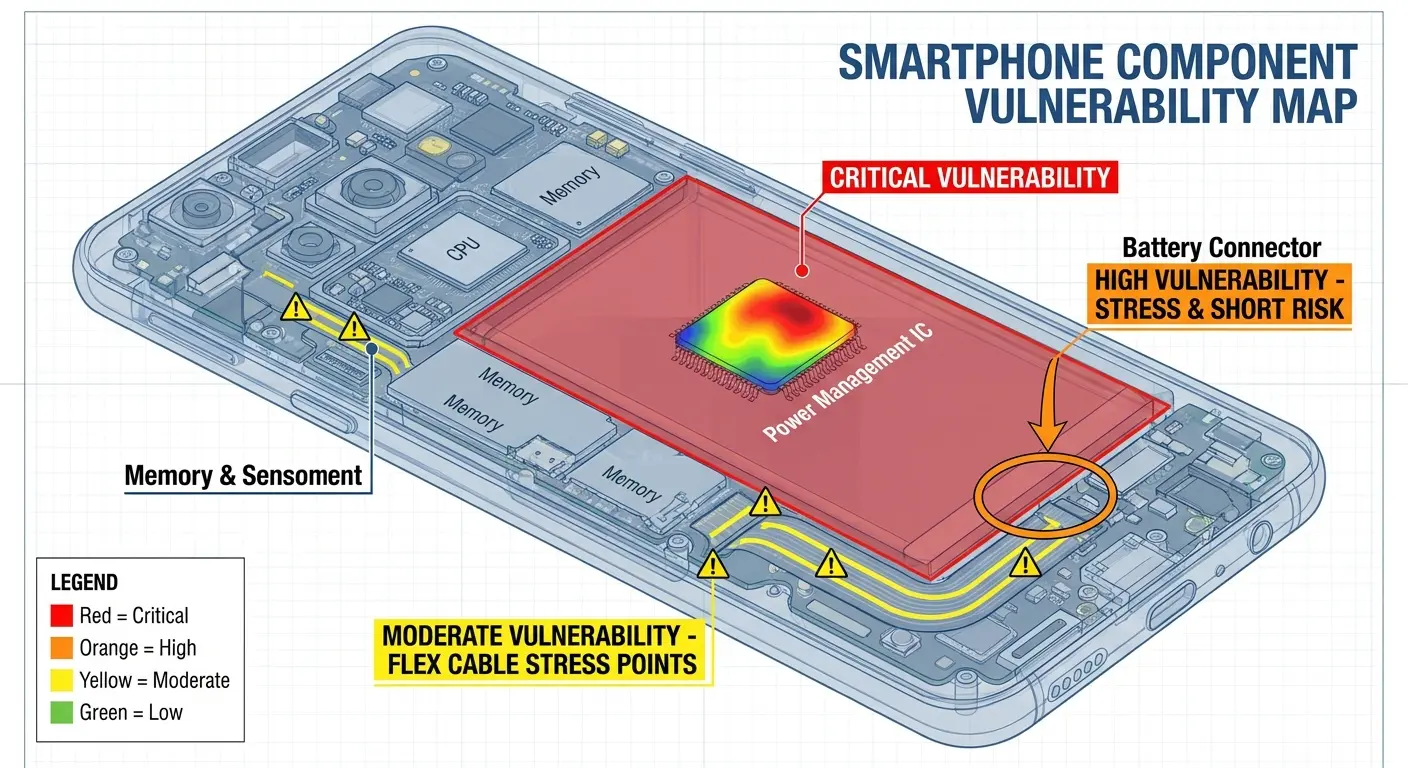
Power management integrated circuits sit near your phone's edge in most designs. They're positioned there for thermal management, but this placement makes them vulnerable to edge and corner impacts.
The battery connector uses spring-loaded pins that maintain contact with the battery's terminals. Drop your phone hard enough, and these pins compress beyond their elastic limit. They don't spring back fully. Contact becomes unreliable.
Your charging port connects to the logic board through a flex cable in many phone models. This cable includes power lines, data lines, and ground connections. Impact stress concentrates at the connection points where the cable meets both the port and the board. These are failure points waiting to happen.
We're not talking about drops from ten feet. A fall from pocket height onto the wrong surface at the wrong angle creates enough force to start this degradation process.
Component |
Location Vulnerability |
Failure Mechanism |
Typical Delay to Failure |
|---|---|---|---|
Power Management IC |
Near device edges for thermal dissipation |
Solder joint micro-fractures from edge impacts |
2-6 weeks |
Battery Connector Pins |
Center-bottom of device |
Compression beyond elastic limit, incomplete spring-back |
1-4 weeks |
Charging Port Flex Cable |
Lower edge connection points |
Stress concentration at cable-to-board junctions |
3-8 weeks |
Logic Board Capacitors |
Distributed across board |
Physical cracking from board flexing during impact |
1-3 weeks |
Why Your Case Didn't Actually Protect These Components
Standard cases absorb impact at the corners and edges. That's their design priority because that's where phones typically make first contact during a drop.
But impact force doesn't just disappear. It transfers through the device. A case that prevents screen cracks might do nothing for the internal component acceleration and deceleration that causes logic board damage.
The mounting system matters more than case thickness. If your phone can shift inside its case during impact, the device itself experiences the full deceleration force. The case protected the exterior while the internals still suffered damage.
You need a case design that mechanically locks the phone in place and distributes force across the entire back surface rather than concentrating it at mounting points. Most cases use corner grips or edge friction, which means the phone's center can flex and bend during impact even while the corners stay protected. Rokform's RokLock mounting system addresses this by creating full-back contact that distributes impact energy across the entire device rather than concentrating stress at corner mounting points.
Why Water Damage Symptoms Don't Always Show Up Immediately
Water damage is sneaky as hell. Your phone takes a swim, you dry it out, it works fine... and then two months later it's dead. And you're sitting there thinking "there's no way that's related."
But it is. Because corrosion doesn't care that your phone seemed fine. It's been slowly eating away at your logic board this entire time, and you just didn't know it.
Moisture creates an electrolytic cell between different metal contacts on your logic board. This cell slowly dissolves metal traces, particularly the ones carrying power.
Your phone might have dozens of power rails delivering different voltages to various components. Corrosion only needs to break one critical rail to prevent the entire device from powering on. The process is slow enough that your phone works normally until the corroded trace finally fails completely.
A phone owner dropped their device in a bathroom sink for approximately three seconds. They immediately powered it off, dried it thoroughly with a towel, and placed it in rice for 48 hours following common advice (and yeah, rice doesn't actually work, but that's another rant). After two days, the phone powered on normally and functioned without any apparent issues for seven weeks. Then, the device suddenly refused to turn on one morning. Inspection revealed extensive corrosion on the logic board's power delivery traces near the charging port, where residual moisture had remained trapped under a connector shield. The electrochemical reaction had been slowly dissolving the copper traces for nearly two months before finally severing the connection completely.
The Specific Areas Where Corrosion Kills Power First
Charging port contacts corrode before almost anything else. They're exposed to humidity and contaminants even without submersion. Once water enters, these contacts become priority targets for electrochemical degradation.
The battery connector area accumulates corrosion because it carries high current. Higher current means more electrochemical activity. The spring pins we mentioned earlier? They're usually gold-plated to resist corrosion, but water exposure can compromise the plating and allow the base metal underneath to oxidize.
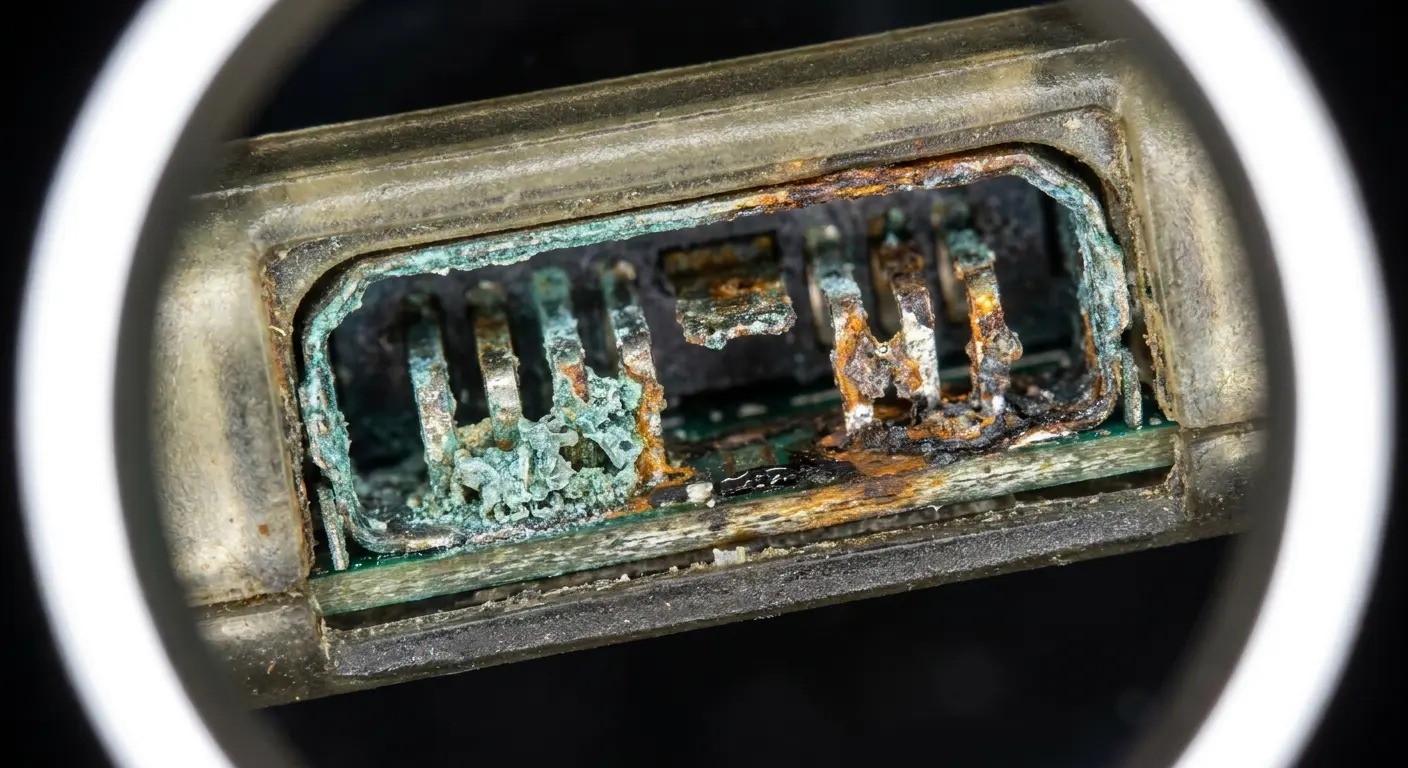
Power button flex cables are another common failure point. These cables route power signals from the physical button to the logic board. They're thin, flexible, and contain minimal corrosion protection. A small amount of moisture trapped under the cable creates enough corrosion to interrupt the power-on signal.
You can have a phone where 95% of the components are perfectly fine, but corrosion in one small connector prevents the entire device from turning on. This is why water damage is so insidious compared to impact damage.
How Case Sealing Actually Works (And Where It Fails)
Cases marketed as waterproof use gaskets and seals around ports and openings. These work well for brief submersion in clean water. They fail over time as the gaskets compress, as adhesive weakens, and as daily wear creates gaps.
Port covers are the weakest link. You open the charging port cover multiple times daily. Each opening stresses the hinge and seal. Eventually, the seal no longer sits flush, and moisture can enter.
Honestly? Most cases don't seal the mounting interface between phone and case. Water that enters through any gap can become trapped between your device and the case interior, creating a moisture pocket that promotes ongoing corrosion even after the external water source is gone.
I've seen phones with active corrosion months after water exposure because the case trapped residual moisture against the device back. The case became a terrarium for electrochemical reactions.
Temperature Extremes and Internal Component Degradation
You left your phone in your car. In summer. On the dashboard.
I see this all the time, and honestly? It drives me crazy because it's so preventable. Your car's dashboard can hit 160°F (that's not "kinda warm," that's "cooking your phone's internals" territory).
And the damage doesn't show up right away, which is why people don't connect the dots. You grab your phone, it's hot, you let it cool down, everything seems fine. But inside? You just aged your battery by six months and stressed every solder joint on the logic board.
Temperature cycling creates expansion and contraction in materials with different thermal coefficients. Your phone contains metals, plastics, glass, and silicon, all of which expand and contract at different rates when heated or cooled.
Solder joints are particularly vulnerable. They connect components with different expansion rates. Repeated temperature cycling creates fatigue in the solder, forming cracks that grow with each cycle. Eventually, the crack separates the connection entirely.
This process is cumulative and invisible. You won't see symptoms until the damage reaches a critical threshold. For power-related components, that threshold is binary: the phone either powers on or it doesn't.
The battery swells. The power management IC starts failing. And three weeks later when your phone won't turn on, you're not thinking about that Tuesday afternoon in the parking lot.
The Specific Temperature Ranges That Cause Damage
Lithium-ion batteries degrade rapidly above 113°F (45°C). This isn't just about reduced capacity. High temperatures cause the battery to swell, which creates physical pressure on internal components. The swelling can disconnect the battery from its connector or damage nearby components through mechanical stress.
Below freezing, battery chemistry slows dramatically. The battery can't deliver its rated current. But the real damage happens during charging at low temperatures. Charging a cold battery causes lithium plating on the anode, which permanently reduces capacity and can create internal short circuits that prevent the battery from functioning.
Your phone's logic board components are rated for specific temperature ranges. Exceed those ranges, and you accelerate electron migration in integrated circuits, degrade capacitor dielectrics, and weaken solder joints. Each exposure adds to cumulative damage.
The dashboard of a car in summer sun can reach 160°F (71°C). That's well beyond safe operating temperatures for phone components. Even a single exposure at this temperature can cause damage that manifests as power failure days later.
Temperature Condition |
Threshold |
Primary Damage Mechanism |
Component Most Affected |
Timeline to Failure |
|---|---|---|---|---|
High Heat (charging) |
Above 113°F (45°C) |
Battery swelling and electrolyte degradation |
Lithium-ion battery |
2-4 weeks |
Extreme Heat (environmental) |
Above 140°F (60°C) |
Solder joint weakening and IC electron migration |
Power management IC |
1-3 weeks |
Dashboard Heat |
150-160°F (65-71°C) |
Accelerated component aging and adhesive failure |
All internal components |
Days to 2 weeks |
Cold Charging |
Below 32°F (0°C) |
Lithium plating on battery anode |
Battery cells |
Immediate to 1 week |
Extreme Cold |
Below 14°F (-10°C) |
Electrolyte crystallization and case brittleness |
Battery and housing |
Hours to days |
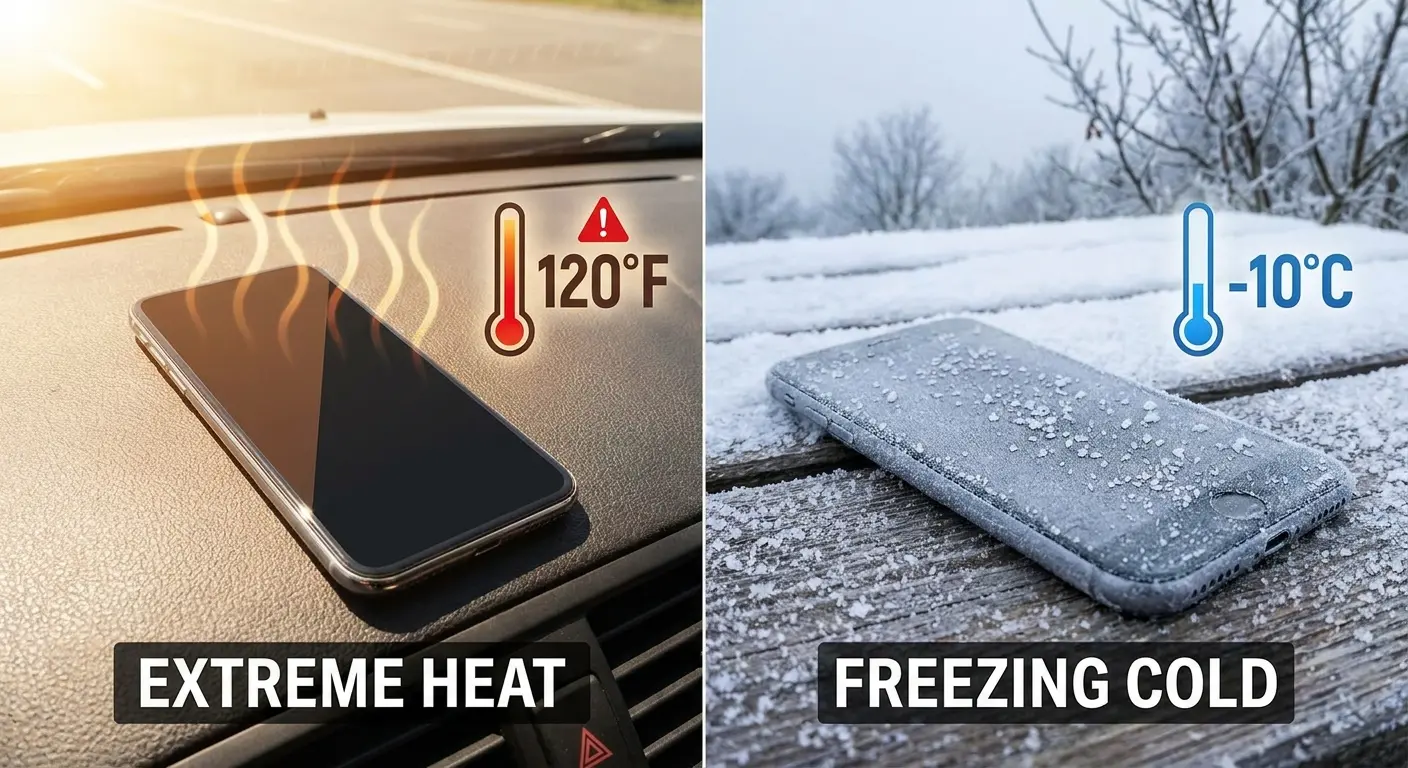
Yeah, I know this table is overkill, but people keep doing this
Why Heat Dissipation Design Matters for Power Longevity
Your phone generates heat during normal operation. Charging generates additional heat. This heat needs to escape, or it accumulates and damages components.
Cases trap heat. The thermal insulation effect varies by material, but any case reduces heat dissipation compared to a bare phone. Thick cases with poor thermal conductivity can raise your phone's operating temperature by 10-15°F during charging or intensive use.
The power management IC and charging circuit are the hottest components during charging. They're designed to operate at elevated temperatures, but chronic heat exposure accelerates their degradation. Over months or years, this leads to failures that prevent proper power delivery.
Case designs that incorporate heat dissipation features help maintain lower operating temperatures. Lower temperatures mean longer component life and reduced risk of heat-related power failures. Rokform's rugged cases use materials and construction methods that balance protection with thermal management, preventing the heat buildup that silently damages power components over time.
You might not think about heat when your phone is working fine, but the damage accumulates silently. By the time symptoms appear, the degradation is already severe.
The Charging Port Destruction Timeline Nobody Talks About
Okay, real talk: how loose is your charging cable in the port right now? If you have to wiggle it to get it to charge, you're already on borrowed time.
Charging port damage is progressive and predictable. Each time you insert a cable, you apply lateral force to the port. The port is soldered to your logic board or connected via flex cable. These connections aren't designed for repeated lateral stress.
Over hundreds of charging cycles, the port loosens. The solder joints crack. The flex cable connection degrades. Eventually, the electrical connection fails even if the port still physically accepts a cable.
Charging Port Health Checklist:
Test cable insertion resistance - Cable should slide in smoothly with slight resistance, not loosely or requiring force
Check for lateral movement - With cable inserted, gentle side-to-side pressure should show minimal port movement
Inspect for debris accumulation - Use a flashlight to check for lint, dust, or corrosion inside the port (you'd be amazed how much lint gets in there)
Verify charging consistency - Phone should begin charging immediately upon cable insertion without repositioning
Examine cable connector condition - Look for bent pins, discoloration, or physical damage on the cable end
Monitor charging speed degradation - Compare current charging times to when the phone was new
Assess port opening alignment - Port should be flush with device edge, not recessed or protruding
How Case Port Openings Contribute to Damage
Cases with oversized port openings allow cable movement. You insert your cable at an angle because the opening is larger than the cable. This angle applies lateral force to the port.
Tight port openings guide the cable straight into the port, reducing lateral stress. But tight openings also create friction between cable and case, which can prevent full cable insertion. Partial insertion creates poor electrical contact and increases resistance, leading to slow charging and potential port damage from arcing.
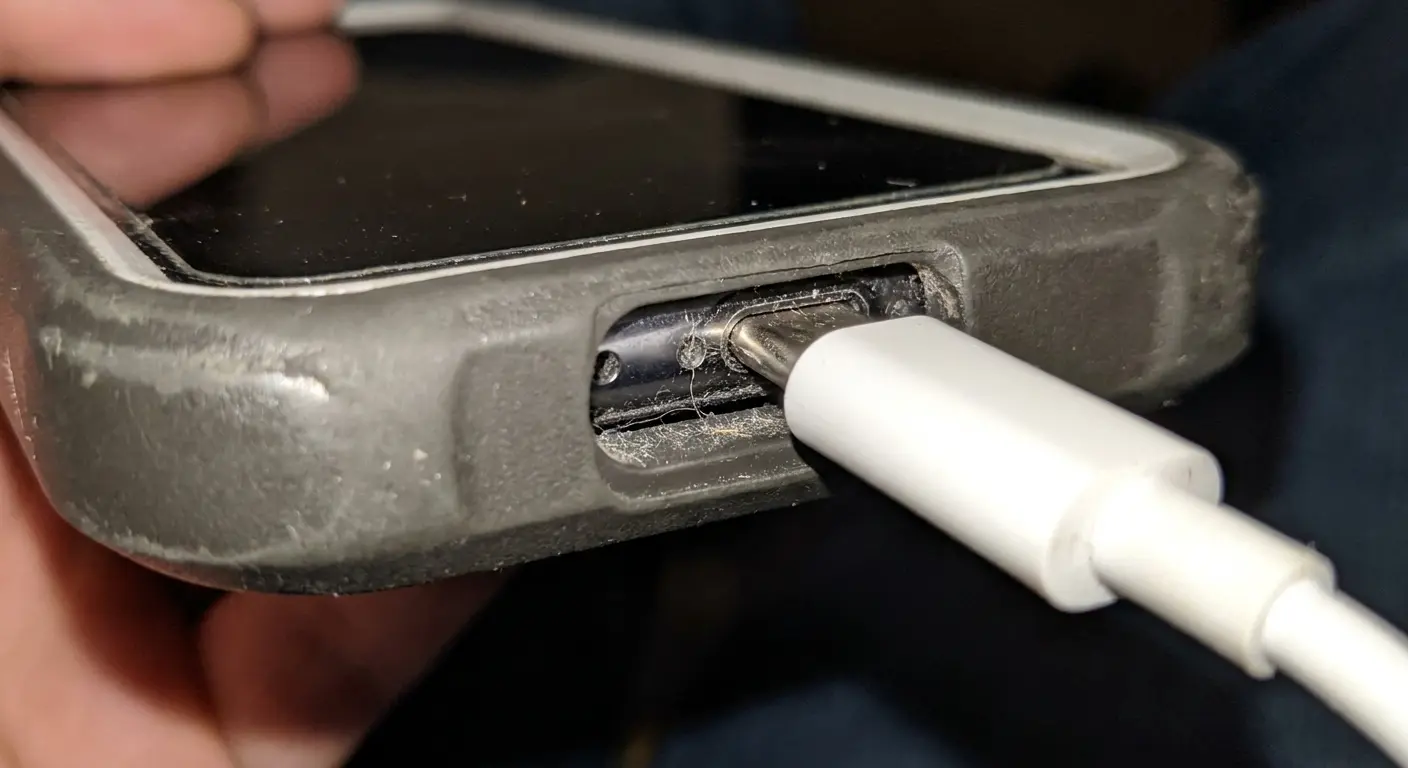
The ideal port opening is precisely sized with a slight chamfer to guide cable insertion. Most cases don't achieve this. They either leave too much clearance or create too much interference.
Magnetic mounting systems near the charging port can also affect cable alignment. If the magnetic field pulls on the cable connector (many USB-C connectors contain ferromagnetic materials), it creates additional lateral stress on the port during charging.
The Wireless Charging Alternative and Its Own Failure Modes
Wireless charging eliminates physical port wear. Sounds like a solution, right?
It just creates different problems.
Wireless charging generates more heat than wired charging due to efficiency losses. This heat concentrates in the center of your phone's back, exactly where the battery sits. Chronic heat exposure accelerates battery degradation and swelling.
Misalignment between phone and charger reduces efficiency and increases heat generation. Cases affect alignment by adding thickness and potentially interfering with the magnetic alignment systems in newer phones.
Wireless charging coils can fail from repeated thermal cycling. The coil is bonded to your phone's back with adhesive that degrades from heat. The coil itself can develop breaks in the fine wire from expansion and contraction. When the coil fails, you lose wireless charging capability and you're back to relying on a potentially damaged charging port.
So basically, you're trading one failure mode for another unless you address the root cause: heat management and physical protection.
When Your Screen Replacement Actually Caused the Power Issue
Let me guess: You got your screen replaced at a mall kiosk or some random repair shop, and now your phone won't turn on. And when you went back, they swore up and down it had nothing to do with their repair.
Yeah. Sure it didn't.
Look, I'm not saying all repair shops are incompetent. But I am saying that screen replacements require disconnecting a bunch of tiny, fragile cables near power-critical components, and if the tech is rushing or inexperienced, they can absolutely cause the exact problem you're dealing with.
Had a guy come in last month (got his screen replaced at one of those mall kiosks, phone worked fine when he left, died two days later). Took it to an actual authorized service center and guess what? The repair tech had used a screw that was half a millimeter too long. Punctured straight through the logic board into a power trace. Created a short that slowly fried the power management IC.
The kiosk insisted it was a coincidence. A half-millimeter-too-long screw. Total coincidence.
Screen replacement requires disconnecting multiple flex cables, including the display connector, touch digitizer connector, and often the front camera assembly. These connectors sit near or share the same board area as power-related components.
Inexperienced technicians can damage adjacent components during disassembly. They might crack a nearby capacitor, loosen a power IC, or create a short circuit with a misplaced screw that's slightly too long.
The battery must be disconnected before screen replacement to prevent short circuits. Reconnecting it improperly (even slightly misaligned spring pins) creates intermittent power delivery that can prevent the phone from turning on reliably.
The Specific Ways Screen Repairs Damage Power Systems
Adhesive remover used to separate the screen can seep into the device and damage components. Some solvents are conductive or corrosive. If adhesive remover reaches the logic board, it can create short circuits or corrode traces.
Heat guns used to soften adhesive can overheat nearby components. Power management ICs are particularly sensitive to heat. Excessive heat during screen removal can damage these ICs enough to cause failure days or weeks later.
Aftermarket screens sometimes draw different current than OEM screens. If the replacement screen draws more current, it can overload the power management system, especially if that system was already stressed from previous damage or age. The overload can cause the power management IC to fail in a protective shutdown that prevents the phone from turning on.
Screw placement errors are common. Phones use screws of different lengths in different positions. Installing a screw that's too long can puncture the logic board or create pressure on components underneath. If that screw contacts a power trace or component, it creates a short circuit that prevents power-on.
And then they look you dead in the eye and say "must be a software issue."
How to Identify Repair-Related Power Failures
Timing is your first clue. If your phone stops turning on within days or weeks of a screen replacement, the repair likely caused or contributed to the failure.
Intermittent power behavior before complete failure suggests connection issues. The phone might turn on sometimes but not others, or it might power on but immediately shut down. These symptoms point to loose connections or damaged flex cables from the repair process.
Unusual heat in specific areas (particularly near the screen connectors or charging port) indicates possible short circuits created during repair. Your phone's thermal management system can't compensate for shorts, so heat builds up locally.
If you can get the phone to power on briefly, check whether the screen functions properly. A working screen with power issues elsewhere suggests the repair damaged components beyond the display assembly itself.
Battery Swelling as a Mounting System Problem
Is your phone's back bulging? Even a little bit?
Stop. Using. The. Phone.
I'm serious. A swollen battery means the chemistry inside has gone wrong and is producing gas. That gas has nowhere to go, so the battery's expanding. And if it keeps expanding, it can crack your screen from the inside, damage your logic board, or (in fun worst-case scenarios) catch fire.
"But it's just a tiny bulge," people say. Yeah, and it's going to be a bigger bulge tomorrow. And eventually it'll be a cracked screen, or a phone that won't turn on, or a small fire in your pocket. None of these are good options.
Battery swelling occurs when the battery's internal chemistry degrades and produces gas. The battery is sealed, so the gas has nowhere to go. Pressure builds inside the cell, causing it to expand.
This expansion creates mechanical stress on everything around the battery. The battery connector can be pushed out of alignment. Nearby components can be physically damaged by pressure. In extreme cases, the swelling battery can crack the logic board itself.
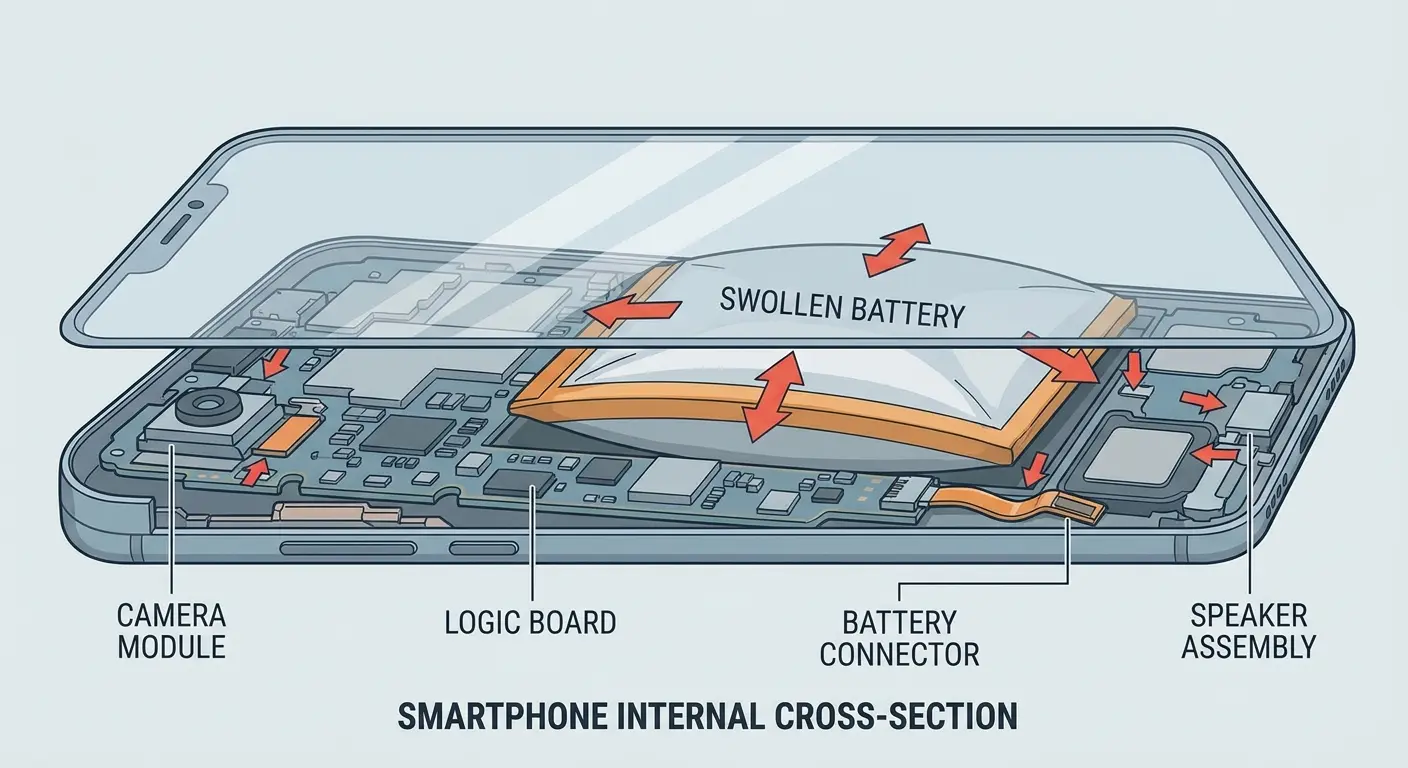
The swelling also indicates that the battery's ability to hold and deliver charge is compromised. Even if the physical damage hasn't disconnected anything yet, the battery might not have enough capacity to power the device through its boot sequence.
Battery Swelling Warning Signs:
Visual Indicators:
Phone rocks or wobbles when placed screen-down on flat surface
Visible gap between screen and frame along edges
Back panel appears raised or no longer flush with frame
Case fits tighter than when phone was new
Screen protector lifting at edges without impact damage
Tactile Indicators:
Back of phone feels less flat when running hand across surface
Pressure required for power button has changed noticeably
Phone feels thicker when held compared to memory of original dimensions
Functional Indicators:
Phone gets unusually hot in lower half during charging
Battery percentage drops rapidly under load
Device shuts down unexpectedly at battery percentages above 20%
Charging takes significantly longer than when device was new
Immediate Actions Required:
Stop charging the device immediately
Power off the phone if still functional
Remove from any case to allow expansion room
Do not attempt to use the device
Schedule professional battery replacement within 48 hours
If you've got any of these, stop charging it and get the battery replaced. Not next week. Now.
Why Cases Accelerate or Prevent Swelling Damage
A case that tightly constrains the phone can prevent a swelling battery from bulging outward. This sounds protective, but it redirects the pressure inward, toward the logic board and internal components. The damage becomes worse, not better.
Cases that allow slight expansion give the battery somewhere to go. The phone's back might bulge visibly, which alerts you to the problem before internal damage occurs. This is preferable to a rigid case that hides the swelling while components get crushed.
The ideal solution is a mounting system that holds the phone securely during normal operation but allows for battery expansion without transmitting pressure to critical components. This requires specific mechanical design that most cases don't incorporate.
Heat management ties back into this issue. Cases that trap heat accelerate battery degradation, which leads to earlier and more severe swelling. Better heat dissipation means slower battery aging and reduced swelling risk.
Recognizing Swelling Before It Causes Power Failure
Your phone wobbles when placed on a flat surface. The screen is separating slightly from the frame. The back feels less flat than it used to. These are early swelling indicators.
The power button might feel different, requiring more or less pressure to activate. Swelling changes the internal geometry and can affect button mechanisms. If your power button stops working reliably, check for swelling.
Cases become harder to install or remove. If your phone suddenly fits tighter in its case, the device dimensions have changed. This usually means battery swelling.
You might notice the phone getting hot in areas away from the processor. Swelling batteries often develop internal resistance problems that cause heat generation during charging or use. Heat in the lower half of the phone (where batteries typically sit) is a warning sign.
How Case Design Affects Long-Term Device Durability
Okay, so we've covered all the ways your phone can die from physical damage. And if you're paying attention, you've probably noticed that a lot of this comes down to: does your case actually protect against these specific failure modes, or is it just thick rubber that makes your phone bulky?
Because here's the thing: most cases are designed to pass drop tests and look protective. They're not designed based on how phones actually fail in the real world.
Cases aren't just cosmetic protection. They're mechanical systems that determine how force, heat, and environmental factors affect your device. The difference between a phone that lasts five years and one that fails in two often comes down to case design choices you probably didn't think about.
The Engineering Principles That Actually Matter
Rigid attachment points concentrate stress. If your case grips your phone at four corners, any impact force gets concentrated at those four points. The phone flexes between them, stressing the logic board.
Distributed mounting systems spread force across the entire phone back. This reduces peak stress at any single point and minimizes logic board flexing during impact. Your internal components experience less acceleration and deceleration.
Thermal conductivity varies dramatically by material. Plastic cases insulate. Metal cases conduct. Hybrid designs can create thermal bridges that pull heat away from critical components. Your power management IC's lifespan is directly related to its operating temperature over time.
Port protection needs to balance accessibility with constraint. We covered this earlier with charging ports, but it applies to all openings. Button covers need to seal against contamination while maintaining tactile feedback. Speaker grilles need to block particles while allowing sound transmission.
Why Standard Case Testing Doesn't Predict Real-World Durability
Drop tests measure single-impact survival. They don't measure cumulative damage from dozens of smaller impacts over months of use. Your phone might pass a six-foot drop test but fail from internal damage after twenty pocket-height drops.
Water resistance ratings (IP ratings) test clean water submersion for specific durations. They don't test moisture exposure from humidity, condensation, or contaminated water. They don't account for seal degradation over time.
Heat testing typically measures maximum operating temperature tolerance, not the effects of chronic heat exposure at moderate elevations above optimal. The difference between operating at 95°F versus 75°F over two years is significant for component longevity, but standard tests don't capture this.
You need to think about case protection in terms of cumulative exposure and long-term effects, not just spectacular failure prevention. The case that keeps your screen intact after a dramatic fall might be slowly cooking your power management IC every time you charge.
The Real Reason Your Phone Died After a "Minor" Drop
You dropped your phone from two feet onto carpet. It didn't even bounce. Now it won't turn on, and you're confused because the drop seemed insignificant.
Impact severity isn't just about height and surface hardness. It's about angle, phone orientation, and internal component positioning at the moment of impact.
A phone landing flat distributes force across its entire back. A phone landing on a corner concentrates force at that point and creates a rotational moment that twists the device. This twisting motion stresses internal connections far more than straight-line deceleration.
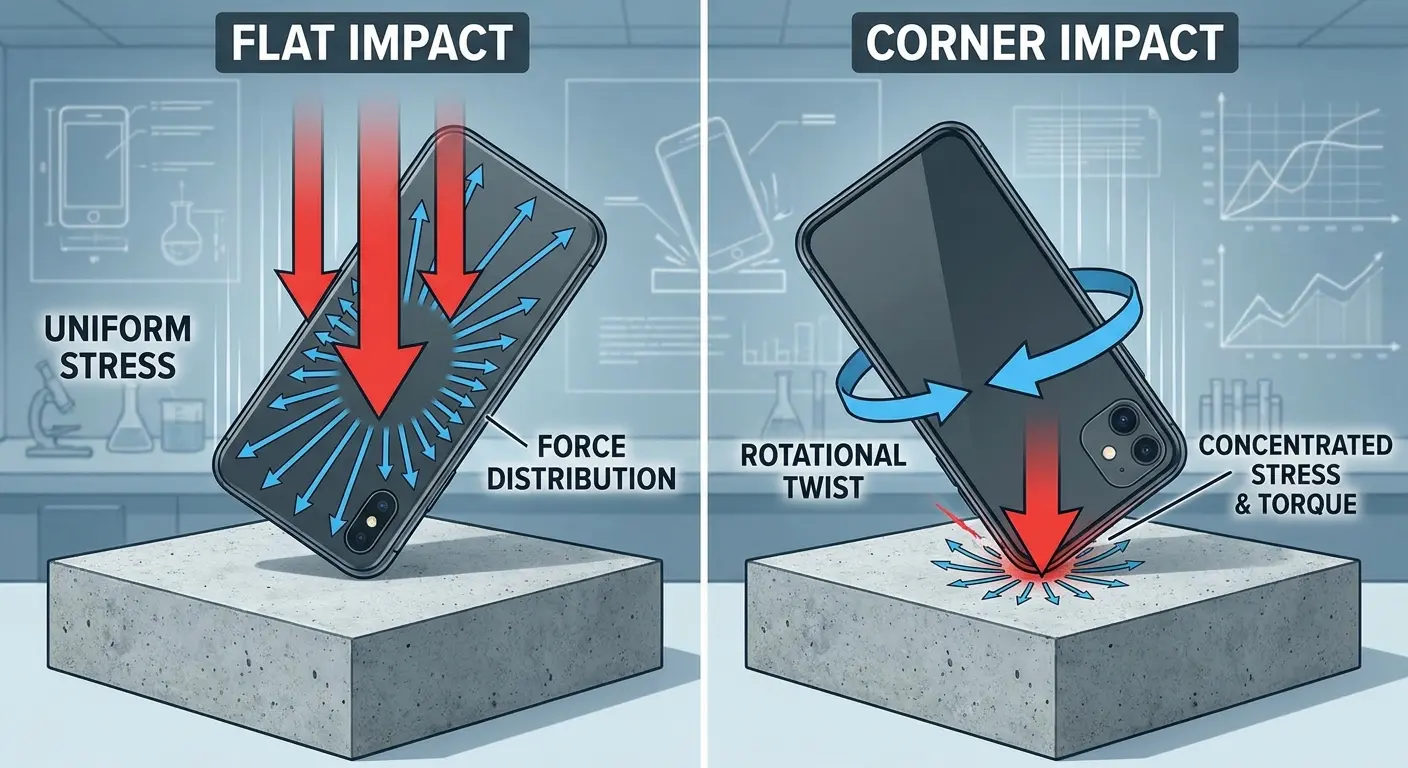
Your phone's internal components have mass. When the phone suddenly stops moving, those components want to keep moving (basic physics). If a component is loosely mounted or already stressed from previous impacts, this can be enough to break its connection.
The Cumulative Damage Model
Your phone doesn't exist in pristine condition until it suddenly breaks. It accumulates damage throughout its life. Each drop, each temperature extreme, each charging cycle adds to a damage total.
Think of component connections as having a durability budget. Each stress event spends some of that budget. Minor drops spend a little. Major drops spend a lot. Temperature cycling spends some. Eventually, the budget is depleted, and the next stress event (even a minor one) causes failure.
So your phone can survive a five-foot drop onto concrete one day and then die from a two-foot drop onto carpet the next week. The concrete drop spent most of the durability budget. The carpet drop spent the last bit.
You can't see this damage accumulation. There's no indicator that tells you your phone is at 60% of its damage capacity. You only find out when it crosses 100% and stops working.
Why the "It Was Working Fine" Argument Doesn't Hold
Your phone worked perfectly until the moment it didn't. This seems like evidence that the failure was sudden and unrelated to previous events. It's actually just evidence of how cumulative damage works.
Electronic components don't gradually fade. They work until they don't. A solder joint with a 90% crack still conducts electricity. A solder joint with a 100% crack doesn't. The transition from working to failed is instant, even though the damage developed over time.
This creates a false impression that the failure was sudden and must have a sudden cause. You search for what happened immediately before the failure, ignoring the months of damage accumulation that caused it.
The minor drop that preceded the failure was the final stress, not the sole cause. But because it was the last event you can identify, you focus on it and conclude that it couldn't possibly have caused such a severe problem.
I can't tell you how many times someone's insisted the drop "couldn't have done anything" because it wasn't dramatic enough. But that's not how this works.
Diagnosing Physical vs. Software Power Failures
You need to determine whether your phone won't turn on due to physical damage or software issues. The diagnostic approach differs significantly.
Software failures usually follow specific patterns. Your phone might show signs of life (vibration, LED indicators, screen backlight) even if it doesn't fully boot. Physical damage more often produces complete unresponsiveness.
Signs That Point to Physical Damage
Complete unresponsiveness to all inputs suggests power delivery failure. No vibration when you press buttons, no heat generation, no LED indicators. The phone acts as if it has no battery, even after charging.
Intermittent behavior where the phone sometimes responds and sometimes doesn't indicates loose connections or damaged components. Software failures are typically consistent (they fail the same way each time).
Recent physical events (drops, water exposure, temperature extremes) in the days or weeks before failure strongly suggest physical causes. The timing correlation matters more than the severity of the event.
Visible physical changes (screen separation, case bulging, port damage) are obvious indicators. But remember that internal damage often exists without external signs.
Signs That Point to Software Issues
The phone shows signs of life but won't complete the boot process. You see the manufacturer logo, then it shuts down or loops. This suggests software corruption or failed updates.
The phone responds to button combinations (forced restart, recovery mode entry) even if it doesn't boot normally. This indicates that power delivery works but the operating system has problems.
Recent software updates or app installations preceded the failure. If your phone stopped turning on right after an update attempt, software is the likely culprit.
The phone gets warm during charging, indicating that power management is functioning. Heat generation means current is flowing and components are working, even if the software won't load.
The Diagnostic Steps That Actually Work
Start with the simplest test: plug the phone into a charger and wait. Not for five minutes. For an hour. Completely depleted batteries can take significant time before they have enough charge to power on.
I've had people swear their phone was bricked, and it just needed 45 minutes on a charger.
Try different chargers and cables. A failed charger or cable mimics a dead phone. This is the most common false diagnosis I see.
Attempt a forced restart using your phone model's specific button combination. This works for software issues but won't help with physical damage. If you get any response (vibration, logo, LED), you're dealing with software.
Check for physical damage indicators: port condition, case fit, screen alignment, unusual heat or cold spots. Physical inspection reveals more than you'd expect.
If none of these produce results, you're likely dealing with physical damage that requires professional repair or replacement.
Prevention Strategies That Actually Address Root Causes
Alright, prevention. Because replacing your phone every 18 months because of preventable physical damage is expensive and annoying.
You can't prevent everything. Phones are fragile computers we carry everywhere and drop constantly. But you can prevent most of the power-related failures we've been talking about.
Choosing Protection Based on Failure Mechanisms
Your case needs to distribute impact force across the phone's back rather than concentrating it at mounting points. Look for full-back contact with the device, not just corner or edge grips.
Heat dissipation matters for long-term reliability. Cases with metal backplates or thermal management features keep your power management components cooler during charging and use. Lower operating temperatures mean longer component life.
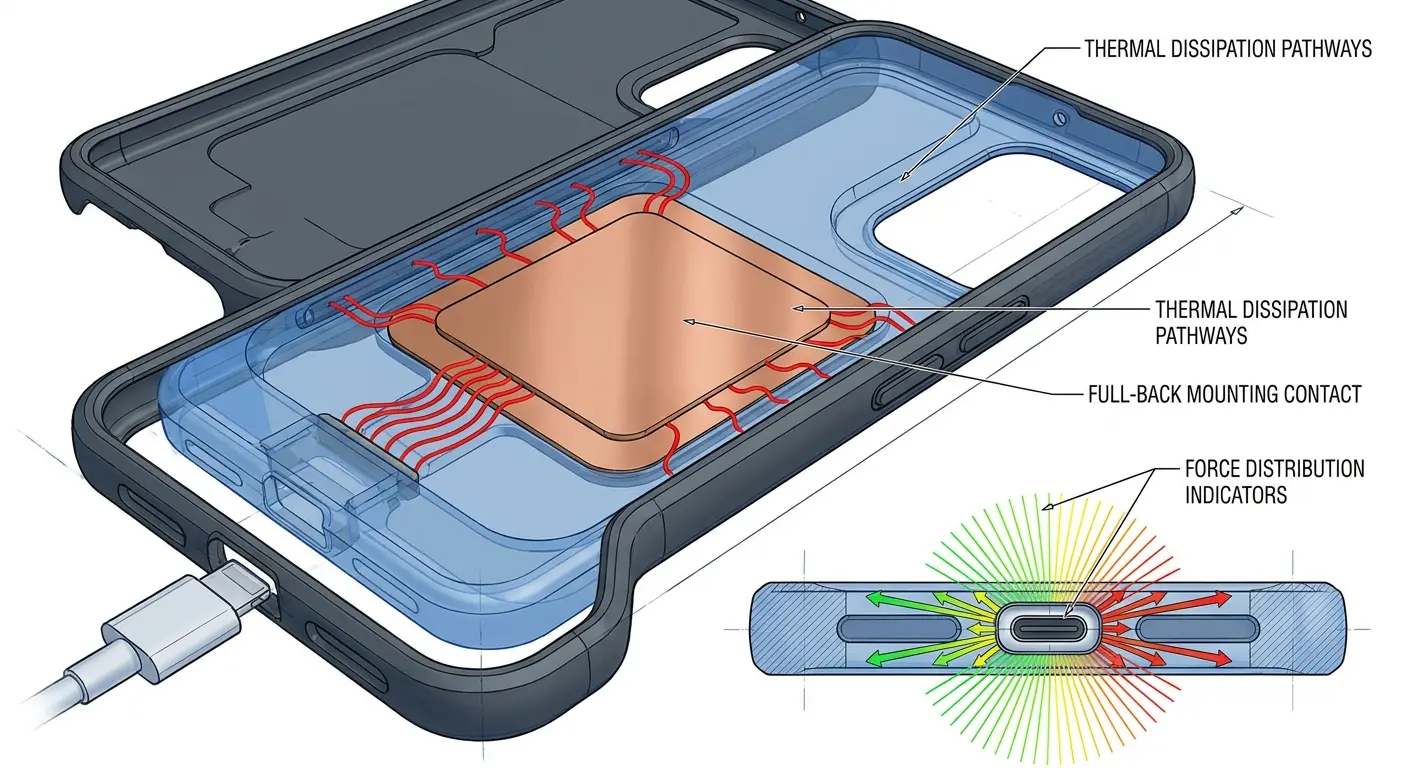
Port protection needs precision. The charging port opening should guide cables straight in without allowing lateral movement. This prevents the cumulative port damage that eventually stops your phone from charging.
Water resistance requires sealed mounting interfaces, not just port covers. If water can get between your phone and case, you're not protected. The seal needs to be at the phone-case interface, not just at external openings.
Rokform's phone case designs incorporate these engineering principles, using precisely machined port openings, distributed mounting systems, and materials selected for both impact protection and thermal management rather than marketing claims about drop heights.
Usage Habits That Extend Power System Life
Avoid charging your phone in hot environments. The combined heat from charging and environmental temperature accelerates battery and power management IC degradation. Charge in cool locations when possible.
Remove cases during extended charging sessions if heat buildup is noticeable. The temporary exposure risk is less damaging than chronic heat exposure to power components.
Use charging cables that fit snugly without wiggling. Loose cables create lateral stress on ports. Replace cables when they develop looseness, not just when they stop working (and honestly, replace them every 6-12 months even if they still work).
Don't ignore early warning signs. Screen separation, case fit changes, and unusual heat patterns indicate developing problems. Address them before they progress to complete failure.
Keep your phone away from temperature extremes. Don't leave it in hot cars or use it extensively in freezing weather. Temperature cycling is cumulative damage that eventually causes power failures.
When to Replace Rather Than Repair
If your phone has survived multiple significant drops, the internal damage might be extensive even if it's still working. Components operating with cracked solder joints or loosened connections are living on borrowed time.
Battery swelling is a replace-don't-repair situation. Once a battery swells, it indicates advanced degradation. Replacing just the battery doesn't address potential damage to components that were stressed by the swelling.
Water damage that's been present for weeks or months creates corrosion that continues spreading. You might repair the immediate failure, but other components are likely compromised and will fail soon.
Phones older than three years with power issues have accumulated enough environmental and usage damage that repair costs approach replacement costs. The power failure is often just the first of multiple impending failures.
Consider the repair cost versus device value. If repair exceeds 50% of a replacement device's cost, and the device is over two years old, replacement usually makes more financial sense.
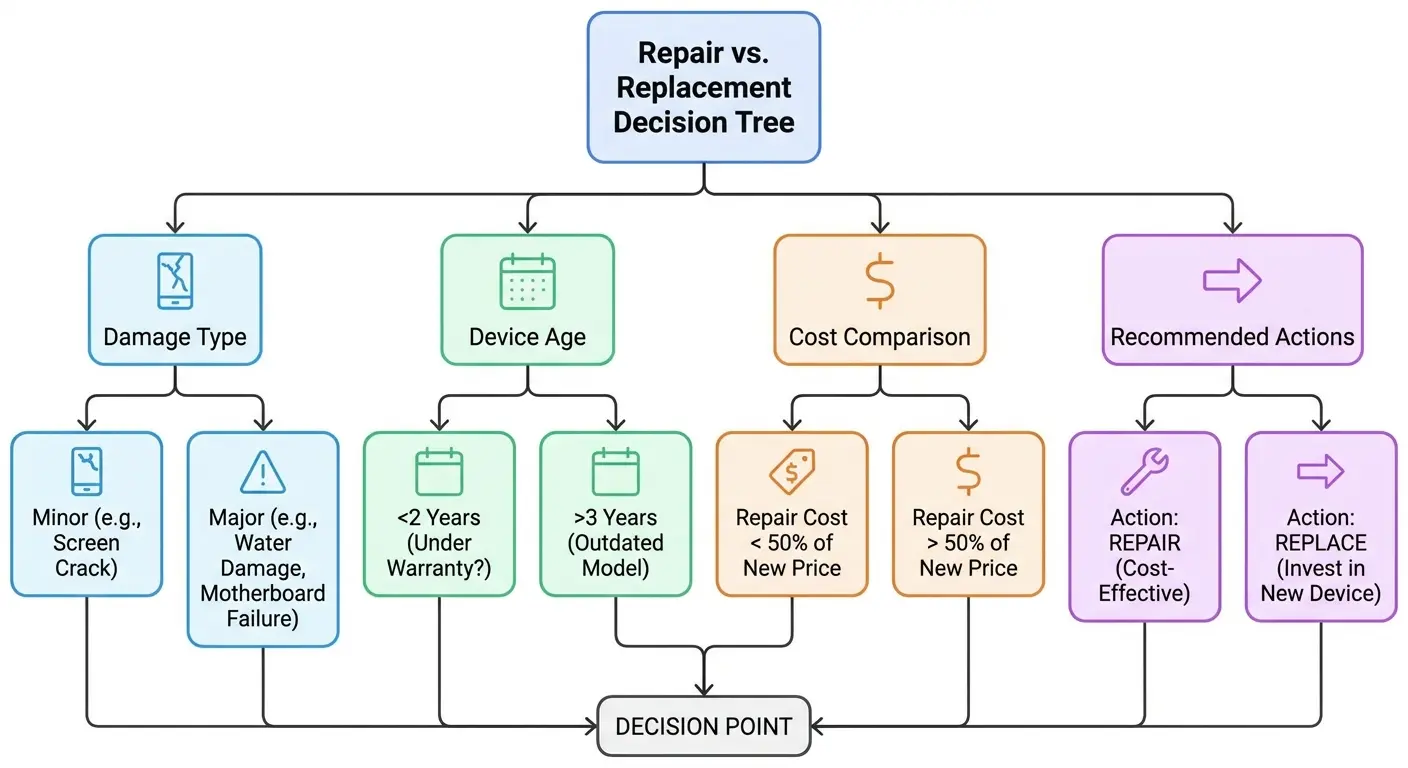
I know nobody wants to hear "buy a new phone," but sometimes that's actually the smart financial decision instead of throwing money at repairs for a device that's going to fail again in two months.
Look, Here's the Reality
Your phone didn't just randomly die. Something happened (maybe it was that drop three weeks ago, maybe it was the afternoon in your hot car, maybe it was water damage from two months back that's been slowly corroding things this whole time).
Most troubleshooting guides focus on software fixes and battery tricks because those are easy to write about and sometimes work. But the physical reality? That causes most power failures. And understanding the actual mechanisms helps you prevent them.
The difference between a phone that lasts and one that fails prematurely isn't luck. It's the accumulation of small decisions about protection, usage habits, and environmental exposure. Your phone's power system is more fragile than you think, and more resilient than it seems, right up until it isn't.
Physical damage is cumulative, invisible, and inevitable without proper protection. Software can be fixed. Hardware failures from physical damage require replacement. Choose your protection based on engineering principles that address real failure mechanisms, not marketing claims about drop heights.
Your phone will eventually fail. The question is whether it fails in five years from natural component aging or in two years from preventable physical damage. Everything we've covered here is about pushing that failure point as far into the future as possible.
Understanding why your phone won't turn on from a physical damage perspective changes how you protect your device. When you know that the minor drop today contributes to the power failure next month, you make different choices about cases, charging habits, and environmental exposure. When you understand that your phone not charging might trace back to weeks of lateral cable stress on the port rather than a sudden failure, you pay attention to port opening design in your case selection.
The protective systems you choose matter. Whether you're looking at motorcycle phone mounts that need to handle extreme vibration or bike phone mounts that expose your device to weather and impacts, the engineering behind the mounting system directly affects how long your phone's power systems survive. These aren't separate concerns from everyday protection (they're intensified versions of the same physical stresses that accumulate during normal use).
I see the pattern constantly: phones that die from "mysterious" power failures that trace back to identifiable physical damage when you know what to look for. The screen that separated slightly two months ago. The charging port that started wiggling last week. The case that fit looser after that parking lot drop. These signs tell you that damage is accumulating, but most people don't connect them to power system degradation until it's too late.
Your phone is an incredibly complex device with vulnerabilities concentrated in its power delivery systems. Those vulnerabilities don't respond to software updates or battery calibration. They respond to mechanical protection, thermal management, and usage patterns that minimize cumulative stress. That's the real answer to why your phone won't turn on (and more importantly, how you prevent it from happening in the first place).
Can you prevent all of it? No. Phones are complicated devices that we drop, get wet, expose to temperature extremes, and generally abuse on a daily basis. Something's eventually going to break.
But you can prevent most of it. Choose protection based on engineering instead of marketing hype. Pay attention to heat. Don't ignore weird symptoms like screen separation or loose charging ports. Use decent cables. Don't leave your phone in temperature extremes.
And maybe (just maybe) your phone will last until you actually want to upgrade instead of being forced into it at 2am when your current phone won't turn on and you need it for work tomorrow.
Yeah, I know this was stupidly long. If you made it this far, congrats. But if it saves you from even one "why won't my phone turn on" panic moment, it was worth writing.
And if your phone's currently not turning on and you're reading this hoping for a magic fix? I'm sorry. It's probably physical damage, and you're probably looking at professional repair or replacement. But at least now you know why it happened and how to prevent it next time.
Take care of your phone's power system. It's the one thing that, when it fails, makes everything else irrelevant.

