


Your phone says 'Emergency Calls Only' and you've already tried the obvious stuff. Airplane mode, restart, pulling the SIM card out and blowing on it like it's a Nintendo cartridge. Nothing worked. That's because you're treating this like a software problem when something inside your phone is physically broken. And no, I'm not talking about your screen. That's fine. I'm talking about the stuff you can't see: the antennas, the connectors, the tiny solder joints that are currently cracked to hell. Let me show you what actually breaks and why.
Table of Contents
The Drop That Changed Everything: Physical Antenna Damage
SIM Card Slot Degradation From Repeated Phone Handling
Internal Component Displacement You Can't See
Case Design Failures That Accelerate Network Problems
Temperature Extremes and Metal Fatigue in Modern Phones
The Mounting System Variable Nobody Considers
Water Damage Symptoms That Mimic Network Issues
When Your Phone Case Actually Causes Signal Loss
TL;DR
Your phone's broken because you dropped it (even if the screen's fine) • That case you love is blocking your signal • Magnetic mounts are antenna killers • Water damage from three weeks ago is still corroding your connections • SIM tray wear from constant case swapping creates intermittent failures • Extreme temperature cycling causes metal fatigue in antenna connections • Vibration from car and motorcycle mounts slowly destroys internal components • Some protective cases create partial Faraday cage effects that block cellular signals while still allowing emergency frequencies
The Drop That Changed Everything: Physical Antenna Damage
Your phone hit concrete. Maybe you remember it, maybe you don't. Doesn't matter. The screen survived, so you figured you were good.
You weren't.
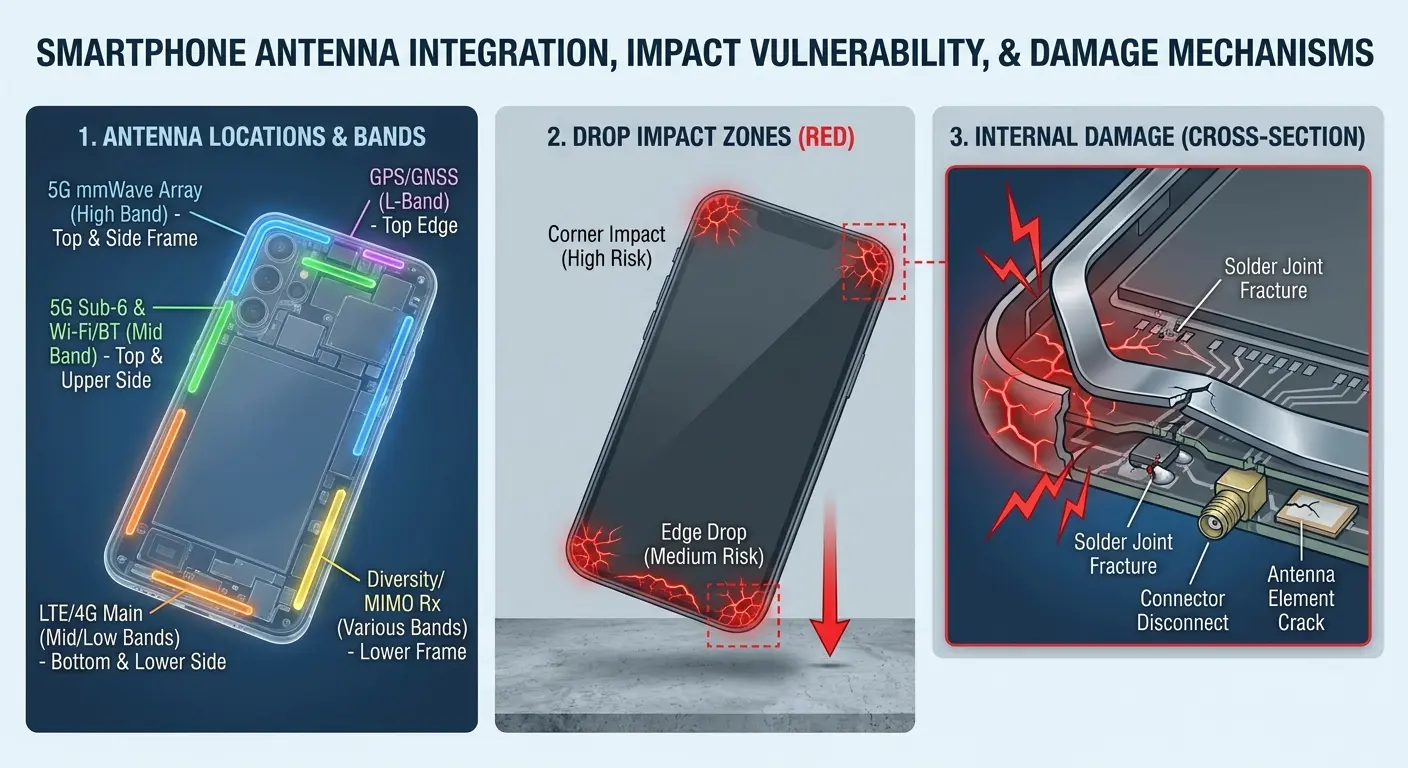
Modern phones have like 4-6 different antennas scattered around the edges. They're just thin metal strips, and when your phone hits the ground, the impact travels through the frame and cracks them. Not always immediately. Sometimes it's a hairline fracture that gets worse over time.
Here's the part that confuses everyone: emergency calls still work. That's because 911 uses different frequencies and different parts of the antenna array. So your phone can ping emergency services just fine while being completely unable to connect to Verizon's LTE network. Fun, right?
Modern smartphones don't use a single antenna anymore. They incorporate multiple antenna arrays positioned around the device's perimeter, each handling different frequency bands. When your phone takes an impact, these antennas (which are basically thin metal strips or printed circuit traces) can crack, separate from their connection points, or develop micro-fractures that disrupt signal transmission.
Emergency call functionality persists because it operates on different frequencies than your regular cellular connection. Regulatory requirements mandate that phones maintain 911 capability even without an active service plan, and these emergency frequencies often use different parts of the antenna array. You might have damaged the specific antenna elements responsible for your carrier's LTE bands while leaving the GSM emergency channels intact.
Where Antennas Actually Live in Your Device
The antenna placement in your phone isn't random. Manufacturers position them in specific locations to maximize signal reception while working around the battery, camera modules, and other components. Most flagship devices place primary cellular antennas in the top and bottom edges of the phone frame. Some models integrate them into the side rails. A few use the display connector as part of the antenna system, which is why some screen replacements mysteriously kill cellular reception.
Phone Component |
Antenna Location |
How Easily It Breaks |
Frequency Bands Affected |
|---|---|---|---|
Primary Cellular Array |
Top and bottom edges |
High (absorbs corner drop energy) |
LTE Bands 2, 4, 5, 12, 66 |
Secondary Diversity Antenna |
Side rails |
Medium (protected by frame structure) |
LTE Bands 13, 25, 41 |
GPS/GNSS Antenna |
Top edge near camera |
High (exposed position) |
GPS L1/L5 frequencies |
Emergency/GSM Fallback |
Distributed across frame |
Low (redundant design) |
850/900 MHz GSM bands |
When you drop your phone, the impact energy travels through the device structure. The corners absorb most of the force, but the energy dissipates along the frame where your antennas live. A drop that appears minor can bend the frame by fractions of a millimeter, which is enough to break an antenna connection.
The Cumulative Damage Problem
You won't see "Emergency Calls Only" after every drop. Antenna damage piles up over time.
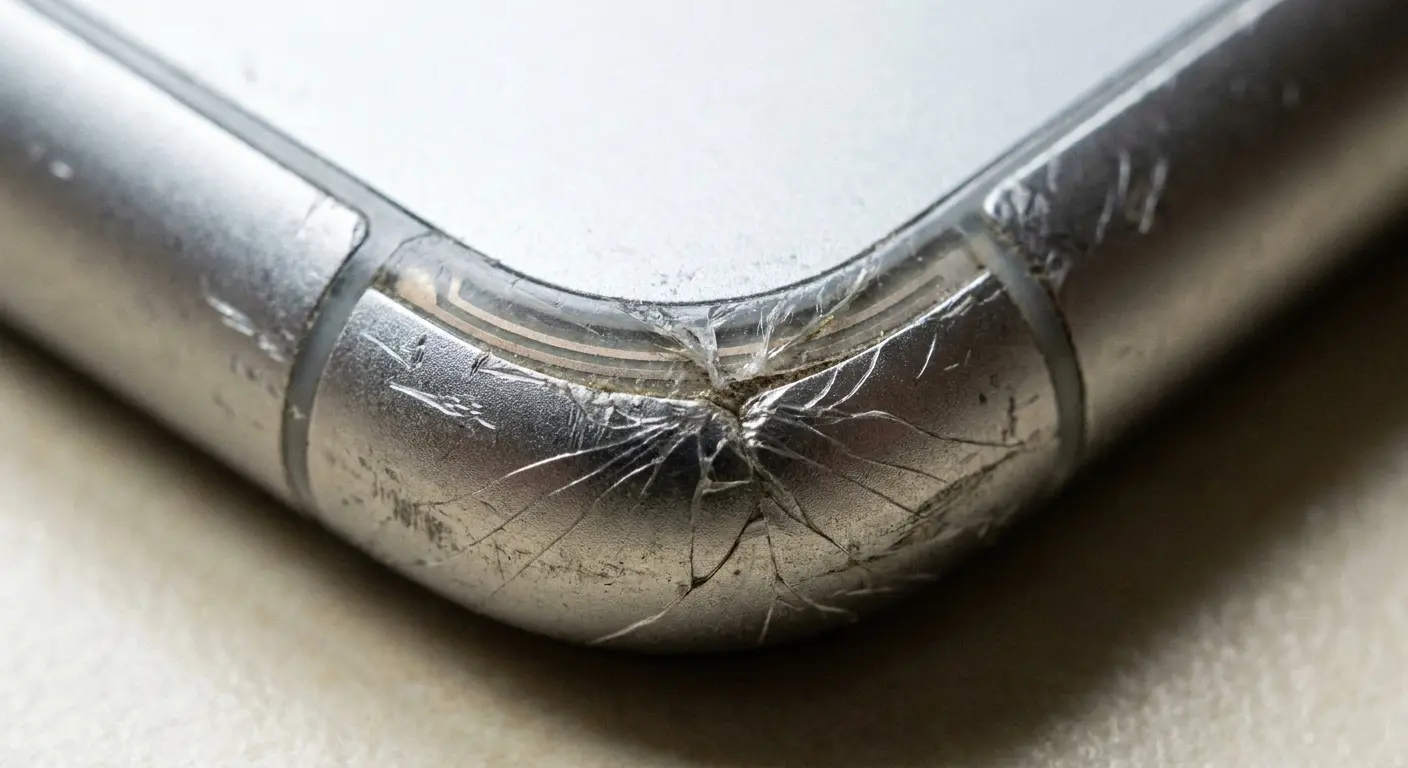
Your first drop might create a hairline crack in an antenna trace. Signal strength drops slightly, but your phone compensates by boosting power to the damaged antenna. You notice nothing. The second drop widens that crack. Your phone starts switching between towers more frequently, draining your battery faster. The third drop completely severs the connection, and suddenly you're limited to emergency calls.
I had a concrete guy come in a few months back, phone completely dead for regular calls. He's dropping this thing constantly. Chest pocket, bends over, phone slides out, hits concrete. Two feet, maybe three. Nothing dramatic. Does this 20-30 times a day.
Four months of this and the antenna trace just gives up. When we opened it up, you could see the fractures under magnification. Seventeen separate cracks along one trace. Each drop added another crack until the whole thing failed. He thought his carrier was screwing him. Nope. Physics was screwing him.
This progression explains why the error seems to appear randomly. You're not connecting it to a drop that happened two weeks ago because the phone worked fine afterward. The damage was already there, waiting for the final stress point.
This is exactly why we designed our Rokform phone cases with multi-layer impact protection that distributes drop energy across the entire case structure rather than concentrating it at corner points where antennas live. (Yeah, I work for Rokform, so obviously I'm biased here, but this is literally the engineering reason we did it this way.)
SIM Card Slot Degradation From Repeated Phone Handling
You swap cases a lot? Travel internationally? You're slowly destroying your SIM tray and don't even know it.
Every time you eject that tray, you're wearing down the mechanical tolerances that keep your SIM card electrically connected to your phone. SIM card slots use spring-loaded contacts that press against the metal pads on your SIM card. These contacts are tiny (we're talking about contact points measured in square millimeters) and rely on precise positioning to maintain electrical continuity. When you insert and remove the tray repeatedly, those spring contacts fatigue. They lose tension. The contact pressure decreases until the connection becomes intermittent.
The Case Swap Cycle
Phone cases protect your device, but installing and removing them creates a specific type of stress on your SIM tray. Most case installation instructions tell you to remove the SIM tray first to avoid pushing it in accidentally during case installation. You're following the instructions correctly, but you're also cycling that tray mechanism more frequently than users who install a case once and forget about it.
The SIM tray ejects through a small hole in the phone's edge. That ejection mechanism includes a spring-loaded plunger and a retention clip. Every ejection cycle compresses the spring and flexes the retention clip. After enough cycles, the clip loses its grip strength.
Your SIM tray starts sitting slightly loose in its slot, and the electrical contacts no longer align perfectly with the SIM card pads.
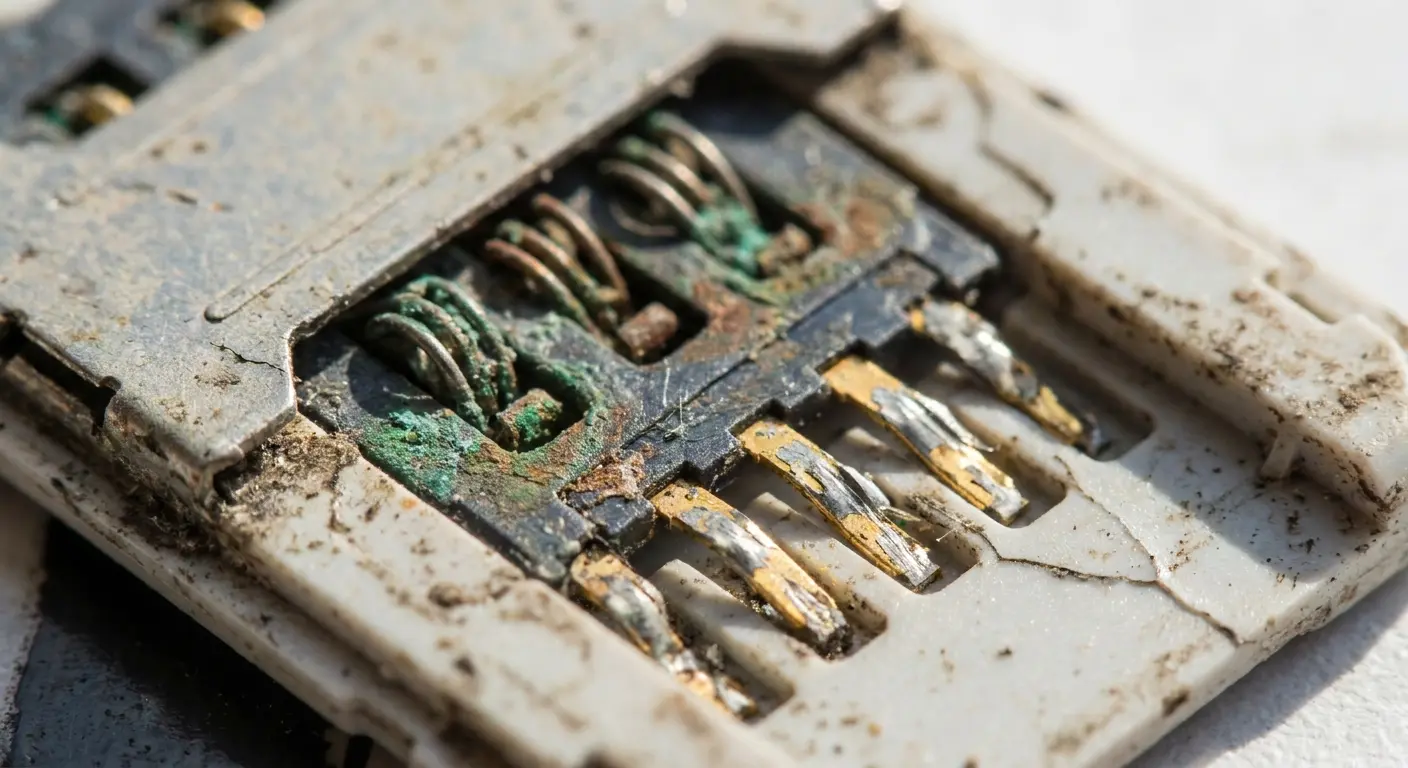
Had a customer who changed phone cases weekly to match outfits. Each case swap required SIM tray removal. After six months and approximately 25 case changes, the phone started dropping calls randomly. The SIM tray retention clip had lost 40% of its original tension. The tray sat 0.3 millimeters deeper in the slot than designed, and two of the eight contact pins no longer made solid electrical contact with the SIM card pads.
This misalignment creates resistance in the electrical connection. Your phone can still read the SIM card, but the data transfer becomes unreliable. When the connection degrades enough, your phone defaults to emergency-only mode because it can't maintain a stable connection with your carrier's network.
Contamination and Contact Corrosion
Your fingers carry oils, moisture, and microscopic debris. Every time you handle your SIM card or touch the inside of the SIM tray, you're depositing these contaminants onto the electrical contacts.
The gold plating on SIM card contacts resists corrosion, but it's not impervious. Finger oils create an insulating film that increases electrical resistance. Moisture (even the small amount present in humid air) can cause electrochemical corrosion between dissimilar metals in the contact assembly. Dust particles create physical gaps between the spring contacts and the SIM card pads.
You can't see this contamination without magnification. The connection wearing out happens slowly. Your phone works fine most of the time, but you start noticing occasional signal drops. Then the drops become more frequent. Eventually, the contamination layer becomes thick enough that your phone can't establish a network connection at all.
Before You Pull Your SIM Tray (Again)
Look, if you're swapping cases constantly or traveling internationally, you're cycling that SIM tray a lot. Here's how to not destroy it:
Wash your hands first (oils and dirt on the contacts are bad)
Work in a clean environment away from fans or open windows
Use the actual ejection tool, not a paperclip
Support the phone on a flat surface rather than holding it in the air
Check the SIM card contacts for visible contamination before putting it back
Make sure it clicks back in firmly and sits flush with the phone's edge
Test cellular connectivity immediately after reinsertion
If it's loose or wobbly, that's your problem right there
Internal Component Displacement You Can't See
Your phone's internal components are held in place by screws, clips, adhesive, and pressure fits. These retention methods work perfectly under normal conditions, but they're not designed to withstand the deceleration forces of a drop onto concrete.
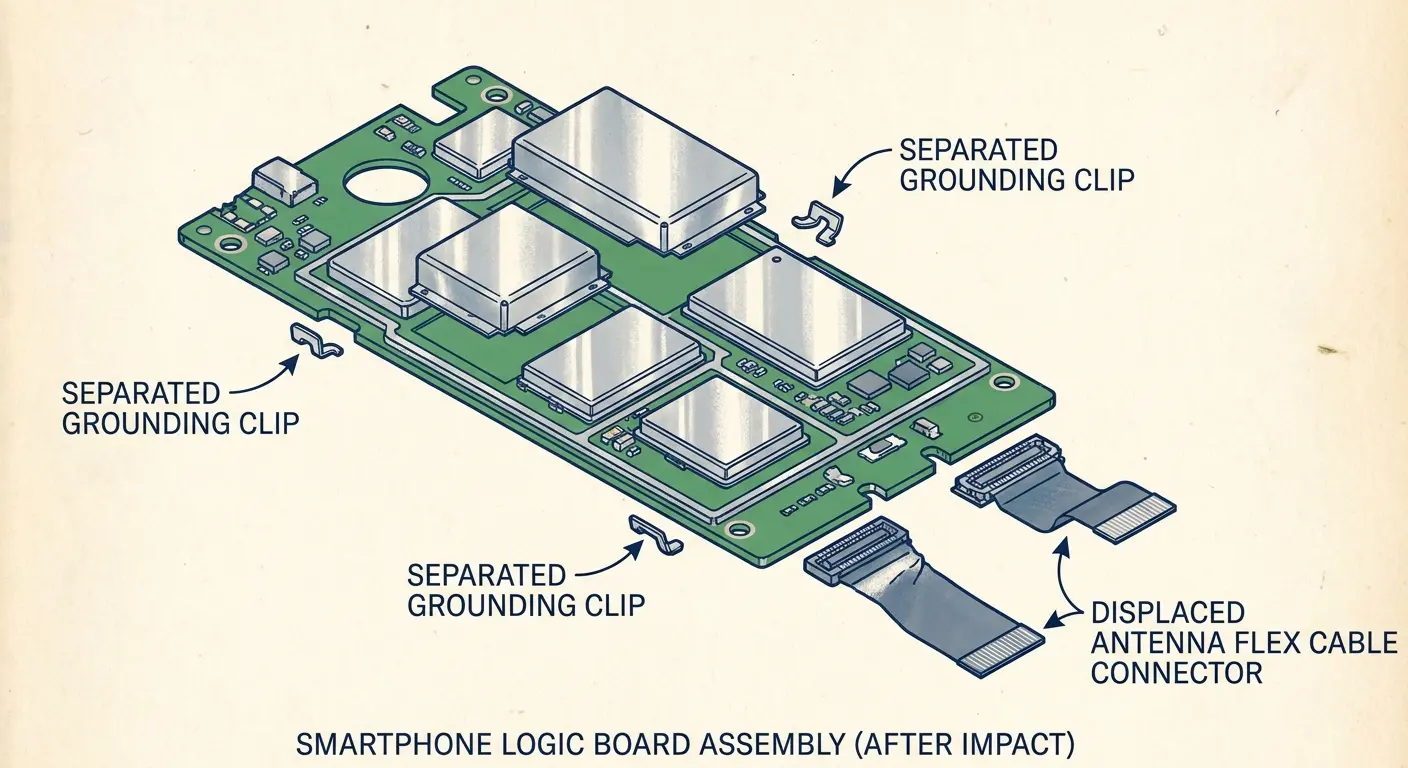
When your phone hits the ground, every component inside experiences sudden acceleration. The battery shifts against its adhesive. The camera module compresses its mounting springs. The logic board flexes. Most importantly, the RF shield cans (metal enclosures that prevent electromagnetic interference) can separate from their grounding points.
RF Shield Separation and Ground Loss
RF shields are metal boxes that cover sensitive radio frequency components on your phone's logic board. They prevent interference between different radio systems (cellular, WiFi, Bluetooth, GPS) and they provide electrical grounding for antenna systems.
These shields attach to the logic board through small clips or solder points around their perimeter. A drop can break these attachment points without damaging the shield itself. The shield looks fine, but it's no longer electrically connected to the board's ground plane.
When an RF shield loses its ground connection, the antenna system it protects stops functioning correctly. Your phone might maintain WiFi and Bluetooth (which use different shields) while losing cellular connectivity. The emergency call system still works because it uses a separate, more robust antenna path that doesn't rely on the compromised shield.
Connector Micro-Separation
Your phone's logic board connects to various components through tiny push-fit connectors. These connectors rely on spring tension and precise alignment. An impact can partially unseat these connectors without fully disconnecting them.
A partially unseated connector creates intermittent contact. The connection works under some conditions but fails under others. Temperature changes cause the phone's internal components to expand and contract slightly, which can temporarily restore or break the partial connection. You experience random signal drops that seem to have no pattern because the pattern is thermal cycling, not anything you're actively doing with the phone.
The antenna connectors are particularly vulnerable because they're often located near the phone's edges (where impact forces concentrate) and they carry high-frequency signals that are sensitive to impedance changes. A connector that's unseated by half a millimeter might still make physical contact, but the electrical characteristics have changed enough to prevent proper antenna operation.
Internal Component |
How It's Attached |
What Breaks After Impact |
What You'll Notice |
|---|---|---|---|
RF Shield Can |
Solder clips (4-6 points) |
Partial or complete ground loss |
Cellular loss, WiFi/Bluetooth functional |
Antenna Flex Cable |
Push-fit connector |
Micro-separation (0.2-0.5mm) |
Intermittent signal, thermal sensitivity |
Battery |
Adhesive strips |
Lateral displacement |
Pressure on adjacent components |
Camera Module |
Spring-loaded pressure fit |
Compression or tilt |
Focus issues, cellular interference |
Logic Board |
Screws and standoffs |
Flexing and micro-cracks |
Multiple system failures (varies by model) |
Case Design Failures That Accelerate Network Problems
Some phone cases block cellular signals while still allowing emergency calls through. This seems impossible (how can a case selectively block some frequencies but not others?), but the physics are straightforward once you understand how emergency call systems work differently than regular cellular connections.
Emergency calls use lower frequencies and higher power levels than normal cellular traffic. The lower frequencies penetrate obstacles more easily (which is why AM radio works in tunnels where FM doesn't). The higher power levels overcome signal attenuation that would block weaker signals.
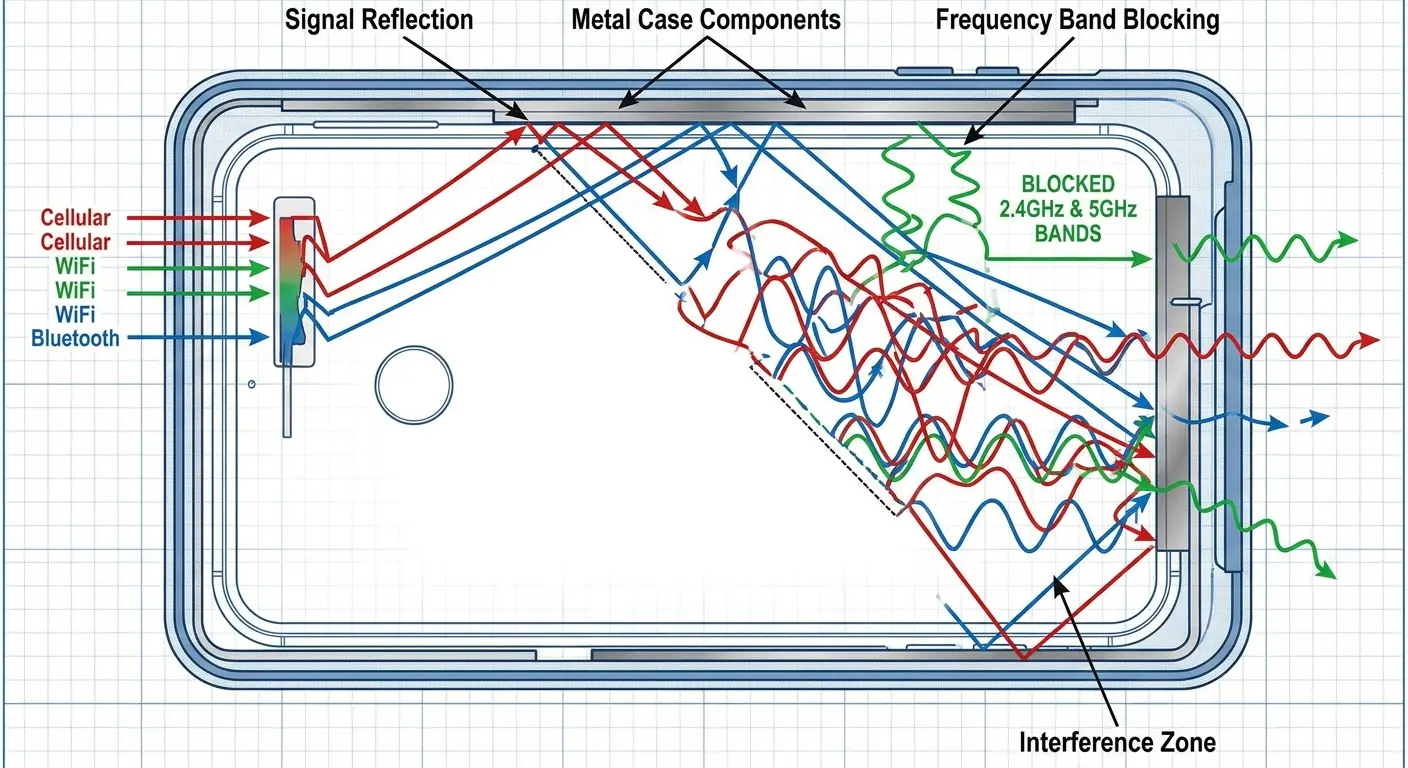
Metal case components are the obvious culprits. Any metal element in your case can act as an unintended antenna that either absorbs signal energy or reflects it away from your phone's actual antennas. Some cases use metal plates for magnetic mounting, metal reinforcement strips for drop protection, or decorative metal accents. Each of these can create signal problems.
The Magnetic Mount Plate Problem
Magnetic mounting systems use a metal plate (usually steel or iron-based) that you attach to your phone or case. This plate interacts with your phone's antenna system in ways that depend on its exact position and size.
If the plate sits directly over one of your phone's antenna bands, it detunes that antenna. The antenna was designed to resonate at specific frequencies, and adding a chunk of metal changes its resonant frequency. Your phone's radio tries to transmit at the carrier's frequency, but the antenna is now optimized for a different frequency. Signal strength drops, and in severe cases, the antenna becomes completely non-functional for that band.
Different carriers use different frequency bands. A magnetic plate might block your connection to one carrier while barely affecting another. You could switch from Verizon to T-Mobile and suddenly your phone works fine, not because of the carrier's network quality, but because T-Mobile uses frequency bands that your detuned antenna can still access.
Internal Case Structure and Signal Reflection
Cases with complex internal structures (honeycomb patterns, air gaps, multi-layer construction) can create signal reflection problems. Radio waves bounce off the internal surfaces of your case, creating interference patterns that either amplify or cancel the signals trying to reach your phone's antennas.
This interference is frequency-dependent. Your case might work perfectly fine for LTE Band 4 (1700 MHz) while completely blocking Band 13 (700 MHz). You experience the problem as inconsistent signal strength that seems to vary by location, but what's really happening is that different towers use different frequency bands, and your case is selectively blocking some of them.
The case material's dielectric properties matter too. Some plastics and synthetic materials have high dielectric constants that slow down radio wave propagation. This creates a phase shift in the signals reaching your antenna, which can cause the phone to misinterpret the signal timing and drop the connection.
Is Your Case Blocking Your Signal?
Take your case off. Check signal strength (Settings → About → scroll down, you'll see it in dBm).
Put case back on. Check again.
Lost more than 10 dBm? Your case is interfering.
Has metal components or carbon fiber? Probably interfering.
Has a magnetic mounting plate? Definitely interfering if it's positioned over an antenna band (usually top or bottom of the phone).
End of evaluation.
Temperature Extremes and Metal Fatigue in Modern Phones
Temperature swings are killing your phone's solder joints and nobody's talking about it.
Every time your phone goes from cold to hot (or hot to cold), the materials inside expand and contract at different rates. The antenna's copper, the circuit board's fiberglass, the solder's tin alloy. They all move differently. Eventually, the solder cracks.
You won't see it happen. First few hundred temperature cycles? Nothing. But those microscopic cracks are forming. After a few thousand cycles, the cracks grow. Your signal gets weaker. Battery drains faster because your phone's working harder to compensate. Then one day the crack goes all the way through and boom. Emergency Calls Only.
Solder Joint Fatigue Progression
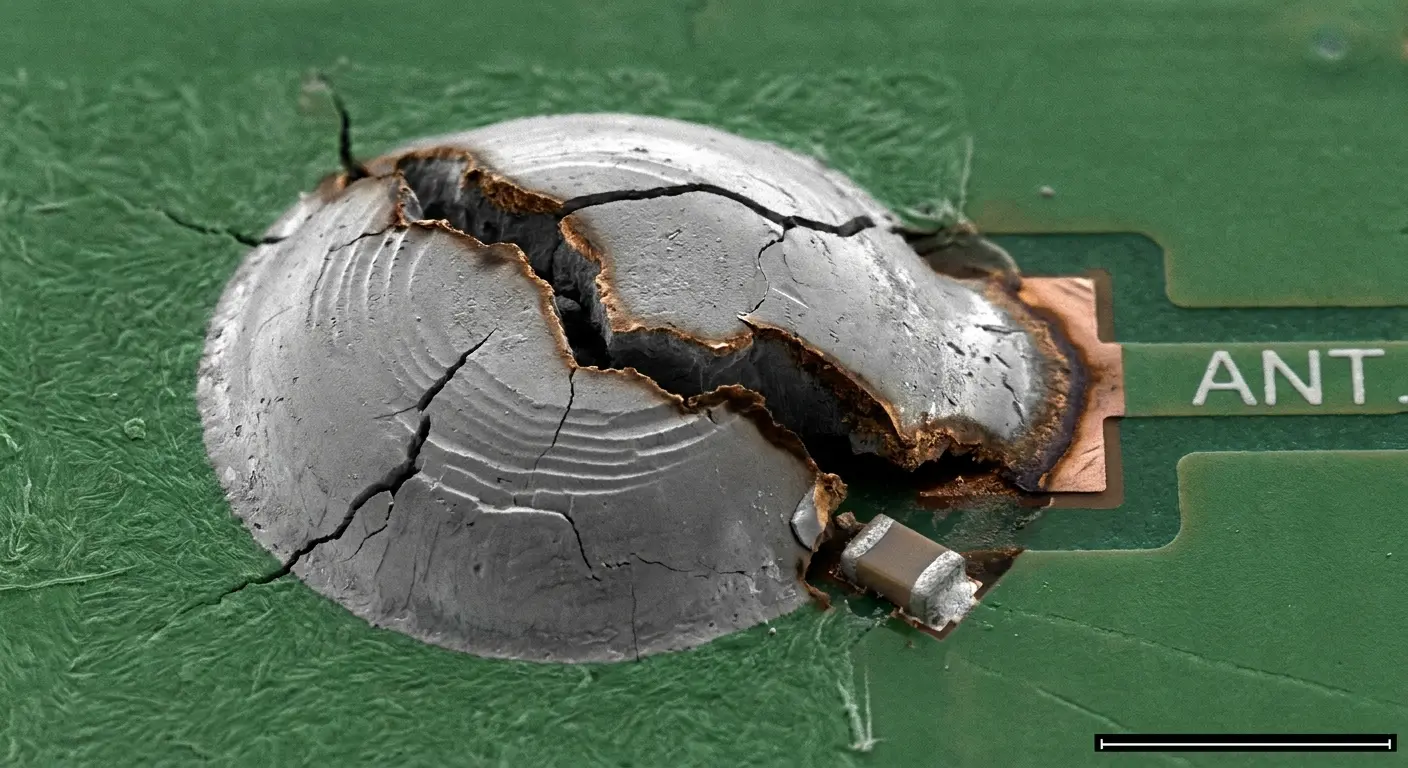
A solder joint fails through a process called thermal cycling fatigue. The joint experiences tension when the phone heats up (because the materials pull apart as they expand at different rates) and compression when it cools down. Each cycle creates microscopic cracks in the solder structure.
These cracks propagate slowly. The first few thousand temperature cycles cause no noticeable problems. The solder joint still conducts electricity normally. After enough cycles (and the exact number depends on the temperature range and the quality of the original solder joint), the cracks grow large enough to create electrical resistance. Your antenna still works, but less efficiently.
Eventually, the cracks connect across the entire joint, and the electrical connection fails completely. Your phone loses access to the frequency bands controlled by that antenna. Emergency calls still work because they use different antennas or different parts of the same antenna array.
Seasonal Failure Patterns
I see this constantly with people who leave their phones in their cars. Summer in a hot car, winter in a freezing one. That's like worst-case scenario for thermal stress.
Winter creates the most stress because of the temperature differential between indoor and outdoor environments. Your phone sits in your 72-degree house, then you walk outside into 20-degree weather. That's a 52-degree temperature swing happening in seconds. The phone's internal components shrink rapidly, creating enormous stress on every solder joint and mechanical connection.
Summer heat causes different problems. High temperatures make solder joints more pliable, which sounds beneficial but actually allows them to deform under stress. A joint that's been weakened by previous thermal cycling can completely separate when the solder becomes soft enough. You take your phone out of a hot car, and suddenly you're stuck with emergency calls only because a solder joint finally gave up.
Had a delivery driver whose phone died every single winter, like clockwork. Three phones in four years. Same problem every time. Dude thought he was cursed. Nope. Just leaving his phone in a freezing truck overnight, then bringing it into warm buildings 40 times a day. The thermal shock was destroying the antenna connections in weeks. His summer replacement phone survived until the next winter when the cycle repeated.
The Mounting System Variable Nobody Considers
Can we talk about phone mounts for a second? Because everyone's mounting their phones for GPS and nobody's connecting the dots when their signal dies.
Vibration is cumulative. Your phone's getting shaken apart and you don't see it happening because there's no visible damage. The destruction's happening to solder joints and connectors inside.
Resonant Frequency Amplification
Every physical object has resonant frequencies where it naturally vibrates most easily. Your phone has multiple resonant frequencies determined by its size, weight distribution, and internal structure. When vibration from your car or bike matches one of these resonant frequencies, the vibration amplitude inside your phone gets amplified dramatically.
A car traveling on rough pavement creates vibrations across a range of frequencies. Most of these vibrations are harmless, but if the road surface and your vehicle's suspension create vibrations that match your phone's resonant frequency, the phone essentially shakes itself apart from the inside.
The antenna connections are particularly vulnerable because they're often located at the phone's edges where vibration amplitude is highest. A solder joint that's already been weakened by thermal cycling can fail after just a few hours of resonant vibration exposure.
Mounting Clamp Stress Points
Phone mounts use clamps, grips, or magnetic attachments to hold your device. These mounting systems create pressure points on specific areas of your phone's frame. The pressure concentrates stress on the internal components directly beneath the clamp contact points.
Most phone mounts grip the device along its edges (top and bottom, or left and right sides). These edges are exactly where manufacturers position the primary cellular antennas. When you tighten a mount's grip to prevent your phone from falling out during a bumpy ride, you're compressing the frame in the same location where delicate antenna connections exist.
The compression itself doesn't immediately break anything. The problem develops when vibration combines with sustained pressure. The clamp holds your phone rigidly while vibration tries to move it. This creates a stress concentration at the clamp contact points. Internal components flex and bend with each vibration cycle, but they're constrained by the external pressure from the clamp.
After enough time in the mount (and we're talking about cumulative hours over weeks or months, not a single trip), the antenna connections fatigue and fail. You remove your phone from the mount, and it seems fine. Two days later, you're stuck with emergency calls only because the damage finally propagated to complete failure.
Look, I'm obviously biased here, but this is why our RokLock mounting system uses magnetic attachment instead of clamps. Eliminates the sustained compression stress on your phone's frame while maintaining secure hold strength. You can skip this paragraph if you want, I get it.
Motorcycle and High-Vibration Scenarios
Worst case? Motorcycles.
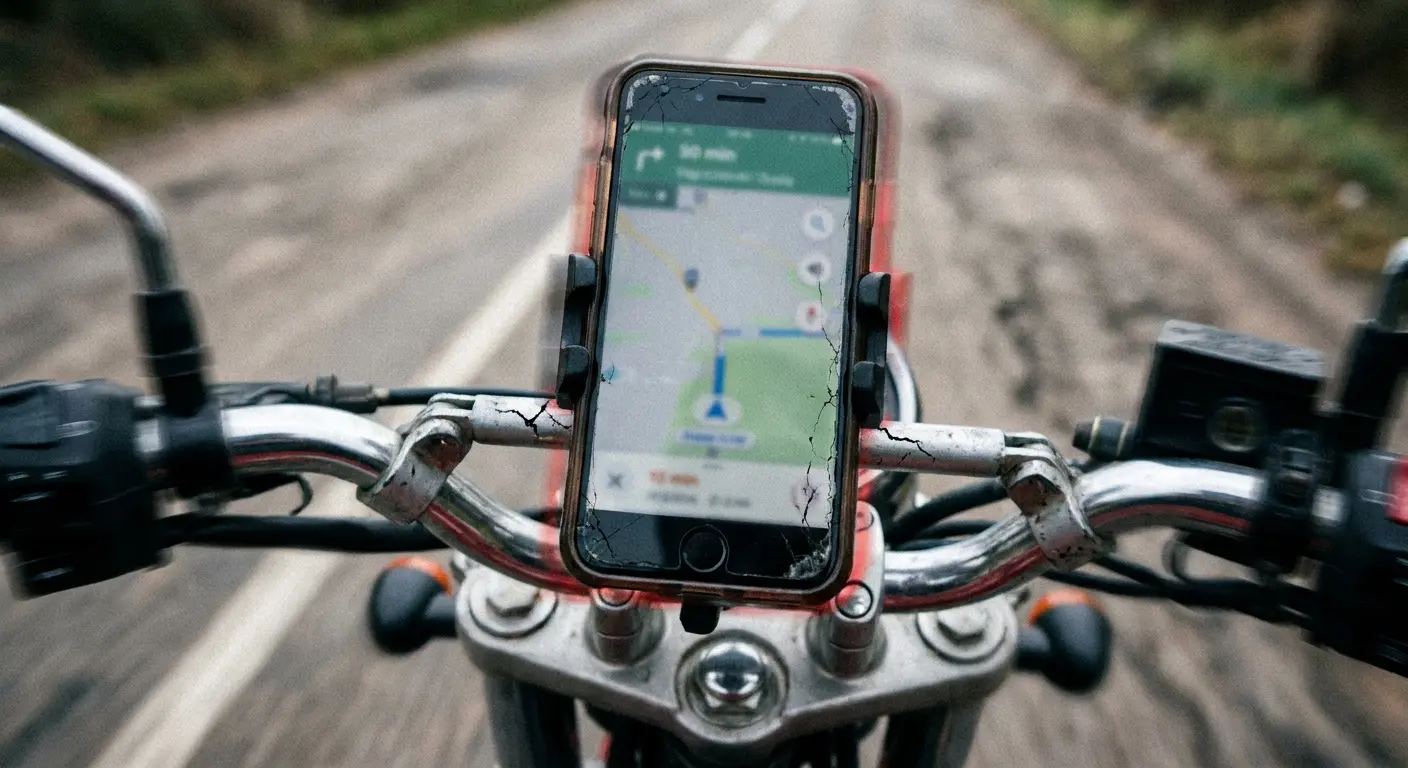
I've seen this so many times it's basically predictable. Rider mounts phone to handlebars, uses it for navigation all summer, signal starts dropping randomly, then by fall the phone's stuck in emergency-only mode. Engine vibration at the wrong frequency just shakes everything loose over time.
Motorcycles generate more intense vibration than cars. The engine vibration transmits directly through the handlebars or frame to whatever mount you've attached. Some motorcycle engines produce vibration frequencies that perfectly match the resonant frequencies of modern smartphones.
Riders who mount their phones to their motorcycles for navigation often report signal problems after a few months of regular use. The pattern is consistent: the phone works fine for calls and data when stationary, but signal strength degrades during rides, and eventually the phone loses all carrier connectivity.
The vibration literally shakes the antenna connections loose. Solder joints crack, RF shield clips separate, and connector pins work themselves out of their sockets. The damage happens slowly enough that you don't connect it to the mounting system because the phone continues working between rides.
We've tested our motorcycle phone mounts specifically for vibration isolation, incorporating dampening materials that absorb engine vibration before it reaches your phone's internal components.
Water Damage Symptoms That Mimic Network Issues
Water damage from three weeks ago is still killing your phone right now.
Everyone thinks water damage is immediate. Phone gets wet, either it dies right away or you're fine. Wrong. Corrosion takes time.
The water evaporated, sure. But it left mineral deposits behind. And there's still moisture trapped in tiny spaces inside your phone, specifically in your antenna connectors. That moisture is causing electrochemical corrosion that's eating away at the metal contacts.
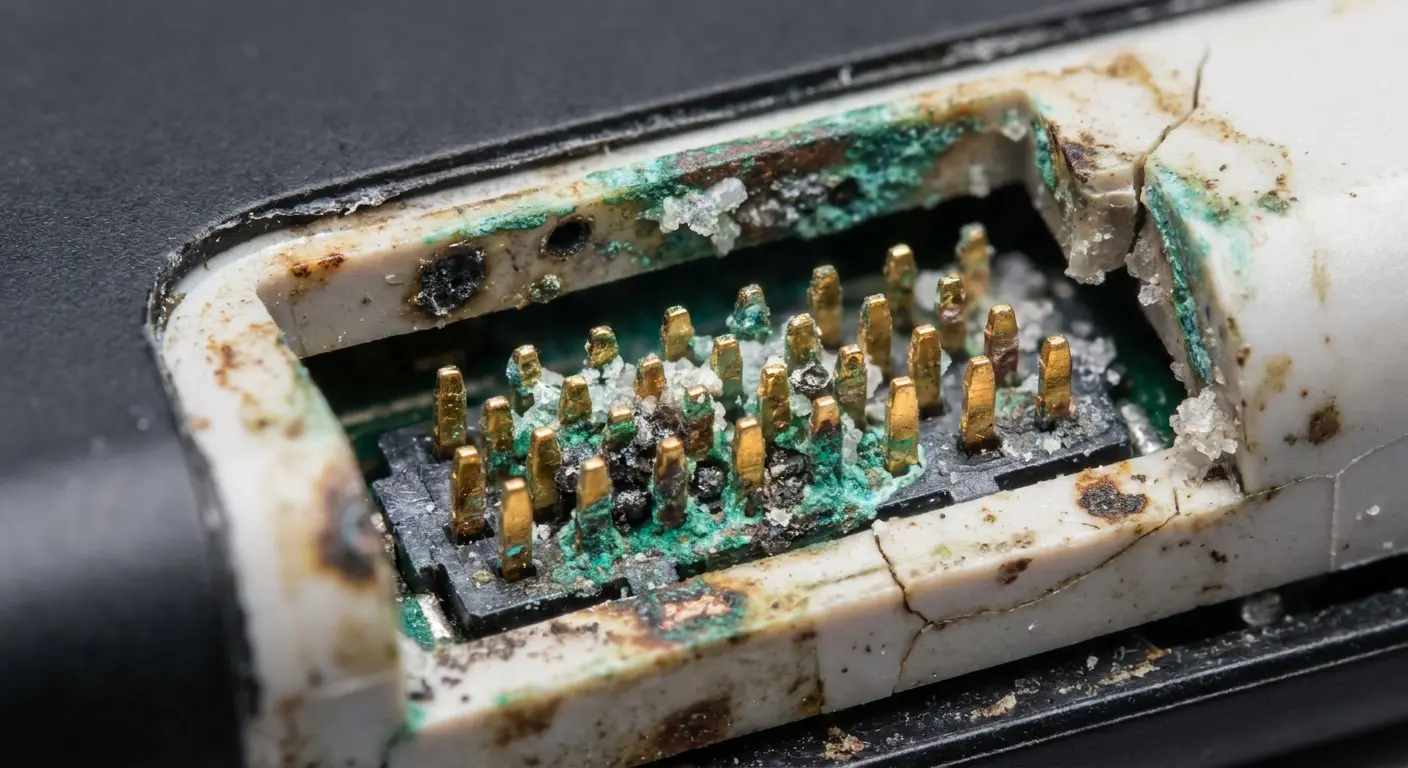
Antenna Contact Corrosion
Water that enters your phone seeks out the lowest points and the tightest spaces. Antenna connectors are small, enclosed spaces where water can accumulate and remain trapped even after the rest of the phone dries out.
The antenna connectors use spring-loaded pins that press against contact pads. When water sits between these contacts, it creates an electrolytic cell. The electrical potential difference between the pins and pads drives an electrochemical reaction that corrodes both surfaces. The corrosion products (usually metal oxides or chlorides if you were near salt water) are non-conductive.
This corrosion process continues as long as any moisture remains. Even after the visible water is gone, absorbed moisture in plastic components or trapped humidity in enclosed spaces keeps the corrosion active. The antenna connection wears out slowly. You might notice decreasing signal strength over several days or weeks before the connection fails completely.
This process takes days or weeks. Your phone works fine at first. Signal strength drops gradually. You don't notice because it's subtle. Then one day the corrosion is bad enough that the antenna connection fails completely.
The Water Indicator Deception
And here's what pisses people off: the water damage indicators inside your phone might still be white (showing no water exposure) because they're not located near the antennas.
Phone manufacturers include water damage indicators (small stickers that change color when exposed to moisture) inside the device. Repair shops and warranty services check these indicators to determine if water damage has occurred.
These indicators are binary: they either show water exposure or they don't. What they can't tell you is how much water entered the phone, where it went, or whether it reached critical components. Your water indicators might still show white (no water exposure) even though water reached your antenna connectors, because the indicators are positioned in different locations than the antennas.
You can have significant water damage to your antenna system while the official water indicators remain unchanged. When you take your phone to a repair shop and they tell you there's no water damage based on the indicators, they're giving you incomplete information.
Did your phone get wet in the last month? Even a little bit? That might be your problem.
Prevention matters more than cure when it comes to water damage. Our waterproof phone cases create sealed barriers that prevent moisture intrusion in the first place, protecting those vulnerable antenna connections from the corrosion that leads to connectivity failures.
When Your Phone Case Actually Causes Signal Loss
Some phone cases block cellular signals while still allowing emergency calls through. Metal components in cases are the obvious problem. Metal plates for magnetic mounts, metal reinforcement, decorative metal bits. Any metal near your phone's antennas can detune them or block signals entirely.
Carbon fiber cases look cool but they're also slightly conductive. Enough to mess with your signal.
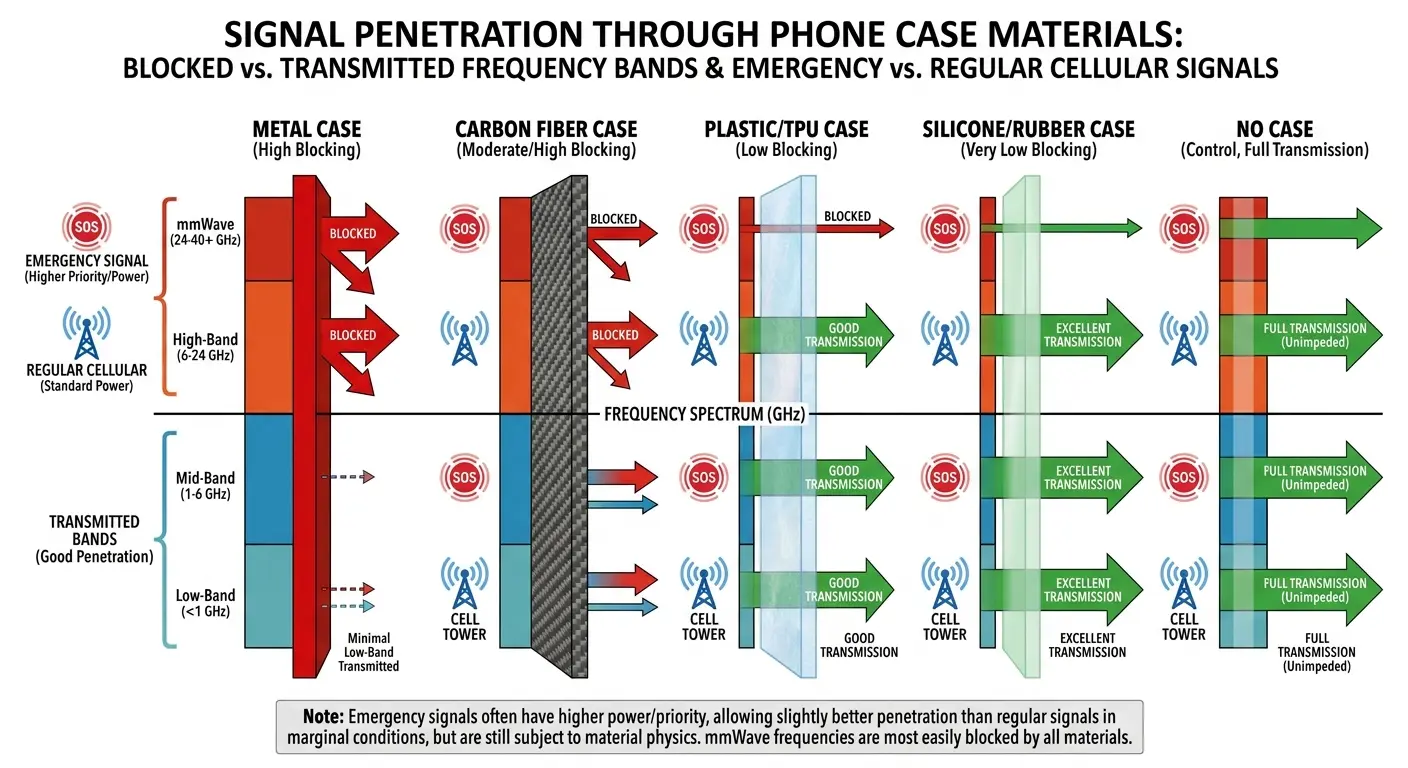
Partial Faraday Cage Effects
A Faraday cage is an enclosure made of conductive material that blocks electromagnetic fields. Phone cases don't create perfect Faraday cages (if they did, your phone would be completely non-functional), but some designs create partial shielding that blocks certain frequencies while allowing others through.
Cases with metal components, conductive coatings, or carbon fiber elements can create this partial shielding effect. The case acts as a filter that attenuates signals based on their frequency. High-frequency LTE signals (operating at 1700-2100 MHz) get blocked more effectively than low-frequency emergency signals (operating at 800-900 MHz).
Here's the weird part: your case might block some frequencies but not others. So emergency calls work (lower frequencies, higher power) but your carrier's LTE bands get blocked. You can make 911 calls all day but can't text your friend.
Material Conductivity and Signal Attenuation
Some case materials that appear to be non-conductive actually have enough conductivity to interfere with cellular signals. Carbon fiber is the most common culprit. It looks like plastic, but it contains conductive carbon strands that can absorb or reflect radio frequency energy.
And those "military grade" tactical cases? Great for drop protection. Also great for blocking signals. Trade-offs.
Cases marketed as "military grade" or "tactical" often use carbon fiber or similar composite materials for strength. These materials provide excellent drop protection, but they also attenuate cellular signals. The attenuation is frequency-dependent, which is why you might maintain a connection in some locations (where towers use frequencies that penetrate the case material) while losing connectivity in others.
Metallic paint finishes and conductive coatings create similar problems. Some cases use metallic finishes for aesthetic reasons without considering the RF implications. A thin metallic coating won't block signals completely, but it reduces signal strength enough that marginal connections fail.
Quick test: take your case off, check your signal strength. Put it back on, check again. If you lose more than 10 dBm, your case is the problem.
This is where our approach differs from typical case manufacturers. We engineer our cases with RF transparency in mind, positioning any magnetic or metal components away from antenna bands. Our RokLock mounting system uses precisely placed magnets that don't interfere with cellular frequencies, and we test every case design against actual antenna locations for current phone models.
Final Thoughts
So yeah. Emergency Calls Only usually means something's physically broken. You've probably already tried all the software fixes. If you hadn't, you wouldn't be reading a 4,000-word article about antenna damage.
The frustrating part? Most of this damage is cumulative. It's not one drop that killed your phone. It's twenty drops, plus thermal cycling, plus that magnetic mount you've been using, plus the case that's blocking half your signal. Everything compounds.
Understanding the hardware angle changes how you approach the problem. You start thinking about when your phone last took an impact, how often you've removed the SIM tray, whether your mounting system might be causing vibration damage, or if your case design is blocking signals.
Most of these hardware issues are progressive. They don't appear suddenly after a single event. The damage piles up over weeks or months until something finally fails completely. That makes diagnosis difficult because you're not connecting the current problem to events that happened in the past.
If you've ruled out software causes and your phone still shows emergency calls only, you're dealing with physical damage to the antenna system, connectors, or related components. The fix might be as simple as switching to a different case design, or it might require professional repair to replace damaged antennas or resolder failed connections. Either way, at least now you know what you're dealing with.

