


Your phone's slow. You've cleared the cache, deleted apps, restarted it fifty times. Nothing works. Want to know why? You broke something. Physically broke it. Inside the phone. And every troubleshooting guide on the internet is going to tell you to do software fixes that won't do a damn thing because the problem isn't software.
I see this every single day. Someone shows up with a "slow phone" and it's always (ALWAYS) physical damage. Stuff you can't see. Stuff that happened months ago when you dropped it and the screen didn't crack so you thought you were fine.
You weren't fine.
Table of Contents
The Micro-Fracture Problem Nobody Talks About
How Your Charging Port Became a Performance Bottleneck
Thermal Throttling From Case Design Failures
Screen Digitizer Lag and Touch Response Degradation
Battery Connector Corrosion and Power Delivery Problems
Protecting Hardware Integrity Before It Affects Speed
The Micro-Fracture Problem Nobody Talks About
You dropped your phone. Screen didn't crack, so whatever, right?
Wrong.
Inside that thing, stuff moved. Solder joints cracked. Ribbon cables pulled on their connectors, not enough to disconnect completely, just enough to screw everything up. And you'll never see it.
This is why your phone is slow, and you won't find the answer in your settings menu. The damage happened at a scale you can't see, affecting connections you can't access without specialized tools. Microscopic fractures in the solder points that connect your processor to memory, your battery to the logic board, your camera module to its flex cable.
Your phone's logic board has hundreds of tiny solder connections. Hundreds. Every single one needs to be perfect.
Drop your phone from waist height (not even that high) and the board flexes. Just a little. Microscopic, really. But those solder joints? They're not designed to flex at all. They crack. Not completely. Just enough to cause problems.
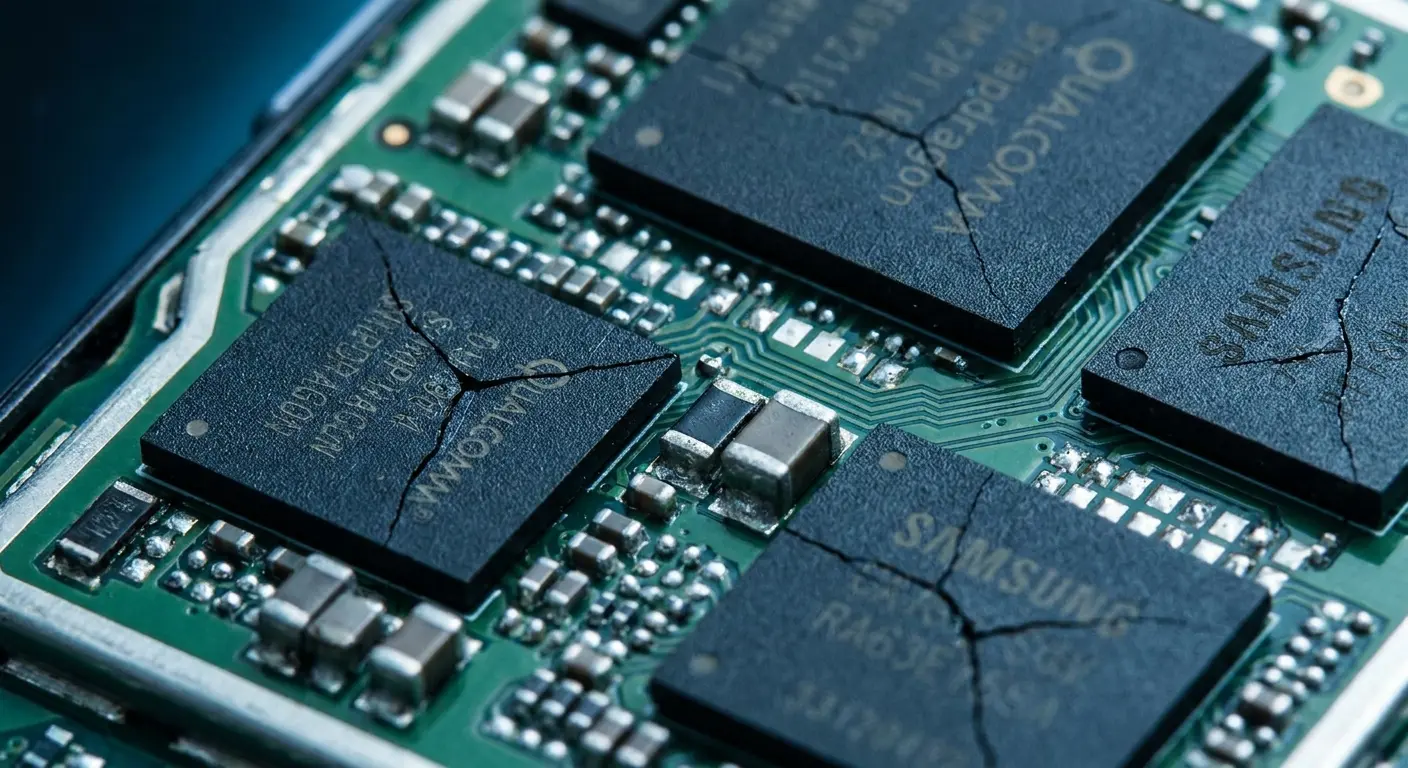
The processor doesn't fail outright. It just starts getting inconsistent signals from RAM, storage chips, or power management circuits. Your phone compensates by retrying operations, which you experience as lag. Apps take longer to open because the system is literally re-attempting failed read operations at the hardware level.
Had a customer last month, some kind of graphic designer. Dropped her iPhone getting out of her car. We've all done it. Screen looked perfect. She forgot about it. Three weeks later, she's back, furious that her photo app takes ten seconds to open. "I think iOS is broken."
I open it up. Display cable's barely hanging on. That parking lot drop unseated it just enough to cause problems, but not enough to fail completely.
She just stared at me. "That's it? That's the whole problem?"
Yeah. That's it.
Drop Type |
Primary Damage Zone |
Performance Impact |
Detection Difficulty |
|---|---|---|---|
Corner impact |
Camera module, flex cables |
Intermittent lag, app crashes |
High (internal damage) |
Face-down fall |
Digitizer layer, display connectors |
Touch delays, phantom inputs |
Medium (visible cracks may appear) |
Back impact |
Logic board flex, battery connector |
System-wide throttling |
Very high (no external signs) |
Repeated small drops |
Solder joint fatigue, connector wear |
Progressive slowdown over weeks |
Extreme (cumulative invisible damage) |
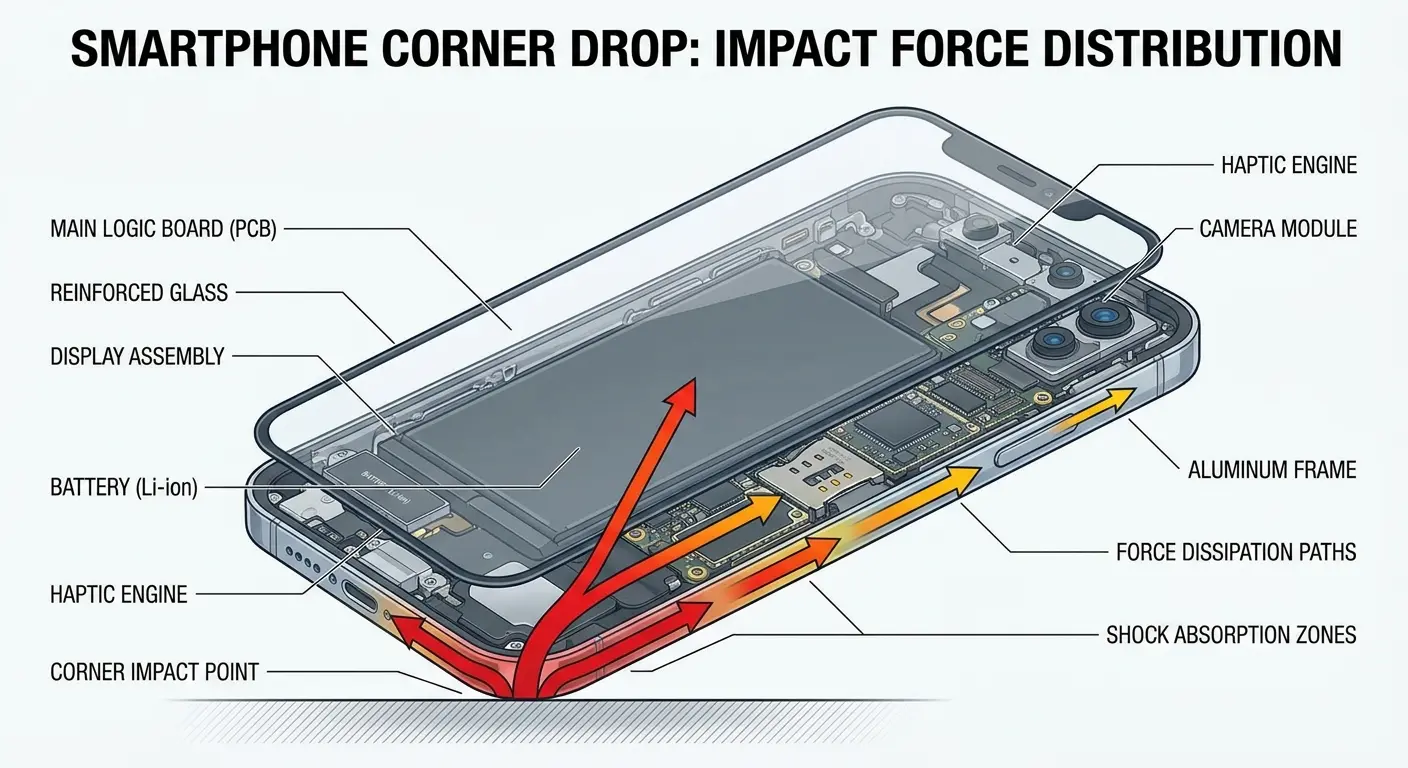
Corner drops are the worst. The impact force concentrates at one point, then radiates through the frame. Your camera module takes the brunt, but the real damage happens to the flex cables connecting your screen, battery, and charging port. These cables use tiny spring-loaded connectors that can partially unseat from a single hard impact.
This compounds over time. Each drop adds stress to already-weakened points. What started as a 2% performance reduction becomes 15% over six months of normal use and occasional drops. You blame software updates, but the real culprit is cumulative physical trauma.
Here's the thing: modern phones pack more components into less space than ever before. That density creates vulnerability. Components sit so close together that any board flex affects multiple connections simultaneously. Your phone is running slow because three different subsystems are now operating with degraded connections, each one forcing retry operations that consume processing cycles.
Face-down falls damage the digitizer connections (we'll get to that later). But they also stress the display's data ribbon cable, which carries video signals from the processor to your screen. When this cable develops intermittent connectivity, your phone has to resend frame data multiple times. You see this as stuttering animations or delayed screen response, but the processor is working overtime just to maintain basic display output.
Back impacts are the silent killers. No visible damage, no immediate symptoms. But the logic board flexed, and somewhere on that board, a solder joint cracked. Maybe it's the connection between your storage chip and processor. Maybe it's a power delivery trace. You won't know until weeks later when your phone is slow and you're searching for answers that blame everything except the real cause.
How Your Charging Port Became a Performance Bottleneck
Pocket lint seems harmless. So does that slight wiggle in your charging cable.
You're looking at a degraded connection that's choking your phone's power delivery system.
Your charging port does more than top up your battery. It's a critical component in your phone's power management ecosystem. When those tiny pins inside the port bend or corrode, they can't deliver the amperage your phone expects. The power management chip detects this reduced current flow and makes a decision: protect the battery by limiting how much power the processor can draw.
You experience this as slowness, but it's actually your phone preventing a crash. The power management chip won't let your processor pull more watts than the charging system can safely provide. If your port can only deliver 1.5 amps instead of the rated 2.4 amps, your processor gets throttled accordingly.
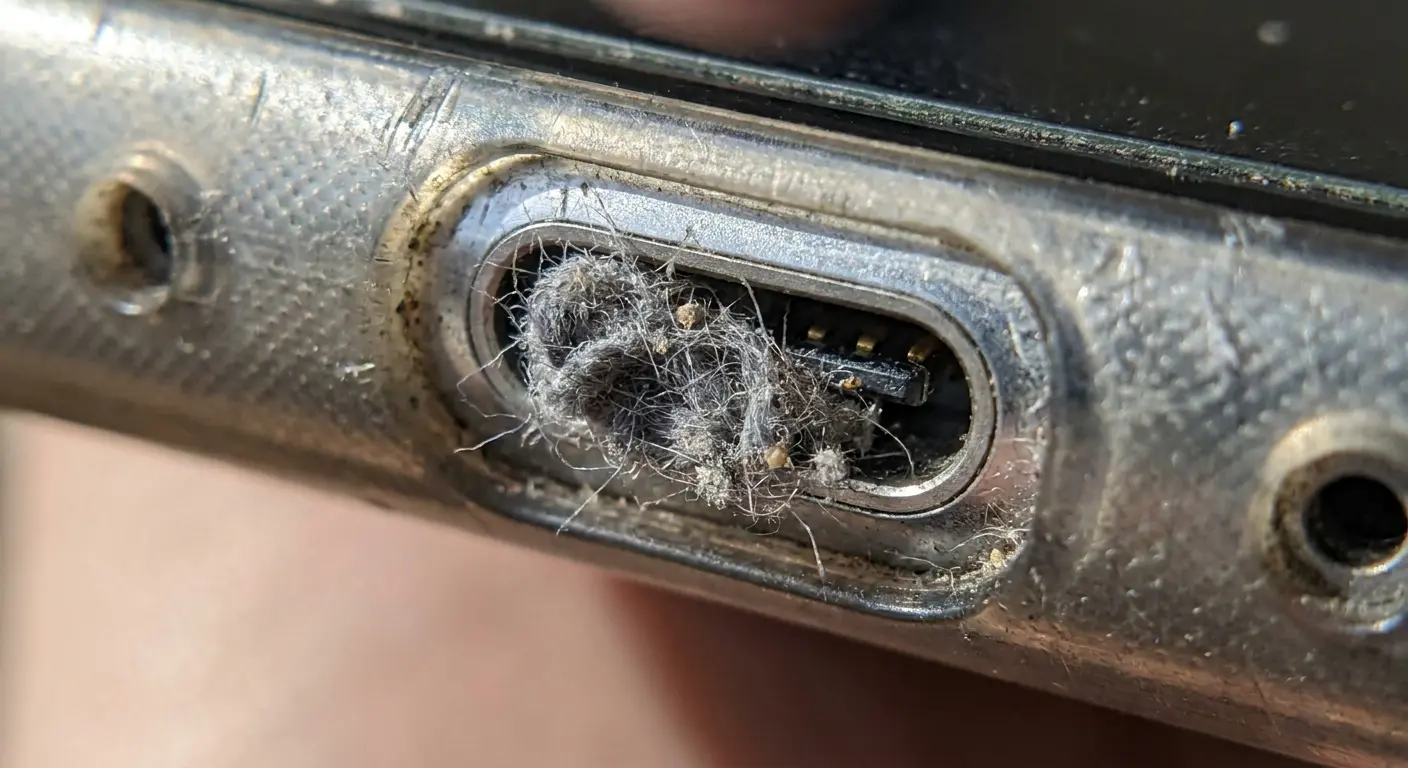
Moisture damage is particularly sneaky here. You don't need to drop your phone in water. Humidity from your pocket, condensation from temperature changes, even sweat during a workout can introduce enough moisture to start oxidation on those charging pins. The oxidation creates resistance. Resistance reduces current flow. Reduced current flow triggers performance throttling.
Had this construction supervisor come in last year. Big guy, kept his phone in his pocket through 10-hour shifts. Eight months of going from air-conditioned offices to hot job sites and back. Humidity, temperature swings, sweat, all of it.
Phone got slow. Real slow. He figured it was just getting old (eight months isn't old, but whatever).
I opened it up. Three of his USB-C pins were corroded to hell. Just covered in oxidation from all that moisture and temperature cycling. His phone was throttling because the charging port couldn't deliver clean power anymore.
He just looked at me. "That's it? The charging port?"
Yeah, man. The charging port.
Debris compounds the problem. Pocket lint compresses into the port with each charging cycle, pushing the cable connector away from full contact with the pins. You might still get a charge, but you're not getting full power delivery. Your phone charges slower and runs slower because the power management chip assumes it's working with a compromised power source.
Look, just check these things: Can you see crap in there when you shine a light? Does your cable wiggle around? Does it charge slow? That's basically it. You can get fancy with the other stuff if you want, but those three will tell you most of what you need to know.
Understanding how to clean your iPhone charging port properly prevents the debris accumulation that creates these power delivery bottlenecks. The process takes less than a minute but can restore performance you thought was gone forever.
Bent pins happen more often than you'd think. You plugged in your cable at a slight angle while half-asleep. The connector pushed against one side of the port, bending a pin by a fraction of a millimeter. That's enough to reduce contact pressure and increase resistance. Your slow phone isn't suffering from age or too many apps. It's being choked by a charging port that can't deliver clean power.
The power management system in modern phones is sophisticated enough to detect these issues but not smart enough to tell you what's wrong. It sees reduced current capacity and responds by limiting processor performance. You get a slow phone with no error message explaining why.
Thermal Throttling From Case Design Failures
That case you bought because it looked cool? It's suffocating your phone. All that heat your processor generates has nowhere to go. It just sits there, cooking your components until your phone throttles itself into uselessness.
Phones throttle performance when internal temperatures exceed safe thresholds. Your processor might be capable of 3.2 GHz. Should run at 3.2 GHz. But because your case is cooking it alive? 2.1 GHz. Maybe less.
Most phones dissipate heat through their aluminum or glass back panel. The processor sits near the center of the phone, and heat radiates outward to the exterior surfaces where it can escape. A case that creates an insulating layer between the phone's back and the open air traps that heat inside.
Case Material |
Thermal Conductivity |
Ventilation Impact |
Best Use Case |
|---|---|---|---|
Thick rubber/silicone |
Very Low |
Blocks heat dissipation |
Light daily use only |
Multi-layer hybrid |
Low to Medium |
Creates insulating air gaps |
Moderate use, avoid gaming |
Thin plastic |
Medium |
Minimal interference |
Balanced protection/performance |
Metal without thermal design |
Medium to High |
Traps heat without channels |
Not recommended |
Engineered thermal cases |
High |
Includes ventilation paths |
Heavy use, gaming, video recording |
Thick rubber cases are the worst. Rubber has low thermal conductivity, meaning it doesn't transfer heat well. The heat your processor generates gets trapped between the phone's back and the case's inner surface. Temperature rises. The thermal management system responds by reducing processor clock speed.
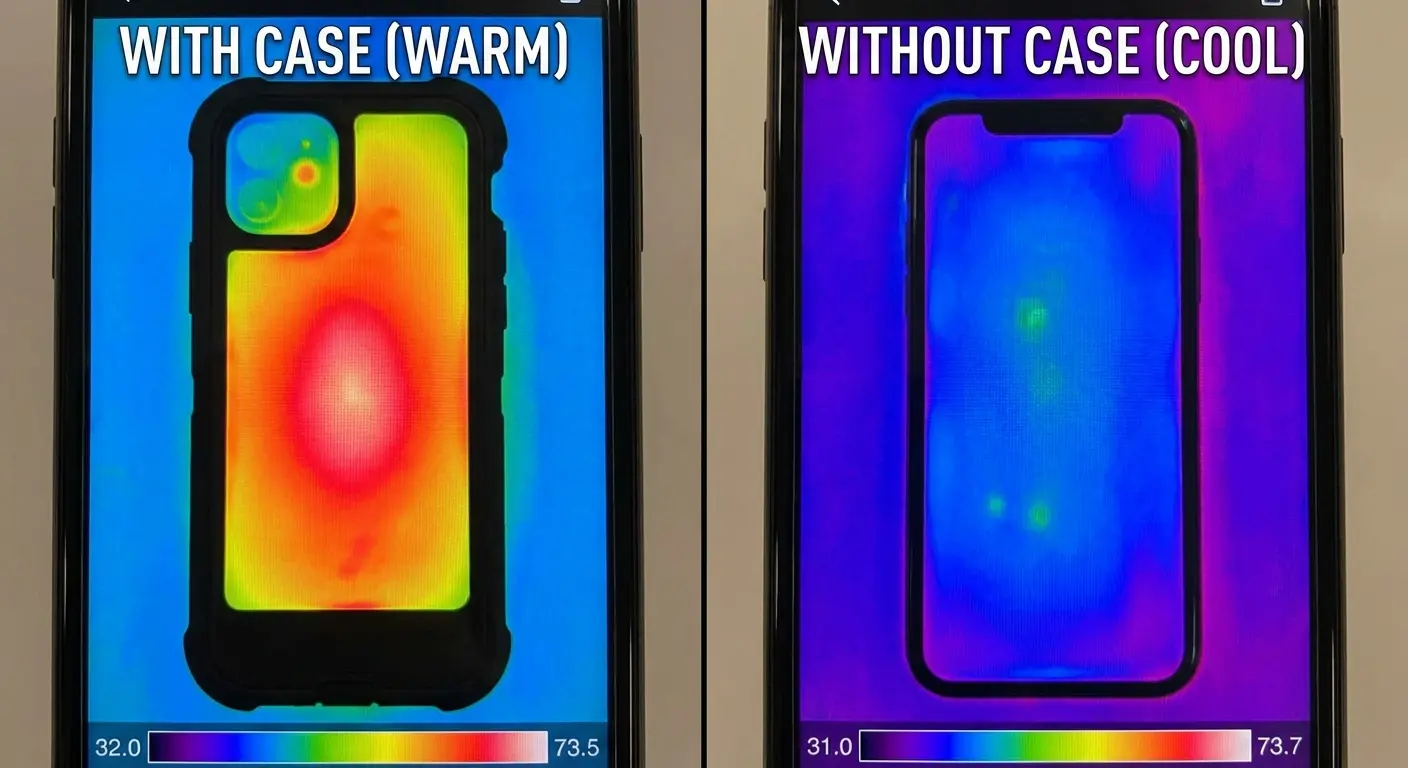
You notice this most during intensive tasks, but the throttling affects everything. Your phone doesn't distinguish between important heat and casual use heat. It just sees temperature rising and cuts performance across the board.
Multi-layer cases compound the problem by adding air gaps between layers. Air is an excellent insulator. That gap between your phone and the outer case layer creates a thermal barrier that prevents heat from escaping efficiently. The temperature difference between a well-designed thermal case and a thick rubber case can be 15-20 degrees Fahrenheit under load.
Mobile gamer came in a few months back. His phone's frame rate kept dropping from 60fps to 30fps after just 15 minutes of gameplay. He'd tried closing background apps, lowering graphics settings, nothing worked.
I told him to take the case off.
The case had an inner rubber layer and outer polycarbonate shell that created an air gap trapping heat around the processor zone. His phone was thermally throttling to protect itself, cutting performance in half. Switched to a single-layer case with ventilation channels and the throttling disappeared completely.
Your slow phones aren't necessarily old or underpowered. They're just overheating because the case you chose prioritizes aesthetics over thermal management. The processor inside is capable of full speed, but it'll never reach that speed if it can't shed heat.
And the worst part? Your phone never tells you it's throttling. It just gets slower and you think you need to upgrade. Meanwhile, the problem is literally wrapped around your phone.
Some manufacturers add metal backplates to cases thinking it'll help with heat dissipation. It doesn't, unless the metal has a thermal pathway to move heat away from the phone. Metal that sits against your phone's back with no ventilation just becomes another heat trap, absorbing thermal energy with nowhere to release it.
Screen Digitizer Lag and Touch Response Degradation
Your screen isn't just cracked on the surface. The digitizer layer underneath took damage that's now creating phantom delays between your touch and the phone's response.
The digitizer is a separate layer from the display glass you see. It's a grid of capacitive sensors that detect where your finger touches. When this layer cracks or delaminates, individual sensors start reporting incorrect or inconsistent values. Your phone's touch controller has to work harder to figure out what you actually meant to tap.
This creates lag that feels like your phone is slow, but it's actually input processing overhead. You tap an app icon, but the damaged digitizer reports multiple touch points or an inconsistent touch location. The touch controller has to run additional filtering algorithms to determine your actual intent. This takes processing cycles away from opening the app you just tapped.
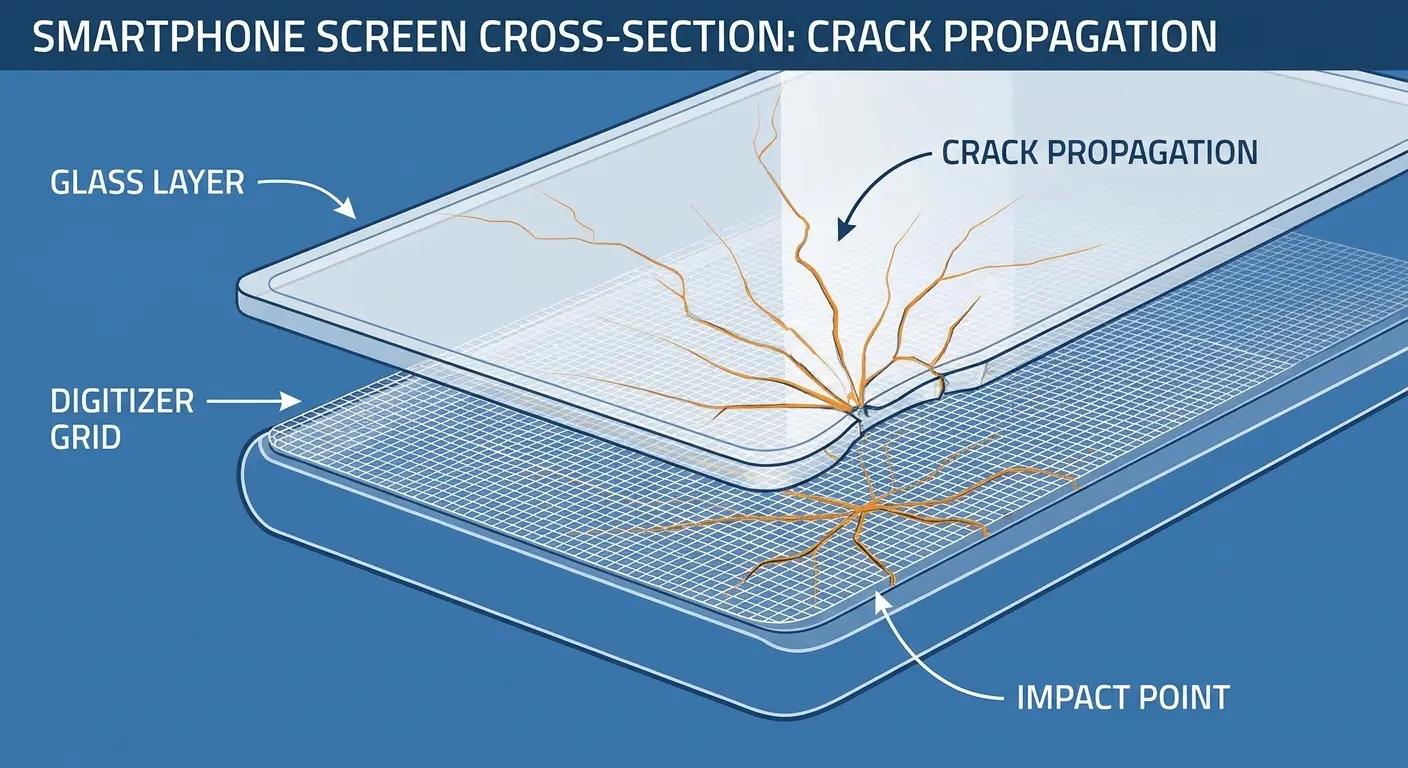
This one drives people crazy because the phone looks fine. Screen's not even cracked. But every tap feels delayed, every swipe feels wrong, and you start thinking you're imagining it.
You're not. Your digitizer's dying.
Pressure damage is harder to spot than visible cracks. You sat on your phone, or it spent a few hours compressed in a tight pocket. The digitizer layer flexed beyond its design tolerance. Now certain areas of the screen have reduced sensitivity or report phantom touches. Your phone constantly processes these false inputs, consuming CPU cycles that should be handling your actual tasks.
Want to know if your digitizer's screwed? Open your notes app and drag your finger around the whole screen. Slow. Does the line skip? Does it jump? Are there dead spots? That's your answer. Everything else is just details.
Edge damage from corner drops creates dead zones where the digitizer doesn't register touches reliably. You tap once, nothing happens, you tap again harder. The phone finally registers the second tap but now has to process both inputs. This creates a stuttering, laggy feel that has nothing to do with processor speed or available RAM.
Why is your phone so slow all of a sudden? Check your screen. That small crack you've been ignoring might extend into the digitizer layer, creating input processing overhead that affects every interaction. The crack doesn't need to be large. Even hairline fractures can disrupt the capacitive grid enough to cause problems.
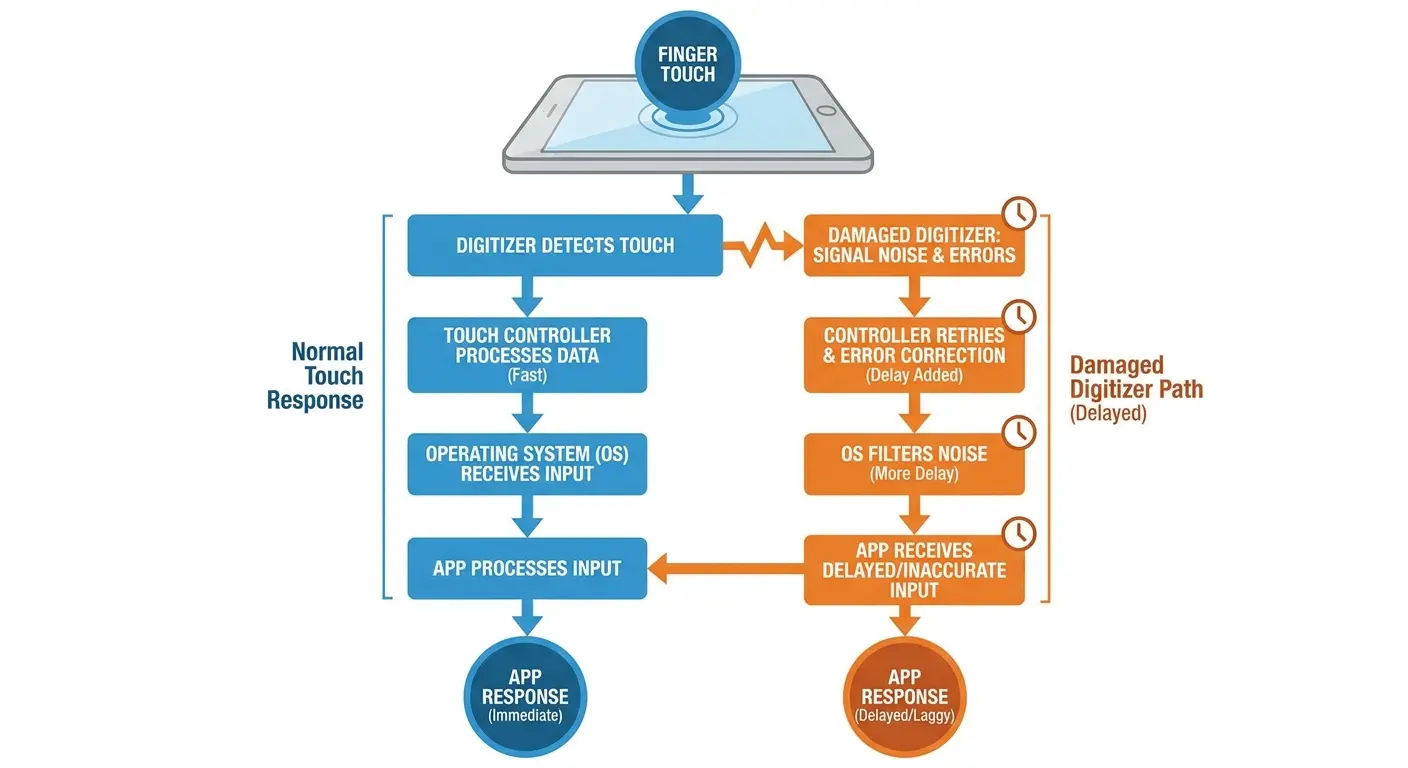
I see this constantly with phones that have survived multiple drops. The glass might still be intact, but the digitizer underneath has accumulated damage. Each impact adds stress. Eventually, the layer develops micro-separations where the adhesive fails or the conductive traces crack. Your touch inputs become unreliable, and your phone slows down trying to interpret what you want.
Protecting against digitizer damage requires understanding how phone cases protect your phone through impact-absorbing bezels and screen-lift design. The bezel needs to extend above the screen surface, creating a buffer zone that prevents direct impact during face-down drops.
Replacement screens sometimes make the problem worse if they use lower-quality digitizers. You fix the crack but end up with a digitizer that has worse touch response than your damaged original. The phone feels slow because the new digitizer requires more processing overhead to achieve the same touch accuracy.
Battery Connector Corrosion and Power Delivery Problems
The battery connector inside your phone has eight or more tiny spring-loaded pins. Corrosion on any one of them creates resistance that throws off your entire power management system.
Your battery connects to the motherboard through a tiny connector with multiple pins handling different functions. Some pins deliver power, others communicate battery health data, and others provide safety monitoring. Corrosion on the power delivery pins creates electrical resistance that your power management system interprets as a failing battery.
The power management chip uses voltage drop across the battery connector to estimate battery health and safe current limits. When corrosion adds resistance, the chip sees voltage drop that looks like an old, degraded battery. It responds by limiting how much current the processor can draw, even if your battery is relatively new and healthy.
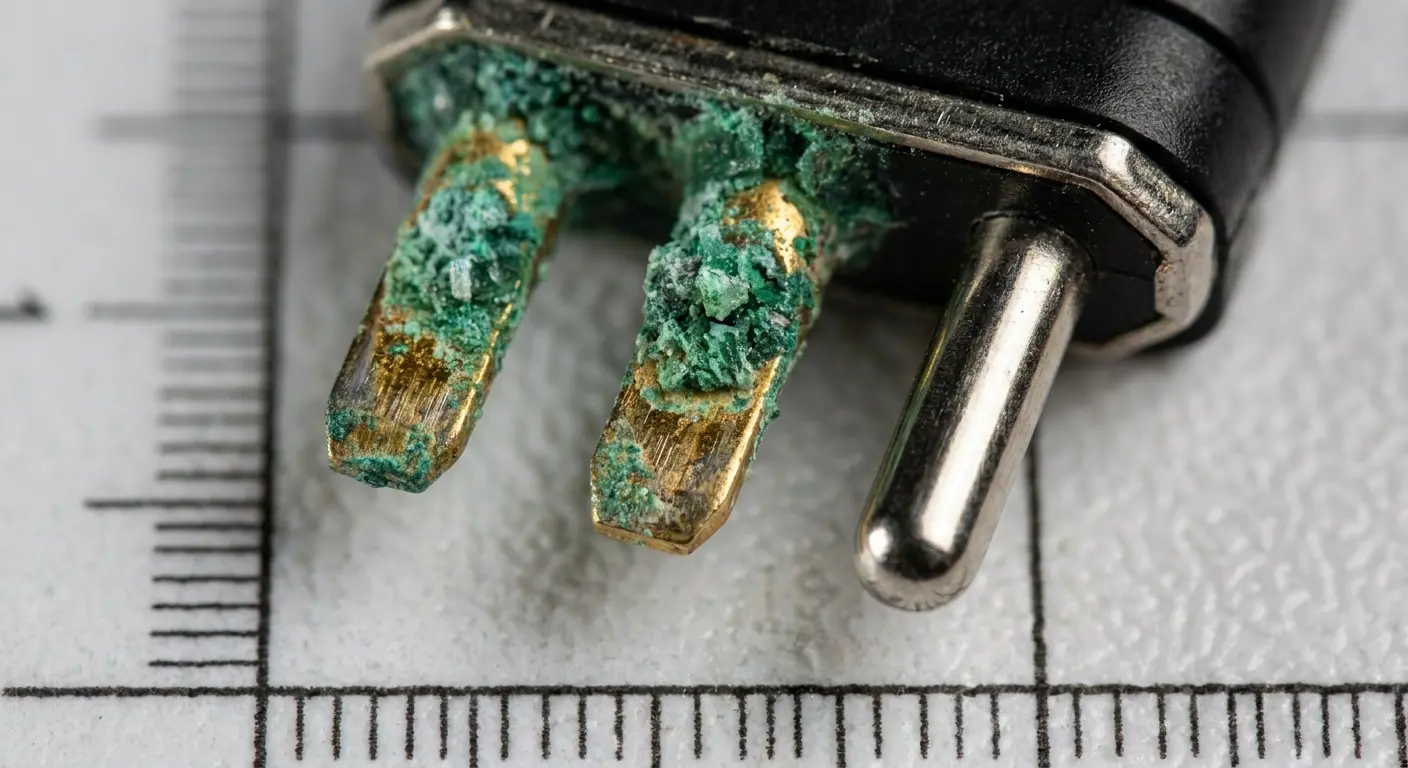
Here's the frustrating part: you can't see this without opening your phone. It's just happening in there, slowly choking your power delivery, and you have no idea. Could be happening right now to your phone. Probably is if you've had it more than a year.
The corrosion happens gradually as moisture infiltrates through temperature cycling, humidity exposure, or micro-gaps in seals that developed from drops and impacts. The connector sits right next to the battery, which generates heat during charging and discharging. This heat drives moisture into the connector housing where it condenses on the metal pins.
The corrosion creates intermittent connections. Your phone might run fine for minutes or hours, then suddenly throttle when the poor connection causes voltage instability. The power management chip sees these voltage fluctuations and assumes the battery can't deliver stable power. It cuts processor performance to prevent crashes or unexpected shutdowns.
Battery health percentages don't account for connector resistance. Your phone reports 85% battery health based on capacity measurements, but it's throttling performance based on power delivery problems caused by the connector. You replace the battery expecting speed improvements, but the new battery connects through the same corroded pins. Performance doesn't improve because the connector was the problem all along.
This is why your Android is so slow even after you've tried every software fix. The Android phone running slow and freezing isn't responding to cache clearing or app management because the issue lives in the hardware layer. Your power management system is protecting itself from what it perceives as unstable power delivery.
Temperature cycling accelerates connector corrosion faster than most people realize. You go from an air-conditioned building to a hot car, then back to air conditioning. Each cycle creates condensation as humidity in the air contacts cold surfaces inside your phone. That moisture settles on the battery connector pins. Over months, oxidation builds up.
The spring tension in these connectors decreases over time as well. Repeated thermal expansion and contraction from charging cycles weakens the springs. Weaker springs mean less contact pressure. Less contact pressure means higher resistance even without corrosion. Your Android phone slow performance might be a combination of both factors working together.
I've opened phones that showed no external signs of moisture damage but had significant corrosion on internal connectors. The seals around charging ports and SIM trays aren't perfect. Microscopic gaps allow humid air to enter. The phone's internal temperature changes drive that air through the device, depositing moisture on cooler components.
I know what you're thinking: "Great, so there's this problem I can't see, can't fix, and can't prevent?"
Pretty much, yeah. But knowing about it means you won't waste time on software fixes that'll never work.
Protecting Hardware Integrity Before It Affects Speed
You can't prevent every drop or eliminate all physical stress, but you can dramatically reduce the damage that accumulates from daily use. The key is understanding which protection strategies address the root causes we've covered.
Cases need to do more than prevent screen cracks. The right case absorbs impact energy before it reaches internal components, distributes stress away from vulnerable board flex points, and maintains thermal pathways for heat dissipation.
Corner reinforcement matters more than overall thickness. Impacts concentrate force at corners, so cases need extra material and shock-absorbing structure at these points. Air gaps or crushable materials in the corners dissipate energy that would otherwise transfer to the logic board and component solder joints.
Raised bezels protect more than just your screen. A bezel that extends 1-2mm above the screen surface prevents direct impact on the display during face-down drops. This protects the digitizer layer from the pressure damage that creates touch lag and phantom input issues.

Thermal design isn't optional if you care about sustained performance. Cases need either ventilation channels that allow heat to escape or materials that actively conduct heat away from the phone's back panel. The best cases incorporate both strategies, using thermally conductive materials in contact with the phone and ventilation paths to move heated air away.
Port protection prevents the debris accumulation and moisture exposure that degrade charging performance. Cases with integrated port covers or dust plugs keep lint and moisture out of your charging port. This single feature can prevent the power delivery issues that trigger system-wide throttling.
Mounting systems reduce drop frequency by eliminating the fumbling and one-handed reaches that lead to most drops. A magnetic mount in your car, on your bike, or at your desk means your phone stays secure during the activities most likely to result in impacts. Preventing drops is more effective than trying to survive them.
Full disclosure: we make cases. That's why I know this stuff. Rokform cases integrate thermal channels specifically designed to pull heat away from processor and camera zones. The materials conduct heat while still providing impact protection. We designed for thermal performance because case-induced throttling makes your phone slow regardless of what processor it has.
Our magnetic mounting system does double duty by keeping your phone secure during high-risk activities and reducing the constant handling that flexes your motherboard and stresses internal connectors. Your phone spends less time in your hand, which means less opportunity for drops, flexing, and the accumulated damage that degrades performance over time. Check out our full range of protective cases and mounting solutions at Rokform's phone case collection.
Port maintenance takes 30 seconds and prevents months of performance issues. Use a wooden toothpick to gently remove lint from your charging port every few weeks. Don't use metal tools that can damage the pins. Keep your phone out of humid environments when possible, and if it does get wet, let it dry completely before charging.
Temperature awareness matters more than you think. Don't leave your phone in direct sunlight or in a hot car. Extreme heat accelerates every degradation process we've discussed: it drives moisture into connectors, it softens solder making it more vulnerable to fatigue, and it can permanently damage battery chemistry.
For those wondering what phone cases construction workers need, the answer lies in protection systems that address these exact physical degradation patterns. Construction environments combine all the risk factors: frequent drops, temperature extremes, humidity exposure, and constant handling.
How to speed up an Android phone often comes down to preventing the physical damage that causes slowdowns in the first place. Software optimization only goes so far when your hardware is compromised. A case that prevents drops, manages heat, and protects ports will do more for long-term performance than any number of cache clearing sessions. I also cover why your phone charges slowly.
Final Thoughts
Your phone's speed depends on hardware integrity as much as software optimization. You can clear cache, update apps, and restart your device all you want, but if drops have fractured solder joints, if your case is causing thermal throttling, or if corrosion has compromised your charging port, no amount of software maintenance will restore performance.
Physical protection isn't complicated. It just requires understanding what causes damage and choosing protection that addresses those specific failure modes. Most phone slowdowns aren't inevitable aging. They're the accumulated result of preventable physical damage.
Someone shows up complaining their two-year-old phone is sluggish. But when you look at the device, the charging port is packed with debris, the case is trapping heat, and the screen has micro-cracks across the digitizer. The phone isn't slow because it's old. It's slow because it's damaged.
You have more control over your phone's long-term performance than you realize. Protect the hardware that enables the performance, and your phone will stay fast far longer than you'd expect.
Learning how often you should upgrade your phone becomes less urgent when proper physical protection prevents the performance degradation that typically drives replacement cycles. Most people replace phones because they've become unbearably slow, not because the hardware is obsolete. That slowness is usually physical damage masquerading as age.

